Listen to this Post
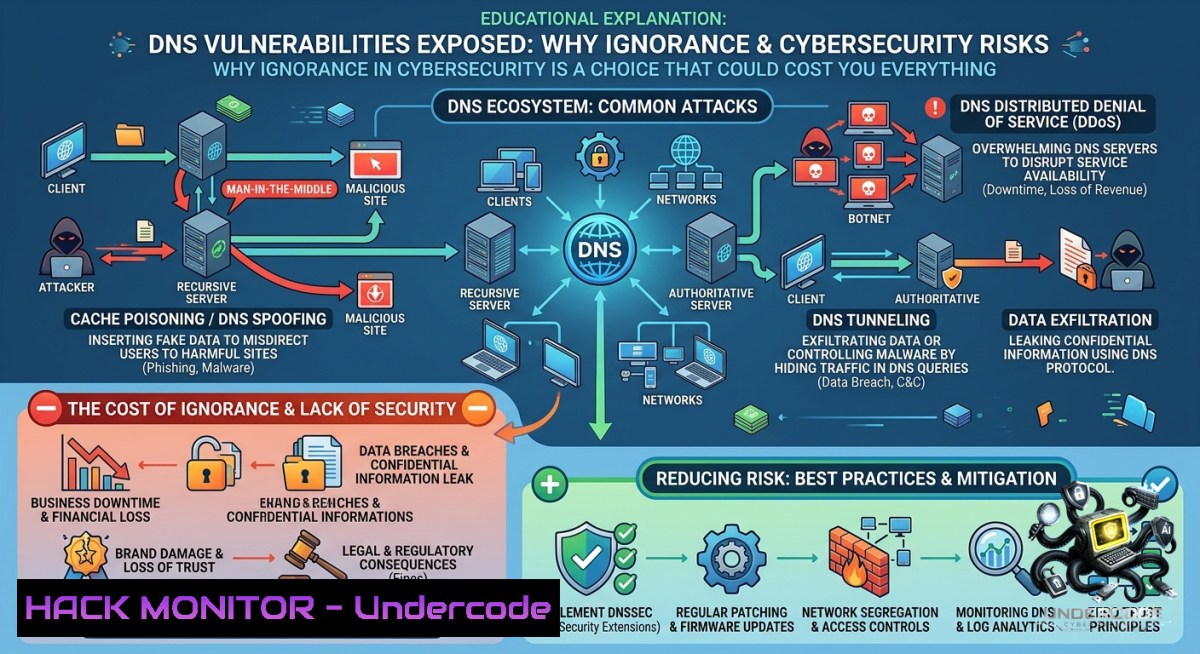
Introduction:
Internet asset and DNS vulnerabilities remain among the most exploited attack vectors in modern cybersecurity, yet a staggering number of security professionals operate with critical knowledge gaps. Threat intelligence experts warn that willful ignorance—whether due to complacency or systemic failures—creates backdoors that adversaries exploit to manipulate data flows, intercept communications, and compromise entire infrastructures. This article extracts technical lessons from DNS vulnerability research and threat intelligence methodologies, providing actionable commands, configurations, and hardening techniques across Linux, Windows, and cloud environments.
Learning Objectives:
- Identify and enumerate DNS misconfigurations, zone transfer vulnerabilities, and subdomain takeovers using open-source intelligence (OSINT) tools.
- Implement DNS hardening techniques, including DNSSEC deployment, query rate limiting, and split-horizon configurations.
- Leverage threat intelligence feeds and automated scripts to detect DNS tunneling, cache poisoning, and DGA-based malware.
You Should Know:
- DNS Enumeration & Vulnerability Discovery: Step‑by‑Step OSINT Guide
DNS misconfigurations are the low-hanging fruit that threat actors love. Before an attacker strikes, they will perform reconnaissance to map your internet assets. Here’s how to think like an adversary—and then defend.
What this does: Enumerates DNS records, tests for zone transfers, identifies subdomains, and detects SPF/DKIM/DMARC weaknesses.
Step‑by‑step guide:
Step 1: Basic DNS reconnaissance using `dig` (Linux/macOS)
 Query A records
dig example.com A +short

Query NS records (name servers)
dig example.com NS +short

Query MX records (mail servers)
dig example.com MX +short

Attempt a zone transfer (AXFR) - often misconfigured
dig axfr @ns1.example.com example.com
Step 2: Windows alternative using `nslookup`
nslookup

<blockquote>
  set type=NS
  example.com
  set type=MX
  example.com
  server ns1.example.com
  ls -d example.com (attempt zone transfer)
Step 3: Automated subdomain enumeration with `dnsrecon`
 Install dnsrecon (Kali/Ubuntu)
sudo apt install dnsrecon

Brute-force subdomains using a wordlist
dnsrecon -d example.com -D /usr/share/wordlists/dnsmap.txt -t brt

Enumerate SRV records for services
dnsrecon -d example.com -t srv

Save results to CSV
dnsrecon -d example.com -t axfr --xml output.xml
Step 4: Subdomain takeover detection
 Use subjack
go get github.com/haccer/subjack
subjack -w subdomains.txt -t 100 -timeout 30 -o results.txt -ssl

Check for dangling CNAMEs pointing to cloud services (AWS S3, Azure, GitHub Pages)
dig CNAME nonexistent-sub.example.com +short
Step 5: DNS cache snooping test
 Check if a recursive resolver leaks cached entries
dig +norecurse @resolver.example.com example.com A
 Compare TTL responses - if non-zero, the record is cached
Why this matters: Attackers use these exact commands to map your attack surface. Run them against your own domains weekly. If a zone transfer succeeds, your DNS server is critically misconfigured.
2. Hardening DNS Against Cache Poisoning & Tunneling
DNS cache poisoning (a la Kaminsky attack) and DNS tunneling (data exfiltration over DNS) remain active threats. Here’s how to lock down BIND9 and Windows DNS Server.
What this does: Implements source port randomization, query rate limiting, DNSSEC, and anomaly detection to prevent common DNS attacks.
Step‑by‑step guide for Linux (BIND9):
Step 1: Enable source port randomization and transaction IDs
 Edit /etc/bind/named.conf.options
options {
query-source address  port 53;  Avoid fixed source port (instead use random)
use-v4-udp-ports { range 1024 65535; };
use-v6-udp-ports { range 1024 65535; };
random-device "/dev/urandom";
};
Step 2: Deploy DNSSEC for zone signing
 Generate keys
cd /etc/bind/keys
dnssec-keygen -a NSEC3RSASHA1 -b 2048 -1 ZONE example.com
dnssec-keygen -f KSK -a NSEC3RSASHA1 -b 4096 -1 ZONE example.com

Sign the zone
dnssec-signzone -A -3 $(head -c 1000 /dev/random | sha1sum | cut -b 1-16) \
-1 INCREMENT -o example.com -t db.example.com
Step 3: Implement Response Rate Limiting (RRL) to block amplification attacks
 In named.conf.options
options {
rate-limit {
responses-per-second 10;
nxdomains-per-second 5;
slip 2;
};
};
Step 4: Windows DNS Server hardening (PowerShell as Admin)
 Prevent cache poisoning by enabling socket pooling and random source ports
Set-DnsServerGlobalQueryBlockList -Enable $true -List @("wpad", "isatap")

Enable DNSSEC for forward zones
Add-DnsServerSigningKey -ZoneName example.com -Type KeyMasterKey -CryptoAlgorithm RsaSha256

Configure rate limiting on Windows Server 2022+
Set-DnsServerResponseRateLimiting -Mode Explicit -ResponsesPerSec 20 -ErrorsPerSec 10
Step 5: Detect DNS tunneling with `dnscat2` detector script
 Monitor for unusually long TXT records or high query volumes
sudo tcpdump -i eth0 -1 port 53 | grep -E "TXT.[A-Za-z0-9]{50,}"
 Install dnscap for deep inspection
sudo apt install dnscap
dnscap -i eth0 -f "udp port 53" -g -e -w dns.log
3. Threat Intelligence Integration: Automating Malicious Domain Detection
The post emphasizes that ignorance is a choice. Proactive threat intelligence feeds can alert you to DNS-based attacks before they land.
What this does: Feeds indicators of compromise (IOCs) from open-source threat intel sources into your firewall or SIEM.
Step‑by‑step guide:
Step 1: Set up a threat intelligence aggregation script (Python)
!/usr/bin/env python3
 Fetch and parse threat intel feeds for malicious domains
import requests
import json

Abuse.ch URLhaus feed for malicious domains
urlhaus = "https://urlhaus.abuse.ch/downloads/csv_recent/"
 Feodo Tracker (C2 servers)
feodo = "https://feodotracker.abuse.ch/downloads/ipblocklist.txt"

def fetch_domains():
resp = requests.get(urlhaus)
domains = []
for line in resp.text.splitlines():
if line.startswith("") or "domain" in line:
continue
parts = line.split(",")
if len(parts) > 2:
domains.append(parts[bash].strip('"'))
return domains

if <strong>name</strong> == "<strong>main</strong>":
mal_domains = fetch_domains()
with open("/etc/dns-blocklist.txt", "w") as f:
for d in mal_domains[:1000]:
f.write(f"server=/d/{0.0.0.0}\n" if d else "")
print(f"Blocked {len(mal_domains)} malicious domains")
Step 2: Deploy a local DNS sinkhole with Pi-hole or Unbound
 Install Pi-hole on Ubuntu/Debian
curl -sSL https://install.pi-hole.net | bash

Add custom blocklists
pihole -a addlist https://urlhaus.abuse.ch/downloads/rpz/
pihole -g  Update gravity

Block DNS over HTTPS (DoH) leaks
iptables -A OUTPUT -p tcp --dport 853 -j DROP  Block DoT
iptables -A OUTPUT -p udp --dport 53 -j DROP  Force internal DNS only
Step 3: Monitor for DGA (Domain Generation Algorithm) domains using ML
 Install dga-detector
git clone https://github.com/andrewaeva/DGA-Detector
cd DGA-Detector
pip install -r requirements.txt
 Run against your DNS logs
python detect.py --input /var/log/dns-queries.log --output alerts.csv
- Linux & Windows Commands for Real-Time DNS Forensics
When an incident occurs, you need to capture DNS traffic and analyze it immediately.
Linux forensic commands:
 Capture live DNS queries and responses
sudo tcpdump -i eth0 -s 0 -1 -vvv port 53 -w capture.pcap

Extract all queried domains from pcap
tshark -r capture.pcap -Y "dns.qry.name" -T fields -e dns.qry.name | sort -u

Monitor /etc/resolv.conf for unauthorized changes (cron job)
echo '!/bin/bash' > /usr/local/bin/check-dns.sh
echo 'sha256sum /etc/resolv.conf > /tmp/dns-baseline' >> /etc/crontab
Windows PowerShell forensic commands:
 View DNS cache entries
ipconfig /displaydns

Clear DNS cache (post-incident)
ipconfig /flushdns

Log DNS queries using built-in auditing
auditpol /set /subcategory:"DNS Client" /success:enable /failure:enable
wevtutil epl Microsoft-Windows-DNS-Client/Operational dnslog.evtx

Monitor DNS over HTTPS (DoH) registry modifications
reg query "HKLM\SYSTEM\CurrentControlSet\Services\Dnscache\Parameters" /v EnableAutoDoh
- Cloud DNS Hardening (AWS Route53 & Azure DNS)
Cloud environments introduce new risks: subdomain takeovers, misconfigured alias records, and public exposure.
Step‑by‑step AWS Route53 hardening:
 Enable DNSSEC signing for a hosted zone (AWS CLI)
aws route53 create-key-signing-key --caller-reference $(date +%s) \
--hosted-zone-id Z1234567890 --key-management-arn arn:aws:kms:...

Enable DNSSEC for the zone
aws route53 enable-hosted-zone-dnssec --hosted-zone-id Z1234567890

Automatically block known malicious domains using Route53 Resolver DNS Firewall
aws route53resolver create-firewall-rule-group --1ame "ThreatBlock"
aws route53resolver create-firewall-rule --firewall-rule-group-id <ID> \
--action BLOCK --priority 10 --1ame "BlockMalware" \
--block-response NODATA --source-ip 0.0.0.0/0
Azure DNS security commands:
 Enable DNSSEC for Azure DNS zone
az network dns zone update -g MyResourceGroup -1 example.com --dnssec-state Enabled

Configure DNS firewall policy
az network dns resolver policy create -g MyRG -1 MyPolicy
az network dns resolver policy virtual-1etwork-link create --policy-1ame MyPolicy ...
What Undercode Say:
- Ignorance in cybersecurity is an operational risk, not an accident. The LinkedIn exchange highlights a critical truth: many security failures stem from knowledge gaps that could be closed with proactive learning and OSINT automation. DNS vulnerabilities are particularly insidious because they remain invisible until exploited.
- Technical defenses must be paired with continuous education. The commands and configurations above are useless if not regularly tested and updated. Set a monthly “DNS harden day” to run enumeration scripts against your own domains, review query logs for tunneling patterns, and refresh threat intelligence feeds. The adversary never stops learning—neither should you.
Prediction:
- -1 The weaponization of DNS over HTTPS (DoH) and DNS over TLS (DoT) by attackers to bypass enterprise monitoring will increase by 300% within 18 months, rendering traditional DNS inspection ineffective unless organizations deploy decryption proxies or endpoint agents.
- +1 Open-source threat intelligence communities (e.g., Abuse.ch, Feodo Tracker) will mature into automated, real-time DNS blocking networks, allowing even small teams to implement zero-day domain protection without expensive commercial feeds.
- -1 The shortage of security professionals skilled in DNS forensics will create a lucrative specialization, but also leave 70% of mid-market enterprises vulnerable to subdomain takeovers and cache poisoning attacks for the foreseeable future.
▶️ Related Video (78% Match):
🎯Let’s Practice For Free:
🎓 Live Courses & Certifications:
Join Undercode Academy for Verified Certifications
🚀 Request a Custom Project:
Secure, high-velocity infrastructure and disruptive technological engineering. Contact our engineering team for high-tier development and proprietary systems:
[email protected]
💎 Smart Architecture | 🛡️ Secure by Design | ⭐ Trusted by Thousands
IT/Security Reporter URL:
Reported By: Andy Jenkinson – Hackers Feeds
Extra Hub: Undercode MoN
Basic Verification: Pass ✅


