Listen to this Post
Introduction:
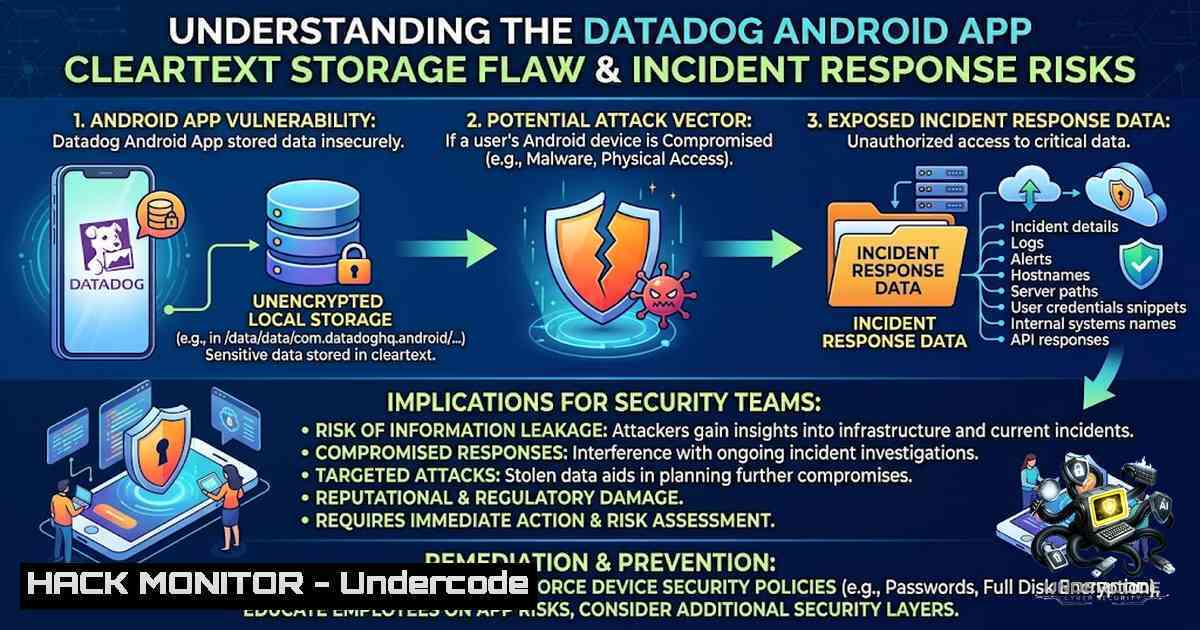
Mobile observability tools place critical incident response data directly into the hands of on-call engineers, but when that data is stored in cleartext on the device, the security posture of the entire monitoring pipeline is compromised. A recently disclosed vulnerability in the Datadog Android app (versions 5.9.1 through 6.0.2) exposed alert titles, bodies, service and host tags, on-call details, incident links, and search history in plaintext – readable by any adversary with physical access to the device or a forensic image. While the flaw required root privileges or forensic acquisition and was not remotely exploitable, it underscores a fundamental principle: sensitive operational data must be encrypted at rest, even on mobile endpoints.
Learning Objectives:
- Understand the implications of cleartext storage of incident response and observability data on mobile devices.
- Learn how to verify whether sensitive application data is being stored securely on Android devices using forensic and debugging techniques.
- Master the technical remediation steps – including database encryption, key management, and secure deletion – to protect sensitive data in mobile applications.
You Should Know:
- The Vulnerability: What Was Stored in Cleartext and Why It Matters
The Datadog Android app, prior to version 6.0.3, stored a wealth of sensitive operational data in an unencrypted SQLite database. According to the researcher who discovered the flaw, the following data categories were exposed:
- Alert titles and bodies – revealing the exact nature of monitored incidents.
- Service and host tags – exposing infrastructure mapping and potential attack surfaces.
- Who got paged – disclosing on-call rotation schedules and personnel.
- On-call and incident links – providing direct access to incident management dashboards.
- Search history – revealing what security teams were actively investigating.
This data was stored in the clear, readable with root access or through a forensic image of the phone. While the flaw was not remotely exploitable nor reachable by another app, the risk is significant in scenarios where devices are lost, stolen, or seized, or where malicious insiders with physical access exist.
Step-by-Step Guide: How to Check for Cleartext Storage on Android
For security researchers and penetration testers, verifying whether an Android app stores sensitive data in cleartext involves the following steps:
- Enable Developer Options and USB Debugging on the target Android device.
- Install the app (in this case, Datadog versions 5.9.1–6.0.2) and generate some data (e.g., trigger alerts, view incidents).
- Use Android Debug Bridge (ADB) to pull the app’s database:
adb shell
run-as com.datadog.app
cat databases/datadog.db > /sdcard/datadog.db
exit
adb pull /sdcard/datadog.db .
4. Inspect the database using SQLite:
sqlite3 datadog.db
.tables
SELECT  FROM alerts;
SELECT  FROM search_history;
5. Look for human-readable text – if alert titles, bodies, or other sensitive fields appear in plaintext, the app is vulnerable.
Linux Command for Forensic Analysis:
strings datadog.db | grep -E "alert|incident|paged|host|service"
Windows Command (using findstr):
findstr /i "alert incident paged" datadog.db
Remediation Perspective: The fix implemented in Datadog 6.0.3 re-encrypts old rows and vacuums the database – a critical step that ensures not only new data but also historical residual data is secured.
2. Database Encryption and Secure Storage on Android
The core technical solution to this class of vulnerability is encrypting sensitive data at the application level. Android provides several mechanisms:
- Android Keystore System – for storing cryptographic keys in a hardware-backed secure container.
- SQLCipher – an open-source extension to SQLite that provides transparent 256-bit AES encryption.
- Room Persistence Library with encryption – using `androidx.security:security-crypto` for encrypting SharedPreferences and files.
Step-by-Step Guide: Implementing Database Encryption in an Android App
1. Add SQLCipher dependency to `build.gradle`:
implementation 'net.zetetic:android-database-sqlcipher:4.5.3'
- Initialize the encrypted database with a key derived from the Android Keystore:
import net.sqlcipher.database.SQLiteDatabase; import net.sqlcipher.database.SQLiteOpenHelper;</li> </ol> public class EncryptedDBHelper extends SQLiteOpenHelper { private static final String DATABASE_NAME = "secure.db"; private static final int DATABASE_VERSION = 1; private byte[] passphrase; public EncryptedDBHelper(Context context, byte[] passphrase) { super(context, DATABASE_NAME, null, DATABASE_VERSION); this.passphrase = passphrase; SQLiteDatabase.loadLibs(context); } @Override public void onCreate(SQLiteDatabase db) { db.execSQL("CREATE TABLE alerts (id INTEGER PRIMARY KEY, title TEXT, body TEXT)"); } }- Encrypt existing data when upgrading from an unencrypted schema:
@Override public void onUpgrade(SQLiteDatabase db, int oldVersion, int newVersion) { if (oldVersion < 2) { // Create encrypted table db.execSQL("CREATE TABLE alerts_encrypted (id INTEGER PRIMARY KEY, title TEXT, body TEXT)"); // Copy data with encryption (handled by SQLCipher transparently) db.execSQL("INSERT INTO alerts_encrypted SELECT FROM alerts"); // Drop old table and rename db.execSQL("DROP TABLE alerts"); db.execSQL("ALTER TABLE alerts_encrypted RENAME TO alerts"); } } -
VACUUM the database to remove residual unencrypted data:
VACUUM;
Key Management Best Practice:
 Generate a secure key using OpenSSL
openssl rand -base64 32
Store this key in the Android Keystore, never in shared preferences or as a hardcoded string.
3. Forensic Acquisition and Data Recovery Risks
The vulnerability highlights a critical threat vector: forensic acquisition of mobile devices. Tools like Cellebrite, GrayKey, and even open-source solutions like `adb backup` can extract application data from locked or unlocked devices. When data is stored in cleartext, forensic examiners – or malicious actors – can trivially recover sensitive operational intelligence.
Step-by-Step Guide: Simulating a Forensic Acquisition
- Create a full device backup (requires USB debugging enabled):
adb backup -apk -shared -all -system -f device_backup.ab
-
Convert the Android Backup (.ab) file to a tar archive:
dd if=device_backup.ab bs=1 skip=24 | openssl zlib -d > device_backup.tar
3. Extract the app’s data directory:
tar -xvf device_backup.tar apps/com.datadog.app/
- Examine the extracted database – if unencrypted, all data is readable.
Mitigation Strategy: In addition to encrypting the database, apps should:
– Disable backup for sensitive data using `android:allowBackup=”false”` in the manifest.
– Use `android:fullBackupContent` to exclude sensitive files from auto-backup.
– Implement file-based encryption (FBE) or device encryption as a secondary layer.Windows Alternative for Backup Extraction:
Using 7-Zip to extract .ab files (after stripping header) $bytes = [System.IO.File]::ReadAllBytes("device_backup.ab") $newBytes = $bytes[24..$bytes.Length] [System.IO.File]::WriteAllBytes("backup.tar", $newBytes) Then extract with 7z 7z x backup.tar- The CVE Assignment Gap and Responsible Disclosure Challenges
A notable aspect of this disclosure is the absence of a CVE identifier. The researcher reported five vulnerabilities in April 2025, and Datadog committed in writing on 18 May 2025 to assigning six CVEs, drafting titles for each. However, the researcher declined the bug bounty because it required signing a Non-Disclosure Agreement (NDA).
The typical CVE Numbering Authorities (CNAs) for Datadog – GitHub and HackerOne – are scoped to open-source projects and bug bounty reports, respectively. Since this was a closed-source app reported via email, neither CNA was applicable. The researcher suggested MITRE as the “CNA of last resort”.
Step-by-Step Guide: How to Request a CVE for a Closed-Source Vulnerability
- Document the vulnerability thoroughly with proof-of-concept code, affected versions, and impact analysis.
- Contact the vendor and allow reasonable time for remediation (typically 90 days).
- If the vendor is unresponsive or unable to assign a CVE, request a CVE ID directly from MITRE via their web form at
cveform.mitre.org. - Provide all technical details including affected product, version, vulnerability type, and a description.
- MITRE will assign a CVE ID if the vulnerability meets their criteria – even if no CNA is available.
Why This Matters: Without a CVE, organizations may not be alerted to the vulnerability through their vulnerability management tools, and security teams may remain unaware of the risk. The lack of a CVE also complicates compliance reporting and risk assessments.
5. Securing Mobile Observability Tools: A Broader Perspective
The Datadog vulnerability is not an isolated incident. Mobile observability and monitoring tools are increasingly targeted because they aggregate sensitive data from across the enterprise. Security teams must apply the principle of least privilege and defense in depth to mobile endpoints.
Step-by-Step Guide: Hardening Mobile Observability Apps
- Enable device-level encryption – ensure all managed devices have full-disk encryption enabled.
- Implement biometric or PIN-based app locking – use `androidx.biometric` to gate access to the app.
- Use runtime permissions – request minimal permissions and validate data access.
- Implement certificate pinning – prevent man-in-the-middle attacks on API traffic.
- Enable remote wipe capabilities – integrate with Mobile Device Management (MDM) solutions.
Linux Command to Check Device Encryption Status:
adb shell getprop ro.crypto.state
 Should return "encrypted"
Windows PowerShell to Check Encryption:
adb shell getprop ro.crypto.state
API Security Consideration: Even if data is encrypted at rest, it must also be encrypted in transit. Ensure all API calls use HTTPS with TLS 1.2 or higher, and implement OAuth 2.0 with short-lived tokens.
Cloud Hardening: For organizations using Datadog, consider:
- Enabling multi-factor authentication (MFA) for all Datadog accounts.
- Restricting API key permissions to the minimum required.
- Regularly auditing audit logs for unauthorized access.
6. Vulnerability Exploitation and Mitigation in Practice
While the Datadog flaw required physical access or forensic acquisition, similar vulnerabilities in other apps could be remotely exploitable. Understanding the exploitation chain is critical for defenders.
Step-by-Step Guide: Exploitation Simulation (Ethical Testing Only)
- Gain physical access to a device with the vulnerable app installed.
- Boot into recovery mode or use a forensic tool to extract the user data partition.
3. Navigate to `/data/data/com.datadog.app/databases/` and pull the database.
- Open the database with any SQLite viewer – no decryption needed.
- Extract alert details, on-call schedules, and incident links – all in plaintext.
Mitigation Commands for System Administrators:
- Force update all devices to Datadog 6.0.3 or later:
Using ADB to check installed version
adb shell dumpsys package com.datadog.app | grep versionName
- Remotely wipe devices that cannot be updated:
Using Android Device Manager or MDM API
Windows Command to Check App Version:
adb shell dumpsys package com.datadog.app | findstr versionName
Incident Response Checklist:
- [ ] Verify all devices have Datadog 6.0.3 or later installed.
- [ ] Rotate any API keys or tokens that may have been exposed.
- [ ] Review audit logs for any unauthorized access to incident data.
- [ ] Conduct a forensic analysis if devices are suspected of being compromised.
What Undercode Say:
- Key Takeaway 1: Cleartext storage of operational data on mobile devices is a critical security gap that can expose incident response workflows, infrastructure mappings, and personnel details – all of which are valuable to adversaries.
- Key Takeaway 2: The absence of a CVE for this vulnerability highlights systemic issues in the responsible disclosure ecosystem, particularly for closed-source applications that fall outside the scope of traditional CNAs.
Analysis: This vulnerability serves as a wake-up call for the observability industry. While Datadog acted responsibly by fixing the issue and re-encrypting the database, the lack of a CVE means many organizations may remain unaware of the risk. Security teams must proactively audit mobile applications that handle sensitive operational data, regardless of vendor assurances. The incident also underscores the importance of defense in depth – even if a vulnerability is not remotely exploitable, physical access or forensic acquisition can still compromise data integrity. Organizations should implement zero-trust principles for mobile endpoints, treating every device as potentially compromised. The researcher’s decision to decline the bounty due to the NDA requirement is also noteworthy – it prioritizes transparency over financial reward, a stance that benefits the broader security community.
Prediction:
- -1 CVE assignment will remain a challenge for closed-source mobile apps – without a clear pathway to CVE assignment, similar vulnerabilities may go unreported or unpublicized, leaving organizations blind to risks.
- -1 Regulatory scrutiny on mobile data storage will increase – as more operational data moves to mobile endpoints, regulators may mandate encryption at rest for incident response and observability tools.
- +1 Vendors will adopt automatic encryption by default – in response to this and similar disclosures, observability platforms will likely implement database encryption as a default feature, rather than an optional one.
- +1 Security researchers will demand transparent disclosure policies – the trend of declining bounties over NDAs will push vendors to adopt more open vulnerability disclosure programs.
- -1 Attackers will target mobile observability apps more aggressively – as defenders rely increasingly on mobile tools, adversaries will shift focus to physical and forensic attacks on these endpoints.
▶️ Related Video (76% Match):
🎯Let’s Practice For Free:
🎓 Live Courses & Certifications:
Join Undercode Academy for Verified Certifications
🚀 Request a Custom Project:
Secure, high-velocity infrastructure and disruptive technological engineering. Contact our engineering team for high-tier development and proprietary systems:
[email protected]
💎 Smart Architecture | 🛡️ Secure by Design | ⭐ Trusted by ThousandsIT/Security Reporter URL:
Reported By: Markesler Going – Hackers Feeds
Extra Hub: Undercode MoN
Basic Verification: Pass ✅🔐JOIN OUR CYBER WORLD [ CVE News • HackMonitor • UndercodeNews ]
📢 Follow UndercodeTesting & Stay Tuned:
- Encrypt existing data when upgrading from an unencrypted schema:


