
Listen to this Post
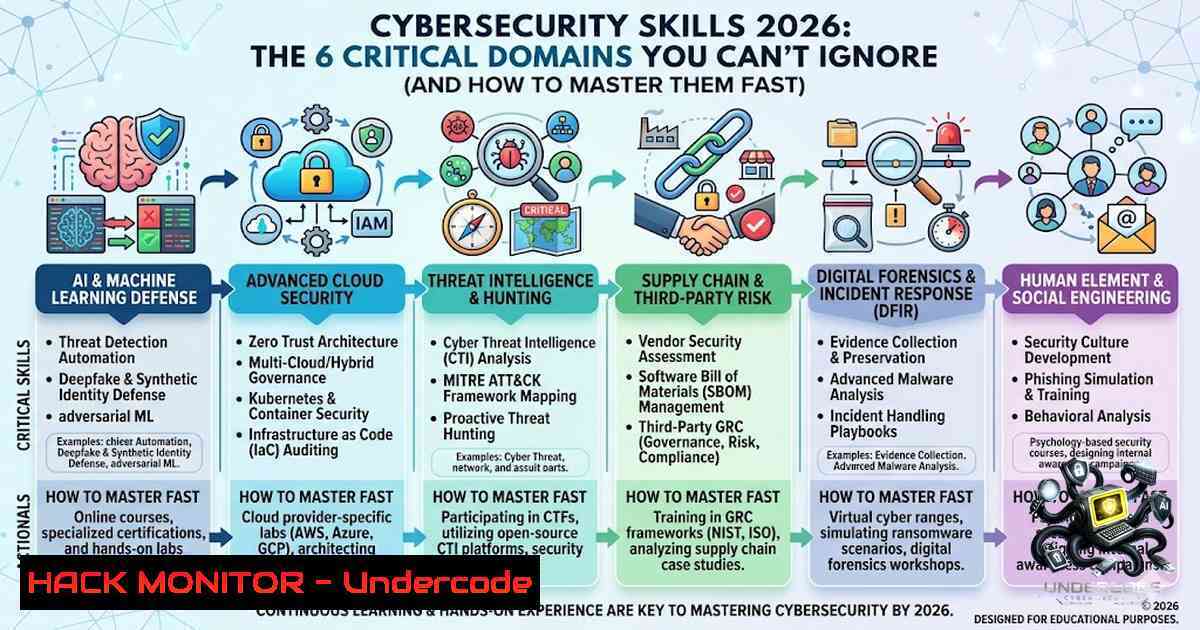
Introduction:
As digital transformation, cloud adoption, and AI initiatives accelerate, cybersecurity has evolved from a niche IT function into a business-critical capability. The demand for professionals who understand not just tools but foundational security principles—network security, threat intelligence, SIEM monitoring, incident response, cloud security, IAM, endpoint defense, application security, cryptography, and automation—has never been higher. This article extracts the core skills from industry discussions, provides step‑by‑step technical guides, and delivers actionable commands for Linux, Windows, and cloud environments to help you build hands‑on expertise.
Learning Objectives:
- Implement and verify network security controls (firewalls, IDS/IPS, VPNs) using command‑line tools on Linux and Windows.
- Deploy a basic SIEM monitoring pipeline with open‑source tools and write custom log analysis queries.
- Execute an incident response workflow, including containment, evidence collection, and recovery, with practical scripts.
- Harden a cloud environment (AWS/Azure) against common misconfigurations using CLI commands and policy as code.
- Automate security tasks (log parsing, alerting, IAM audits) using Python and PowerShell.
You Should Know:
- Network Security Hardening: Firewalls, IDS/IPS, and VPN Verification
Extended context: Network security remains the bedrock of defense. Understanding how to inspect traffic, configure firewall rules, detect intrusions, and verify VPN tunnels is essential. Below are commands to audit and harden network settings on Linux (iptables/nftables, tcpdump) and Windows (netsh, New-1etFirewallRule), plus IDS rules with Snort.
Step‑by‑step guide – Linux (Ubuntu/Debian):
1. List current iptables rules:
`sudo iptables -L -v -1`
Shows packet counts and chains; look for open ports (e.g., 22, 80, 443).
2. Block an IP with nftables (modern replacement):
`sudo nft add rule ip filter input ip saddr 192.168.1.100 drop`
3. Capture live traffic for analysis:
`sudo tcpdump -i eth0 -1 -c 100 ‘tcp port 443’`
Capture 100 HTTPS packets – verify encryption and handshakes.
4. Test IDS/IPS with Snort (install via sudo apt install snort):
Run in packet logger mode:
`sudo snort -dev -l /var/log/snort -h 192.168.1.0/24`
Then simulate a port scan: `nmap -sS 192.168.1.10` → check alerts in /var/log/snort/alert.
Windows (PowerShell as Admin):
- List all firewall rules:
`Get-1etFirewallRule | Where-Object {$_.Enabled -eq ‘True’} | Format-Table DisplayName, Direction, Action`
– Block inbound SSH (port 22) on public profile:
`New-1etFirewallRule -DisplayName “Block SSH Public” -Direction Inbound -LocalPort 22 -Protocol TCP -Action Block -Profile Public`
– Verify VPN connectivity (check routing table for tunnel interface):
`Get-1etIPInterface | Where-Object {$_.InterfaceMetric -lt 5}` and `route print -4`
- SIEM & Security Monitoring: Turning Logs into Actionable Insights
Extended context: SIEM (Security Information and Event Management) aggregates logs from firewalls, servers, and applications to detect anomalies. Using open‑source ELK (Elasticsearch, Logstash, Kibana) or Wazuh, you can build a lab environment. Below are commands to ingest Windows Event Logs and Linux syslog, then query for failed logins.
Step‑by‑step – Install Wazuh (single host):
1. On Ubuntu 22.04:
`curl -sO https://packages.wazuh.com/4.7/wazuh-install.sh && sudo bash wazuh-install.sh –generate-config-files`
Then run the all‑in‑one installation: `sudo bash wazuh-install.sh –wazuh-indexer node-1`
2. Forward Windows Event Logs (Security log) to SIEM:
Install Winlogbeat:
`choco install winlogbeat` (or download from elastic.co)
Edit `C:\Program Files\Winlogbeat\winlogbeat.yml` to set `hosts: [“your_siem_ip:5044”]`.
Start service: `Start-Service winlogbeat`
- Query for failed RDP logins in Kibana (Discover tab):
`event.code: 4625 AND winlog.event_data.LogonType: 10`
4625 = failed logon; LogonType 10 = remote interactive (RDP).
4. Linux syslog monitoring (send auth.log):
In `/etc/filebeat/filebeat.yml` add:
filebeat.inputs:
- type: log
enabled: true
paths:
- /var/log/auth.log
Then `sudo systemctl restart filebeat`
3. Incident Response: Containment, Investigation, and Recovery
Extended context: A structured IR plan reduces dwell time. The following steps cover live response on a compromised Linux server (suspected reverse shell) and Windows workstation (ransomware behavior). Use PowerShell for memory capture and Linux for network isolation.
Step‑by‑step – Linux (containment & forensic collection):
1. Isolate the host immediately:
`sudo iptables -I INPUT -j DROP` and `sudo iptables -I OUTPUT -j DROP` breaks all connectivity except local.
2. Collect running processes and network connections:
`ps auxf > ps_snapshot.txt`
`ss -tunap | grep ESTABLISHED > connections.txt`
3. Capture memory with LiME (Linux Memory Extractor):
`sudo insmod lime.ko “path=/tmp/mem.lime format=lime”`
Then `dd if=/proc/kcore of=/tmp/mem.dd` (alternative).
4. Check for persistence (cron jobs, systemd timers):
`crontab -l` for user; `sudo systemctl list-timers –all`
Windows (PowerShell IR):
- Terminate suspicious process by name (e.g., “ransomware.exe”):
`Get-Process -1ame ransomware -ErrorAction SilentlyContinue | Stop-Process -Force`
- Disable network adapter (containment):
`Get-1etAdapter | Where-Object {$_.Status -eq ‘Up’} | Disable-1etAdapter -Confirm:$false`
– Collect Windows Event Logs for last 24 hours:
`Get-WinEvent -FilterHashtable @{LogName=’Security’; StartTime=(Get-Date).AddDays(-1)} | Export-Csv -Path security_events.csv`
- Check for scheduled tasks created by attacker:
`schtasks /query /fo CSV /v | findstr /i “unknown”`
4. Cloud Security: Hardening AWS and Azure Environments
Extended context: Misconfigured S3 buckets, over‑permissive IAM roles, and unencrypted disks are top cloud vulnerabilities. Below are CLI commands to audit and fix common issues using AWS CLI and Azure PowerShell.
Step‑by‑step – AWS:
1. List S3 buckets with public ACLs:
aws s3api get-bucket-acl --bucket YOUR_BUCKET --query 'Grants[?Grantee.URI==http://acs.amazonaws.com/groups/global/AllUsers`]’If output is non‑empty, remediate: `aws s3api put-bucket-acl --bucket YOUR_BUCKET --acl private`aws s3api put-bucket-encryption –bucket YOUR_BUCKET –server-side-encryption-configuration ‘{“Rules”:[{“ApplyServerSideEncryptionByDefault”:{“SSEAlgorithm”:”AES256″}}]}’
<h2 style="color: yellow;">2. Enforce bucket encryption (AES‑256):</h2>
<h2 style="color: yellow;"></h2>aws ec2 describe-security-groups –filters Name=ip-permission.to-port,Values=22 –query ‘SecurityGroups[?IpPermissions[?IpRanges[?CidrIp==
<h2 style="color: yellow;">3. Audit security groups with open SSH (0.0.0.0/0:22):</h2>
<h2 style="color: yellow;">0.0.0.0/0]]]’`
Azure (PowerShell):
- Find storage accounts with allowBlobPublicAccess enabled:
`Get-AzStorageAccount | Where-Object {$_.AllowBlobPublicAccess -eq $true} | Select-Object StorageAccountName, ResourceGroupName`
– Disable public blob access:
`Update-AzStorageAccount -ResourceGroupName “myRG” -1ame “mystorage” -AllowBlobPublicAccess $false`
- Enable Azure Defender for Cloud (free trial for labs):
`Set-AzSecurityPricing -1ame “VirtualMachines” -PricingTier “Standard”`
- Identity & Access Management (IAM) and Zero Trust: Least Privilege Audits
Extended context: IAM is the core of Zero Trust. Overprivileged accounts are a leading cause of data breaches. The following scripts audit Active Directory users, local admin rights on Windows, and Linux sudoers, then implement MFA enforcement.
Step‑by‑step – Windows (Active Directory / local):
- List all domain users with AdminCount=1 (privileged accounts):
`Get-ADUser -Filter {AdminCount -eq 1} -Properties AdminCount, MemberOf | Select-Object Name, MemberOf`
2. Find local administrators on a set of machines (invoke against a list):
`Invoke-Command -ComputerName PC01, PC02 -ScriptBlock {Get-LocalGroupMember -Group “Administrators”}`
- Enforce MFA for Azure AD users (conditional access via MS Graph):
Requires PowerShell module `Microsoft.Graph`
`Connect-MgGraph -Scopes “Policy.ReadWrite.ConditionalAccess”`
Then create a policy:
$conditions = @{ UserRiskLevels = "high" }
New-MgIdentityConditionalAccessPolicy -DisplayName "MFA for High Risk" -State "enabled" -Conditions $conditions -GrantControls @{ BuiltInControls = "mfa" }
Linux (sudo and SSH hardening):
- List all users with sudo rights:
`grep -Po ‘^sudo.+:\K.$’ /etc/group | tr ‘,’ ‘\n’`
- Remove unnecessary sudo privileges (edit `/etc/sudoers` safely):
`sudo visudo` → comment out `%sudo ALL=(ALL:ALL) ALL` and add granular rules, e.g., `username ALL=(ALL) /usr/bin/systemctl restart nginx`
– Enforce SSH key‑only authentication + disable root login:
Edit/etc/ssh/sshd_config:PasswordAuthentication no,PermitRootLogin no, then `sudo systemctl restart sshd`
6. Security Automation with Python and PowerShell
Extended context: Scripting transforms manual monitoring into proactive defense. Below are two automation scripts: a Python log watcher for failed SSH attempts and a PowerShell user audit for stale AD accounts.
Step‑by‑step – Python (monitor /var/log/auth.log for brute force):
1. Script:
import re
import time
from collections import defaultdict

failed_attempts = defaultdict(int)
with open('/var/log/auth.log', 'r') as f:
for line in f:
if 'Failed password' in line:
ip = re.search(r'from (\d+.\d+.\d+.\d+)', line)
if ip:
failed_attempts[ip.group(1)] += 1
if failed_attempts[ip.group(1)] >= 5:
print(f"ALERT: {ip.group(1)} exceeded 5 failed attempts")
 Add iptables block command here: os.system(f"sudo iptables -A INPUT -s {ip.group(1)} -j DROP")
2. Run as a cron job every 5 minutes:
`crontab -e` → `/5 /usr/bin/python3 /home/user/ssh_monitor.py`
Windows PowerShell (find inactive AD accounts >90 days):
- One‑liner script:
$inactiveDate = (Get-Date).AddDays(-90) Search-ADAccount -AccountInactive -TimeSpan $inactiveDate -UsersOnly | Where-Object {$_.Enabled -eq $true} | Select-Object Name, SamAccountName, LastLogonDate - Export and disable them (after verification):
`Search-ADAccount -AccountInactive -TimeSpan $inactiveDate -UsersOnly | Disable-ADAccount`
What Undercode Say:
- The most successful cybersecurity professionals are not tool‑collectors; they internalize fundamentals (network protocols, OS internals, crypto primitives) and continuously adapt. Hands‑on labs—building a home SIEM, breaking into your own test VMs, automating log analysis—outperform any certification alone.
- “Cybersecurity is a marathon” means you must budget time weekly for deliberate practice. Start with network hardening commands (iptables, netsh), then move to incident response dry runs. The community’s top 2026 focus areas—cloud security and threat hunting—are well‑justified, but only if you can script and query (Python/SQL). Without automation, you drown in alerts.
Expected Output:
Introduction: [Provided at article start]
What Undercode Say: [Provided above]
Expected Output: [Full article as written]
Prediction:
- +1 Cloud security roles will see 40% salary growth by 2027 as misconfiguration liability laws tighten; mastering AWS/Azure CLI and IaC (Terraform) becomes as critical as traditional networking.
- +1 Automated incident response (SOAR) will reduce mean time to contain (MTTC) from days to minutes; professionals who combine Python scripting with IR workflows will become irreplaceable.
- -1 The proliferation of AI‑generated polymorphic malware will outpace signature‑based SIEM rules; organizations that fail to adopt behavioral analytics and UEBA will suffer breach fatigue.
- -1 Over‑reliance on “Zero Trust” marketing without implementing device health attestation and micro‑segmentation will create dangerous blind spots – IAM audits (like the AD scripts above) remain painfully underutilized.
▶️ Related Video (76% Match):
🎯Let’s Practice For Free:
🎓 Live Courses & Certifications:
Join Undercode Academy for Verified Certifications
🚀 Request a Custom Project:
Secure, high-velocity infrastructure and disruptive technological engineering. Contact our engineering team for high-tier development and proprietary systems:
[email protected]
💎 Smart Architecture | 🛡️ Secure by Design | ⭐ Trusted by Thousands
IT/Security Reporter URL:
Reported By: Yasinagirbas Cybersecurity – Hackers Feeds
Extra Hub: Undercode MoN
Basic Verification: Pass ✅


