
Listen to this Post
Introduction:
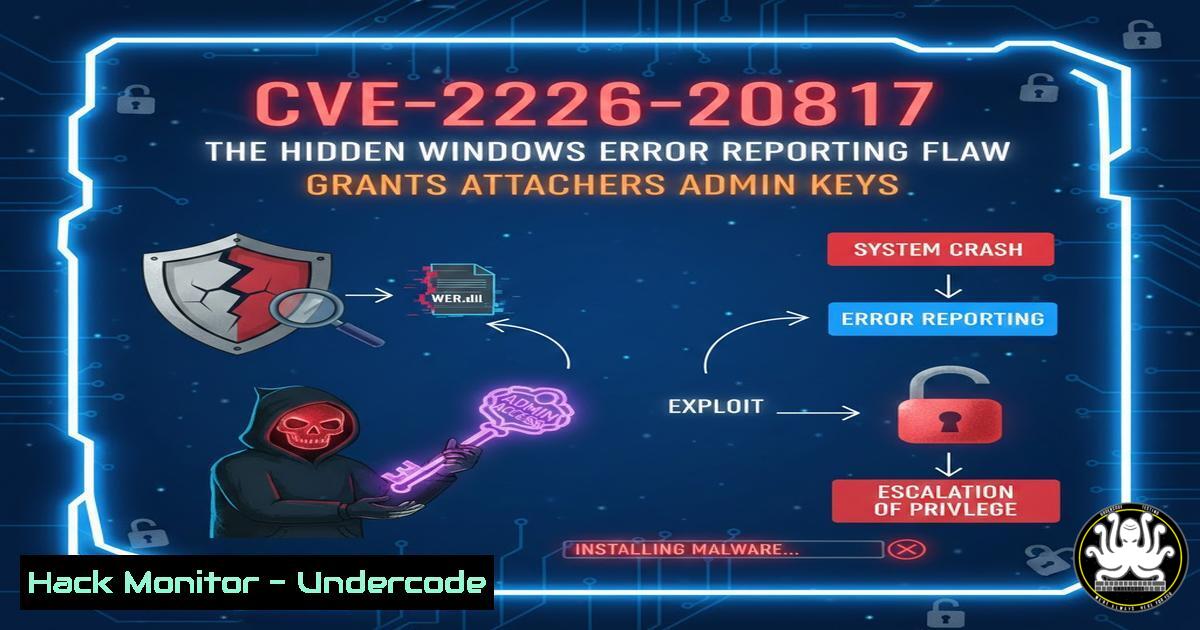
A critical local privilege escalation (LPE) vulnerability has been discovered in the Windows Error Reporting (WER) service, a core component for crash reporting and diagnostics. Designated as CVE-2026-20817, this flaw allows authenticated local attackers to bypass security checks and execute arbitrary code with SYSTEM-level privileges, posing a severe threat to endpoint security and integrity. Understanding this vulnerability’s mechanism and implementing immediate mitigations is paramount for security teams to prevent attackers from moving laterally and establishing persistent footholds.
Learning Objectives:
- Understand the technical mechanism behind the CVE-2026-20817 WER service privilege escalation flaw.
- Learn how to detect potential exploitation attempts on your Windows endpoints using built-in tools.
- Apply Microsoft’s recommended mitigation and hardening steps to secure vulnerable systems.
You Should Know:
1. Anatomy of the WER Service Exploit
The Windows Error Reporting service (WerSvc) is designed to collect and report application crash data. Under specific conditions, it can launch helper processes (like `WerFault.exe` or WerMgr.exe) to handle these reports. CVE-2026-20817 exploits an improper authorization check during this launch sequence. An attacker with standard user privileges can manipulate the process creation parameters, tricking the service into spawning a process with elevated `SYSTEM` privileges under their control. This effectively turns a low-privilege user session into a fully privileged one.
Step‑by‑step guide explaining what this does and how to use it.
Step 1: Attacker gains initial foothold. An attacker first gains execution as a standard user, potentially through phishing, credential theft, or exploiting another low-severity bug.
Step 2: Triggering the vulnerability. The attacker crafts a malicious payload or leverages existing tools to interact with the WER service API, calling functions related to process creation without triggering the proper security validation.
Step 3: Privilege escalation. The WER service, operating as SYSTEM, is deceived into launching the attacker’s specified binary (e.g., `cmd.exe` or a reverse shell) with full system privileges. The attacker now owns the machine.
2. Detecting Exploitation Attempts with Command-Line Forensics
Proactive monitoring is crucial. Suspicious activity related to `WerFault.exe` or `WerMgr.exe` originating from non-standard users or locations can be a key indicator of compromise (IOC).
Step‑by‑step guide explaining what this does and how to use it.
Step 1: Monitor Process Creation. Use Windows Command Prompt or PowerShell to list processes and their parents. Look for `WerFault.exe` spawned by unexpected user contexts.
Command (PowerShell): `Get-Process WerFault, WerMgr | Select-Object ProcessName, Id, ParentProcessId, Path | Format-List`
Command (CMD with Sysinternals): `pslist.exe | findstr /i “werfault wermgr”`
Step 2: Analyze Service Logs. Check the Windows Event Log for unusual WER service activity.
Command (PowerShell): `Get-WinEvent -LogName “Application” | Where-Object {$_.ProviderName -like “Windows Error Reporting”} | Select-Object -First 20`
Step 3: Establish a Baseline. Understand normal WER behavior in your environment to spot anomalies. Tools like Sysmon with a strong configuration can automate this logging.
3. Applying the Official Microsoft Mitigation
Microsoft’s primary mitigation involves disabling the vulnerable launch feature within the WER service via a registry flag. This prevents the abused functionality while maintaining core reporting features.
Step‑by‑step guide explaining what this does and how to use it.
Step 1: Open Registry Editor with Administrator rights. Press Win + R, type regedit, and confirm.
Step 2: Navigate to the WER configuration key. Go to: `HKEY_LOCAL_MACHINE\SOFTWARE\Microsoft\Windows\Windows Error Reporting`
Step 3: Create or Modify the `DWORD` value. Create a new `DWORD (32-bit) Value` named Disabled. Set its value data to 1.
Step 4: Restart the WER Service. For the change to take effect, restart the Windows Error Reporting Service.
Command (Admin PowerShell): `Restart-Service -Name WerSvc -Force`
Warning: Always test registry changes in a non-production environment first. Some legitimate debugging functionality may be affected.
4. Hardening the WER Service Configuration
Beyond the immediate fix, hardening the service configuration reduces the attack surface. This involves restricting service permissions and enabling audit logging.
Step‑by‑step guide explaining what this does and how to use it.
Step 1: Review Service ACLs. Use `sc.exe` to query the WER service’s security descriptor.
Command (Admin CMD): `sc.exe sdshow WerSvc`
Step 2: Consider Tightening Permissions (Advanced). Using tools like sc.exe sdset, you can potentially remove excessive permissions from non-administrative users. Caution: Incorrect ACLs can break the service. Document any changes thoroughly.
Step 3: Enable Detailed Auditing. Implement audit policies to log all access to the `WerSvc` service and key registry paths.
Group Policy Path: `Computer Configuration -> Windows Settings -> Security Settings -> Advanced Audit Policy Configuration -> System Audit Policies -> Object Access -> Audit Security System Extension.`
5. Integrating with Broader Vulnerability Management
CVE-2026-20817 is not an isolated incident. It underscores the need for a robust, layered security posture that assumes local privileges can be escalated.
Step‑by‑step guide explaining what this does and how to use it.
Step 1: Prioritize Patch Management. Apply the official Microsoft patch for CVE-2026-20817 immediately upon release. The registry fix is a workaround, not a permanent solution.
Step 2: Implement Least Privilege. Ensure no standard users have administrative rights. Use Privileged Access Workstations (PAWs) for administrators.
Step 3: Deploy Endpoint Detection & Response (EDR). Configure your EDR to alert on and block suspicious parent-child process relationships, especially those involving `WerSvc` spawning unusual children like `powershell.exe` or cmd.exe.
What Undercode Say:
- Key Takeaway 1: This LPE flaw turns any initial access into full system compromise, making it a potent enabler for ransomware, data theft, and persistent attacks. It highlights the critical risk of “trusted” system components becoming attack vectors.
- Key Takeaway 2: The mitigation is a registry-based configuration change, not a patch. This requires proactive, manual, or scripted deployment across the entire enterprise, leaving a window of exposure for unmanaged or slow-to-update systems.
The discovery of CVE-2026-20817 follows a worrying trend of vulnerabilities in core Windows management and diagnostic subsystems. These components often run with high privileges and are overlooked in hardening exercises. While the immediate fix is straightforward, the deeper lesson is the necessity of continuous vulnerability assessment and configuration management for all system services, not just exposed network daemons. Security teams must pivot from viewing such services as benign to treating them as potential privilege escalation gateways that require strict control and monitoring.
Prediction:
Vulnerabilities in foundational Windows services like WER will continue to be a high-value target for advanced persistent threat (APT) groups and ransomware affiliates. We predict a surge in automated exploitation tools integrating CVE-2026-20817 into broader attack chains within weeks of public disclosure. Furthermore, this flaw will accelerate the adoption of “default-deny” and application control policies (like Windows Defender Application Control) in enterprise environments, as organizations seek to block unauthorized executables regardless of the escalation method. In the long term, expect Microsoft to increase scrutiny and potentially refactor legacy service architectures, moving towards more isolated, low-privilege designs for components historically trusted as SYSTEM.
▶️ Related Video (84% Match):
🎯Let’s Practice For Free:
IT/Security Reporter URL:
Reported By: Ekiledjian Windows – Hackers Feeds
Extra Hub: Undercode MoN
Basic Verification: Pass ✅


