Listen to this Post
Introduction
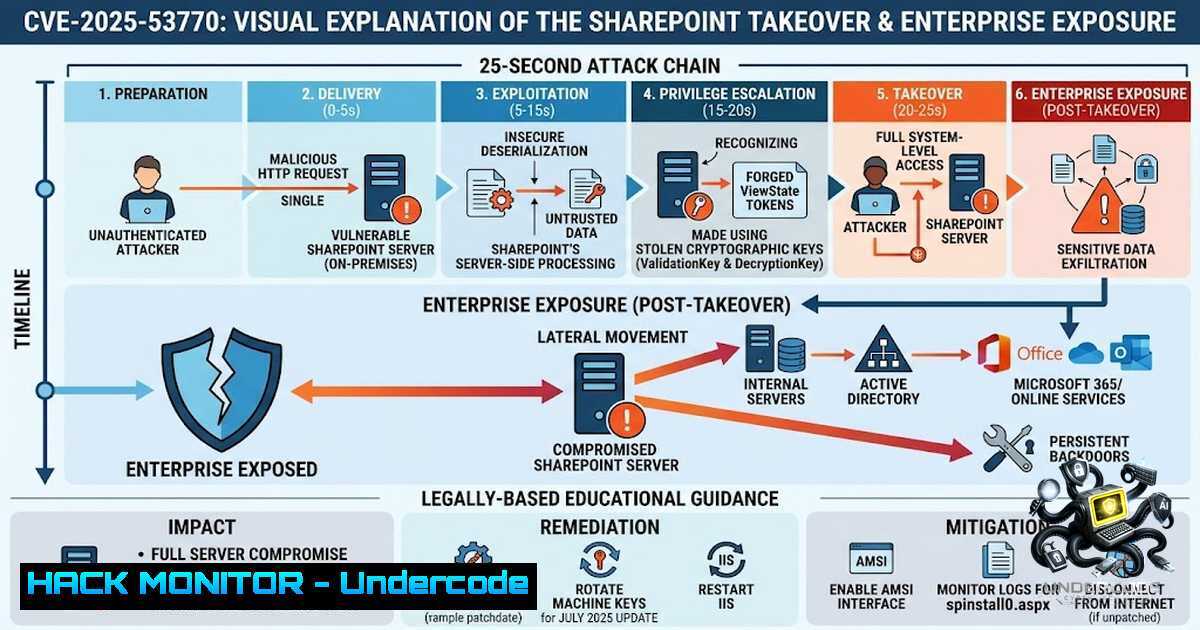
In a chilling demonstration of modern cyber warfare, security researchers have uncovered that attackers can fully compromise an on-premises Microsoft SharePoint environment in as little as 25 seconds. This isn’t theoretical—it’s happening right now. The vulnerability, tracked as CVE-2025-53770 with a CVSS score of 9.8, enables unauthenticated remote code execution through unsafe deserialization of untrusted data. What makes this attack particularly devastating is its ability to extract ASP.NET MachineKeys—the cryptographic keys that SharePoint uses to validate all requests—allowing attackers to forge legitimate-looking payloads that bypass every security control in place.
The “ToolShell” exploitation campaign, attributed to threat groups including Linen Typhoon and Violet Typhoon, has already compromised over 400 organizations, with an estimated 8,000-10,000 additional servers at immediate risk. With over 200,000 SharePoint services globally potentially vulnerable, this represents one of the most significant enterprise security threats of 2025.
Learning Objectives
- Understand the Attack Chain: Comprehend how CVE-2025-53770 enables unauthenticated RCE through MachineKey extraction and forged ViewState payloads
- Master Detection and Response: Learn to identify Indicators of Compromise (IoCs) through log analysis, network monitoring, and endpoint detection
- Implement Hardening Controls: Acquire hands-on skills to patch, rotate cryptographic keys, and configure AMSI to prevent exploitation
- Understanding the Attack Chain: From Zero to Domain Admin in 25 Seconds
The CVE-2025-53770 exploitation follows a remarkably efficient chain that security researchers have observed completing in under 30 seconds. The attack begins with an unauthenticated HTTP POST request to a critical SharePoint endpoint: /_layouts/15/ToolPane.aspx. This request includes a crafted HTTP Referer header set to /_layouts/SignOut.aspx, which triggers an authentication bypass vulnerability.
Once the bypass succeeds, the attacker can extract the server’s MachineKey configuration—specifically the ValidationKey and DecryptionKey. These keys are the backbone of SharePoint’s ViewState validation mechanism, used to ensure that POST data hasn’t been tampered with. With these keys in hand, an attacker can forge arbitrary __VIEWSTATE payloads that the server accepts as completely legitimate.
Step-by-step breakdown of the exploit:
- Reconnaissance: The attacker identifies an internet-facing on-premises SharePoint server (versions 2016, 2019, or Subscription Edition)
- Initial Exploitation: Sends crafted POST request to `/_layouts/15/ToolPane.aspx` with spoofed Referer header
- Key Extraction: Server responds with MachineKey configuration data
- Payload Forging: Attacker uses stolen ValidationKey and DecryptionKey to create malicious __VIEWSTATE payloads
- Code Execution: Forged payload is accepted as legitimate, enabling arbitrary remote code execution
- Lateral Movement: Attacker uses SharePoint’s trusted connections to Outlook, Teams, and OneDrive to move laterally across the domain
The scariest part? Patching alone does not solve the issue—you must rotate the cryptographic keys to invalidate all tokens that the attacker may have already forged.
Detection Commands (Windows PowerShell):
 Check IIS logs for suspicious ToolPane.aspx POST requests
Get-Content "C:\inetpub\logs\LogFiles\W3SVC.log" | Select-String "_layouts/15/ToolPane.aspx" -Context 5,5

Search for anomalous ViewState payloads in IIS logs
Get-Content "C:\inetpub\logs\LogFiles\W3SVC.log" | Select-String "VIEWSTATE" | Where-Object { $_ -match "Content-Length: [0-9]{5,}" }

Check for newly created .aspx files in SharePoint directories
Get-ChildItem -Path "C:\inetpub\wwwroot\wss\VirtualDirectories\_layouts\" -Filter ".aspx" | Where-Object { $_.LastWriteTime -gt (Get-Date).AddHours(-24) }
Linux-based log analysis (if SharePoint is running on Linux or logs are aggregated):
 Search for ToolPane.aspx access patterns
grep -r "_layouts/15/ToolPane.aspx" /var/log/nginx/.log /var/log/apache2/.log 2>/dev/null

Look for unusually large POST requests (potential ViewState payloads)
awk '$6 == "POST" && $10 > 10000 {print $0}' /var/log/nginx/access.log

Extract suspicious IPs making repeated ToolPane requests
grep "ToolPane.aspx" /var/log/nginx/access.log | awk '{print $1}' | sort | uniq -c | sort -1r
- MachineKey Extraction and Forged ViewState: The Core Vulnerability
The heart of CVE-2025-53770 lies in unsafe deserialization of untrusted data. SharePoint’s ViewState mechanism, designed to preserve page state across postbacks, becomes an attack vector when an attacker can control the cryptographic keys used to validate it.
Under normal operation, SharePoint uses the MachineKey (comprising ValidationKey and DecryptionKey) to:
– Validate that ViewState data hasn’t been tampered with (integrity)
– Decrypt ViewState data if encryption is enabled (confidentiality)
When an attacker extracts these keys, they can:
- Forge authentication tokens: Create valid-looking ViewState payloads that grant administrative privileges
- Bypass CSRF protections: Craft requests that appear to come from legitimate users
- Achieve persistent access: The stolen keys enable access even after the initial vulnerability is patched
Understanding MachineKey configuration in SharePoint:
<!-- MachineKey configuration in web.config (DO NOT SHARE) -->
<system.web>
<machineKey
validationKey="[64-character hex string]"
decryptionKey="[32-character hex string]"
validation="SHA1"
decryption="AES" />
</system.web>
Post-exploitation forensic analysis:
 Check web.config for MachineKey settings (PowerShell)
$webConfigs = Get-ChildItem -Path "C:\inetpub\wwwroot\wss\VirtualDirectories\" -Filter "web.config" -Recurse
foreach ($config in $webConfigs) {
$content = Get-Content $config.FullName -Raw
if ($content -match "<machineKey") {
Write-Host "MachineKey found in: $($config.FullName)" -ForegroundColor Yellow
 Extract the keys (for forensic purposes only)
$content -match "validationKey=""([^""]+)""" | Out-1ull
Write-Host "ValidationKey: $($matches[bash].Substring(0,20))..."
}
}

Audit IIS application pool identities
Get-IISAppPool | Select-Object Name, ProcessModel, IdentityType
3. Immediate Containment: Stop the Bleeding Before Patching
When a potential compromise is detected, time is critical. The following steps should be executed in order, with the understanding that mere patching is insufficient—key rotation and session invalidation are mandatory.
Emergency Response Checklist:
Step 1: Isolate Affected Servers
 Block inbound traffic to SharePoint ports (443/80) via Windows Firewall
New-1etFirewallRule -DisplayName "BLOCK-SHAREPOINT-EMERGENCY" -Direction Inbound -Protocol TCP -LocalPort 80,443 -Action Block

Alternatively, use Azure/cloud network security groups to isolate
 For on-premises, coordinate with network team to segment the VLAN
Step 2: Rotate MachineKeys Immediately
 Generate new MachineKey (64-char validation, 32-char decryption)
 Run this on ALL SharePoint servers in the farm
Add-Type -AssemblyName System.Web
$validationKey = [System.Web.Security.MachineKey]::GenerateKey(64)
$decryptionKey = [System.Web.Security.MachineKey]::GenerateKey(32)

Update web.config for each SharePoint web application
 This must be done carefully - improper rotation can break the farm
 Microsoft provides specific guidance for SharePoint farm key rotation
Step 3: Invalidate All Sessions
 Force all users to re-authenticate
 Clear all authentication cookies by recycling application pools
Restart-WebAppPool -1ame "SharePoint Web Services"
Restart-WebAppPool -1ame "SharePoint Central Administration v4"

Or use SharePoint Management Shell to reset security tokens
$sts = Get-SPSecurityTokenServiceConfig
$sts.LocalLoginProvider.RequireSsl = $true
$sts.Update()
Step 4: Enable AMSI in Full Mode
 Configure Antimalware Scan Interface for SharePoint
 AMSI provides deep inspection of potentially malicious content
Set-SPEnterpriseSearchServiceApplication -AMSIEnabled $true
 Verify AMSI status
Get-SPEnterpriseSearchServiceApplication | Select-Object AMSIEnabled
Step 5: Deploy Microsoft Defender AV on All SharePoint Servers
 Ensure Microsoft Defender is active and updated
Set-MpPreference -DisableRealtimeMonitoring $false
Update-MpSignature -UpdateSource MicrosoftUpdateServer
Start-MpScan -ScanType QuickScan
4. Hardening SharePoint Against Future Exploits
Beyond patching CVE-2025-53770, organizations must implement defense-in-depth measures to protect against similar vulnerabilities. The ToolShell campaign demonstrates that attackers are actively chaining multiple vulnerabilities—including CVE-2025-53771 (path traversal), CVE-2025-49704, and CVE-2025-49706—to maintain persistence.
Windows Hardening Commands:
 Enable IIS Request Filtering to block suspicious patterns
 This can block requests containing known exploit strings
Add-WebConfigurationProperty -Filter "system.webServer/security/requestFiltering/denyUrlSequences" -1ame "." -Value @{sequence="ToolPane.aspx"}

Configure IIS to log all POST requests with full payload
 This requires custom logging configuration

Enable HTTP Strict Transport Security (HSTS)
Add-WebConfigurationProperty -Filter "system.webServer/rewrite/outboundRules" -1ame "." -Value @{
name = "Add HSTS Header"
preCondition = "IsHttps"
patternSyntax = "Wildcard"
match = @{serverVariable="RESPONSE_Strict-Transport-Security" pattern=""}
action = @{type="Rewrite" value="max-age=31536000; includeSubDomains"}
}

Restrict access to sensitive SharePoint directories
$acl = Get-Acl "C:\inetpub\wwwroot\wss\VirtualDirectories\App_Data"
$rule = New-Object System.Security.AccessControl.FileSystemAccessRule("IIS_IUSRS", "Read", "Deny")
$acl.AddAccessRule($rule)
Set-Acl "C:\inetpub\wwwroot\wss\VirtualDirectories\App_Data" $acl
Network-Level Protection:
 Example WAF rule (ModSecurity) to block ToolPane exploitation attempts
 Add to /etc/modsecurity/owasp-crs/rules/REQUEST-913-SCANNER-DETECTION.conf

SecRule REQUEST_URI "@contains /_layouts/15/ToolPane.aspx" \
"id:913100,\
phase:1,\
t:none,\
block,\
msg:'SharePoint ToolPane Exploit Attempt Detected',\
severity:'CRITICAL',\
tag:'application-multi',\
tag:'language-multi',\
tag:'platform-multi',\
tag:'attack-scanner',\
tag:'paranoia-level/1'"
5. Advanced Threat Hunting: Detecting the Undetectable
Because CVE-2025-53770 exploitation can be stealthy—especially after keys are stolen—organizations must adopt proactive threat hunting practices. The attack leaves subtle traces that can be identified with the right queries.
Microsoft Defender Hunting Query (KQL):
// Hunt for anomalous ViewState payloads
DeviceProcessEvents
| where Timestamp > ago(7d)
| where FileName in~ ("powershell.exe", "cmd.exe", "wmic.exe", "cscript.exe")
| where ProcessCommandLine has_any ("__VIEWSTATE", "MachineKey", "ValidationKey")
| project Timestamp, DeviceName, AccountName, ProcessCommandLine, InitiatingProcessCommandLine

// Detect unusual IIS worker process behavior
DeviceProcessEvents
| where Timestamp > ago(24h)
| where FileName == "w3wp.exe"
| where ProcessCommandLine contains "SharePoint"
| summarize Count = count() by DeviceName, bin(Timestamp, 5m)
| where Count > 50 // Unusually high request volume
SIEM Correlation Rules (Splunk/ELK):
index=iis sourcetype=iis
uri_path="/_layouts/15/ToolPane.aspx"
| stats count by clientip, uri_query, http_user_agent
| where count > 5
| eval threat_score = count  10
| table _time, clientip, uri_query, threat_score
Linux Log Analysis for Hybrid Environments:
 Monitor for suspicious process creation from w3wp.exe (IIS worker)
 Using Sysmon for Linux or auditd
auditctl -a always,exit -S execve -F path=/usr/bin/w3wp -k sharepoint_exec

Search for unauthorized web shell uploads
find /var/www/sharepoint -1ame ".aspx" -mmin -60 -type f -exec ls -la {} \;

Check for unexpected outbound connections (Fast Reverse Proxy detection)
ss -tunap | grep ESTAB | grep -E ":(80|443|8080|8443)" | awk '{print $5}' | sort | uniq -c
6. Incident Response: When You’ve Been Breached
If indicators of compromise are confirmed, follow this structured incident response framework:
Phase 1: Containment (0-4 hours)
– Isolate SharePoint servers from production networks
– Revoke all active sessions and force re-authentication
– Rotate all cryptographic keys (MachineKey, certificates, service account passwords)
Phase 2: Eradication (4-24 hours)
– Apply July 2025 security updates (KB5002768 for Subscription Edition, KB5002754 for 2019, KB5002759 for 2016)
– Remove any webshells or backdoors from SharePoint directories
– Remove Fast Reverse Proxy (FRP) instances and scheduled tasks
– Rebuild affected servers from known-good images if severe compromise is confirmed
Phase 3: Recovery (24-72 hours)
– Restore SharePoint content from clean backups
– Test all functionality in isolated environment before production return
– Implement enhanced monitoring and alerting
Phase 4: Lessons Learned (Ongoing)
– Conduct root cause analysis
– Update incident response playbooks
– Implement additional controls (network segmentation, WAF, AMSI)
Forensic Collection Commands:
 Collect critical evidence for analysis
 IIS Logs
Copy-Item -Path "C:\inetpub\logs\LogFiles\W3SVC.log" -Destination "C:\Forensics\IISLogs\" -Recurse

SharePoint Event Logs
Get-WinEvent -LogName "Microsoft-SharePoint" -MaxEvents 10000 | Export-Csv "C:\Forensics\SharePointEvents.csv"

Security Event Logs
Get-WinEvent -LogName Security -FilterXPath "[System[(EventID=4624 or EventID=4625 or EventID=4672)]]" -MaxEvents 5000 | Export-Csv "C:\Forensics\SecurityEvents.csv"

File System Timelines
Get-ChildItem -Path "C:\inetpub\wwwroot\wss\" -Recurse | Select-Object FullName, LastWriteTime, CreationTime | Export-Csv "C:\Forensics\FileTimeline.csv"

Check for suspicious scheduled tasks
Get-ScheduledTask | Where-Object { $_.State -1e "Disabled" } | Select-Object TaskName, TaskPath, State | Export-Csv "C:\Forensics\ScheduledTasks.csv"
What Undercode Say
- “Patching is table stakes—key rotation is the game-changer.” Organizations that only apply the July 2025 security update without rotating MachineKeys remain vulnerable. The stolen keys enable persistent access that survives patching.
-
“Your SharePoint server is a gateway to your entire domain.” SharePoint’s deep integration with Active Directory, Exchange, Teams, and OneDrive means that a single compromised server can lead to full domain takeover. The attackers in the CVE-2024-38094 campaign used an Exchange service account with Domain Administrator privileges to move laterally across the entire network.
-
“The 25-second timeline isn’t hyperbole—it’s the new reality.” Automated exploitation tools can complete the entire attack chain in under 30 seconds. This means traditional incident response timelines (hours or days) are no longer acceptable. Organizations must implement automated detection and response capabilities that can act in seconds.
-
“Defense in depth means assuming breach.” With over 400 confirmed compromises and thousands more at risk, organizations must operate under the assumption that they’ve already been breached. This shifts the security posture from prevention-focused to detection-and-response-focused, with continuous monitoring and rapid containment as the primary objectives.
-
“AMSI is your last line of defense—enable it now.” The Antimalware Scan Interface provides deep inspection capabilities that can detect and block malicious payloads even if the underlying vulnerability is exploited. Organizations that haven’t enabled AMSI in Full Mode are leaving a critical defense capability on the table.
Prediction
-1: Expect a surge in ransomware deployments leveraging SharePoint as entry point. The ToolShell campaign has already demonstrated ransomware deployment (Warlock, 4L4MD4R). As more attackers adopt these techniques, we’ll see an increase in ransomware attacks originating from compromised SharePoint servers, particularly targeting government agencies and critical infrastructure.
-1: The vulnerability window will expand to older, unsupported versions. SharePoint 2013 and earlier versions are no longer supported and remain vulnerable. Organizations still running these versions face an existential threat—there is no patch available, and the only viable option is migration to supported versions or SharePoint Online.
+1: Cloud migration will accelerate as organizations abandon on-premises SharePoint. SharePoint Online (Microsoft 365) is not affected by CVE-2025-53770. The security advantages of cloud-hosted services—automatic patching, managed security, and reduced attack surface—will drive accelerated migration from on-premises to cloud, fundamentally reshaping enterprise SharePoint architecture over the next 12-18 months.
-1: Expect more zero-day disclosures in the SharePoint ecosystem. The ToolShell campaign exploited incomplete fixes from earlier vulnerabilities, demonstrating that SharePoint’s codebase contains deep-seated architectural weaknesses. Security researchers will intensify their focus on SharePoint, leading to more vulnerabilities being discovered and exploited before patches are available.
+1: The cybersecurity industry will develop specialized SharePoint security solutions. The high-profile nature of these attacks will drive innovation in SharePoint-specific security tools, including specialized WAF rules, EDR integrations, and automated key rotation solutions. This will create new opportunities for security vendors and improve the overall security posture of the SharePoint ecosystem over the long term.
▶️ Related Video (88% Match):
🎯Let’s Practice For Free:
🎓 Live Courses & Certifications:
Join Undercode Academy for Verified Certifications
🚀 Request a Custom Project:
Secure, high-velocity infrastructure and disruptive technological engineering. Contact our engineering team for high-tier development and proprietary systems:
[email protected]
💎 Smart Architecture | 🛡️ Secure by Design | ⭐ Trusted by Thousands
IT/Security Reporter URL:
Reported By: Kurozy It – Hackers Feeds
Extra Hub: Undercode MoN
Basic Verification: Pass ✅


