Listen to this Post
Introduction:
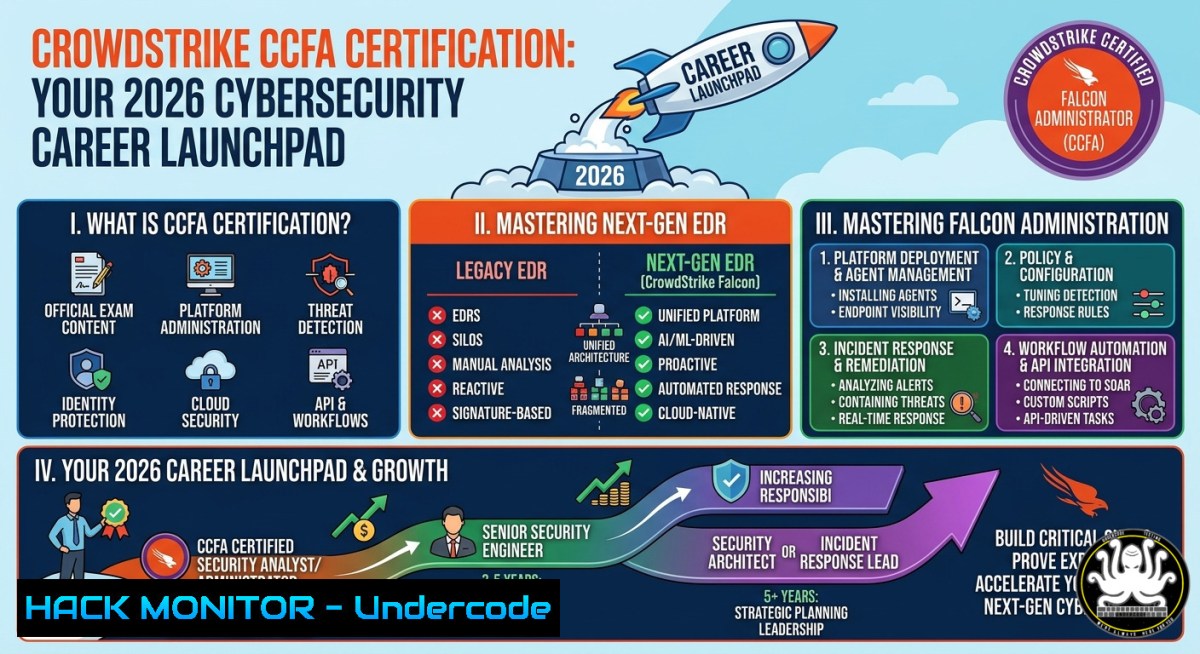
Endpoint Detection and Response (EDR) has become the cornerstone of modern cybersecurity operations, with CrowdStrike Falcon leading the cloud-native XDR market. The CrowdStrike Certified Falcon Administrator (CCFA) credential validates hands-on expertise in deploying, configuring, and managing the Falcon platform – from sensor installation to real-time threat hunting. As organizations accelerate zero-trust adoption, CCFA-certified professionals are critical for reducing mean time to detect (MTTD) and respond (MTTR) to breaches.
Learning Objectives:
- Master Falcon sensor deployment across Windows, Linux, and macOS endpoints using CLI and group-based policies
- Implement real-time detection rules, IOA (Indicators of Attack) exclusions, and automated response workflows
- Leverage Falcon API for custom integrations, threat hunting scripts, and SIEM/SOAR enrichment
You Should Know:
- Deploying CrowdStrike Falcon Sensor via Command Line (Windows & Linux)
What this does:
The Falcon sensor is a lightweight kernel-mode driver that streams telemetry to the CrowdStrike cloud. Deploying via CLI enables silent, scripted installations across thousands of endpoints – essential for enterprise scale.
Step‑by‑step guide (Windows):
- Download the Windows sensor MSI from Falcon Console → Hosts → Sensor Downloads.
- Obtain your unique Customer ID (CID) from console settings.
3. Run silent installation with token:
msiexec /i FalconSensor_Windows.msi /quiet /norestart CID=YOUR_CID TOKEN=YOUR_TOKEN
4. Verify installation:
Get-Service -Name CSFalconService
5. Check sensor status via CLI:
"%ProgramFiles%\CrowdStrike\CSFalconService.exe" -i
Step‑by‑step guide (Linux – Ubuntu/Debian):
 Download sensor (authenticate with Falcon API)
curl -L -u "CLIENT_ID:CLIENT_SECRET" "https://api.crowdstrike.com/sensors/queries/installers/v1?filter=os:'Linux'" -o FalconSensor.deb

Install
sudo dpkg -i FalconSensor.deb
sudo /opt/CrowdStrike/falconctl -s --cid=YOUR_CID --token=YOUR_TOKEN

Start service
sudo systemctl enable falcon-sensor && sudo systemctl start falcon-sensor

Verify
sudo /opt/CrowdStrike/falconctl -g --aid
- Configuring Falcon API Access for Automated Threat Hunting
What this does:
The Falcon API (OAuth2-based) allows you to fetch detections, quarantine files, and stream events into your SIEM. This bypasses manual console checks and enables real-time playbooks.
Step‑by‑step guide (Python example):
import requests

Obtain OAuth2 token
url = "https://api.crowdstrike.com/oauth2/token"
data = {"client_id": "YOUR_CLIENT_ID", "client_secret": "YOUR_SECRET"}
headers = {"Content-Type": "application/x-www-form-urlencoded"}
response = requests.post(url, data=data, headers=headers)
token = response.json()["access_token"]

Get recent detections
detection_url = "https://api.crowdstrike.com/detects/queries/detects/v1"
headers = {"Authorization": f"Bearer {token}"}
params = {"limit": "10", "sort": "first_behavior|desc"}
detections = requests.get(detection_url, headers=headers, params=params)

Print detection hashes and hostnames
for d in detections.json()["resources"]:
print(f"Host: {d['host']['hostname']} | SHA256: {d['behaviors'][bash]['sha256']}")
Windows PowerAutomate / PowerShell alternative:
$body = @{client_id=$env:CS_CLIENT_ID; client_secret=$env:CS_SECRET}
$token = Invoke-RestMethod -Uri "https://api.crowdstrike.com/oauth2/token" -Method Post -Body $body
$headers = @{Authorization = "Bearer $($token.access_token)"}
$detections = Invoke-RestMethod -Uri "https://api.crowdstrike.com/detects/queries/detects/v1?limit=5" -Headers $headers
$detections.resources | ForEach-Object { Write-Host $_ }
- Creating Custom IOA Rules for Zero-Day Ransomware Protection
What this does:
Indicators of Attack (IOA) rules detect behavioral patterns – not just known signatures. Writing custom IOAs blocks novel ransomware TTPs (e.g., mass file encryption or shadow copy deletion) before execution.
Step‑by‑step guide:
- In Falcon Console, navigate to Configuration → IOA Rules → Add Custom IOA.
- Set rule type: Process Creation or File Write.
- Define conditions (e.g., `ImageFileName` contains `wevtutil.exe` AND `CommandLine` contains `clr` for log wiping).
- Assign severity (High/Critical) and response action: Block and Quarantine.
5. Test in a sandbox before deploying globally.
Example rule to detect vssadmin shadow copy deletion (ransomware behavior):
– Parent process: `cmd.exe`
– Image filename: `vssadmin.exe`
– Command line contains: `Delete Shadows` OR `resize shadowstorage`
– Action: Block + Alert SOC
4. Hardening Falcon Sensor for Cloud Workloads (AWS/Azure)
What this does:
Falcon sensor protects cloud VMs and containers, but misconfigurations can create blind spots. Hardening includes network egress filtering, proxy configuration, and minimizing resource overhead.
Step‑by‑step guide (AWS EC2 – Linux):
 Ensure outbound connectivity to CrowdStrike cloud (allow ports 443 & 80)
 Falcon uses these endpoints (verify from your region):
 api.crowdstrike.com, falcon.us-2.crowdstrike.com, etc.

Configure proxy if required
sudo /opt/CrowdStrike/falconctl -s --proxy=http://proxy.corp.com:8080

Restrict sensor logging to avoid disk fill
sudo falconctl -s --LogLevel=Warning --FileSizeLimit=500

Enable FIM (File Integrity Monitoring) for critical cloud binaries
falconctl -s --FimEnable=1 --FimPaths=/usr/bin,/usr/sbin
Windows Server core hardening:
 Set Falcon service to high priority
Set-Service -Name CSFalconService -StartupType Automatic
Set-ItemProperty -Path "HKLM:\SYSTEM\CurrentControlSet\Services\CSFalconService" -Name "Priority" -Value 128

Restrict sensor memory usage
New-ItemProperty -Path "HKLM:\SOFTWARE\CrowdStrike" -Name "MemoryLimitMB" -Value 2048 -PropertyType DWORD
- Mitigating Falcon Sensor Tampering (Anti‑Tampering & Uninstall Protection)
What this does:
Attackers may attempt to stop or uninstall EDR sensors. CrowdStrike provides anti‑tampering features that require a unique maintenance token and user-level protections.
Step‑by‑step guide to configure uninstall protection:
- In Falcon Console → Host Management → Sensor Policies.
2. Enable “Anti‑Tampering” (prevents service stop/kill).
- Set “Uninstall Protection” to require a 32‑character maintenance token.
- Store tokens in a vault (HashiCorp Vault or Azure Key Vault).
Forcing protection on Linux:
 Lock sensor configuration from non‑root
sudo chattr +i /opt/CrowdStrike/falconctl
 Verify process is unkillable
ps aux | grep falcon
 Should show as a kernel module (not a standard process)
Windows equivalent (via Group Policy):
 Disable local admin override
Set-ItemProperty -Path "HKLM:\SOFTWARE\CrowdStrike\Config" -Name "AllowLocalAdminOverride" -Value 0
 Enforce sensor service restart upon failure
sc failure CSFalconService reset=86400 actions=restart/5000/restart/10000/reboot/30000
- Threat Hunting with Falcon Event Search (FQL – Falcon Query Language)
What this does:
FQL is CrowdStrike’s proprietary query language for searching billions of events in seconds. It allows proactive hunting for indicators like unusual process chains, registry persistence, and lateral movement.
Step‑by‑step guide (using Falcon Console Event Search):
1. Navigate to Investigate → Event Search.
2. Use FQL syntax: `field:value` or `field:
`.</h2>

<ol>
<li>Example hunt for `wmic.exe` used for remote process execution:
[bash]
CommandLine: "wmic.exeprocess call create" AND event_simpleName:ProcessRollup2
4. Export results as JSON for further analysis.
Common FQL hunting queries:
- PowerShell download cradle: `CommandLine: “Net.WebClientDownloadString” AND event_simpleName:ProcessRollup2`
– Pass‑the‑hash via mimikatz: `CommandLine: “mimikatzsekurlsa::logonpasswords” OR ImageFileName:\mimikatz.exe`
– Suspicious scheduled tasks: `CommandLine: “schtasks/create” AND event_simpleName:ProcessRollup2`
– LSASS access attempt (non‑audit): `TargetImageFilename: “C:\Windows\System32\lsass.exe” AND event_simpleName:ProcessAccess`
- Integrating Falcon with SIEM (Splunk via Falcon Data Replicator)
What this does:
– Pass‑the‑hash via mimikatz: `CommandLine: “mimikatzsekurlsa::logonpasswords” OR ImageFileName:\mimikatz.exe`
– Suspicious scheduled tasks: `CommandLine: “schtasks/create” AND event_simpleName:ProcessRollup2`
– LSASS access attempt (non‑audit): `TargetImageFilename: “C:\Windows\System32\lsass.exe” AND event_simpleName:ProcessAccess`
Falcon Data Replicator forwards raw telemetry to cloud storage (AWS S3/Azure Blob) for SIEM ingestion, enabling long‑term retention and correlation with other logs.
Step‑by‑step integration with Splunk:
- Enable Falcon Data Replicator from Console → Support → Data Replicator.
- Configure S3 bucket (IAM role with read/write permissions).
- Install Splunk Add‑on for CrowdStrike Falcon from Splunkbase.
- Configure input to pull from S3 (AWS credentials + bucket name).
5. Build correlation searches:
– `index=falcon sourcetype=”crowdstrike:detection” | stats count by host,detection_name`
– Join with Windows event logs to map attacker timeline.
Alternative (using Falcon API + Logstash):
 logstash.conf snippet
input {
http_poller {
urls => {
detections => "https://api.crowdstrike.com/detects/queries/detects/v1?limit=100"
}
request_headers => {
"Authorization" => "Bearer ${CS_API_TOKEN}"
}
schedule => { cron => "/5    " }
}
}
output { elasticsearch { hosts => ["localhost:9200"] } }
What Undercode Say:
Key Takeaways:
- CCFA certification is not just about using a console – it requires proficiency in API automation, performance tuning, and threat hunting queries.
- Proactive hardening (anti‑tampering, memory limits, proxy config) directly reduces the risk of sensor bypass by sophisticated adversaries.
Analysis (10 lines):
The CCFA credential bridges the gap between traditional antivirus administration and modern EDR operations. Unlike vendor‑agnostic certs (e.g., CISSP), CCFA tests deep platform knowledge – from kernel‑level sensor behavior to cloud API rate limits. In 2026, CrowdStrike holds ~18% of the EDR market (Gartner), making CCFA a high‑ROI investment. However, candidates often overlook Linux deployment nuances (systemd vs. init.d) and FQL efficiency. The most common failure point is IOA rule creation – writing too broad rules causes false positives, while narrow rules miss true attacks. Successful administrators combine CCFA with MITRE ATT&CK mapping and SIEM correlation. Additionally, leveraging the Falcon API for automated containment reduces MTTR from hours to seconds. As adversarial AI evolves, CrowdStrike’s Graph‑based detection (Falcon OverWatch) remains a differentiator. Thus, CCFA holders who also practice Python scripting and cloud hardening will outperform peers. Finally, the certification renews annually – mirroring the fast pace of threat landscape changes.
Prediction:
-
- Demand for CCFA professionals will grow 35% YoY as legacy AV replacements accelerate across Fortune 2000.
-
- CrowdStrike will introduce AI‑powered IOA recommendation engine (GenAI) in 2027, making custom rule writing more accessible.
- – Attackers will increasingly target Falcon sensor uninstall tokens via LSASS dumping, forcing stronger token rotation policies.
-
- Integration with Microsoft Security Copilot and Sentinel will make Falcon data a tier‑1 source for autonomous response.
- – Organizations without dedicated Falcon administrators will suffer from misconfigured exclusions, leading to ransomware breakthroughs.
▶️ Related Video (78% Match):
🎯Let’s Practice For Free:
IT/Security Reporter URL:
Reported By: Shwan Alatroshi – Hackers Feeds
Extra Hub: Undercode MoN
Basic Verification: Pass ✅
🎓 Live Courses & Certifications:
Join Undercode Academy for Verified Certifications
🚀 Request a Custom Project:
Secure, high-velocity infrastructure and disruptive technological engineering. Contact our engineering team for high-tier development and proprietary systems:
[email protected]


