
Listen to this Post
Introduction
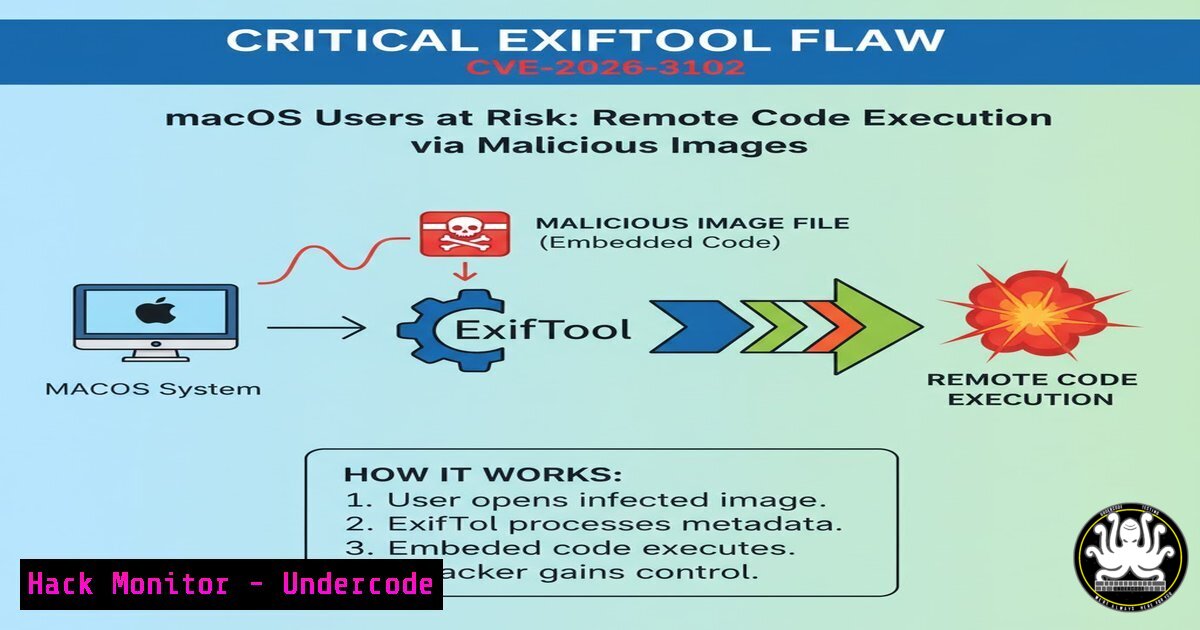
A critical security vulnerability discovered by Kaspersky’s Global Research and Analysis Team (GReAT) in ExifTool—the ubiquitous open-source metadata manipulation utility—is putting macOS users at significant risk. Tracked as CVE-2026-3102, this OS command injection flaw allows attackers to execute arbitrary code remotely by embedding malicious shell commands within the DateTimeOriginal metadata field of PNG images . When vulnerable versions of ExifTool process these specially crafted files on macOS systems, the embedded commands execute automatically, potentially leading to system compromise, data theft, or malware deployment .
Learning Objectives
- Understand the technical mechanics of CVE-2026-3102 and why macOS systems are uniquely vulnerable
- Learn to identify vulnerable ExifTool installations and detect indicators of compromise
- Master mitigation techniques including patching, input validation, and secure configuration practices
You Should Know
1. Understanding CVE-2026-3102: Technical Deep Dive
The vulnerability resides in the SetMacOSTags function within lib/Image/ExifTool/MacOS.pm, specifically in the PNG File Parser component . ExifTool versions up to 13.49 on macOS improperly handle the DateTimeOriginal argument, failing to sanitize shell metacharacters before passing user-controllable metadata to system-level operations .
Root Cause Analysis:
The flaw stems from improper neutralization of special elements used in OS commands (CWE-77, CWE-78). When ExifTool processes image metadata with the `-n` (or --printConv) flag enabled—which outputs raw, machine-readable data without conversion—it becomes vulnerable to command injection . The SetMacOSTags function accepts DateTimeOriginal values and incorporates them into system calls without adequate filtering.
Attack Vector:
Attackers craft PNG files with malicious DateTimeOriginal metadata containing shell metacharacters (;, |, $(), backticks). When a victim processes this file with vulnerable ExifTool on macOS, the injected commands execute with the privileges of the ExifTool process .
Detection Commands:
 Check your ExifTool version
exiftool -ver

Scan for suspicious metadata in PNG files
exiftool -DateTimeOriginal -a -G1 suspicious.png

Recursively scan directories for files with unusual metadata patterns
find /path/to/images -name ".png" -exec exiftool -DateTimeOriginal {} \; | grep -E "[;&|`$()]"
2. The macOS-Specific Exploitation Mechanism
Why does this vulnerability specifically affect macOS? The answer lies in the Unix-based architecture and default shell environments (zsh/bash) of macOS systems . Many macOS applications and automation workflows directly invoke system commands to process file outputs, creating an expanded attack surface.
Exploitation Conditions:
- The vulnerable ExifTool version (≤13.49) must be running on macOS
- The `-n` flag must be enabled during processing
- The DateTimeOriginal field must contain malicious shell commands in invalid format
Proof of Concept Concept:
While actual exploit code isn’t provided here for security reasons, researchers demonstrated that one command generates the weaponized image, and a second triggers execution on the target system . The malicious image appears visually normal in any viewer because pixel data remains untouched—only metadata is compromised.
Linux/Windows Verification Commands:
 Linux: Check installed ExifTool version
apt-cache policy exiftool
 or
exiftool -ver

Windows: Verify version (after adding to PATH)
exiftool.exe -ver

Cross-platform: Examine metadata for anomalies
exiftool -v -DateTimeOriginal suspect_image.png
3. Identifying Vulnerable Systems and Indicators of Compromise
Organizations must audit their environments to identify vulnerable ExifTool installations, particularly in automated workflows and Digital Asset Management (DAM) systems .
Version Detection Script:
!/bin/bash
 audit_exiftool.sh - Scan system for vulnerable ExifTool versions

echo "Scanning for ExifTool installations..."
VULN_VERSION="13.49"

Find all exiftool executables in PATH and common locations
locations=$(which exiftool 2>/dev/null)
locations="$locations /usr/local/bin/exiftool /opt/homebrew/bin/exiftool"

for exe in $locations; do
if [ -f "$exe" ]; then
version=$($exe -ver 2>/dev/null)
echo "Found ExifTool $version at $exe"

Compare versions (simple string comparison - for production, use proper version comparison)
if [ "$version" = "$VULN_VERSION" ] || [ "$(echo -e "$version\n$VULN_VERSION" | sort -V | head -n1)" = "$version" ] && [ "$version" != "13.50" ]; then
echo " ⚠️ VULNERABLE: Version $version is affected by CVE-2026-3102"
else
echo " ✅ PATCHED: Version $version is safe"
fi
fi
done

Check for embedded ExifTool in applications
echo -e "\nChecking for applications that may bundle ExifTool..."
find /Applications -name ".app" -type d -exec find {} -name "exiftool" -o -name "exif" \; 2>/dev/null
Indicators of Compromise:
- Unusual child processes spawned from ExifTool or Perl interpreter
- PNG files with abnormally long DateTimeOriginal metadata containing shell metacharacters
- Unexpected network connections following image processing operations
- System log entries showing unexpected command execution
Windows PowerShell Detection:
 PowerShell script to detect suspicious files
Get-ChildItem -Path C:\Users\ -Recurse -Include .png | ForEach-Object {
$output = & exiftool -DateTimeOriginal $<em>.FullName 2>$null
if ($output -match "[;&|`$()]") {
Write-Host "SUSPICIOUS: $</em> contains potential injection patterns"
}
}
4. Patching and Mitigation Strategies
The ExifTool maintainer released version 13.50 on February 7, 2026, which addresses CVE-2026-3102 with patch commit `e9609a9bcc0d32bd252a709a562fb822d6dd86f7` . Organizations must upgrade immediately and verify all automated workflows reference the patched version.
Upgrade Commands:
 macOS - Homebrew installation
brew update
brew upgrade exiftool

macOS - Manual installation
wget https://github.com/exiftool/exiftool/archive/refs/tags/13.50.tar.gz
tar -xzf 13.50.tar.gz
cd exiftool-13.50
perl Makefile.PL
make
sudo make install

Linux (Debian/Ubuntu) - if using manual install
 Or check if backport available
sudo apt update
sudo apt install exiftool  May not have 13.50 yet

Verify upgrade
exiftool -ver  Should return 13.50 or higher
Immediate Workarounds (if patching isn’t immediately possible):
- Disable the `-n` flag when processing untrusted images
2. Process images in sandboxed environments or containers
- Implement strict input validation before passing files to ExifTool
- Run ExifTool on non-macOS systems for untrusted image processing
Configuration Hardening:
 Create wrapper script that sanitizes input
!/bin/bash
 safe_exiftool.sh - Sanitize before processing

input_file="$1"
temp_file="/tmp/safe_$(basename "$input_file")"

Strip potentially malicious metadata before processing
exiftool -all= -o "$temp_file" "$input_file" 2>/dev/null

Process the sanitized file
exiftool "${@:2}" "$temp_file"

Clean up
rm -f "$temp_file"
5. Defensive Programming and Input Validation
For developers integrating ExifTool into applications, proper input validation is critical. The vulnerability highlights the danger of trusting file metadata without sanitization .
Perl/Python Validation Examples:
 Perl - Dangerous pattern to avoid
my $raw_value = get_tag_value($file, 'DateTimeOriginal', raw => 1);
system("echo $raw_value");  NEVER DO THIS - command injection risk

Perl - Safe approach
use String::ShellQuote;
my $safe_value = shell_quote($raw_value);
system("echo", $safe_value);  Use array form to avoid shell interpretation
 Python - Safe metadata handling
import subprocess
import shlex

def safe_exiftool_call(image_path):
 Use subprocess with arguments list, not shell=True
result = subprocess.run(
['exiftool', '-DateTimeOriginal', image_path],
capture_output=True,
text=True,
check=False
)
return result.stdout

Validate output before using
output = safe_exiftool_call('image.png')
if any(c in output for c in ';&|$()`'):
print("Warning: Suspicious characters detected in metadata")
API Security Considerations:
If your application accepts image uploads and processes them with ExifTool:
1. Validate file types thoroughly (don’t trust extensions)
2. Process files in isolated environments
3. Implement strict rate limiting
4. Log all ExifTool invocations with file hashes
- Consider using dedicated metadata extraction services with proper sandboxing
6. Cloud and Enterprise Hardening
Organizations using ExifTool in cloud workflows or enterprise DAM systems face amplified risk due to automated processing pipelines .
Cloud-Native Protection:
 Kubernetes pod with security context for ExifTool processing
apiVersion: v1
kind: Pod
metadata:
name: exiftool-processor
spec:
containers:
- name: exiftool
image: your-secure-image:latest
securityContext:
readOnlyRootFilesystem: true
runAsNonRoot: true
runAsUser: 1000
capabilities:
drop: ["ALL"]
volumeMounts:
- name: tmp
mountPath: /tmp
- name: input
mountPath: /input:ro
- name: output
mountPath: /output
volumes:
- name: tmp
emptyDir: {}
- name: input
persistentVolumeClaim:
claimName: input-pvc
- name: output
persistentVolumeClaim:
claimName: output-pvc
AWS Lambda Protection:
 AWS Lambda handler with sandboxing
import json
import subprocess
import tempfile
import os
import boto3

def lambda_handler(event, context):
s3 = boto3.client('s3')

Download file to temp location
with tempfile.NamedTemporaryFile(suffix='.png', delete=False) as tmp_file:
s3.download_fileobj(event['bucket'], event['key'], tmp_file)
tmp_path = tmp_file.name

try:
 Run ExifTool with timeout and resource limits
result = subprocess.run(
['exiftool', '-json', tmp_path],
capture_output=True,
text=True,
timeout=30,
check=False
)

Validate output
if result.returncode == 0:
return {
'statusCode': 200,
'body': result.stdout
}
else:
return {
'statusCode': 500,
'body': 'Processing failed'
}
except subprocess.TimeoutExpired:
return {'statusCode': 408, 'body': 'Timeout'}
finally:
os.unlink(tmp_path)
7. Future-Proofing: Metadata Processing Security
CVE-2026-3102 represents a broader class of vulnerabilities where “passive” data files become attack vectors . As automated processing pipelines become more prevalent, organizations must adopt comprehensive security strategies.
Defense-in-Depth Recommendations:
- Isolation: Process all untrusted files in isolated environments (containers, VMs, or serverless functions)
2. Validation: Implement multi-layer validation before metadata extraction
- Monitoring: Deploy detection rules for suspicious process trees
- Supply Chain Security: Continuously track open-source component vulnerabilities
- Least Privilege: Run ExifTool with minimal necessary permissions
Continuous Monitoring Script:
!/bin/bash
 monitor_exiftool.sh - Monitor ExifTool executions
sudo auditctl -w /usr/local/bin/exiftool -p x -k exiftool_exec

Watch for suspicious command patterns
sudo tail -f /var/log/system.log | grep -E "exiftool.[;&|`$()]" --line-buffered
What Undercode Say
Key Takeaway 1: The “Safe File” Assumption Is Dangerous
The ExifTool vulnerability demolishes the lingering misconception that image files are inherently safe. Attackers increasingly exploit trusted processing tools rather than targeting applications directly—a classic “living off the land” approach. Security professionals must recognize that any file processing utility, regardless of how trusted or ubiquitous, represents a potential attack surface when handling untrusted input. The fact that ExifTool processes metadata silently in countless automated workflows makes this vulnerability particularly insidious—victims may never know their systems were compromised because the image itself appears normal.
Key Takeaway 2: macOS Is Not Immune to Sophisticated Attacks
The macOS focus of CVE-2026-3102 serves as a wake-up call for Apple users who believe their platform is inherently more secure. While macOS benefits from Unix foundations and Apple’s security features, it remains vulnerable to command injection flaws when trusted tools mishandle input. The deep integration of command-line utilities in macOS workflows—from forensic analysis to media production—creates unique risks that attackers are beginning to exploit. Organizations must apply the same rigorous patch management and security monitoring to macOS systems as they do to other platforms.
The broader implication of CVE-2026-3102 extends beyond this single vulnerability. We’re witnessing an evolution in attack methodology where threat actors target the plumbing of digital workflows rather than the applications themselves. Metadata parsers, file converters, and data processing libraries—the quiet workhorses of modern computing—represent an expanding attack surface that has received insufficient security attention. The simplicity of exploitation contrasts sharply with the depth of ExifTool’s integration into professional workflows, creating risk asymmetry where low-effort attacks can yield high-value compromises. Organizations must inventory all automated processing pipelines, verify their software supply chain security, and implement defense-in-depth strategies that assume file inputs cannot be trusted. The age of trusting file metadata is over—every byte, even in a seemingly innocent image, must be treated as potentially hostile until proven otherwise.
Prediction
Within the next 6-12 months, we will likely see threat actors weaponize CVE-2026-3102 in targeted campaigns against media organizations, forensic laboratories, and enterprises with automated content processing workflows. The vulnerability’s requirement for user interaction (processing a malicious image) will not prevent exploitation in environments where automated systems ingest user-uploaded content. Security researchers predict this flaw will inspire a wave of similar discoveries in other metadata processing libraries, as attackers begin scrutinizing the “hidden” code paths in file parsing utilities. Apple may respond with enhanced sandboxing for applications that process metadata, potentially restricting access to system commands from within metadata handlers. The most significant long-term impact will be increased regulatory scrutiny of open-source software security in critical workflows, potentially leading to mandatory security audits for widely-used libraries like ExifTool. Organizations that fail to inventory and patch their metadata processing pipelines may find themselves compromised through the most unexpected attack vector: a seemingly innocent photograph.
▶️ Related Video (74% Match):
🎯Let’s Practice For Free:
IT/Security Reporter URL:
Reported By: Varshu25 Macos – Hackers Feeds
Extra Hub: Undercode MoN
Basic Verification: Pass ✅


