Listen to this Post
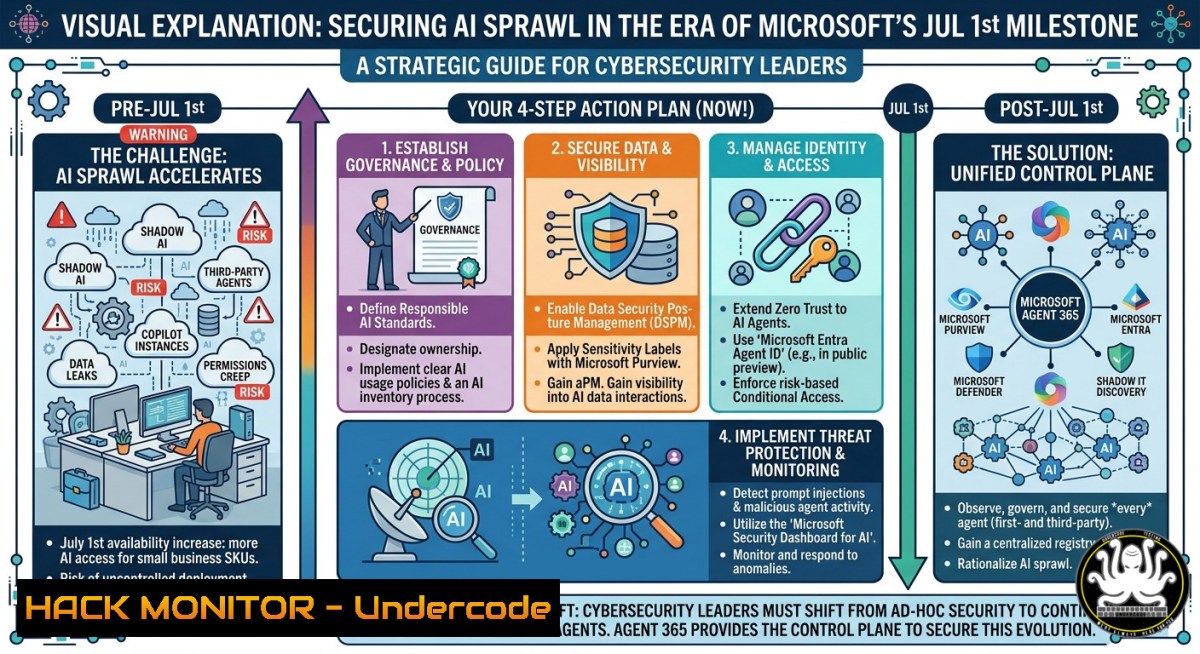
Introduction:
The rapid proliferation of autonomous AI agents across enterprise environments has created a massive blind spot for security teams, as these agents operate beyond the reach of traditional security controls. Microsoft is enforcing a critical licensing change to address this gap: starting July 1, 2026, organizations must have a Microsoft Agent 365 license to enable AI agent inventory, detection, and runtime protection capabilities that were previously accessible through Microsoft Defender for Cloud Apps alone. This shift transforms AI agent security from an optional preview feature into a foundational governance requirement.
Learning Objectives:
- Discover and inventory all autonomous AI agents operating across your Microsoft and multi-cloud environments using Microsoft Defender’s advanced hunting capabilities.
- Implement real-time runtime protection to detect and block unsafe agent actions, prompt injections, and data exfiltration attempts.
- Configure least-privilege identity controls, network isolation, and posture management to harden AI agent security posture.
You Should Know:
- Discovering Your AI Agent Inventory with KQL Advanced Hunting
Before July 1, security teams leveraging Microsoft Defender for Cloud Apps can access AI agent detection as a preview feature. After the deadline, an Agent 365 license becomes mandatory for continued visibility and protection. The discovery process centers on the `AIAgentsInfo` table within Microsoft Defender’s advanced hunting, which provides a complete inventory of Agent 365-managed agents alongside their security-relevant properties including authentication settings, access controls, tools, and knowledge sources.
Step-by-step guide to query your AI agent inventory:
- Sign in to the Microsoft Defender portal as a System Administrator.
- Navigate to Investigation & response > Hunting > Advanced hunting.
- Enter and run this KQL query to retrieve all active agents:
AIAgentsInfo
| summarize arg_max(Timestamp, ) by AIAgentId
| where RegistrySource == "A365"
| where AgentStatus != "Deleted"
This query returns the latest snapshot of each agent using `arg_max()` to filter historical duplicates, then filters for active agents in your organization.
4. To identify agents with excessive permissions, run:
AIAgentsInfo
| summarize arg_max(Timestamp, ) by AIAgentId
| where AuthenticationType == "ApiKey"
| project AIAgentName, AuthenticationType, Permissions, RiskLevel
This surfaces agents using API keys instead of managed identities—a significant risk indicator.
- For agent tool usage analysis across your environment:
AIAgentsInfo
| summarize arg_max(Timestamp, ) by AIAgentId
| mv-expand Tools
| where Tools has_any ("shell", "http_request", "file_access")
| summarize Count = count() by Tools, RiskLevel
Tools like `shell` and `http_request` introduce high-risk capabilities that require additional scrutiny.
After July 1, access to these queries and the dedicated AI agent inventory UI requires an Agent 365 subscription. The inventory currently supports agents built with Microsoft Copilot Studio, Microsoft Foundry, AWS Bedrock, and GCP Vertex AI.
- Enabling Real-time Runtime Protection Against AI Agent Threats
Autonomous AI agents introduce unique security risks due to their ability to invoke tools, access data, and take actions across systems without human intervention. Microsoft Defender’s real-time protection (RTP) integrates directly with Work IQ MCP to evaluate supported agent-initiated tool invocations before execution—blocking actions the system deems risky, including attempts to extract system instructions, leak sensitive data, misuse internal-only tools, and route information to malicious destinations.
Step-by-step guide to enable real-time protection:
- In the Microsoft Defender portal, go to System > Settings > Security for AI agents.
- Ensure Security for AI agents is toggled on.
- Verify that Agent 365 shows as connected under AI real-time protection & investigation.
- For extended protection on Microsoft Copilot Studio agents, also connect Copilot Studio under the same section.
-
Power Platform integration (requires Power Platform Administrator collaboration):
– Sign in to the Power Platform Portal.
– Navigate to Security → Threat Protection.
– Select Microsoft Defender – Copilot Studio AI Agents.
– Toggle Enable Microsoft Defender – Copilot Studio AI Agents to on.
The connection status may take up to 30 minutes to update initially, with full deployment time varying based on environment complexity.
- To verify protection is active, query blocked actions using advanced hunting:
AlertEvidence
| where Timestamp > ago(24h)
| where ServiceSource == "Microsoft Defender for Cloud Apps"
| where Category == "AgentRuntimeBlock"
| project Timestamp, AlertName, AgentName, ToolName, BlockReason
This KQL query returns all blocked agent actions from the past 24 hours, helping security teams identify recurring attack patterns.
When an unsafe action is blocked, Microsoft Defender generates a detailed alert documenting what was blocked, why it was deemed risky, and which agent, user, and tool were involved—enabling investigation through familiar XDR workflows. For agents built with Copilot Studio, additional protection is provided by evaluating model prompts and responses independently of the Work IQ MCP integration.
- Hardening AI Agent Identity and Network Security in Cloud Environments
The rapid adoption of AI agents has exposed critical vulnerabilities in identity management and network isolation. A single compromised dependency in an AI model’s supply chain can turn every agent relying on it into an attack vector for credential exfiltration and backdoor installation. Agents with excessive permissions or improperly configured tool authentication can enable unauthorized access to sensitive resources across your infrastructure. The Microsoft Cloud Security Benchmark v2 introduces a dedicated Artificial Intelligence Security domain with controls addressing AI platform security, application security, and monitoring.
Step-by-step guide for hardening AI agent security:
Identity Controls:
- Replace API keys with Microsoft Entra ID: API keys cannot support fine-grained access control or user-level audit trails. Configure agents to use Entra ID authentication with conditional access policies and multifactor authentication.
- Implement least-privilege role assignments: Use the Cognitive Services OpenAI User role for inference-only access rather than Contributor, which enables model deployment and management privileges.
- Deploy managed identities: For service-to-service authentication, eliminate stored credentials by using managed identities, which reduce credential exposure risk and eliminate management overhead.
- Utilize Microsoft Entra Agent ID: For agent identity management, Agent ID provides a unified directory of agent identities created across Copilot Studio and Microsoft Foundry, enabling scoped, short-lived token-based access.
Network Isolation (Azure-focused):
- Deploy private endpoints: Eliminate public internet exposure for AI services by routing traffic through Azure Private Link, keeping communications within the Azure backbone network.
- Configure private DNS zones: Verify correct DNS configuration for name resolution within the private network architecture.
- Block metadata endpoints on AKS: Configure NetworkPolicies to block access to the Azure metadata endpoint (169.254.169.254), preventing credential theft through prompt injection attacks that could otherwise steal tokens in under 60 seconds.
- Apply workload identity federation: For agents running on AKS, implement Workload Identity Federation to provide per-agent isolation with distinct identities.
Posture Management Example – Agent Risk Assessment:
The AI agent inventory UI provides centralized visibility with posture insights and security recommendations. To programmatically assess risk:
AIAgentsInfo
| summarize arg_max(Timestamp, ) by AIAgentId
| extend RiskFlags = case(
AuthenticationType == "ApiKey", "HIGH:APIKeyAuth",
Permissions contains "Contributor", "MEDIUM:ExcessivePerms",
AgentStatus == "Misconfigured", "HIGH:Misconfigured",
"LOW:Acceptable"
)
| where RiskFlags contains "HIGH"
| project AIAgentName, Platform, CreationTime, RiskFlags, Recommendations
This query flags high-risk agents based on authentication method, permission levels, and configuration status, enabling prioritized remediation.
4. Automated Attack Patterns and Investigation Techniques
The threat landscape for AI agents extends beyond traditional security risks to include prompt injection attacks, hidden instruction manipulation, and zero-click attacks using embedded instructions in retrieved content. A realistic attack timeline on AKS demonstrates how credential theft can unfold in under 47 seconds: initial access via a maliciously crafted prompt leads to tool invocation against internal admin APIs, environment variable enumeration, and token exfiltration—all before traditional detection mechanisms trigger.
Step-by-step guide for investigating AI agent incidents:
- Access unified incident queue: In the Microsoft Defender portal, expand Investigation & response > Incidents & alerts > Incidents to view all alerts stitched across endpoints, identities, and cloud apps.
2. Hunt for prompt injection attempts:
AlertEvidence
| where Timestamp > ago(7d)
| where AlertName contains "PromptInjection"
| project Timestamp, AgentName, UserId, PromptPreview, ToolInvolved, ActionBlocked
| order by Timestamp desc
3. Trace agent tool invocation chains:
DeviceEvents
| where Timestamp > ago(24h)
| where ActionType contains "AgentToolInvocation"
| extend ToolName = extractjson("$.ToolName", AdditionalFields)
| extend DestinationAddress = extractjson("$.Destination", AdditionalFields)
| where DestinationAddress != ""
| project Timestamp, DeviceName, AgentName, ToolName, DestinationAddress
This query reveals outbound tool calls, helping identify when an agent attempts to communicate with unknown or untrusted endpoints.
4. Monitor for data exfiltration patterns:
CloudAppEvents
| where Timestamp > ago(24h)
| where Application contains "CopilotStudio"
| where ActionType in ("FileUpload", "EmailSend", "APIExport")
| project Timestamp, AccountDisplayName, Application, ActionType, FileName, TargetDestination
5. Correlate agent activity with identity signals:
IdentityLogonEvents
| where Timestamp > ago(24h)
| where AccountUpn in (datatable(upn:string) ["[email protected]", "[email protected]"])
| join kind=inner (
AlertEvidence | where Timestamp > ago(24h) | project AlertId, AccountUpn = tostring(AdditionalFields.User)
) on AccountUpn
| project Timestamp, AccountUpn, LogonType, IPAddress, AlertId, AlertName
Microsoft Defender provides real-time protection for high-confidence threats including credential leakage through legitimate channels (email or external APIs), use of obfuscated hidden content to manipulate agent behavior, and routing information to malicious destinations. When an alert is generated, security teams can investigate the full kill chain by correlating signals across endpoints, identities, and cloud applications within the unified XDR incident view.
5. Open Source Alternatives for AI Agent Monitoring
While Microsoft Defender provides comprehensive AI agent security through the Agent 365 license, open source alternatives exist for organizations seeking local-first, vendor-agnostic monitoring solutions. Aegis is an open-source endpoint detection and response (EDR) tool specifically designed for AI agents, monitoring 107 known AI agent signatures (Claude Code, AutoGPT, and others), tracking file access to sensitive directories (.ssh, .aws, .gnupg, .env), logging outbound TCP connections per agent PID, and applying 68 behavioral detection rules across eight categories with rolling 10-session baselines and four-axis anomaly scoring.
Step-by-step guide for deploying Aegis:
- Clone the repository: `git clone https://github.com/antropos17/Aegis.git`
2. Install dependencies: `npm install
</h2>npm run build
<h2 style="color: yellow;">3. Build the application:</h2>npm start`
<h2 style="color: yellow;">4. Run the monitoring dashboard: - For local LLM detection, ensure Ollama, LM Studio, vLLM, or llama.cpp runtimes are present—Aegis automatically detects them
Aegis provides trust scoring with grades A+ through F using time-decay algorithms and multi-dimensional threat assessment, along with a multi-agent dashboard displaying all monitored agents in a bento-grid with risk rings and activity feeds. Unlike enterprise SaaS solutions, Aegis runs entirely locally with no telemetry uploads, making it suitable for air-gapped environments and privacy-sensitive deployments. However, it lacks integration with enterprise SIEM platforms and the advanced threat intelligence feeds available through Microsoft’s commercial offering.
Alternative open source tool – Korveo:
Korveo provides a full trace of every LLM call, tool invocation, and decision, plus a real-time firewall that blocks credential exfiltration, cross-tenant leaks, and destructive tool calls. Run `korveo demo` to instrument a real agent and observe how prompt injection attempts are blocked in real time.
When to choose open source vs. commercial:
- Open source fits: air-gapped environments, privacy-first deployments, organizations with limited budgets, and teams requiring full code visibility and customization.
- Commercial (Agent 365) fits: enterprises needing XDR integration, unified incident response, global threat intelligence, compliance certifications, and 24/7 Microsoft support.
What Undercode Say:
- The July 1 deadline transforms AI agent security from an optional preview into a mandatory governance requirement—organizations delaying license assessment risk sudden visibility gaps across their autonomous agent infrastructure.
- Runtime protection and advanced hunting KQL queries are now essential capabilities that separate proactive security teams from reactive ones in defending AI attack surfaces.
The mandatory Agent 365 licensing shift signals a broader industry trend: as autonomous AI agents proliferate across enterprises, security vendors will increasingly package governance and monitoring capabilities into paid tiers rather than bundled features. Organizations that build detection engineering expertise around KQL hunting queries and runtime behavioral analysis today will have a significant advantage when agent sprawl reaches the tens of millions of agents Microsoft already tracks in preview environments. The convergence of identity security (Entra ID Agent ID), network isolation (private endpoints, metadata blocking), and runtime detection (Work IQ MCP integration) represents the emerging blueprint for defense-in-depth AI agent security.
Prediction:
-
- The mandatory licensing model will accelerate enterprise adoption of formal AI agent governance frameworks, reducing shadow AI risks and establishing clear accountability for agent behavior across organizations.
-
- Small and medium businesses without dedicated security budgets may struggle with the additional $15–$99 per-user licensing costs, potentially leaving AI agent attack surfaces unmonitored and increasing breach risks.
🎯Let’s Practice For Free:
IT/Security Reporter URL:
Reported By: Markolauren Agent365 – Hackers Feeds
Extra Hub: Undercode MoN
Basic Verification: Pass ✅
🎓 Live Courses & Certifications:
Join Undercode Academy for Verified Certifications
🚀 Request a Custom Project:
Secure, high-velocity infrastructure and disruptive technological engineering. Contact our engineering team for high-tier development and proprietary systems:
[email protected]


