Listen to this Post
Introduction:
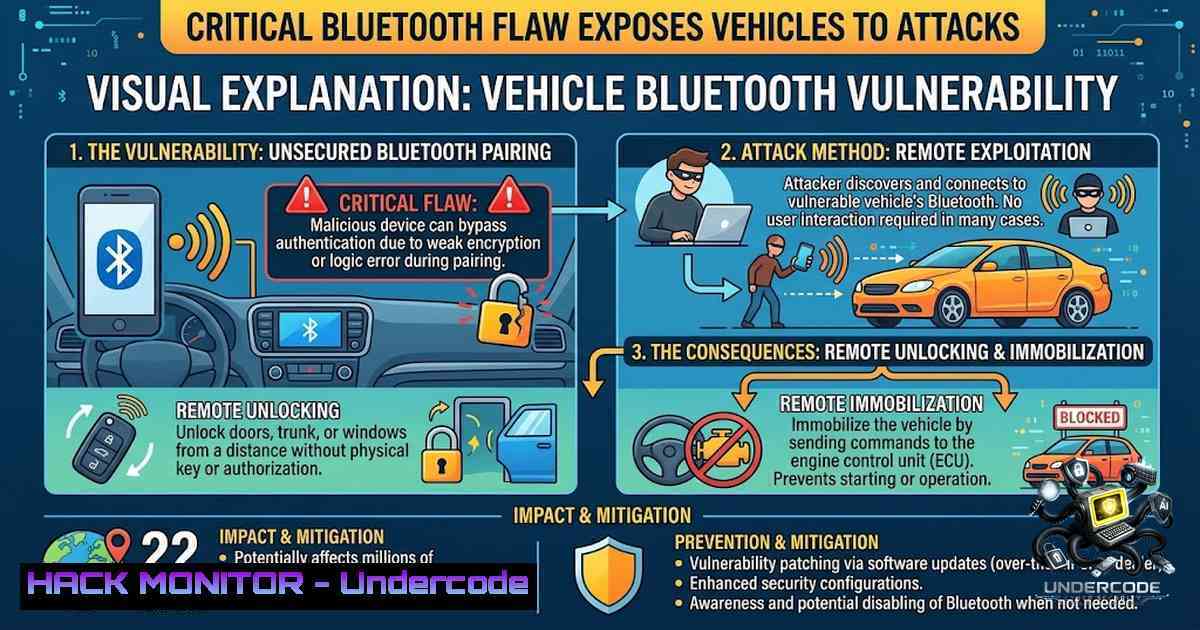
A fundamental cryptographic failure in aftermarket vehicle security systems from KARR and SWDS has exposed approximately 2.2 million vehicles to remote takeover via Bluetooth. Researchers at the University of California, San Diego (UCSD) discovered that all affected devices share an identical, hardcoded authentication key, allowing any attacker within 4.5 meters to unlock doors, activate horns, flash headlights, and even prevent engine startup—effectively rendering physical theft deterrents obsolete. This vulnerability, disclosed at DEF CON and USENIX Security, highlights the systemic risks posed by embedded IoT devices that lack proper cryptographic entropy and firmware update mechanisms.
Learning Objectives:
- Understand the technical root cause of the Bluetooth authentication bypass (static shared key) in KARR and SWDS systems.
- Learn how to identify vulnerable vehicles and assess exposure using Bluetooth scanning and packet analysis tools.
- Master step‑by‑step mitigation strategies, including firmware updates, Bluetooth disablement, and physical system removal.
- Acquire practical command‑line skills for Linux and Windows to audit Bluetooth Low Energy (BLE) devices and detect anomalous signals.
- Analyze the broader implications for IoT security, supply chain risk, and the automotive aftermarket industry.
You Should Know:
- The Hardcoded Key Catastrophe: How a Single Exploit Unlocks Millions of Cars
The vulnerability stems from a shocking design flaw: every KARR and SWDS security module installed over the past nine years uses the same Bluetooth authentication key. This means that once an attacker obtains or reverse‑engineers this key—a trivial exercise given that the key is embedded in firmware and can be extracted via debugging interfaces or public databases—they possess a master key capable of unlocking any vehicle equipped with these systems. The UCSD researchers discovered the issue accidentally while investigating credit card cloning devices; they observed unknown Bluetooth signatures emanating from parked cars and later traced them to these aftermarket modules.
The attack vector is deceptively simple:
- Proximity: The attacker must be within approximately 4.5 meters (15 feet) of the target vehicle.
- Connection: Using a standard Bluetooth‑enabled device (smartphone, laptop, or dedicated SDR), the attacker initiates a connection to the module’s broadcast service.
- Authentication: The module accepts the hardcoded key without any challenge‑response or session‑specific randomness.
- Exploitation: Once paired, the attacker can send commands to unlock doors, trigger the horn, flash lights, and, critically, set an immobilizer flag that prevents the engine from starting if the vehicle is already off.
What makes this particularly dangerous is that the devices remain active even if the owner never subscribed to the KARR or SWDS service; dealers install them as standard equipment, and they continue to broadcast and accept connections indefinitely. Removal is non‑trivial, requiring dashboard disassembly and expert knowledge of the ignition and onboard systems wiring.
Step‑by‑Step Guide: Auditing Your Vehicle for Bluetooth Vulnerability
This guide is for educational and defensive purposes only. Unauthorized access to vehicle systems is illegal.
On Linux (using `hcitool` and `hcidump`):
 Install Bluetooth tools if not present
sudo apt-get install bluez bluez-utils

Scan for nearby Bluetooth devices (inquiry scan)
sudo hcitool scan

For more detailed BLE scanning (if the module uses BLE)
sudo hcitool lescan

Capture Bluetooth packets to identify KARR/SWDS signatures
sudo hcidump -i hci0 -w karr_capture.pcap

Filter for specific UUIDs or manufacturer data (replace XX:XX:XX:XX:XX:XX with your vehicle's MAC)
sudo tcpdump -r karr_capture.pcap -Y "bttype == 0x04" | grep "XX:XX:XX:XX:XX:XX"

Use bluetoothctl to interact with discovered devices
bluetoothctl
[bash] scan on
[bash] devices
[bash] pair XX:XX:XX:XX:XX:XX  This will fail unless you have the key
On Windows (using PowerShell and Bluetooth Command Line Tools):
 List all paired Bluetooth devices
Get-PnpDevice -Class Bluetooth | Select-Object FriendlyName, InstanceId

Use the built-in Bluetooth API via PowerShell to discover devices
Add-Type -AssemblyName System.Runtime.WindowsRuntime
$asTaskGeneric = ([System.WindowsRuntimeSystemExtensions].GetMethods() | ? { $<em>.Name -eq 'AsTask' -and $</em>.GetParameters().Count -eq 1 -and $_.GetParameters()[bash].ParameterType.Name -eq 'IAsyncOperation`1' })[bash]

Alternatively, use the Windows Device Console (devcon) to manage Bluetooth adapters
devcon listclass Bluetooth

For advanced packet capture, install Wireshark with the Bluetooth plugin
 Then use the "Bluetooth" capture interface to inspect traffic.
Key Takeaway: If you own a vehicle purchased from a Honda, Toyota, Mazda, Ford, or Jeep dealership in Southern California over the last nine years, it is highly likely that a vulnerable KARR or SWDS module is installed—even if you never paid for the service. Perform a Bluetooth scan near your vehicle to identify unknown devices; if you see a MAC address that does not correspond to your infotainment system or phone, you may be affected.
- Firmware Update and Patching: The Official Mitigation Path
Following responsible disclosure, KARR released a firmware update that addresses the static key vulnerability. The update replaces the hardcoded key with a per‑device unique key and implements a proper challenge‑response authentication mechanism. The update is available for both active subscribers and owners who never activated the service.
Step‑by‑Step Guide: Applying the KARR Firmware Update
- Identify your system model: Locate the KARR or SWDS module under the dashboard (usually near the steering column). Note the model number and firmware version.
- Download the update: Visit the official KARR firmware update instructions page: https://www.karrsecurity.com/karr-security-firmware-update-instructions.
- Prepare a USB drive: Format a USB flash drive as FAT32 and copy the firmware file (
.binor.hex) to the root directory.
4. Apply the update:
- Turn the ignition to the “ON” position (do not start the engine).
- Insert the USB drive into the module’s USB port (if available) or use the OBD‑II port with a compatible programmer.
- Follow the on‑screen prompts (if the module has a display) or observe the LED indicator: a slow blink indicates update in progress; a steady light indicates completion.
- Verify the update: After the update, perform a Bluetooth scan again. The module’s MAC address may change, and authentication should now require a unique key. If you can still pair without a PIN, the update was not applied correctly.
- If you cannot perform the update yourself: Contact your dealership or a certified mechanic. KARR claims they have notified dealers, but it is unclear whether owners are being proactively contacted.
Important Note: KARR has contested the researchers’ conclusion that a single exploit works on all devices, asserting that only a small subset of systems with specific Bluetooth components are affected. However, the UCSD team stands by their findings, and the vulnerability was presented at DEF CON with a live demonstration. Given the conflicting statements, it is prudent to apply the update regardless of your system version.
3. Advanced Mitigation: Disabling Bluetooth and Physical Removal
If a firmware update is not available or you prefer a more drastic approach, you can disable the Bluetooth functionality of the module or remove it entirely. This is particularly relevant for owners who never subscribed to the service and do not wish to have an active, vulnerable radio in their vehicle.
Step‑by‑Step Guide: Disabling Bluetooth on the KARR/SWDS Module
Note: This requires moderate mechanical and electrical knowledge. If unsure, consult a professional.
- Locate the module: Under the driver’s side dashboard, look for a small black box with antenna wires. It is often zip‑tied to the wiring harness.
- Disconnect the antenna: The Bluetooth antenna is typically a small, external PCB antenna or a wire with an SMA connector. Unplugging it will drastically reduce the effective range, making proximity attacks impractical.
- Fuse pull (temporary): Some modules are powered via a dedicated fuse in the under‑dashboard fuse box. Consult your vehicle’s manual to identify the fuse for “aftermarket security” or “KARR” and remove it. This will de‑energize the module but may also disable other functions (e.g., starter kill).
- Full removal (permanent): Disconnect the module’s power and ground wires, and bypass the starter kill relay (if present). This requires tracing the wiring back to the ignition harness. Incorrect bypassing can prevent the vehicle from starting. Refer to the module’s installation manual or seek professional help.
Step‑by‑Step Guide: Using a Bluetooth Jammer (Not Recommended)
While technically possible, using a Bluetooth jammer is illegal in most jurisdictions and would only prevent the attack while the jammer is active—it does not fix the underlying vulnerability. Additionally, jamming may interfere with other Bluetooth devices (e.g., hands‑free calling, tire pressure monitors). Do not attempt this.
- Supply Chain and Database Exposure: The Unseen Risk
The UCSD researchers also discovered a publicly accessible online database containing VINs and locations of vehicles equipped with these systems. This means that attackers do not need to randomly scan for vulnerable vehicles; they can query the database to identify specific targets, their make and model, and even their approximate location (if GPS data was stored). This turns a proximity‑based attack into a targeted, pre‑planned operation.
Step‑by‑Step Guide: Checking If Your VIN Is Exposed
This is a defensive reconnaissance step. Do not attempt to access the database without authorization.
- Visit the KARR security website and look for a VIN lookup tool (if provided). Some manufacturers offer this to check for recalls or security notices.
- Contact your dealer and ask them to check if your VIN is associated with a KARR or SWDS installation. They have access to the installation records.
- Monitor public data breach notifications: If the database is ever leaked or indexed by search engines, your VIN could become publicly searchable. Use a VIN privacy service or consider requesting that your dealer remove your information from the database.
- Enable two‑factor authentication on any mobile apps associated with your vehicle (e.g., remote start, tracking). While this does not address the Bluetooth vulnerability, it adds a layer of security for cloud‑based features.
-
Broader Implications: IoT Authentication Failures and the Aftermarket Industry
This incident is a textbook case of what happens when IoT devices are designed without security in mind. The use of a shared, hardcoded key violates every fundamental principle of cryptographic authentication. It is reminiscent of the infamous Mirai botnet, where default credentials were embedded in millions of IoT devices. Here, the stakes are higher: physical access to a vehicle, theft, and potential for dangerous driving scenarios.
Step‑by‑Step Guide: Hardening Your Vehicle’s IoT Ecosystem
- Inventory all aftermarket devices: Make a list of every device added to your vehicle after purchase—security systems, trackers, remote starters, dash cams, OBD‑II dongles.
- Check for default credentials: For each device, look up the manufacturer’s default passwords or keys. If they are publicly documented, change them immediately (if possible).
- Update firmware regularly: Set a calendar reminder to check for firmware updates every three months. Many manufacturers do not push updates automatically.
- Disable unused services: If a device offers Bluetooth, Wi‑Fi, or cellular connectivity that you do not use, disable it in the device’s settings or physically disconnect the antenna.
- Use a Faraday pouch: For key fobs and RFID cards, store them in a Faraday pouch when not in use to prevent relay attacks. This does not help against the Bluetooth vulnerability but is good practice.
What Undercode Say:
- Key Takeaway 1: The static Bluetooth key vulnerability is a catastrophic design failure that affects approximately 2.2 million vehicles, primarily in the US and Japan, but the risk is global due to secondary sales. This is not a theoretical flaw; it has been demonstrated in live conditions and presented at top security conferences.
-
Key Takeaway 2: Mitigation is possible but fragmented. KARR has released a firmware update, but the onus is on the vehicle owner to discover and apply it—dealers are not proactively notifying customers. This highlights a systemic issue in the aftermarket industry: liability is shifted to the end‑user, who often lacks the technical expertise to secure their own vehicle.
Analysis: The KARR/SWDS incident is a wake‑up call for the entire automotive industry. As vehicles become increasingly software‑defined, the attack surface expands exponentially. We are moving from a world where car theft required physical tools and skill to one where a smartphone and a leaked key can unlock millions of cars. The researchers’ discovery of a public database of VINs exacerbates the problem, turning a proximity attack into a targeted one. This is not an isolated case; similar flaws exist in other aftermarket systems, telematics units, and even OEM infotainment platforms. The industry must adopt mandatory security standards, including unique per‑device keys, secure boot, and over‑the‑air update capabilities. Furthermore, there must be a clear legal framework for liability: if a dealer installs a vulnerable device, they should bear the responsibility for patching it or removing it upon request. Until then, vehicle owners must take proactive steps—scanning their own cars, applying updates, and, if necessary, removing these insecure modules entirely. The DEF CON and USENIX Security presentations will likely spur further research, and we can expect more disclosures in the coming months. The question is not if another similar flaw will be found, but when.
Prediction:
- +1 Increased consumer awareness will drive demand for third‑party security audits of aftermarket devices, creating a new niche for automotive cybersecurity firms.
-
-1 Litigation will surge as vehicle owners whose cars are stolen or damaged due to this vulnerability file class‑action lawsuits against KARR, Acrisure, and dealerships that installed the systems without adequate security warnings.
-
-1 The public database of VINs will be scraped and indexed by malicious actors, leading to a wave of targeted thefts in the next 12‑18 months, especially in regions where the firmware update has not been widely applied.
-
+1 Regulatory bodies (e.g., NHTSA, UN ECE) will accelerate the development of mandatory cybersecurity standards for aftermarket automotive IoT devices, potentially requiring unique cryptographic keys and mandatory update mechanisms by 2028.
-
-1 Until the firmware update reaches a critical mass of vehicles, the window of opportunity for attackers remains wide open. Given that the update requires physical access to the vehicle or a USB drive, many owners will never apply it, leaving millions of cars permanently vulnerable.
-
+1 The vulnerability will serve as a case study in cybersecurity curricula worldwide, educating the next generation of engineers on the importance of cryptographic hygiene and the dangers of shared secrets in embedded systems.
▶️ Related Video (82% Match):
https://www.youtube.com/watch?v=0vsYaPGIiFg
🎯Let’s Practice For Free:
🎓 Live Courses & Certifications:
Join Undercode Academy for Verified Certifications
🚀 Request a Custom Project:
Secure, high-velocity infrastructure and disruptive technological engineering. Contact our engineering team for high-tier development and proprietary systems:
[email protected]
💎 Smart Architecture | 🛡️ Secure by Design | ⭐ Trusted by Thousands
IT/Security Reporter URL:
Reported By: Redhotcyber Cybersecurity – Hackers Feeds
Extra Hub: Undercode MoN
Basic Verification: Pass ✅


