Listen to this Post
Introduction:
In the high-stakes world of cybersecurity, financial audits, and regulatory compliance, the integrity of IT systems is non-negotiable. IT General Controls (ITGC) form the backbone of an organization’s control environment, ensuring that systems operate as intended, data is reliable, and access is restricted. As digital transformation accelerates, understanding how to audit these controls is the difference between a clean bill of health and a catastrophic data breach. This article provides a deep-dive technical checklist derived from industry-standard practices, equipping professionals with the commands and methodologies required to conduct a rigorous ITGC audit.
Learning Objectives:
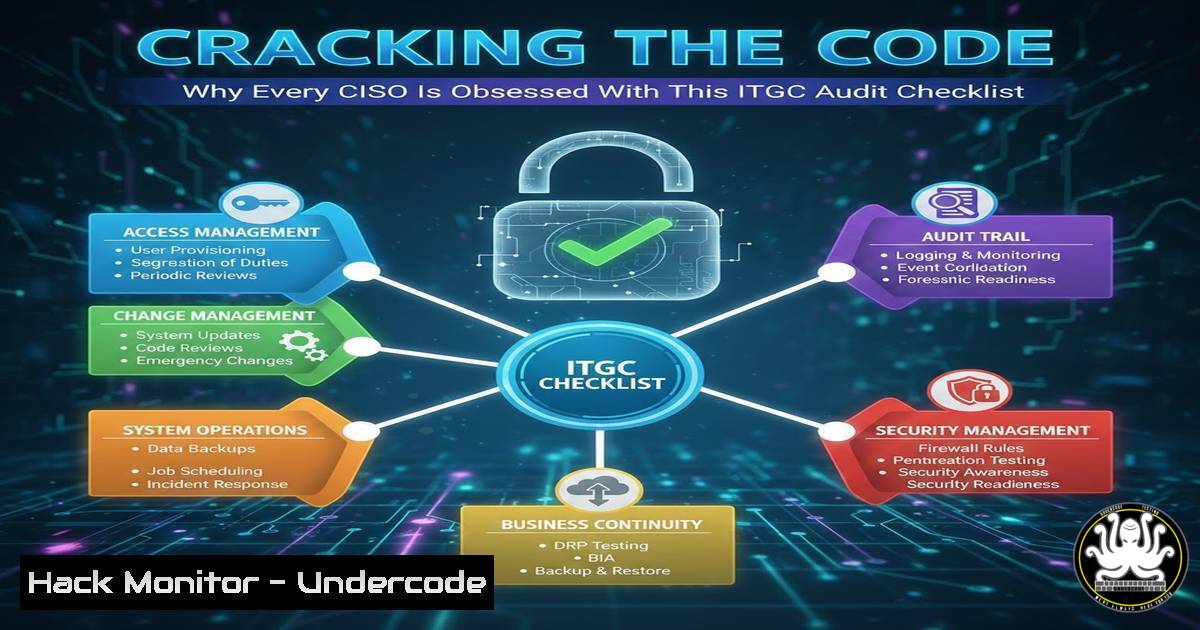
- Understand the four primary domains of ITGC: Access Control, Change Management, IT Operations, and Backup/Recovery.
- Learn how to execute specific command-line and GUI-based verification techniques for Windows and Linux environments.
- Master the art of auditing privileged access, configuration drift, and disaster recovery readiness.
- Access Control: The Art of the Principle of Least Privilege
Access Control is the first line of defense. The goal here is to verify that only authorized users have access to systems and data, and that their privileges are appropriate for their role.
Step‑by‑step guide:
Auditors must verify that user access rights are properly provisioned, reviewed, and revoked.
On Windows (Active Directory Environment):
Use PowerShell to identify privileged users and stale accounts.
 List all members of the Domain Admins group
Get-ADGroupMember -Identity "Domain Admins" | Select-Object Name, SamAccountName, ObjectClass

Find all users with non-expiring passwords (security risk)
Search-ADAccount -PasswordNeverExpires | Where-Object {$_.Enabled -eq $true} | Select-Object Name, SamAccountName

Identify dormant accounts (e.g., not logged in for 90 days)
Search-ADAccount -AccountInactive -TimeSpan 90.00:00:00 -UsersOnly | FT Name, SamAccountName
On Linux:
Review the `/etc/passwd` and `/etc/sudoers` files for unauthorized sudo access.
 List all users with UID 0 (root privileges)
awk -F: '($3 == "0") {print}' /etc/passwd

Check sudoers for excessive permissions
cat /etc/sudoers | grep -v "^" | grep -v "^$"

Audit last login times for all users
lastlog | tail -n +2 | awk '{print $1,$5,$6,$7,$8}'
What this does:
These commands expose the “keys to the kingdom.” If you find service accounts with interactive login rights or former employees still in the Admin group, you have identified a critical control failure.
2. Change Management: Auditing the Configuration Drift
Unauthorized changes are a primary cause of system outages and security vulnerabilities. Auditors must ensure that changes follow a formal process of authorization, testing, and implementation.
Step‑by‑step guide:
We need to verify that the system configuration matches the approved baseline and that unauthorized software isn’t present.
Verifying Windows Patches and Installed Software:
 List all installed hotfixes/patches
Get-HotFix | Sort-Object InstalledOn -Descending | Select-Object HotFixID, InstalledOn, Description

Check for recently installed software
Get-WmiObject -Class Win32_Product | Select-Object Name, Version, InstallDate
Checking Linux File Integrity and Package Changes:
 For Debian/Ubuntu: Check audit logs for package installations
grep " install " /var/log/dpkg.log

For RHEL/CentOS: Verify file signatures of critical binaries against RPM database
rpm -Va

Check for recent changes in the /etc directory (configuration files)
find /etc -type f -mtime -7 -ls
What this does:
This process helps identify “configuration drift.” If critical system files have been modified without a corresponding change ticket in your ITSM tool (like ServiceNow or Jira), it signals a breakdown in the change management process.
3. IT Operations: Logging, Monitoring, and Job Scheduling
This domain ensures that the IT environment is running smoothly and that issues are detected in a timely manner. Auditors focus on the health of monitoring systems and the integrity of automated tasks.
Step‑by‑step guide:
Reviewing job schedules and verifying that logging is active and centralized.
Auditing Scheduled Tasks (Windows):
 View all scheduled tasks
Get-ScheduledTask | Where-Object {$_.State -ne 'Disabled'} | FT TaskName, State, TaskPath

Examine the actions of a specific high-privilege task
Get-ScheduledTask -TaskName "ExampleTask" | Get-ScheduledTaskInfo
Auditing Cron Jobs (Linux):
 List all user crontabs
for user in $(cut -f1 -d: /etc/passwd); do echo $user; crontab -u $user -l; done

Check system-wide cron directories
ls -la /etc/cron
cat /etc/crontab
Logging Verification:
Check if security logs are being forwarded to a SIEM.
 Linux (rsyslog): Check configuration
cat /etc/rsyslog.conf | grep "@@"  Check for remote logging server
 Windows: Verify Event Log service is running
Get-Service -Name EventLog | Format-List Status, Name, DisplayName
What this does:
It ensures that critical batch jobs haven’t been tampered with and that audit trails are preserved and offloaded, preventing an attacker from covering their tracks by deleting local logs.
4. Backup and Recovery: The Immutability Test
Without reliable backups, a ransomware attack can destroy a business. Auditors must go beyond checking if a backup ran; they must verify its integrity and the restoration process.
Step‑by‑step guide:
Testing backup configurations and attempting a file-level restore simulation.
Checking Backup Logs (Generic Linux):
 Check backup logs for errors (example for backup scripts logging to /var/log)
grep -i "error|fail" /var/log/backup.log

Check the size of the last backup to ensure it's not empty
ls -lh /backup/location/latest_backup.tar.gz
Auditing Backup Retention and Permissions (Windows):
 Check if shadow copies exist (Volume Snapshot Service)
vssadmin list shadows

Verify backup files are not accessible to standard users (preventing deletion)
Get-Acl "D:\Backups" | Format-List
The “Immutability” Check:
Manually attempt to delete or modify a backup file using a standard user account.
 On Linux, try to write to a backup mounted share
touch /mnt/backup_share/test_write_file
 If it succeeds, the backup is not immutable and is vulnerable to ransomware.
What this does:
This simulates a ransomware attack. If a standard user can delete backups, so can malware. The goal is to find “immutable” or “air-gapped” backup solutions.
5. Vulnerability Management: The External Attack Surface
While ITGC is internal, the configuration of these controls directly impacts the external risk. Auditors should correlate internal control weaknesses with external exposure.
Step‑by‑step guide:
Using Open Source Intelligence (OSINT) to audit external exposure related to internal control failures.
If internal access controls are weak, external services might be exposed.
 Using nmap to check for exposed RDP (Port 3389) or SSH (Port 22) on public IPs
nmap -p 3389,22 <public_ip_range>

Using curl to check for exposed .git folders or config files (Change Management failure)
curl -k -L https://target.com/.git/config
What this does:
It validates the “outside-in” view. An exposed .git folder indicates a failure in the change management process (source code leakage), while an open RDP port suggests weak access control perimeter defenses.
6. Database Security: Auditing the Crown Jewels
Databases house the most sensitive data. Auditing database configurations falls under the ITGC umbrella, specifically within access and change management.
Step‑by‑step guide:
Querying the database for privilege escalations and audit settings.
For Microsoft SQL Server:
-- Find users with sysadmin privileges (equivalent to root)
SELECT name, type_desc, is_disabled
FROM sys.server_principals
WHERE IS_SRVROLEMEMBER('sysadmin', name) = 1;

-- Check if audit logging is enabled
SELECT  FROM sys.server_audits;
For MySQL:
-- List all users and their hosts
SELECT user, host, authentication_string FROM mysql.user;

-- Find users with global privileges (GRANT ALL)
SHOW GRANTS FOR 'user'@'host';
What this does:
It identifies over-privileged database accounts and confirms that sensitive data access is logged, a key requirement for GDPR, HIPAA, and SOX compliance.
What Undercode Say:
- Automation is the Future of Auditing: Manual checks are no longer sufficient. The commands listed above should be scripted into automated audit tools to provide continuous compliance monitoring rather than point-in-time snapshots.
- The Human Element Remains the Weakest Link: The most sophisticated access control lists are useless if a helpdesk employee falls for a phishing scam and resets an attacker’s MFA. Technical controls must be paired with continuous security awareness training.
Prediction:
Within the next 18 months, we will see the emergence of “Autonomous ITGC Auditing” powered by Large Language Models (LLMs). Instead of running manual `PowerShell` or `SQL` queries, auditors will prompt an AI agent to “audit dormant privileged accounts across the hybrid cloud environment and remediate any found.” This will shift the auditor’s role from data collection to data interpretation and strategy, making checklists like this the blueprint for machine-executable compliance policies.
▶️ Related Video (78% Match):
🎯Let’s Practice For Free:
IT/Security Reporter URL:
Reported By: Gmfaruk It – Hackers Feeds
Extra Hub: Undercode MoN
Basic Verification: Pass ✅


