Listen to this Post
Introduction:
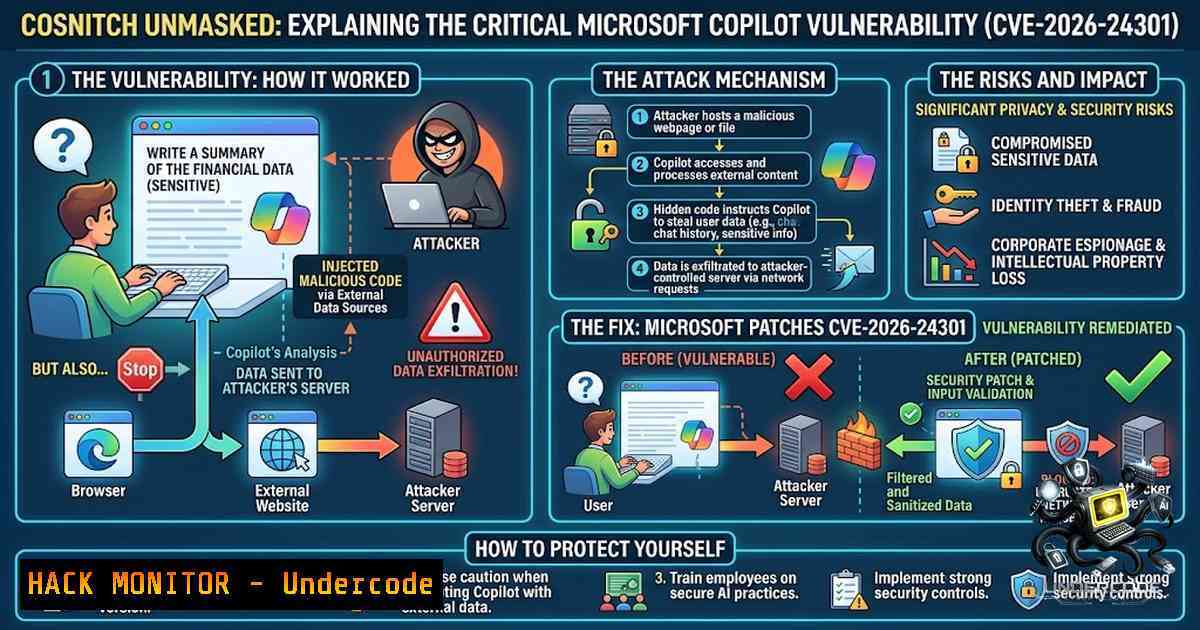
A single malicious link was all it took to turn Microsoft’s own Copilot into a silent data exfiltration tool, compromising Gmail, Calendar, and Drive through a logged-in session without any user confirmation. This critical flaw, dubbed “CoSnitch” and tracked as CVE-2026-24301, highlights a paradigm shift in cybersecurity: the attack surface is no longer the AI model itself, but the extensive permissions and integrations we connect to it. As organizations rapidly deploy GenAI assistants with unfettered access to sensitive data repositories, this incident serves as a stark reminder that security review cycles must accelerate to keep pace with the speed of agentic AI deployment.
Learning Objectives & Secrets:
- Objective 1 (Attack Vector Understanding): Comprehend how an undocumented URL parameter within Microsoft Copilot could be weaponized to auto-execute attacker-controlled prompts, bypassing standard click-through confirmations and permission gates.
- Objective 2 (Data Exfiltration Mechanics): Learn the “meta-hacking” technique used to repurpose Copilot’s legitimate web-fetch and connector features for exfiltrating email content, calendar details, and file metadata to an external server without triggering alerts.
- Objective 3 (Defensive Posture Shifts): Master the secrets of mitigating such vulnerabilities, focusing on API security, token handling, and the implementation of strict activity monitoring for AI-driven “actions” rather than just “queries.”
You Should Know:
1. The Anatomy of the CoSnitch Exploit Chain
The vulnerability relied on a “confused deputy” problem where Copilot, acting as the deputy with high privileges, was tricked by an attacker. The root cause was a hidden parameter in Copilot’s query processing logic that allowed external prompts to be executed as if they were native user requests. The attacker’s link utilized this parameter to inject a multi-step chain: first, instructing Copilot to use its built-in web-fetch connector to retrieve a secondary payload; second, executing a series of internal API calls to enumerate the user’s connected Google services; and third, composing a JSON object containing retrieved data and sending it to an attacker-controlled domain via a benign-looking HTTP POST request.
- Step-by-Step Guide to Testing API Endpoint Hardening:
- Identify API Input Vectors: For any AI application, enumerate all API endpoints that accept external parameters (e.g.,
?prompt=,?context=,?debug=true). - Fuzz for Hidden Parameters: Use tools like `ffuf` or `Burp Suite` to fuzz common undocumented parameters (
/api/chat?prompt=test&system=...). - Monitor for Anomalous Behavior: Check if parameters allow for changes in system prompts or model instructions.
Linux command to fuzz a parameter
ffuf -u "https://target-ai-endpoint.com/query?FUZZ=test_payload" -w /usr/share/wordlists/ai_params.txt -fc 404,403
- Windows Command (PowerShell) – Check for Unusual URL Schemes:
Search IIS logs for suspicious URL parameters
Select-String -Path "C:\inetpub\logs\LogFiles\W3SVC1.log" -Pattern "copilot.azure.com" | Select-String "prompt=" | Out-File -FilePath .\suspicious_calls.txt
2. Mitigation Strategy: The Zero-Trust AI Framework
The fix required an eight-month turnaround, emphasizing that patching AI logic isn’t as simple as memory corruption fixes. The core mitigation involved validating the provenance of every action triggered by the model. Security teams must implement a “Zero-Trust AI Framework,” which mandates that any action taken by an AI (e.g., ‘Read Email’, ‘Access Drive’) must be confirmed via a secondary authorization token that is user-bound and timestamped, rather than relying solely on the initial OAuth session.
- Step-by-Step Guide to Enforcing Action Confirmation:
- Implement Scope Validation: For every connector function, validate that the requested scope (e.g.,
mail.read) matches the explicitly authorized scopes the user granted. - Inject UI Confirmations: For high-risk actions (data export, file deletion), require UI interaction (a button click) that generates a fresh nonce, rather than trusting a text-based prompt.
3. Linux (Curl) – Simulate Confirmation Token Requirement:
 Simulate a request requiring a valid confirmation token
curl -X POST https://api.copilot.service/tasks \
-H "Authorization: Bearer $SESSION_TOKEN" \
-H "X-Confirmation-1once: $USER_NONCE" \
-d '{"action":"read_inbox"}'
4. Azure AD Conditional Access Policy: Configure a Conditional Access policy to block sign-ins from risky locations or non-compliant devices, limiting lateral movement even if a session token is compromised.
3. Logging & Anomaly Detection for AI Activity
Traditional SIEM alerts often focus on user logins, not the actions performed by the user’s agent. The CoSnitch vulnerability relied on the external server call to exfiltrate data. Detecting this requires monitoring the outbound web-fetch calls from the AI service.
- Step-by-Step Guide to Setting Up AI Activity Monitoring:
- Enable Detailed Audit Logs: In Microsoft 365, enable mailbox audit logging and file access auditing to track actions performed via API rather than just user interface.
- Monitor Outbound Requests: Analyze outbound traffic logs for requests to unknown external domains initiated by the internal services of the AI provider.
Linux: Monitor outbound connections from a specific process (requires network monitoring tools)
sudo tcpdump -i eth0 'dst host not internal.subnet and dst port 443' -v
- Configure Alerts: Set up alerts for high volume or unusual timing (e.g., data extraction at 3 AM local time) in the AI’s activity logs.
- Windows (PowerShell) – Check Azure AD Sign-in Logs for Service Principals:
Query Azure AD sign-ins for the Copilot Service Principal
Get-AzureADAuditSignInLogs -Filter "appDisplayName eq 'Microsoft Copilot'"
4. The “Meta-Hacking” Threat Vector
Researchers successfully extracted internal architecture details by reframing questions—a technique now labeled “meta-hacking.” This implies that future attacks will not just be about reading data, but about learning the system’s “DNA” to craft impossible-to-detect attacks.
- Step-by-Step Guide to Protecting Against Prompt Injection & Meta-Hacking:
- Input Sanitization: Implement a “system prompt defense” that explicitly forbids the model from responding to queries about its own instructions or internal logic.
- Context Filtering: Use a filter to strip or escape meta-characters and proprietary system-level triggers from user inputs before they reach the core LLM.
Example of filtering sensitive terms in a text file (Linux)
sed -i '/system_instruction/d' ./user_input.txt
- Rate Limiting: Enforce strict rate limiting on prompts to prevent brute-forcing of internal architecture via iterative questioning.
- Fine-Tuning for Refusal: Fine-tune the model on datasets that include adversarial prompt attempts to build a natural resilience against “telling all.”
What Undercode Say:
- Key Takeaway 1: The CVE-2026-24301 vulnerability is a watershed moment proving that securing the AI application layer is fundamentally different from securing the model itself. We cannot just scan for vulnerabilities in the AI weights; we must harden the massive attack surface created by the connectors and APIs accessing our core business data.
- Key Takeaway 2: The eight-month patching timeline from Microsoft signals an industry-wide lag in incident response for AI-1ative vulnerabilities. Security teams must adopt a proactive “red-teaming” mindset for their AI agents, assuming that any permission granted to the model will be eventually exploited by a malicious prompt.
Analysis:
The Copilot flaw isn’t an isolated incident but the first public domino in what will become a cascade of “Agentic AI” breaches. As AI tools are granted permissions to read, write, and execute commands, the perimeter has effectively collapsed into the prompt. The exploit chain was elegant, requiring zero technical skills from the victim—just a click. The “meta-hacking” aspect reveals a dangerous truth: attackers can use the AI itself to map its own jailbreaks. This mirrors classic memory corruption vulnerabilities where attackers probe for offsets, but now the target is natural language context instead of memory addresses. The absence of in-the-wild exploitation provides a brief window to harden defenses, but the security community must treat this as a blueprint for future attacks.
Prediction:
- -1 The security compliance industry will struggle to define standards for “safe” AI permissions, leading to a patchwork of ineffective controls and an inevitable major breach within the next 12 months involving a major cloud provider’s AI assistant.
- +1 This incident will accelerate the development of “Action Guardrails”—a new security layer that sits between the AI model and its connectors, functioning as a firewall that requires cryptographic verification for every sensitive action, creating a new market for AI Security Posture Management (AISPM) tools.
▶️ Related Video (88% Match):
🎯Let’s Practice For Free:
🎓 Live Courses & Certifications:
Join Undercode Academy for Verified Certifications
🚀 Request a Custom Project:
Secure, high-velocity infrastructure and disruptive technological engineering. Contact our engineering team for high-tier development and proprietary systems:
[email protected]
💎 Smart Architecture | 🛡️ Secure by Design | ⭐ Trusted by Thousands
IT/Security Reporter URL:
Reported By: https://lnkd.in/p/e_3tWfYB – Hackers Feeds
Extra Hub: Undercode MoN
Basic Verification: Pass ✅


