Listen to this Post
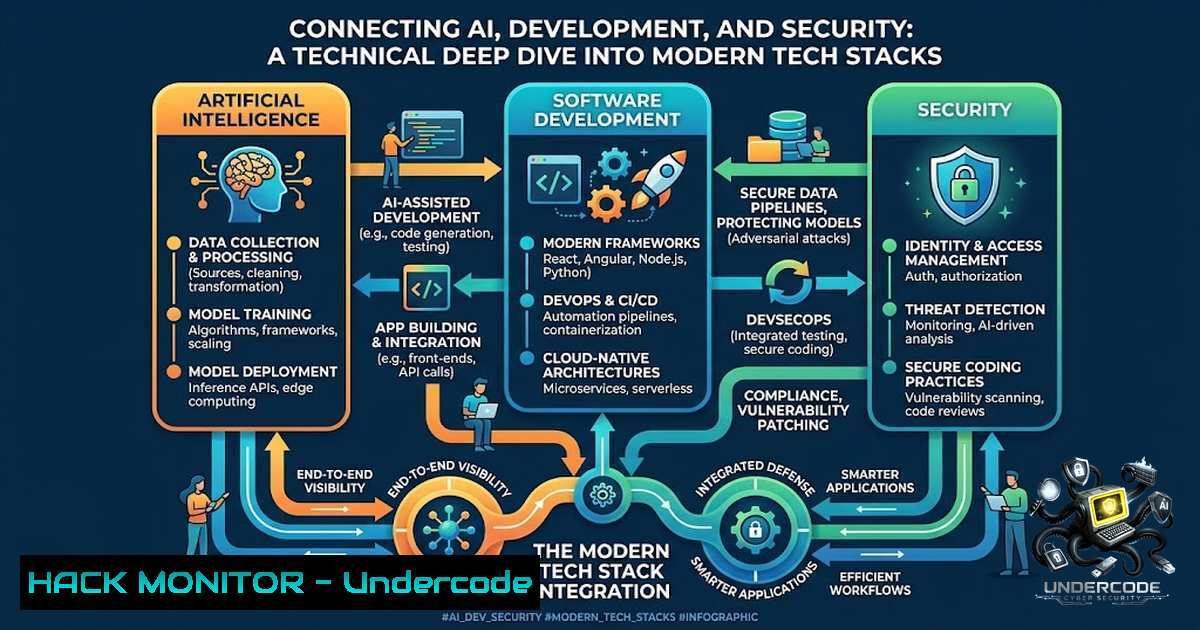
Introduction:
The convergence of artificial intelligence, full-stack development, and cloud infrastructure is reshaping how modern applications are built and secured. As developers and architects increasingly integrate AI tools into their workflows, understanding the security implications of this integration—from API key management to cloud hardening—becomes paramount. This article provides a technical exploration of the skills and tools required to navigate this complex landscape, focusing on practical security measures and best practices for the modern developer and AI architect.
Learning Objectives:
- Understand the security implications of integrating Generative AI (GenAI) into CI/CD pipelines and application development.
- Implement robust API security and access control measures for AI services and cloud platforms.
- Apply DevSecOps principles to harden infrastructure and mitigate vulnerabilities in multi-cloud environments.
- Learn to monitor and log activities across complex, AI-driven architectures.
You Should Know:
1. Securing the AI-Enabled Development Pipeline
The integration of AI tools, such as code assistants and automated testing, introduces new security vectors. AI models can inadvertently generate code with vulnerabilities or leak sensitive data through prompt injection. To secure this pipeline, implement strict access controls and monitoring.
Step-by-Step Guide:
- Scan AI-Generated Code: Use static application security testing (SAST) tools like `Semgrep` or `SonarQube` in your CI/CD pipeline to automatically scan all code, including that generated by AI.
- Sanitize Inputs: Treat all prompts as potential vectors for injection attacks. Implement input validation and sanitization.
- Limit API Key Exposure: Store API keys for AI services (e.g., OpenAI, Anthropic) using environment variables or a dedicated secrets manager like HashiCorp Vault or Azure Key Vault.
- Monitor AI Activity: Set up alerts for unusual API usage patterns, such as an unexpected surge in requests or requests for sensitive data.
5. Linux Command (Example):
 Check for exposed API keys in a Git repository using trufflehog
trufflehog git <repository_url>
2. Building Secure Full-Stack Applications
Modern full-stack development involves multiple layers, each with its own attack surface. Frontend security focuses on Cross-Site Scripting (XSS), while backend and API security covers injection attacks, broken authentication, and insecure deserialization.
Step-by-Step Guide:
- Frontend: Implement Content Security Policy (CSP) headers to mitigate XSS. Use `npm audit` or `yarn audit` to regularly check for vulnerabilities in third-party libraries.
- Backend: Enforce strict input validation. Use parameterized queries to prevent SQL injection.
- API Security: Use OAuth 2.0 and OpenID Connect (OIDC) for robust authentication and authorization. Ensure APIs are protected against mass assignment attacks by using a whitelist approach for data binding.
- Windows Command (Example – for developing in Windows):
Check for vulnerable packages in a Node.js project
npm install -g audit-ci
audit-ci --config ./audit-ci.json
- Linux Command (Example – for a Python backend):
Use bandit to scan Python code for common security issues
bandit -r <path_to_your_project> -f json -o bandit_report.json
-
Data Science and Cloud Hardening on AWS, Azure, and GCP
Data science workloads often involve processing large volumes of sensitive data on cloud platforms. Hardening these environments is critical. This includes configuring Identity and Access Management (IAM) policies, securing data storage, and ensuring network security.
Step-by-Step Guide:
- IAM: Apply the principle of least privilege. Grant only the permissions necessary for a specific role to perform its functions. Avoid using root accounts for daily operations.
- Data Encryption: Encrypt data at rest (using services like AWS KMS, Azure Key Vault, Google Cloud KMS) and in transit (using TLS).
- Network Security: Use Virtual Private Clouds (VPCs) or Virtual Networks (VNs) and private subnets to isolate sensitive resources. Restrict inbound/outbound traffic using Security Groups and Network Access Control Lists (ACLs).
4. Linux Command (AWS CLI):
 List all S3 buckets and check their public access settings
aws s3api list-buckets --query "Buckets[].Name" --output text | xargs -I {} aws s3api get-bucket-public-access-block --bucket {}
5. Azure CLI:
 List all storage accounts and their network rules
az storage account list --query "[].{Name:name, NetworkRuleSet:networkRuleSet}" --output table
4. Indie Hacking and Securing SaaS Infrastructure
For independent developers building SaaS products, cost-effective security is key. This involves automating security checks, implementing a Web Application Firewall (WAF), and ensuring secure payment processing via PCI DSS compliance.
Step-by-Step Guide:
- Automated Scanning: Use free or low-cost tools like `OWASP ZAP` to perform automated security scans against your deployed application.
- WAF Implementation: For cloud-based applications, deploy a WAF (e.g., AWS WAF, Azure WAF, Cloudflare) to block common web exploits.
- Payment Security: Ensure your payment flow redirects users to the payment provider (e.g., Stripe, Paddle) to avoid handling sensitive credit card data directly. Implement webhook signature verification to prevent forged events.
- Linux Command (Example – using OWASP ZAP in Docker):
Run a quick automated scan against your application
docker run -v $(pwd):/zap/wrk:rw -t owasp/zap2docker-stable zap-baseline.py -t http://<your_app_url> -r scan_report.html
5. Building in Public and Managing Secrets
Building in public is a great way to gain traction but carries significant security risks. It’s crucial to avoid accidentally committing sensitive information to public repositories.
Step-by-Step Guide:
- Use
.gitignore: Ensure your `.gitignore` file is properly configured to exclude files containing secrets (e.g.,.env,config.json,.pem). - Pre-Commit Hooks: Implement client-side pre-commit hooks using tools like `pre-commit` to run scripts that check for secrets before the code is committed.
- Use a Separate Secrets Vault: For CI/CD, use the secrets feature of your platform (e.g., GitHub Actions secrets, GitLab CI/CD variables) rather than hardcoding values.
4. Linux Command (Example):
 Use pre-commit to run a check for secrets
pre-commit install
pre-commit run --all-files
6. Monitoring, Logging, and Incident Response
A robust monitoring and logging strategy is essential for detecting and responding to security incidents in real-time. This includes collecting logs from all components, establishing baselines for normal behavior, and setting up actionable alerts.
Step-by-Step Guide:
- Centralized Logging: Aggregate logs from your applications, cloud services, and infrastructure into a central system like the ELK stack (Elasticsearch, Logstash, Kibana) or Datadog.
- Key Metrics to Monitor: Track failed logins, API errors, unusual traffic spikes, and unauthorized access attempts. For AI applications, monitor for anomalous prompts that could indicate prompt injection attacks.
- Alerting: Configure alerts to notify your team when critical events occur. For example, send a Slack or email notification if a user attempts to access a forbidden resource.
- Linux Command (Example – analyzing a log file):
Analyze an Apache access log for 404 errors (potential scanning)
awk '$9 == 404 {print $7}' /var/log/apache2/access.log | sort | uniq -c | sort -1r | head -10
What Undercode Say:
- Key Takeaway 1: The integration of AI is a double-edged sword; it accelerates development but demands a new layer of security focused on data exposure and model integrity.
- Key Takeaway 2: A proactive, automated security posture is no longer optional but a necessity for indie hackers and enterprises alike. Tools like SAST, secret scanning, and automated vulnerability assessments are crucial.
- Analysis: The post reflects the multifaceted nature of a modern tech professional—spanning AI, full-stack development, and cloud infrastructure. This breadth creates significant opportunity but also introduces complex security challenges. The most critical risk is the exposure of sensitive data or credentials, which can be catastrophic, especially for a “builder in public” persona. The analysis underscores the need to integrate security (DevSecOps) at every stage, from code generation with AI to cloud deployment. The solution lies in a combination of technical controls (encryption, access control) and process controls (automated scanning, monitoring). It is a constant cycle of innovation, assessment, and mitigation.
Prediction:
- +1 The evolution of AI-driven security tools will automate vulnerability detection and remediation, allowing developers to focus more on innovation.
- +1 The demand for “Platform Architects” with a strong security focus will increase significantly, creating new, high-value career paths.
- -1 The speed of AI code generation will outpace the development of security safeguards, leading to a surge in vulnerabilities in newly created applications.
- -1 Without robust, easy-to-implement security solutions, the “indie hacking” movement may produce a significant number of insecure SaaS products, posing risks to end-users.
▶️ Related Video (82% Match):
🎯Let’s Practice For Free:
🎓 Live Courses & Certifications:
Join Undercode Academy for Verified Certifications
🚀 Request a Custom Project:
Secure, high-velocity infrastructure and disruptive technological engineering. Contact our engineering team for high-tier development and proprietary systems:
[email protected]
💎 Smart Architecture | 🛡️ Secure by Design | ⭐ Trusted by Thousands
IT/Security Reporter URL:
Reported By: https://lnkd.in/p/eur8Je-J – Hackers Feeds
Extra Hub: Undercode MoN
Basic Verification: Pass ✅


