
Listen to this Post
Introduction:
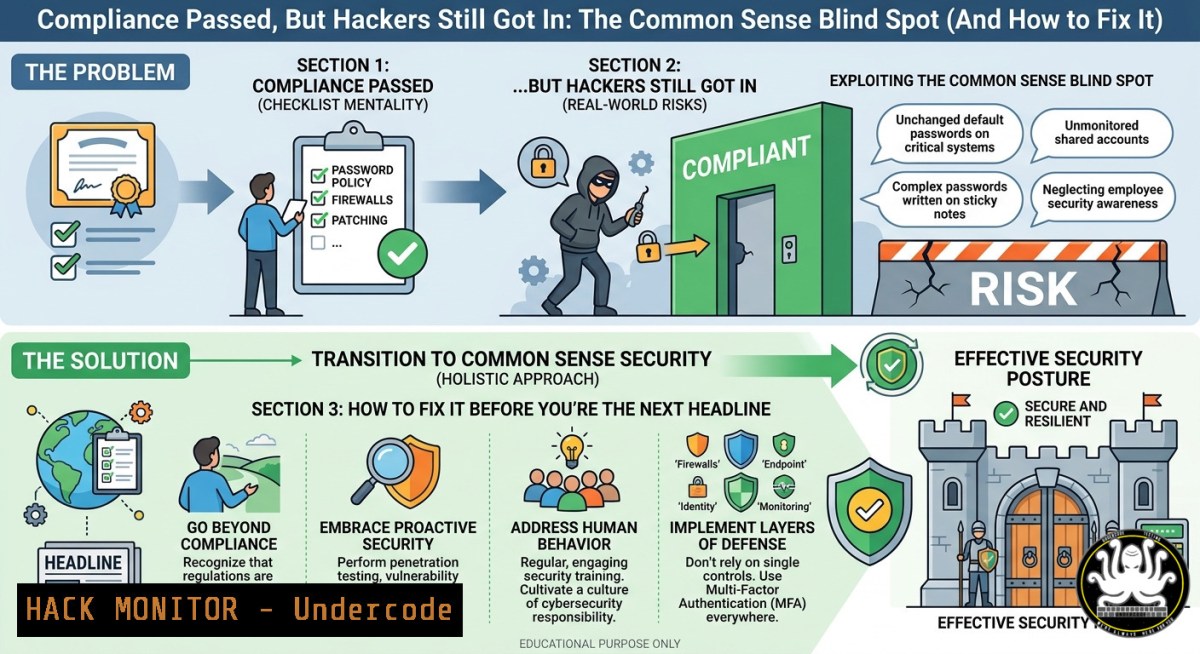
Compliance frameworks like ISO 27001, SOC 2, and PCI DSS are designed to enforce minimum security standards, but passing an audit does not guarantee real-world protection. Attackers routinely exploit the gap between what auditors check and what actually keeps systems safe—a gap often filled by misconfigurations, overprivileged accounts, and forgotten secrets that “common sense” would have flagged. This article explores why compliance without practical verification fails, and provides actionable steps, commands, and tools to bridge that divide.
Learning Objectives:
- Identify five common “compliant but vulnerable” configurations that bypass automated scans.
- Execute Linux/Windows commands and use open-source tools to detect overprivileged IAM roles, exposed secrets, and weak network rules.
- Apply step‑by‑step hardening techniques for AWS, APIs, and AD environments that go beyond checklists.
You Should Know:
- The “Compliant” S3 Bucket That Leaks Everything – How to Find and Lock It
Many compliance checklists only verify that “bucket logging is enabled” or “encryption is on”, but they rarely test whether the bucket is actually public. Attackers scan for “Read” or “Write” ACLs that auditors miss.
Step‑by‑step guide – Linux / AWS CLI
- Install AWS CLI and configure with a read‑only IAM user:
`sudo apt install awscli -y` (Debian/Ubuntu)
`aws configure`
2. List all S3 buckets in your account:
`aws s3 ls`
- Check bucket ACLs for `AllUsers` or `AuthenticatedUsers` permissions:
`aws s3api get-bucket-acl –bucket YOUR-BUCKET-NAME`
- Test public read access from an anonymous session (no credentials):
`aws s3 ls s3://YOUR-BUCKET-NAME –no-sign-request`
- Remove public access immediately if the command returns any data:
`aws s3api put-public-access-block –bucket YOUR-BUCKET-NAME –public-access-block-configuration “BlockPublicAcls=true,IgnorePublicAcls=true,BlockPublicPolicy=true,RestrictPublicBuckets=true”`
Windows equivalent (PowerShell with AWS Tools)
`Install-Module -Name AWSPowerShell`
`Get-S3Bucket | ForEach-Object { Get-S3ACL -BucketName $_.BucketName }`
- Hardcoded Secrets That Passed Static Analysis – Manual Discovery with TruffleHog
Compliance tools often check for secrets in `.env` files but ignore logs, compiled binaries, or Git commit history. Common sense says: never hardcode credentials. Yet auditors rarely run secret scanners across entire repositories.
Step‑by‑step guide – Linux / macOS
1. Install TruffleHog (Go version for speed):
`git clone https://github.com/trufflesecurity/trufflehog`
`cd trufflehog && go install</h2>
2. Scan the current Git repository for high‑entropy strings and known API keys:
<h2 style="color: yellow;">trufflehog git file://$(pwd) –json –only-verified</h2>
3. For an entire filesystem (including logs and backups):
<h2 style="color: yellow;">trufflehog filesystem / –exclude-paths /tmp/exclude.txt</h2>
4. Automatically revoke any discovered key via cloud provider CLI (example for AWS):
<h2 style="color: yellow;">aws iam delete-access-key –access-key-id AKIA…`
2. Scan the current Git repository for high‑entropy strings and known API keys:
<h2 style="color: yellow;">
3. For an entire filesystem (including logs and backups):
<h2 style="color: yellow;">
4. Automatically revoke any discovered key via cloud provider CLI (example for AWS):
<h2 style="color: yellow;">
Windows (using Docker)
`docker run -v ${PWD}:/pwd trufflesecurity/trufflehog git file:///pwd`
- Overprivileged IAM Roles – Using Policy Simulator to Catch “Compliant but Dangerous” Permissions
Auditors love to see “least privilege” written in a policy, but they rarely simulate real user actions. A role that can `s3:GetObject` on any bucket is compliant with “encryption required” but allows data exfiltration from unintended buckets.
Step‑by‑step guide – AWS Console + CLI
- Enumerate all IAM roles with inline or managed policies:
`aws iam list-roles –query “Roles[].RoleName”`
- For a suspicious role, retrieve its attached policies:
`aws iam list-attached-role-policies –role-name MyRole`
- Use the AWS Policy Simulator (CLI) to test if the role can read a specific secret bucket:
`aws iam simulate-principal-policy –policy-source-arn arn:aws:iam::123456789012:role/MyRole –action-names s3:GetObject –resource-arns arn:aws:s3:::sensitive-bucket/secret.txt` - If the simulation returns
"allowed" : true, tighten the policy by removing wildcard resources:
`aws iam put-role-policy –role-name MyRole –policy-name RestrictPolicy –policy-document file://restricted.json`
(where restricted.json contains `”Resource”: “arn:aws:s3:::allowed-bucket/”`)
- Network Security Groups That Passed Compliance but Failed Lateral Movement Tests
A common compliance item is “no direct RDP/SSH from 0.0.0.0/0”. However, many auditors allow a “bastion subnet” that is still reachable via a misrouted VPN or a forgotten NAT gateway. Attackers pivot from a compromised EC2 instance to internal resources because security group rules are overly permissive in the `10.0.0.0/8` range.
Step‑by‑step guide – Nmap + Custom Scripting
- From a test instance inside your VPC, run a network scan against the RFC 1918 ranges to identify open internal ports that should be restricted:
`sudo nmap -sn 10.0.0.0/8 | grep -oP ‘(?<=for )\d+\.\d+\.\d+\.\d+' > alive.txt` - For each alive host, check for high‑risk ports (SSH, RDP, SMB, Redis) that are not in the compliance exception list:
`nmap -iL alive.txt -p 22,3389,445,6379 -oG open_ports.txt`
- Use AWS CLI to revoke offending security group rules (example: revoke RDP from a wide CIDR):
`aws ec2 revoke-security-group-ingress –group-id sg-12345678 –protocol tcp –port 3389 –cidr 10.0.0.0/8`
Windows (PowerShell with EC2Tools)
`Get-EC2SecurityGroup | Select-Object -ExpandProperty IpPermissions | Where-Object {$_.IpProtocol -eq “tcp” -and $_.FromPort -eq 3389}`
5. Windows Group Policy That Enforces Password Complexity but Allows LM Hashes
Many compliance scans check for “Password must meet complexity requirements” = Enabled. They ignore the “Store passwords using reversible encryption” or “Network security: LAN Manager authentication level” settings. Attackers extract LM hashes (weak) even when complexity is enabled.
Step‑by‑step guide – Windows PowerShell (Domain Controller)
1. Check for dangerous GPO settings using `Get-GPOReport`:
`Get-GPOReport -All -ReportType XML | Select-String -Pattern “ClearTextPassword|LmCompatibilityLevel”`
- Manually verify the registry on a domain‑joined machine:
`reg query HKLM\SYSTEM\CurrentControlSet\Control\Lsa /v LmCompatibilityLevel`
If value is 0,1, or 2 – LM hashes are being stored or sent.
3. Harden the setting via GPO:
- Open Group Policy Management → Default Domain Policy
- Navigate to Computer Configuration → Windows Settings → Security Settings → Local Policies → Security Options
- Set “Network security: LAN Manager authentication level” to “Send NTLMv2 response only. Refuse LM & NTLM” (Level 5)
4. Force immediate update: `gpupdate /force`
- Scan for any remaining LM hashes in the NTDS.dit file (requires DSInternals PowerShell module):
`Install-Module DSInternals`
`Get-ADReplAccount -All | Where-Object {$_.LMHash -ne “00000000000000000000000000000000”}`
- API Security Blind Spot – JWT “None” Algorithm and Missing Audience Validation
Compliance may require “OAuth 2.0” or “JWT for authentication”, but many implementations accept the `alg: none` header, effectively bypassing signature verification. Auditors rarely test this because it requires crafting a custom token.
Step‑by‑step guide – Linux / Python
- Test an API endpoint that uses JWT: capture a legitimate token (e.g., from `Authorization: Bearer` header).
- Use `pyjwt` to generate a token with `alg: none` and same claims:
`pip install pyjwt`
import jwt
fake_token = jwt.encode({"user": "admin", "exp": 9999999999}, key=None, algorithm="none")
print(fake_token)
3. Send the crafted token to the API with curl:
curl -H "Authorization: Bearer eyJ0eXAiOiJKV1QiLCJhbGciOiJub25lIn0..." https://api.target.com/admin`jwt.decode(token, verify_signature=True, algorithms=[“HS256”])`).
4. If the API returns admin data, the server is vulnerable – disable `alg: none` in your JWT library configuration (e.g., in Python
5. Additionally enforce `aud` (audience) claim validation to prevent token reuse across different services:
jwt.decode(token, key, audience=["api.internal"], algorithms=["HS256"])
What Undercode Say:
- Compliance is a baseline, not a shield – auditors rarely run exploitation tools like TruffleHog, Policy Simulator, or Nmap from an attacker’s perspective. Passing a checkmark does not mean a real hacker cannot walk right in.
- Common sense security demands continuous validation: test S3 public access weekly, simulate IAM permissions before deployment, and manually verify GPO settings beyond the first page of a compliance report. The most dangerous vulnerabilities are the ones the scanner was never told to look for.
Analysis (10 lines):
The post’s humor (“Compliance Passed, Common Sense Failed”) reflects a systemic issue: organizations spend millions on audit readiness but neglect the practical, dirty‑hands verification that stops breaches. Attackers exploit this gap with trivial techniques – public buckets, leftover secrets, overprivileged roles, and deprecated authentication protocols. Each of the six sections above provides a command‑level fix that auditors typically skip. The pattern is clear: compliance drives documentation, but common sense drives configuration. Without embedding red‑team thinking into compliance cycles, “passed” becomes a false sense of security. Real‑world breaches (e.g., Capital One, Uber) repeatedly involved compliant but misconfigured resources. Automation helps, but human judgment of “does this actually make sense?” remains irreplaceable. The key is to shift from “check the box” to “break the box” testing.
Prediction:
Within 18 months, AI‑driven “compliance validation agents” will emerge that automatically run simulated attacks (like the commands above) against infrastructure, generating evidence of “pass with exceptions” rather than a binary pass/fail. However, attackers will then shift to abusing AI‑generated configuration defaults and hallucinated policy exceptions. The future of compliance will not be fewer checklists, but dynamic checklists that change based on real‑time attack surface analysis – forcing organizations to finally merge common sense with compliance. Those that wait for regulators to mandate this will be breached; those that adopt “red team compliance” now will lead the next security maturity curve.
▶️ Related Video (64% Match):
🎯Let’s Practice For Free:
IT/Security Reporter URL:
Reported By: %F0%9D%97%96%F0%9D%97%BC%F0%9D%97%BA%F0%9D%97%BD%F0%9D%97%B9%F0%9D%97%B6%F0%9D%97%AE%F0%9D%97%BB%F0%9D%97%B0%F0%9D%97%B2 %F0%9D%97%A3%F0%9D%97%AE%F0%9D%98%80%F0%9D%98%80%F0%9D%97%B2%F0%9D%97%B1 – Hackers Feeds
Extra Hub: Undercode MoN
Basic Verification: Pass ✅


