
Listen to this Post
Introduction:
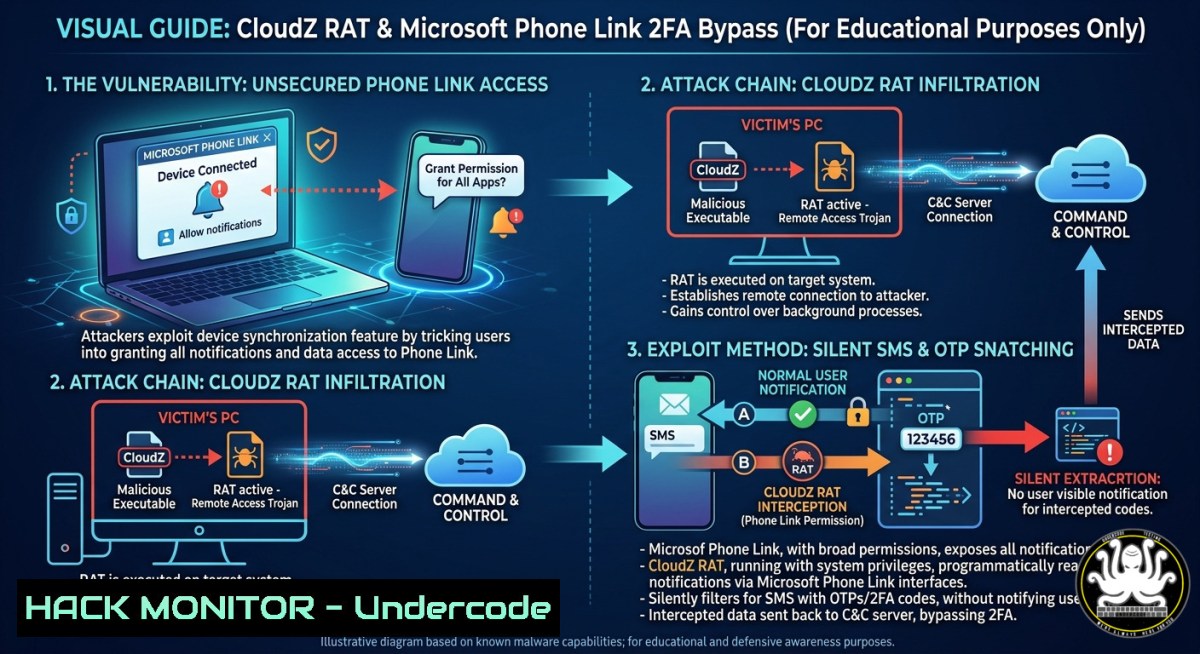
A newly uncovered malware campaign is abusing a trusted Windows-Android bridge to quietly siphon SMS messages and one-time passwords (OTPs) from compromised PCs—without ever infecting the mobile device itself. Active since at least January 2026, the CloudZ Remote Access Trojan (RAT) and its undocumented Pheno plugin exploit Microsoft’s Phone Link app, turning a legitimate cross-device sync tool into a stealthy 2FA bypass weapon.
Learning Objectives:
- Understand how CloudZ RAT and the Pheno plugin intercept SMS-based OTPs by targeting Phone Link’s local SQLite database.
- Analyze the multi-stage infection chain and advanced evasion techniques used by the malware.
- Apply detection and mitigation strategies, including practical PowerShell, Sysmon, and EDR queries to hunt for this threat in your environment.
You Should Know:
- The Nasty Mechanics of the CloudZ & Pheno Shakedown
Microsoft Phone Link (formerly “Your Phone”) is a built-in Windows 10/11 feature that mirrors SMS, notifications, and calls from an Android or iOS device to a PC and stores synchronized data locally in an SQLite database (e.g., PhoneExperiences-.db). The CloudZ RAT abuses this convenience by leveraging a custom plugin, Pheno.
Rather than exploiting a vulnerability in Phone Link, the malware misuses the application’s legitimate functions. Once CloudZ is executed on a compromised Windows machine, it downloads and loads the Pheno plugin. Pheno continuously scans for active Phone Link processes (such as YourPhone, PhoneExperienceHost, or Link to Windows). When an active PC-to-phone bridge is confirmed, the attacker can read the Phone Link SQLite database directly from the victim’s hard drive, extracting SMS messages, call logs, authenticator notifications, and any OTPs sent via SMS. The phone itself remains untouched; the attack happens entirely on the PC side.
Because the malware disables Phone Link’s data encryption by interacting with the decrypted database while the app is running, conventional mobile-focused security controls become irrelevant. This “cross-device pivot” shifts the risk from the handset to the enterprise-managed Windows endpoint, often bypassing EDR solutions that do not monitor Phone Link’s data storage.
Step‑by‑step guide explaining what this does and how to use it (for defenders and researchers):
 -- SIMULATED OFFENSIVE TESTING / DEFENSIVE ANALYSIS --
 1. Locate the Phone Link SQLite database (requires Windows host with active Phone Link pairing)
cd C:\Users\%USERNAME%\AppData\Local\Packages\Microsoft.YourPhone_8wekyb3d8bbwe\LocalState
dir PhoneExperiences-.db

<ol>
<li>Use sqlite3 (from sysinternals or standalone) to inspect its contents
sqlite3 PhoneExperiences-.db "SELECT name FROM sqlite_master WHERE type='table';"</p></li>
<li><p>Query for SMS messages (table names vary, but common names include 'Message', 'SmsMessage')
sqlite3 PhoneExperiences-.db "SELECT  FROM Message LIMIT 5;"
WARNING: This simulates what CloudZ/Pheno would do. Do not run on production without authorization.</p></li>
<li><p>Defender: Monitor for unauthorized access to these database files using Sysmon
sysmon -s  Ensure Sysmon running with Event ID 11 (FileCreate) and 15 (FileCreateStreamHash)</p></li>
<li><p>PowerShell snippet to alert on PhoneExperiences-.db access by non-PhoneLink processes
Get-WinEvent -FilterHashtable @{LogName='Microsoft-Windows-Sysmon/Operational'; ID=11} | Where-Object { $<em>.Message -like "PhoneExperiences-.db" -and $</em>.Message -notlike "YourPhone.exe" } | Format-List
Understanding this attack chain is crucial for building effective detections. Defenders should look for processes other than `YourPhone.exe` or `PhoneExperienceHost.exe` reading the `PhoneExperiences-.db` files. EDR/SIEM rules should alert on any access to these SQLite databases from non-standard binaries.
- The Infection Trail: From Fake Update to RAT Domination
The initial access vector remains unknown, but Talos researchers observed a multi-stage chain beginning with a fake ConnectWise ScreenConnect update (often named `systemupdates.exe` or Windows-interactive-update.exe).
Step 1: The Rust‑compiled Dropper
The malicious executable (compiled in Rust on Jan 1, 2026) decrypts and drops an embedded .NET loader disguised as a text file (update.txt or msupdate.txt) into C:\ProgramData\Microsoft\windosDoc\. This loader uses anti‑analysis checks (CPU core count, sandbox string detection, time‑based evasion) to avoid debugging. It checks for tools like Wireshark, Fiddler, Procmon, and Sysmon; if any are present, the loader exits.
Step 2: Persistence via Scheduled Task
The .NET loader establishes persistence by creating a scheduled task named `SystemWindowsApis` under \Microsoft\Windows\. This task runs the malware using the legitimate LOLBin `regasm.exe` under the SYSTEM account with highest privileges at system startup.
Step 3: CloudZ Execution and C2 Communication
Once executed, the .NET-compiled CloudZ RAT decrypts its embedded configuration (XOR key 0xCA), establishes an encrypted TCP socket to the command-and-control (C2) server (e.g., 185.196.10.136:8089), and awaits Base64-encoded instructions. CloudZ uses three hardcoded user‑agent strings and anti‑cache headers to evade HTTP inspection. Supported commands include:
– `RunShell` — Execute arbitrary shell commands.
– `BrowserSearch` — Exfiltrate web browser credentials.
– `plugin` / `savePlugin` — Load or save plugins (like Pheno) to disk.
– `rec` — Record the screen.
– `GetWidgetLog` — Retrieve Phone Link reconnaissance logs and data.
Step 4: Pheno Plugin Activation
After CloudZ reaches out to the C2 server, it downloads the Pheno plugin and saves it to C:\ProgramData\Microsoft\whealth\. Pheno then executes its Phone Link data extraction routine as described above. The plugin writes its findings to a staging folder, and CloudZ reads this data back and exfiltrates it to the attacker’s C2 server.
Practical hunting command (Windows):
 Hunt for suspicious scheduled tasks
schtasks /query /fo LIST /v | findstr "SystemWindowsApis"

Check for the persistence folder
dir C:\ProgramData\Microsoft\whealth\

Look for the loader files
dir C:\ProgramData\Microsoft\windosDoc.txt

Search for executions of regasm.exe at odd times (Sysmon Event ID 1)
Get-WinEvent -FilterHashtable @{LogName='Microsoft-Windows-Sysmon/Operational'; ID=1} | Where-Object { $_.Message -like "regasm.exe" }
- Bypassing SMS‑Based 2FA: Why Your MFA Might Be Useless
The most damaging consequence of CloudZ is its ability to intercept SMS‑based one‑time passwords, directly defeating two‑factor authentication. Many organizations and users still rely on SMS for 2FA, believing it adds a sufficient security layer. However, CloudZ shows that a compromised PC connected to a phone can render SMS-based MFA completely ineffective—the attacker gets the OTP in real time from the phone’s synchronized messages without ever touching the mobile device.
Moreover, the malware can also intercept push notifications from authenticator apps, further expanding the scope of compromised authentication methods. Once the attacker has the OTP (or the push approval), they can log in as the victim, reset passwords, and take over accounts—often before the user even realizes an MFA request was sent.
To truly secure your authentication, you must move beyond SMS. Organizations should enforce the use of FIDO2 security keys or authenticator apps that do not rely on push notifications that can be intercepted. Hardware-based phishing-resistant MFA is the gold standard.
Linux command for checking SMS 2FA usage (if using a Linux system with connected Android):
 If you use scrcpy or Android Debug Bridge (ADB) for testing, check for SMS sync apps
adb shell dumpsys package com.google.android.apps.messaging | grep "version"

Always a good reminder: use TOTP instead of SMS
 Example: Generate a TOTP secret with oathtool on Linux
sudo apt install oathtool
oathtool --totp -b "YOURSECRETKEY"
- Proactive Defense: How to Hunt and Block CloudZ on Your Network
Defenders need to adopt a multi-layered approach that includes prevention, detection, and response. Since CloudZ uses a dropper and loads plugins dynamically, early detection can stop the attack before the main RAT is deployed.
Indicators of Compromise (IOCs) to hunt for:
- File paths:
C:\ProgramData\Microsoft\windosDoc\update.txt, `C:\ProgramData\Microsoft\whealth\`
– Scheduled task name: `SystemWindowsApis`
– Process names:systemupdates.exe, `Windows-interactive-update.exe`
– Network indicators: TCP connection to185.196.10.136:8089, use of HTTP with anti-cache headers and known user-agents - Registry changes: Persistence through `HKCU\Software\Microsoft\Windows\CurrentVersion\Run` or scheduled tasks
Recommended mitigation steps:
- Disable Microsoft Phone Link if cross-device syncing is not a business requirement. Go to `Settings > Bluetooth & devices > Phone Link` and turn it off.
- Use application control policies (AppLocker or WDAC) to block execution from
C:\ProgramData\Microsoft\windosDoc\. - Monitor for unusual execution of
regasm.exe—this legitimate utility should rarely be run outside of development. - Deploy EDR rules that alert on any process (other than
YourPhone.exe) accessingPhoneExperiences-.db. - Use network blocking to prevent connections to known C2 IPs and domains. Add `185.196.10.136` to firewall blocklists.
Example Windows Firewall rule to block the known C2 IP:
New-NetFirewallRule -DisplayName "Block CloudZ C2 IP" -Direction Outbound -RemoteAddress 185.196.10.136 -Action Block
Example Sysmon configuration (partial) to log database access:
<Sysmon>
<EventFiltering>
<FileCreate onmatch="include">
<TargetFilename condition="contains">PhoneExperiences-</TargetFilename>
</FileCreate>
</EventFiltering>
</Sysmon>
5. Hardening Your Enterprise Against “Cross-Device” Pivots
The CloudZ campaign highlights a blind spot in security architectures: the implicit trust in cross-device synchronization features. Many organizations have robust mobile device management (MDM) and Windows endpoint protection, but rarely do they consider the data flow between the two. CloudZ demonstrates that a malware infection on a single PC can effectively compromise a paired mobile device’s most sensitive data—SMS, OTPs, and authenticator notifications.
To harden against such attacks, adopt the following enterprise measures:
– Enforce conditional access policies that require both device compliance and user risk signals before granting access to resources.
– Segregate sensitive workflows: Do not allow employees to pair personal phones with corporate PCs. If Phone Link is necessary for productivity, ensure it is only used with company-managed mobile devices enrolled in MDM.
– Deploy ZTNA (Zero Trust Network Access) so that even if credentials and OTPs are stolen, the attacker cannot access internal applications without additional device and identity checks.
– Regularly audit cross-device sync configurations via PowerShell or Group Policy to ensure Phone Link is disabled on high‑risk endpoints.
Group Policy to disable Phone Link across domain-joined machines:
 Set registry key to disable Phone Link
reg add "HKLM\SOFTWARE\Policies\Microsoft\Windows\CrossDevice" /v "DisableCrossDevice" /t REG_DWORD /d 1 /f
PowerShell to audit Phone Link usage across the network:
Get-ChildItem -Path "C:\Users\AppData\Local\Packages\Microsoft.YourPhone_8wekyb3d8bbwe\LocalState" -ErrorAction SilentlyContinue | Select-Object FullName, LastWriteTime
6. What Undercode Say:
- Cross-device sync is a silent attack surface. Trusted bridges like Phone Link create new paths for data theft that bypass mobile-focused defenses. Defenders must monitor the PC side of these connections.
- SMS-based 2FA is effectively dead. CloudZ proves that intercepting SMS OTPs is trivial once a PC is compromised. Enterprises and individuals must urgently migrate to phishing-resistant MFA (hardware keys or passkeys).
The CloudZ/Pheno campaign serves as a stark reminder that legitimate features can be subverted into powerful malware tools. As Windows continues to integrate deeper with mobile ecosystems, attackers will increasingly target the seams between devices. Your security strategy must account for the complete digital estate: from the endpoint to the cloud, and now, across every connected screen in between. The most effective defense combines disabling unnecessary sync features, deploying application control, monitoring for unusual database access, and—most critically—killing SMS for MFA before an attacker kills your accounts.
Prediction:
This technique will be rapidly weaponized by other threat actors, including state‑sponsored groups, to bypass SMS‑based 2FA at scale. We will soon see variants that target other cross‑device sync utilities (e.g., Dell Mobile Connect, Intel Unison) and even cloud‑based notification sync services. Organizations that continue relying on SMS for authentication will face a wave of account takeovers, forcing regulators to finally mandate phishing‑resistant MFA across critical sectors.
▶️ Related Video (72% Match):
🎯Let’s Practice For Free:
IT/Security Reporter URL:
Reported By: Hackermohitkumar Cloudz – Hackers Feeds
Extra Hub: Undercode MoN
Basic Verification: Pass ✅


