
Listen to this Post
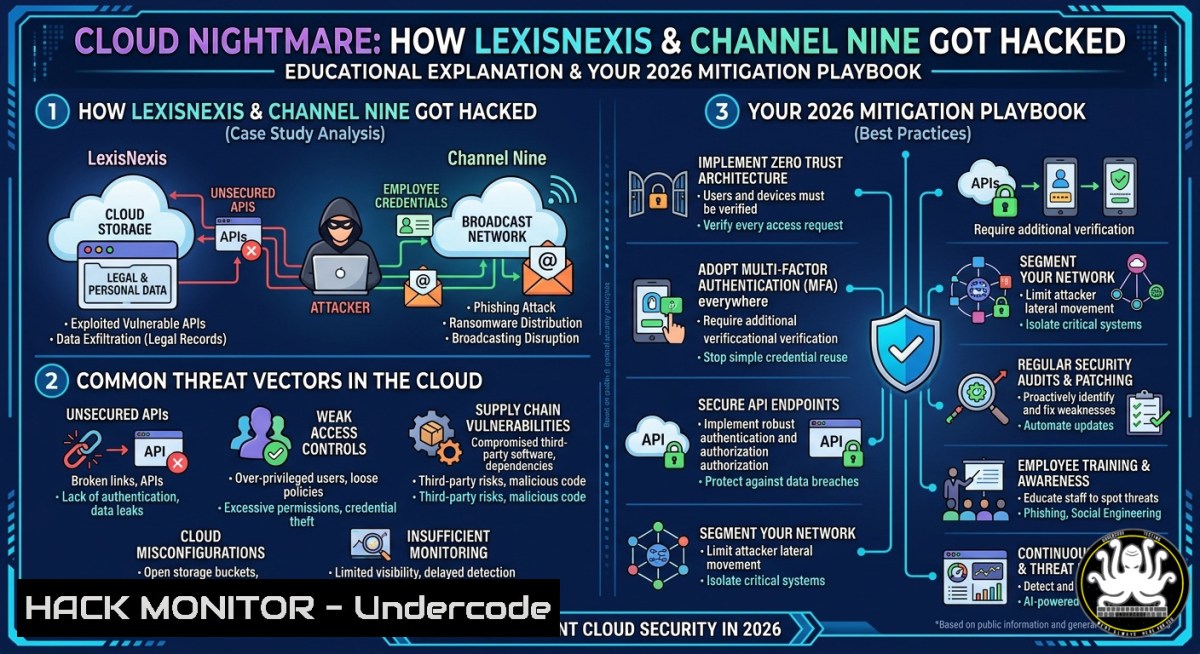
Introduction:
In March 2026, LexisNexis suffered a major cloud breach rooted in mismanaged access controls and excessive user privileges, echoing the 2025 Channel Nine incident where system misconfigurations led to exposed internal data. These real-world failures underscore a critical truth: cloud security isn’t about buying tools—it’s about enforcing least privilege, hardening configurations, and adopting well-architected frameworks before attackers exploit your over-permissioned identities.
Learning Objectives:
- Understand the root causes of the LexisNexis (2026) and Channel Nine (2025) cloud breaches, focusing on IAM misconfigurations and privilege creep.
- Implement actionable mitigation strategies including strong authentication, least privilege policies, secure configuration scanning, and framework-based resilience.
- Execute hands-on Linux/Windows commands and API security checks to detect and remediate excessive access and misconfigurations in real cloud environments.
You Should Know:
- Detecting Excessive User Privileges & Mismanaged Access Controls
Step‑by‑step guide to identifying over‑permissioned identities and misconfigured roles – the exact flaws that enabled the LexisNexis breach.
What this does: Scans IAM policies, user role assignments, and group memberships to flag privilege creep, unused permissions, and risky trust relationships.
How to use it (AWS example):
 List all IAM users and their attached policies (Linux/CloudShell)
aws iam list-users --query 'Users[].UserName' --output text | xargs -I {} aws iam list-attached-user-policies --user-name {} --query 'AttachedPolicies[].PolicyName' --output table

Find users with administrative privileges (simulated)
aws iam list-policies --scope Local --query 'Policies[?PolicyName==<code>AdministratorAccess</code>].Arn' --output text | while read policy; do aws iam list-entities-for-policy --policy-arn "$policy" --query 'PolicyUsers[].UserName' --output text; done

Windows (using AWS CLI in PowerShell)
Get-IAMUserList | ForEach-Object { Get-IAMAttachedUserPolicyList -UserName $_.UserName }
Manual access review script (Linux):
 Check for any IAM role with "trust policy" allowing wildcard principals
aws iam list-roles --query 'Roles[?AssumeRolePolicyDocument.Statement[?Principal.AWS==``]].[bash]' --output table
Remediation command: Enforce a permission boundary to limit privilege escalation.
aws iam put-user-permissions-boundary --user-name vulnerable_user --permissions-boundary arn:aws:iam::aws:policy/PowerUserAccess
- Hardening System Configurations to Prevent the Next Channel Nine
Step‑by‑step guide to secure cloud resource configurations, focusing on storage buckets, compute instances, and network exposure – the root cause of the 2025 Channel Nine leak.
What this does: Automates detection of public exposure, versioning misconfigurations, and unencrypted data stores.
AWS S3 bucket public block enforcement:
 Check buckets with public access
aws s3api list-buckets --query 'Buckets[].Name' --output text | xargs -I {} aws s3api get-bucket-acl --bucket {} --query 'Grants[?Grantee.URI==`http://acs.amazonaws.com/groups/global/AllUsers`]'

Block all public access for a bucket
aws s3api put-public-access-block --bucket vulnerable-bucket --public-access-block-configuration "BlockPublicAcls=true,IgnorePublicAcls=true,BlockPublicPolicy=true,RestrictPublicBuckets=true"
Windows / Azure CLI equivalent:
 Azure: List storage containers with anonymous access
az storage container list --account-name youraccount --query "[?publicAccess=='container']" --output table

Remediate: Set to private
az storage container set-permission --name container-name --public-access off --account-name youraccount
Linux security misconfiguration scanning using `scoutsuite`:
 Install and run Scout Suite (open-source)
git clone https://github.com/nccgroup/ScoutSuite
cd ScoutSuite
pip install -r requirements.txt
python scout.py --provider aws --report-dir ./reports
Manual hardening checklist for EC2 / Compute Engine:
- Disable unused ports (e.g., `sudo ufw deny 22` if SSH not needed)
- Enforce IMDSv2 to prevent metadata theft: `aws ec2 modify-instance-metadata-options –instance-id i-xxxx –http-tokens required`
– Enable VPC flow logs for anomaly detection: `aws logs create-log-group –log-group-name VPCFlowLogs`
- Enforcing Strong Authentication & Least Privilege in CI/CD Pipelines
Step‑by‑step guide to eliminate over‑permissioned service accounts and enforce short‑lived credentials – a critical gap in both the LexisNexis and Channel Nine attack chains.
What this does: Replaces long‑lived access keys with IAM roles, enforces MFA, and automates least‑privilege policy generation.
Step 1: Remove static credentials from code/configs
 Linux: Scan for AWS keys in your repository
grep -r "AKIA" --include=".py" --include=".sh" --include=".yaml" .
grep -r "sk-" --include=".env" .  for OpenAI/API keys

Windows (PowerShell)
Get-ChildItem -Recurse -Include .yaml, .json | Select-String "AKIA[0-9A-Z]{16}"
Step 2: Enforce MFA on all IAM users (AWS CLI + jq)
 List users without MFA device
aws iam list-users --query 'Users[?PasswordEnabled==<code>true</code>].[bash]' --output text | while read user; do
mfa=$(aws iam list-mfa-devices --user-name $user --query 'MFADevices' --output text)
if [ -z "$mfa" ]; then echo "NO MFA: $user"; fi
done
Step 3: Implement least privilege with IAM Access Analyzer
 Generate policy based on actual CloudTrail history (Linux)
aws accessanalyzer start-policy-generation --policy-generation-request '{
"cloudTrailDetails": {
"trails": [{"cloudTrailArn": "arn:aws:cloudtrail:region:account:trail/your-trail"}],
"accessRole": "arn:aws:iam::account:role/AccessAnalyzerMonitor"
},
"principalArn": "arn:aws:iam::account:user/overpermissioned_user"
}'
 Then download and apply the generated least-privilege policy
Step 4: Rotate keys automatically (AWS Lambda + Python)
 Deploy as scheduled Lambda
import boto3
iam = boto3.client('iam')
for user in iam.list_users()['Users']:
for key in iam.list_access_keys(UserName=user['UserName'])['AccessKeyMetadata']:
if key['Status'] == 'Active':
days_old = (datetime.now() - key['CreateDate'].replace(tzinfo=None)).days
if days_old > 90:
iam.update_access_key(UserName=user['UserName'], AccessKeyId=key['AccessKeyId'], Status='Inactive')
new_key = iam.create_access_key(UserName=user['UserName'])
 Send new key to user via secure channel
4. API Security: Hardening Endpoints Against Privilege Escalation
Step‑by‑step guide to test and secure REST/GraphQL APIs – a common vector when cloud access controls fail, as seen in the Channel Nine data extraction.
What this does: Simulates excessive privilege exploitation and enforces rate limiting, authentication, and input validation.
Testing for IDOR (Insecure Direct Object Reference) using cURL (Linux):
 Attempt to access another user's resource by changing ID parameter
curl -X GET "https://api.target.com/v1/user/1234/profile" -H "Authorization: Bearer $TOKEN"
 Then try /user/1235, /user/1, etc.

Check for missing rate limiting - send 200 rapid requests
for i in {1..200}; do curl -s -o /dev/null -w "%{http_code}\n" -H "Authorization: Bearer $TOKEN" "https://api.target.com/v1/search?q=test" & done | sort | uniq -c
Mitigation: Implement GraphQL depth limiting (Node.js example)
const depthLimit = require('graphql-depth-limit');
const server = new ApolloServer({
typeDefs,
resolvers,
validationRules: [depthLimit(5)] // Prevents massive nested queries
});
Windows / API Gateway hardening (using Azure API Management):
 Set JWT validation policy
az apim api policy show --api-id myapi --resource-group rg --service-name apim-service
 Add inbound policy: <validate-jwt header-name="Authorization" failed-validation-httpcode="401" ... />
5. Adopting Well‑Architected Frameworks: Automated Compliance as Code
Step‑by‑step guide to continuously enforce security baselines using infrastructure as code (IaC) scanning – turning the paper’s “well‑architected frameworks” into automated guardrails.
What this does: Prevents misconfigurations at deployment time using tools like checkov, tfsec, and cfn-nag.
Install and run Checkov on Terraform templates (Linux):
pip install checkov
checkov -d /path/to/terraform/ --framework terraform --quiet
 Example output: "CKV_AWS_111: Ensure IAM policies do not allow full administrative access"
Sample remediation for a publicly exposed RDS instance (Terraform):
 Before (vulnerable)
resource "aws_db_instance" "default" {
publicly_accessible = true
}

After (hardened)
resource "aws_db_instance" "default" {
publicly_accessible = false
storage_encrypted = true
backup_retention_period = 30
}
Continuous compliance with Open Policy Agent (OPA):
 Policy to deny any S3 bucket without encryption
echo 'package aws.s3
deny[bash] { input.public_access_block.configuration.block_public_acls == false msg = "Public ACLs not blocked" }' > policy.rego

Evaluate against your bucket JSON state
opa eval --data policy.rego --input bucket_state.json "data.aws.s3.deny"
Windows / Azure Policy as Code:
 Deploy Azure Policy to enforce HTTPS only on storage accounts
New-AzPolicyDefinition -Name "RequireHttpsStorage" -Policy "https://raw.githubusercontent.com/Azure/azure-policy/master/built-in-policies/policyDefinitions/Storage/StorageAccountHttpsEnabled.json"
What Undercode Say:
- Key Takeaway 1: The LexisNexis (2026) and Channel Nine (2025) breaches were not zero-days—they were predictable failures of identity and configuration hygiene. Over‑permissioned roles and public buckets remain the top cloud killers.
- Key Takeaway 2: Automation is non‑negotiable: manual reviews can’t scale. Tools like ScoutSuite, Checkov, and IAM Access Analyzer turn best practices into continuously enforced policies.
- MFA and short‑lived credentials block 99% of credential‑based attacks – yet many enterprises still rely on static API keys embedded in code. The commands above provide immediate remediation paths.
- Least privilege requires continuous trimming. Use CloudTrail + Access Analyzer to generate actual‑use policies; don’t guess permissions.
- API depth limiting and IDOR testing must become part of every CI/CD pipeline – misconfigured GraphQL endpoints can expose entire databases in one query.
- Well‑architected frameworks are only as good as their implementation. IaC scanning shifts security left, catching public exposure before
terraform apply. - Both breaches reinforce that cloud shared responsibility includes the customer’s IAM and configuration – vendors provide tools, not guarantees.
Prediction:
Within 18 months, regulatory bodies will mandate real‑time IAM anomaly detection and automated least‑privilege remediation following high‑profile 2025–2026 cloud breaches. Organisations still relying on manual access reviews will face existential audit failures. The future of cloud security is autonomous policy adjustment – where AI agents continuously analyse access patterns and revoke permissions without human intervention, turning today’s reactive commands into proactive immunity.
▶️ Related Video (78% Match):
🎯Let’s Practice For Free:
IT/Security Reporter URL:
Reported By: Chadsaliby Cloud – Hackers Feeds
Extra Hub: Undercode MoN
Basic Verification: Pass ✅


