Listen to this Post
Introduction:
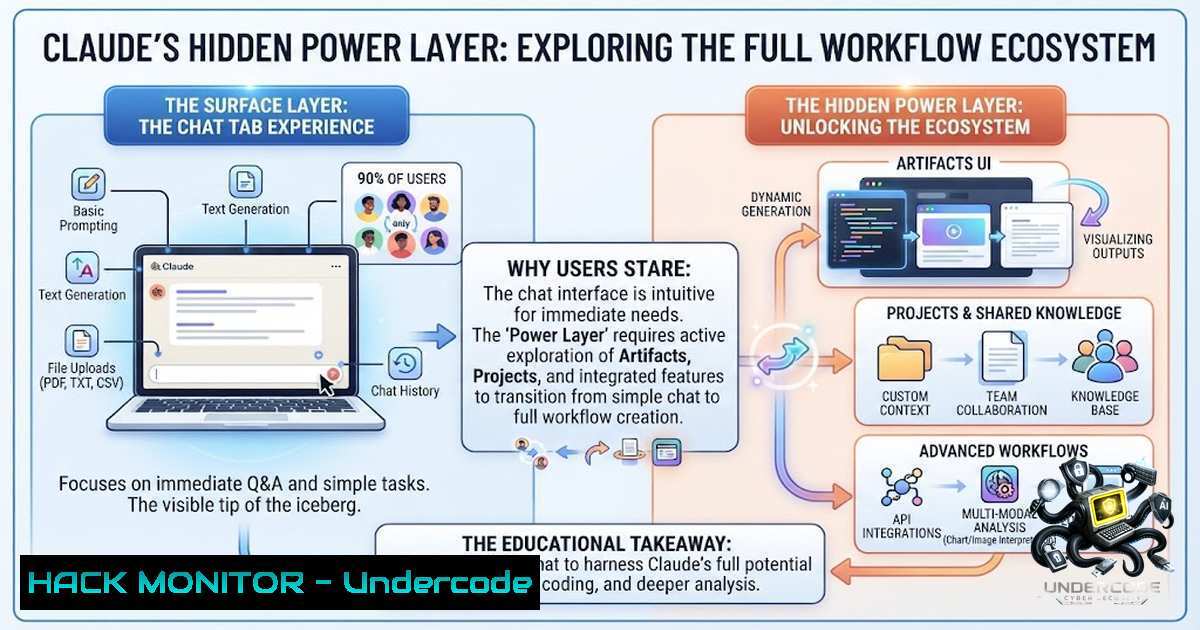
Most professionals treat Claude as a sophisticated chatbot—ask a question, get an answer, move on. But this surface-level interaction taps into less than 10% of what the platform actually delivers. The real leverage isn’t in better prompting; it’s in building persistent memory systems, reusable Skills, and autonomous workflows that execute complex, multi-step tasks across your files and applications without you sitting at the keyboard. This article deconstructs Claude’s three-level mastery path—from basic usage to system-building—and provides the technical groundwork to skip the shallow end entirely.
Learning Objectives:
- Master Claude Projects to create persistent workspaces with dedicated files, instructions, and scoped memory for recurring workflows
- Build and deploy custom Skills using SKILL.md files that encode team expertise into repeatable, triggerable instruction sets
- Implement memory-driven context systems using CLAUDE.md to maintain project conventions across sessions
- Configure Cowork for autonomous task execution across local files, Slack, Google Workspace, and Microsoft 365
You Should Know:
1. Projects: Your Persistent AI Workspace
Most users open a fresh chat every time, forcing Claude to re-learn context from scratch. Projects solve this by creating dedicated workspaces with their own files, instructions, and crucially—memory that persists across tasks.
Step-by-step guide to creating a Project:
- Navigate to Projects: Hover over the left side of your account and click “Projects,” or go directly to
claude.ai/projects. -
Create a new Project: Click the “+ New Project” button in the top-right corner.
-
Name and describe: Give your Project a name and add a description (note: Claude will not have access to these details).
-
Set Project Instructions: Click “Set project instructions” and add rules for how Claude should behave and respond. Claude will use these instructions for all chats within the Project.
-
Add context: Attach folders, links, or import existing chat projects. In Cowork, you can start from scratch, import from a Claude project, or use an existing folder on your computer.
Project capabilities in Cowork (available on Pro, Max, Team, and Enterprise plans via Claude Desktop):
- Instructions: Add tone, formatting, or rules to guide all tasks in the project
- Scheduled tasks: Set up recurring tasks specific to the project
- Context: Add local folders, link chat projects, or paste URLs for Claude to reference
- Memory: Claude remembers context from tasks within the project and applies it to future tasks. Memory is scoped to the project—what Claude learns in one project doesn’t carry over to others
Practical example: A content marketing team can create a “Q4 Campaign” Project with brand guidelines, past performance data, competitor analysis, and style instructions. Every piece of content generated within that Project inherits this context automatically.
2. Skills: Encoding Repeatable Expertise
Skills are instruction files that turn Claude from a general-purpose assistant into a specialized expert for your specific workflows. Instead of explaining your process every time, you encode it once.
Step-by-step guide to creating a custom Skill:
Step 1: Understand the core requirement
Clarify what problem your skill solves. Strong skills address concrete needs with measurable outcomes. “Extract financial data from PDFs and format as CSV” beats “Help with my finance stuff”.
Step 2: Create the skill.md file
Every skill consists of a directory containing at minimum a `skill.md` file with YAML frontmatter:
name: Brand Guidelines
description: Apply Acme Corp brand guidelines to presentations and documents, including official colors, fonts, and logo usage.
Required metadata:
name: Human-friendly name (64 characters max)description: What the skill does and when to use it—this is critical because Claude uses this to determine when to invoke your skill (200 characters max)
Step 3: Write the main instructions
Use markdown with clear hierarchy: overview, prerequisites, execution steps, examples, error handling, and limitations:
 Overview
This skill provides Acme Corp's official brand guidelines for creating consistent, professional materials.

Brand Colors
- Primary: FF6B35 (Coral)
- Secondary: 004E89 (Navy Blue)
- Accent: F7B801 (Gold)

Typography
Headers: Montserrat Bold
Body text: Open Sans Regular
Step 4: Upload and test your skill
- In Claude.ai/Claude apps: Go to Settings and add your custom skill there
- Enable the skill in Customize > Skills
- Try several different prompts that should trigger it
- Review Claude’s thinking to confirm it’s loading the skill
Pro tip: Skills work across both Claude Code and Cowork, and follow the open Agent Skills standard, making them portable to other compatible tools. You can also ask Claude to package a workflow into a skill by simply saying “Package what we just did into a skill”.
3. CLAUDE.md: The Memory System That Changes Everything
CLAUDE.md is a plain markdown file that Claude automatically reads at the start of every session in that directory. Think of it as the briefing you’d give a capable new teammate on their first morning: how the team does things, what to avoid, and where important pieces live.
Step-by-step guide to implementing CLAUDE.md:
Step 1: Location hierarchy
Claude looks in several places and merges what it finds, from broad to specific:
| Location | Scope | Good for |
|-|-|-|
| `~/.claude/CLAUDE.md` | Every project on your machine | Personal preferences |
| `
| `
Step 2: Run /init
In any project, type /init. Claude will explore the codebase and draft a CLAUDE.md for you, covering build commands, test commands, a structure overview, and any conventions it detects.
Step 3: What to include
Aim for a file that is short and signal-dense—under roughly 200 lines:
- Commands: How to build, test, lint, and run locally. Claude will execute these, so accuracy matters
- Conventions: Naming, error handling, code style
- Project structure: Where key files and components live
- Rules: What to avoid, preferred approaches
Step 4: Mid-session updates
You can add to it mid-session: open `/memory` to edit the file directly, or just ask Claude to “remember” a rule and it will append it to the right CLAUDE.md for you.
Cost efficiency: Claude applies prompt caching to CLAUDE.md. The first request pays full token price; subsequent requests within ~5 minutes hit the cache at the much lower cache-read rate. Changes invalidate the cache, so keep the file lean.
4. Cowork: From Conversation to Autonomous Execution
Cowork is Claude working directly with your files, folders, and apps—reading, editing, and producing real outputs on your machine. Where Chat is a conversation, Cowork is a knowledge work agent that executes multi-step tasks end-to-end.
Step-by-step guide to getting started with Cowork:
Step 1: Check compatibility
Cowork requires the latest version of Claude Desktop for macOS or Windows. Download the Cowork readiness check program for your system to verify compatibility.
Step 2: Set up connectors
Connectors plug Cowork into the systems where your work already lives—Slack, Salesforce, Microsoft 365, Jira, Google Workspace. Enable connectors from the Customize panel in the left sidebar:
- Google Workspace: Calendar, Drive, Gmail
- Docusign, Apollo, Clay, and more
Step 3: Configure instructions
Set standing rules at three levels:
- Global instructions (Settings → Cowork → Global instructions): Apply to every Cowork session
- Project instructions: Apply only inside that Project, on top of global ones
- Organization instructions (enterprise): Org-wide guidance across Chat, Cowork, and Code
Step 4: Run a task
Describe the outcome you want, step away, and come back to finished work—formatted documents, organized files, synthesized research, and more. Cowork can even orchestrate across Excel and PowerPoint, running analysis in one and turning it into a presentation in the other.
Security note: Cowork has unique risks due to its agentic nature and internet access. Team or Enterprise plan owners can turn off web search for Cowork and Chat in Organization settings. You can delete tasks at any time, and deleted data is removed from backend storage within 30 days.
5. Prompt Engineering for Agentic Workflows
Moving beyond one-shot prompts is essential for building systems that work without you.
Core principles:
Be explicit: Claude 4 is more a precise executor than a creative extender. Want outputs that “exceed expectations”? Ask for them explicitly.
Add context: Explain the reasoning behind instructions. Instead of “never use ellipses,” say “never use ellipses because this will be read aloud”.
Define the role and context: Set a role in the system prompt to focus Claude’s behavior and tone for your use case.
Specify the task up front: Treat Claude like a capable engineer you’re delegating to rather than a pair programmer you’re guiding line by line.
Use structured formats: Ask Claude to create tests before starting work and track them in structured formats like tests.json.
Example agentic workflow prompt:
Role: Senior Data Analyst
Context: We're analyzing Q4 sales data for a retail company with 500+ stores
Task: Extract patterns, identify underperforming regions, and generate a presentation with recommendations
Output: Structured markdown with tables, followed by a PowerPoint-ready summary
Constraints: Include confidence intervals, flag any data quality issues, cite all sources
6. Linux and Windows Commands for Claude Integration
Linux/Mac terminal commands for managing Claude context files:
 Initialize CLAUDE.md in current directory
/init

Edit memory file mid-session
/memory

View current CLAUDE.md content
cat ~/.claude/CLAUDE.md

Create project-level CLAUDE.md
nano <repo-root>/CLAUDE.md

List all Claude configuration files
find ~ -1ame "CLAUDE.md" 2>/dev/null

Check Claude Desktop version (Linux)
claude-desktop --version

Start Claude Desktop from terminal
claude-desktop
Windows PowerShell commands:
 Navigate to Claude configuration
cd ~.claude\

View CLAUDE.md content
Get-Content CLAUDE.md

Edit CLAUDE.md
notepad ~.claude\CLAUDE.md

Find all CLAUDE.md files
Get-ChildItem -Path C:\ -Filter CLAUDE.md -Recurse -ErrorAction SilentlyContinue

Check Claude Desktop version (Windows)
claude-desktop.exe --version
Docker setup for isolated Claude environments:
 Dockerfile for Claude development environment
FROM ubuntu:22.04
RUN apt-get update && apt-get install -y \
curl \
git \
vim \
python3 \
python3-pip
RUN curl -fsSL https://claude.ai/install.sh | sh
WORKDIR /workspace
CMD ["claude-desktop"]
- API Security and Cloud Hardening for Claude Deployments
API key management:
- Never hardcode API keys in CLAUDE.md or SKILL.md files
- Use environment variables: `export ANTHROPIC_API_KEY=”your-key”`
– Rotate keys regularly and use scoped permissions
Network security:
- Cowork respects your current network egress permissions
- Web fetch runs server-side and is limited to search results and URLs you’ve shared
- Team/Enterprise admins can disable web search for Cowork and Chat
Monitoring and compliance:
- Team/Enterprise admins can use OpenTelemetry (OTel) to monitor Claude Cowork activity across the organization
- Cowork activity is not captured in the Compliance API at this time
- Deleted tasks are removed from backend storage within 30 days
Cloud deployment checklist:
1. Enable code execution only when necessary
2. Use Organization instructions for enterprise-wide policies
3. Implement connector permissions (read-only vs. write)
- Set up private plugin marketplaces for controlled distribution
- Monitor usage, costs, and tool activity via OTel
What Undercode Say:
- Key Takeaway 1: The three-level mastery path—learning to use Claude, making Claude work for you, and building systems that work without you—represents a fundamental shift from AI as a tool to AI as a workforce. Most users never reach Level 3 because they skip the foundational work of Projects, Skills, and memory systems.
-
Key Takeaway 2: Claude’s true power emerges when you treat it not as a chatbot but as an agentic system with persistent memory, reusable skills, and autonomous execution capabilities. The difference between a 10% user and a 90% user isn’t intelligence—it’s architecture.
Analysis: The roadmap outlined in the original post reflects a broader industry trend: AI is moving from conversational interfaces to agentic systems that execute complex workflows autonomously. Claude’s Projects, Skills, and Cowork features represent a significant evolution in how knowledge workers interact with AI. The emphasis on memory (CLAUDE.md) and repeatable processes (Skills) addresses the core limitation of LLMs—lack of persistence. By encoding institutional knowledge into portable skill files, organizations can standardize AI-assisted workflows across teams, reducing the cognitive load of re-explaining processes. The security and monitoring capabilities (OTel, connector permissions, admin controls) indicate that Anthropic is positioning Claude for enterprise-scale deployment, where governance and compliance are non-1egotiable. For professionals who invest the time to master these systems, the ROI is substantial: tasks that once took weeks can be completed in minutes. However, the agentic nature of Cowork introduces new risks—autonomous file access, cross-app orchestration, and scheduled tasks require careful permission management and oversight. The future belongs to those who can build systems that amplify human capability rather than replace it.
Prediction:
- +1 Organizations that implement Claude Projects + Skills + Cowork will see 3-5x productivity gains in knowledge work within 12 months, particularly in research, content creation, and data analysis workflows
- +1 The open Agent Skills standard will emerge as the de facto format for shareable AI workflows, creating a marketplace for reusable skills across industries
- -1 Enterprises that deploy Cowork without robust monitoring (OTel) and permission controls will face compliance challenges and potential data leakage incidents
- -1 The gap between “power users” who master these systems and casual users will widen dramatically, creating new digital divides in professional productivity
- +1 Scheduled tasks in Cowork will evolve into fully autonomous AI agents that run entire business functions—recurring reports, meeting prep, research briefs—with minimal human intervention
- -1 Security teams will need to develop new frameworks for agentic AI governance, as traditional data loss prevention tools are not designed for AI agents with file system access and cross-app orchestration capabilities
▶️ Related Video (82% Match):
https://www.youtube.com/watch?v=0ILWIHwlv_8
🎯Let’s Practice For Free:
🎓 Live Courses & Certifications:
Join Undercode Academy for Verified Certifications
🚀 Request a Custom Project:
Secure, high-velocity infrastructure and disruptive technological engineering. Contact our engineering team for high-tier development and proprietary systems:
[email protected]
💎 Smart Architecture | 🛡️ Secure by Design | ⭐ Trusted by Thousands
IT/Security Reporter URL:
Reported By: Claudes Roadmap – Hackers Feeds
Extra Hub: Undercode MoN
Basic Verification: Pass ✅


