Listen to this Post
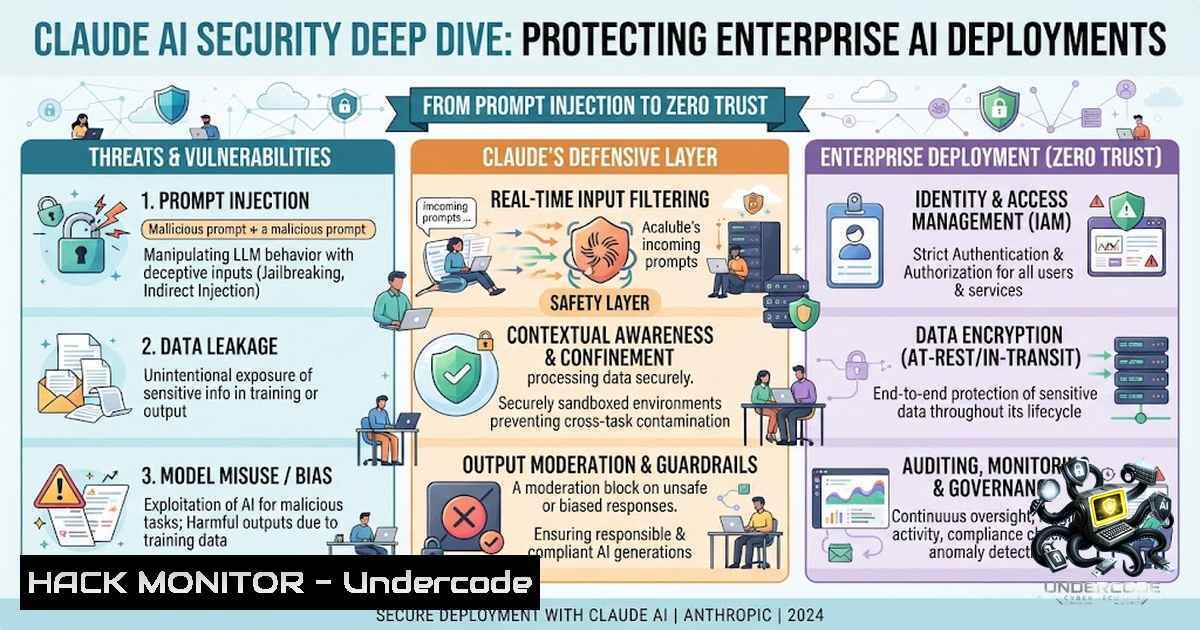
Introduction:
As organizations rapidly integrate large language models like Anthropic’s Claude into their security operations, development workflows, and business processes, a new attack surface emerges that traditional security controls weren’t designed to address. From prompt injection vulnerabilities that can exfiltrate sensitive conversation data to the governance challenges of autonomous AI agents with tool access, securing AI deployments requires a fundamentally different approach. This article explores the critical security considerations for enterprise Claude deployments, providing hands-on techniques to harden your AI infrastructure against emerging threats.
Learning Objectives:
- Understand prompt injection attack vectors and implement defense-in-depth mitigation strategies
- Configure API safeguards, tenant restrictions, and network-level access controls for Claude Enterprise
- Apply Zero Trust principles to autonomous AI agents and MCP-enabled deployments
- Master security-hardened configurations across Linux, Windows, and macOS environments
- Implement compliance monitoring and data loss prevention for AI-powered workflows
You Should Know:
1. Understanding and Mitigating Prompt Injection Attacks
Prompt injection remains the most significant security risk facing enterprise AI deployments. Unlike traditional software vulnerabilities, prompt injection is a form of adversarial persuasion where malicious instructions hidden in web content, emails, or documents trick the AI into taking unintended actions. Attackers can instruct Claude to summarize previous conversations to build user profiles, extract sensitive chats about mergers or medical concerns, or dump what the model considers sensitive information.
Step-by-Step Guide to Hardening Against Prompt Injection:
Step 1: Implement Input Sanitization
Before sending any external data to Claude, sanitize all inputs. External data from Jira tickets, GitHub PRs, or customer messages should never be injected directly into prompts without validation.
Step 2: Deploy Moderation APIs
Run a moderation API against all end-user prompts before they reach Claude. This ensures harmful or malicious content is filtered at the boundary.
Step 3: Establish Human Review Systems
Set up internal human review to flag prompts marked as potentially harmful, enabling intervention to restrict or remove users with high violation rates.
Step 4: Create Custom Interaction Frameworks
Restrict end-user interactions with Claude to a limited set of prompts or allow Claude only to review specific knowledge bases you already possess.
Step 5: Leverage Claude’s Built-in Resistance
Claude demonstrates significantly stronger prompt injection robustness than previous models, thanks to advanced training methods like Constitutional AI. Layer your own strategies on top of this foundation.
Linux Command for Log Analysis:
 Monitor Claude API logs for suspicious patterns
sudo journalctl -u claude-api -f | grep -E "injection|suspicious|blocked"
 Parse access logs for unusual prompt lengths (potential injection attempts)
awk '$9 > 2000 {print $0}' /var/log/claude/access.log | mail -s "Suspicious Long Prompts" [email protected]
Windows PowerShell for API Monitoring:
 Monitor Claude API endpoints for anomalous activity
Get-WinEvent -LogName "Claude-API" | Where-Object {$_.Message -match "injection|blocked"} | Format-Table TimeCreated, Message
 Set up real-time alerting
Register-ObjectEvent -Query "SELECT  FROM System WHERE EventID=4625" -Action { Send-MailMessage -To "[email protected]" -Subject "Claude Alert" }
2. Enterprise-Grade API Security and Access Controls
Securing Claude at the API level requires a multi-layered approach combining network controls, identity management, and compliance enforcement. Anthropic now offers integrations with over 60 top security and compliance providers across DLP, SASE, data security, SIEM, and security operations categories.
Step-by-Step Guide to API Security Configuration:
Step 1: Enforce Tenant Restrictions
IT administrators on Enterprise plans can enforce network-level access control, ensuring users on corporate networks can only access approved organizational accounts, preventing unauthorized personal account usage.
Step 2: Configure Data Loss Prevention
Block personal account usage from corporate networks and enforce data residency and access policies.
Step 3: Implement API Safeguards Tools
Create custom frameworks that restrict end-user interactions with Claude to a limited set of prompts, reducing the attack surface for malicious behavior.
Step 4: Deploy Compliance API Integrations
Tools like Akto’s Claude Compliance API Integration provide security teams visibility into Claude Enterprise chats, files, connectors, and projects, detecting prompt injection, sensitive data leakage, and policy violations.
Step 5: Establish Audit Logging
Ensure comprehensive audit logging for all Claude interactions, including tool usage, API calls, and user authentication events.
Linux Command for API Key Rotation:
 Automate API key rotation using AWS Secrets Manager
aws secretsmanager rotate-secret --secret-id claude-api-key --rotation-rules "{\"AutomaticallyAfterDays\": 30}"
 Verify key rotation status
aws secretsmanager describe-secret --secret-id claude-api-key --query 'RotationEnabled'
Windows Command for Access Control:
 Enforce network-level restrictions via Windows Firewall
netsh advfirewall firewall add rule name="Claude API Access" dir=out action=block remoteip=0.0.0.0/0 localport=443 protocol=TCP
 Create exception for approved IP ranges
netsh advfirewall firewall add rule name="Claude API Allowed" dir=out action=allow remoteip=192.168.1.0/24 localport=443 protocol=TCP
3. Zero Trust Architecture for Autonomous AI Agents
Agentic AI systems introduce unique security challenges. Autonomous agents with tool access can authenticate as users, query production databases, create and merge pull requests, send emails, and modify Confluence pages. The Zero Trust framework for AI agents addresses tool access, autonomous decision-making, context persistence, and multi-agent coordination.
Step-by-Step Guide to Zero Trust Agent Deployment:
Step 1: Implement the Hard Rule
Restricted data never enters an AI context window — not in files Claude reads, not as examples.
Step 2: Differentiate Risk Profiles
The biggest mistake in enterprise AI governance is applying the same rules to everything. Local usage and shared usage have fundamentally different risk profiles.
Step 3: Deploy Security-Hardened Configurations
Use production-ready configurations like claude-code-hardened, built by security engineers through direct penetration testing of Claude Code, Claude Cowork, and Claude Chat in enterprise environments.
Step 4: Control the Six Critical Domains
Ensure your Claude and MCP deployment addresses: secrets management, identity and access control, network isolation, approved server governance, audit logging, and policy enforcement.
Step 5: Monitor Agent Behavior
Implement continuous monitoring of agent actions, including file access, network connections, and system modifications.
Linux Command for Agent Activity Monitoring:
 Monitor Claude Code agent file access
inotifywait -m -r -e access,modify /path/to/claude-workspace | while read event; do
echo "$(date): $event" >> /var/log/claude-agent.log
done
 Audit network connections from Claude processes
sudo lsof -i -P -1 | grep claude
Windows PowerShell for Agent Auditing:
 Monitor Claude Code process activity
Get-Process -1ame "claude" | Get-Process -IncludeUserName | Format-Table ProcessName, UserName, StartTime
 Track file system changes in Claude workspace
$watcher = New-Object System.IO.FileSystemWatcher
$watcher.Path = "C:\ClaudeWorkspace"
$watcher.Filter = "."
$watcher.EnableRaisingEvents = $true
Register-ObjectEvent $watcher "Changed" -Action { Write-Host "File changed: $($EventArgs.FullPath)" }
4. Security Training and Compliance Readiness
As AI becomes embedded in security operations, formal training becomes essential. Courses now cover prompt engineering for cybersecurity, Claude 3 security and cost optimization, and AI-driven SOC operations. Organizations must also prepare for AI-accelerated offense, closing patch gaps and handling higher volumes of vulnerability reports.
Step-by-Step Guide to Building AI Security Training Programs:
Step 1: Assess Current Capabilities
Evaluate your team’s understanding of AI security risks, including prompt injection, data leakage, and model manipulation.
Step 2: Implement Role-Based Training
Develop training tracks for different roles: security engineers, developers, SOC analysts, and executives.
Step 3: Deploy Hands-On Labs
Use platforms like O’Reilly’s Agentic AI Coding for Cybersecurity course, which covers Claude Code, Codex CLI, Cursor, and OpenCode for real-world cybersecurity workflows.
Step 4: Establish Governance Frameworks
Leverage experience in establishing AI governance frameworks to ensure safe and practical AI tool usage.
Step 5: Conduct Regular Security Drills
Run simulated prompt injection attacks and agent compromise scenarios to test defenses.
Linux Command for Training Environment Setup:
 Set up isolated training environment using Docker
docker run -it --rm --1ame claude-training -v /training-data:/data anthropic/claude:latest
 Create vulnerability scanning pipeline
docker run --rm -v $(pwd):/src aquasec/trivy image --severity HIGH,CRITICAL claude:latest
Windows Command for Compliance Scanning:
 Run Grype vulnerability scanner
grype dir:C:\ClaudeWorkspace --fail-on high
 Generate compliance report
grype dir:C:\ClaudeWorkspace -o json > compliance_report.json
5. Advanced Threat Detection and Incident Response
Detecting AI-specific threats requires specialized monitoring. The OWASP Top 10 now includes prompt injection and Agent Goal Hijack as critical risks. Memory persistence attacks have been identified where routine developer workflows can turn into persistent prompt injection.
Step-by-Step Guide to AI Threat Detection:
Step 1: Implement Context-Aware Monitoring
Monitor for “phantom user turn” phenomena where context-aware prompt injection can carry data-exfiltration payloads.
Step 2: Deploy Memory Attack Detection
Watch for routine workflows that could turn into persistent prompt injection, such as cloning repositories and approving dependency installations.
Step 3: Establish Incident Response Playbooks
Develop specific playbooks for AI security incidents, including prompt injection detection, data leakage containment, and agent compromise response.
Step 4: Integrate SIEM with AI Telemetry
Connect Claude Enterprise integrations with existing SIEM solutions for comprehensive monitoring.
Step 5: Conduct Regular Penetration Testing
Use security-hardened configurations developed through direct penetration testing of Claude deployments.
Linux Command for Incident Detection:
 Real-time detection of suspicious Claude activity
tail -f /var/log/claude/.log | grep -E "injection|exfil|unauthorized|bypass" | while read line; do
echo "$(date): ALERT - $line" >> /var/log/claude-incidents.log
 Trigger alert
curl -X POST https://your-siem-endpoint/alerts -d "{\"message\":\"$line\"}"
done
Windows PowerShell for Incident Response:
 Automated incident response script
$suspicious = Get-EventLog -LogName "Claude-Security" -EntryType Error, Warning | Where-Object {$_.Message -match "injection|blocked"}
if ($suspicious.Count -gt 0) {
Send-MailMessage -To "[email protected]" -Subject "Claude Security Incident" -Body "Suspicious activity detected"
Start-Process "C:\IncidentResponse\containment.ps1"
}
What Undercode Say:
- Key Takeaway 1: Prompt injection is not a bug — it’s persuasion. The security community has been warning about this for years, and organizations must treat it as a fundamental architectural risk rather than a fixable vulnerability.
-
Key Takeaway 2: Zero Trust for AI agents is non-1egotiable. Autonomous agents with tool access represent a paradigm shift in security risk, requiring completely new governance frameworks that distinguish between local and shared usage profiles.
-
Key Takeaway 3: Enterprise AI security requires a layered defense strategy. No single control is sufficient — organizations must combine input sanitization, moderation APIs, human review systems, network controls, and continuous monitoring to achieve meaningful protection.
Analysis: The integration of AI like Claude into enterprise environments represents both unprecedented opportunity and unprecedented risk. While Anthropic has made significant strides in building security into their models — from Constitutional AI training to ASL-3 protections for CBRN-related misuse — the ultimate security of AI deployments depends on how organizations configure, monitor, and govern these systems. The emergence of prompt injection as a persistent attack vector, combined with the growing autonomy of AI agents, demands that security teams develop entirely new skill sets and frameworks. Organizations that treat AI security as an afterthought will find themselves vulnerable to attacks that traditional security tools cannot detect or prevent. Those that proactively implement defense-in-depth strategies — from API safeguards to Zero Trust agent architectures — will be positioned to safely harness the transformative power of AI while maintaining enterprise-grade security posture.
Prediction:
- +1 Enterprise AI security will become a distinct cybersecurity discipline within 18 months, with dedicated certifications, frameworks, and tooling emerging to address the unique challenges of LLM security.
-
+1 Organizations that implement Zero Trust architectures for AI agents will demonstrate significantly lower incident rates and faster recovery times, creating a competitive advantage in AI adoption.
-
-1 The frequency and sophistication of prompt injection attacks will increase dramatically as attackers recognize the high value of exfiltrating sensitive AI conversation data, potentially leading to major data breaches in 2026-2027.
-
-1 Organizations that fail to implement proper API safeguards and network controls will face regulatory scrutiny and potential fines as AI governance frameworks mature and enforcement intensifies.
-
+1 The integration of AI security monitoring with existing SIEM and SOAR platforms will become standard practice, enabling automated detection and response to AI-specific threats.
-
-1 The persistence of memory-based attacks will expose vulnerabilities in AI development workflows, requiring significant changes to how developers interact with AI coding assistants.
-
+1 Security-hardened configurations like `claude-code-hardened` will become the industry standard for enterprise AI deployments, with vendors offering pre-hardened solutions as default options.
-
-1 Organizations that treat all AI usage with the same security policies will experience the highest rate of security incidents, as local and shared usage have fundamentally different risk profiles that require differentiated controls.
▶️ Related Video (78% Match):
https://www.youtube.com/watch?v=1MJvRAkBmbM
🎯Let’s Practice For Free:
🎓 Live Courses & Certifications:
Join Undercode Academy for Verified Certifications
🚀 Request a Custom Project:
Secure, high-velocity infrastructure and disruptive technological engineering. Contact our engineering team for high-tier development and proprietary systems:
[email protected]
💎 Smart Architecture | 🛡️ Secure by Design | ⭐ Trusted by Thousands
IT/Security Reporter URL:
Reported By: Harishkumar Sh – Hackers Feeds
Extra Hub: Undercode MoN
Basic Verification: Pass ✅


