Listen to this Post
Introduction:
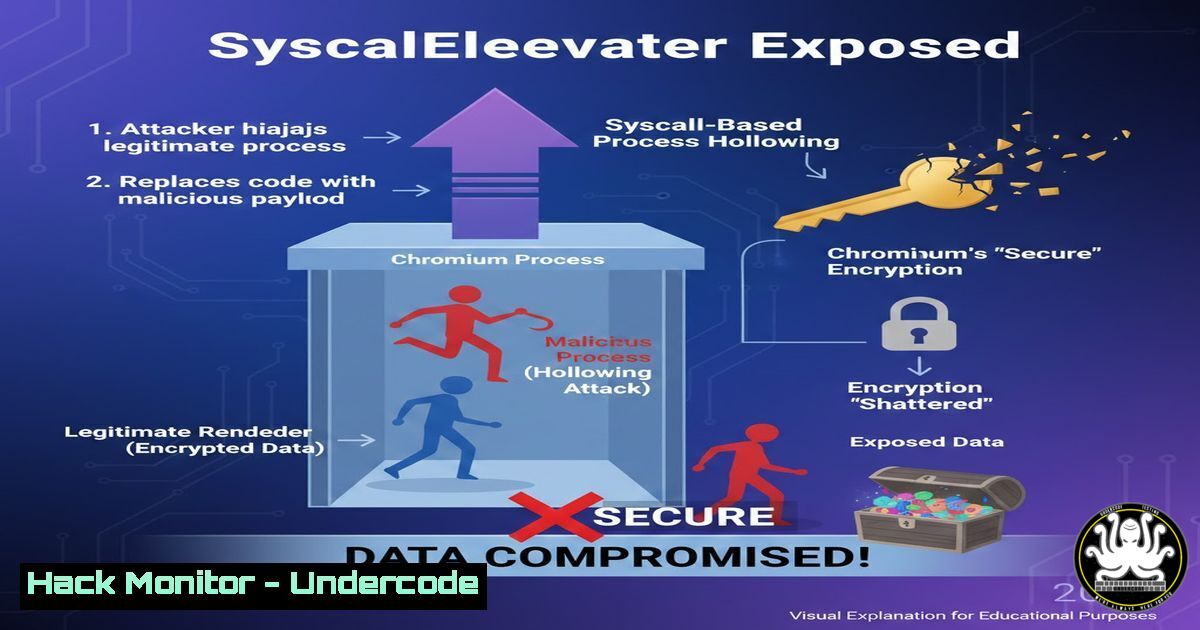
Chromium’s App-Bound Encryption is designed to be the last line of defense for sensitive browser data, tying decryption keys to a specific process on a specific device. However, the emergence of tools like ChromElevator demonstrates a sophisticated in-memory attack that bypasses these protections entirely. This article deconstructs the post-exploitation technique of Direct Syscall-based Reflective Process Hollowing, revealing how attackers can perform fileless, user-mode extraction of cookies, passwords, and payment data from Chrome, Edge, and Brave without triggering traditional security alarms.
Learning Objectives:
- Understand the mechanics of Chromium’s App-Bound Encryption and its intended security boundary.
- Deconstruct the attack chain of Direct Syscall-based Reflective Process Hollowing.
- Learn defensive strategies and detection methodologies for this class of fileless, in-memory attacks.
You Should Know:
1. The Illusion of App-Bound Security
Chromium’s App-Bound Encryption encrypts the Local State file (containing the decryption key for the “Login Data” and “Cookies” SQLite databases) using a key derived from the Windows Data Protection API (DPAPI) or an OS-level credential store. This key is bound to the user’s profile and the Chromium process. The core flaw exploited is that once the legitimate browser process loads this key into memory, it becomes a target. ChromElevator does not attack the encrypted data at rest; it attacks the live process where the secret is decrypted for use.
2. The Attack Vector: Reflective Process Hollowing Primer
Process Hollowing is a technique where a malicious payload is injected into a suspended, legitimate process, replacing its memory space. Reflective loading takes this further by having the payload itself handle its own loading and execution without calling standard Windows API functions, which are heavily monitored. ChromElevator uses a multi-stage approach:
– Step 1: Identify and suspend a target Chromium process (e.g., chrome.exe, msedge.exe).
– Step 2: Use direct syscalls (via frameworks like SysWhispers3) to call low-level Windows Native API (e.g., NtAllocateVirtualMemory, NtWriteVirtualMemory). This bypasses user-mode hooks placed by EDR/AV solutions.
Example Syscall Stub (Theoretical):
; Syscall for NtAllocateVirtualMemory (x64)
mov r10, rcx
mov eax, [bash]
syscall
ret
– Step 3: Write a reflective DLL loader shellcode into the suspended process’s memory. This shellcode is responsible for locating, decrypting (if needed), and mapping the malicious DLL.
– Step 4: The hollowed process is resumed, executing the shellcode which loads the attacker’s DLL entirely in memory.
3. Extraction Module: Targeting the In-Memory SQLite Databases
Once the malicious reflective DLL runs inside the browser’s security context, it has full access to the process’s memory. The tool then:
– Step 1: Locates the handles or memory regions for the `Login Data` (passwords) and `Cookies` SQLite databases. These are held decrypted in the browser’s working memory.
– Step 2: Uses SQLite commands via memory pointers to execute queries and extract records.
Example In-Memory Query Logic (Pseudo-C):
sqlite3 db;
sqlite3_open_v2("file:MemoryDB?mode=memory&cache=shared", &db, SQLITE_OPEN_READONLY, NULL);
sqlite3_exec(db, "SELECT origin_url, username_value, password_value FROM logins", callback, 0, NULL);
– Step 3: For passwords still protected by DPAPI, the tool, now operating as the correct user, can call `CryptUnprotectData` legitimately to decrypt them.
4. Evasion Techniques: Going Fully Fileless
ChromElevator’s stealth is multifaceted. To hunt for such activity, defenders must look beyond disk scans:
– Direct Syscalls: Avoids kernel32.dll/ntdll.dll hooks. Detection requires kernel-mode ETW tracing or syscall telemetry.
– No Dropped Files: The payload is delivered and executed via remote process memory manipulation only. Command used to inject remotely (theoretical, using a tool like `ps.exe` from Sysinternals and a custom injector):
.\injector.exe --pid 1234 --shellcode-path shellcode.bin --technique hollow
– Living Off the Land: Uses the browser’s own signed binaries as the host process, making parent-child process relationships appear normal.
5. Defensive Hardening: Mitigations and Detection Strategies
Organizations must adopt a multi-layered defense-in-depth approach.
- Mitigation 1: Enable Windows Defender Attack Surface Reduction (ASR) rules, particularly “Block process creations originating from PSExec and WMI commands” and “Block credential stealing from the Windows local security authority subsystem (lsass.exe)” (which can be analogous for browser processes).
- Mitigation 2: Deploy policies to restrict arbitrary code injection. In Linux terms, analogous hardening uses `seccomp-bpf` to filter syscalls. For Windows, consider constrained language mode via
▶️ Related Video (88% Match):
🎯Let’s Practice For Free:
IT/Security Reporter URL:
Reported By: Splog Chromelevator – Hackers Feeds
Extra Hub: Undercode MoN
Basic Verification: Pass ✅


