Listen to this Post
Introduction:
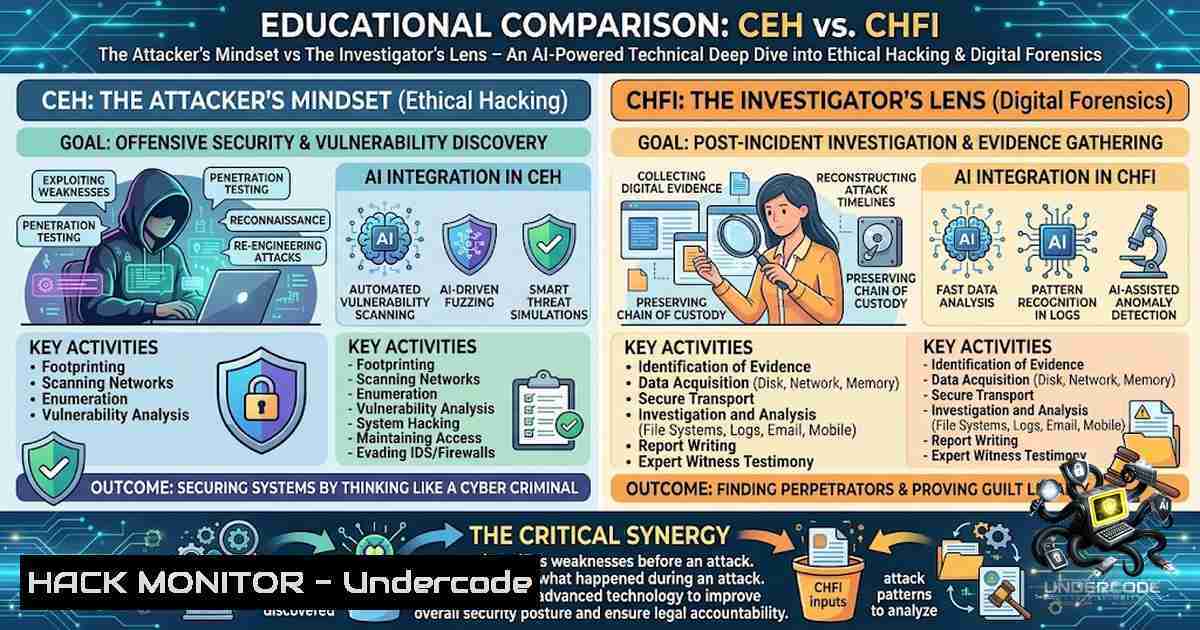
In the modern cybersecurity landscape, two distinct paradigms govern how organizations defend their digital assets: the offensive perspective of ethical hacking and the defensive rigor of digital forensics. The Certified Ethical Hacker (CEH) v13 methodology equips professionals with AI-driven attack techniques spanning reconnaissance to cryptography, while the Computer Hacking Forensic Investigator (CHFI) v12 framework provides the forensic readiness to trace, preserve, and analyze digital evidence across Windows, Linux, macOS, cloud, and IoT environments. Understanding when to think like an attacker and when to think like an investigator is the cornerstone of a mature security operations program.
Learning Objectives:
- Master the CEH v13 20-module curriculum covering all attack vectors from reconnaissance to cryptography, with AI integration across every phase of ethical hacking.
- Develop proficiency in CHFI v12 digital forensics processes, including evidence acquisition, chain of custody, and forensic imaging across 68+ hands-on labs.
- Learn to apply AI-powered automation in reconnaissance, scanning, and covering tracks to accelerate penetration testing workflows.
- Acquire skills to investigate web application attacks, network traffic, malware, and cloud incidents using SIEM and forensic tools.
- Build capabilities to detect, respond to, and mitigate advanced persistent threats (APTs), fileless malware, and IoT/OT attacks.
You Should Know:
1. AI-Powered Reconnaissance and Network Scanning (CEH v13)
CEH v13 integrates artificial intelligence into every phase of the ethical hacking lifecycle, enabling security professionals to work up to 10 times faster and detect threats that traditional methods miss. The reconnaissance phase leverages AI automation to footprint targets, gather intelligence from public sources, and identify potential entry points with unprecedented speed.
Step-by-Step Guide – AI-Enhanced Reconnaissance:
- Step 1: Deploy AI-assisted OSINT tools to aggregate data from social media, DNS records, and search engines. Use automated scripts to correlate findings and generate a comprehensive attack surface map.
- Step 2: Utilize AI-driven network scanning tools (e.g., Nmap with machine learning plugins) to perform intelligent port scanning, service detection, and OS fingerprinting. The AI model prioritizes high-value targets based on vulnerability likelihood.
- Step 3: Apply AI-based vulnerability analysis to correlate scan results with known CVE databases, reducing false positives and highlighting exploitable weaknesses.
- Step 4: Generate automated attack path recommendations, simulating how an adversary would chain vulnerabilities to achieve privilege escalation or lateral movement.
Linux Command Example – AI-Enhanced Nmap Scan:
nmap -sV -sC -O -T4 --script=vuln --script-args=ai-priority=high 192.168.1.0/24
 Flags: -sV (service version), -sC (default scripts), -O (OS detection), -T4 (aggressive timing)
 The --script=vuln runs vulnerability detection scripts; AI prioritization can be integrated via custom NSE scripts
Windows Command Example – PowerShell Recon:
Get-1etTCPConnection -State Established | Select-Object LocalAddress, LocalPort, RemoteAddress, RemotePort
 Lists active network connections for identifying potential command-and-control (C2) traffic
2. System Hacking and Covering Tracks (CEH v13)
Once access is gained, attackers employ system hacking methodologies to escalate privileges, maintain persistence, and cover their tracks. CEH v13 covers steganography, privilege escalation techniques, and AI-driven log manipulation to evade detection.
Step-by-Step Guide – Post-Exploitation and Covering Tracks:
- Step 1: Perform privilege escalation using known exploits (e.g., Dirty Pipe on Linux, PrintNightmare on Windows) or AI-recommended attack vectors based on system configuration.
- Step 2: Deploy rootkits or fileless malware to establish persistence without writing to disk.
- Step 3: Use steganography to hide malicious payloads within image or audio files, bypassing traditional signature-based detection.
- Step 4: Clear or manipulate event logs to obscure activities. On Windows, use `wevtutil` to clear specific logs; on Linux, modify `/var/log/auth.log` or use `shred` to overwrite sensitive files.
Linux Command Example – Log Manipulation:
shred -vfz -1 10 /var/log/auth.log
 Overwrites the authentication log 10 times with random data, then zeroes it out
Windows Command Example – Clearing Event Logs:
wevtutil cl Security
 Clears the Security event log (requires administrative privileges)
3. Digital Forensics Investigation Process (CHFI v12)
CHFI v12 provides a structured framework for digital forensics, from forensic readiness to evidence presentation in legal proceedings. The 15-module curriculum covers disk structures, file systems, data acquisition, and anti-forensics countermeasures.
Step-by-Step Guide – Forensic Investigation Workflow:
- Step 1: Forensic Readiness – Prepare the organization by establishing policies, procedures, and tools for evidence collection. Ensure compliance with chain of custody requirements.
- Step 2: Evidence Acquisition – Create forensic images of hard drives, memory dumps, and network captures using tools like FTK Imager or dd on Linux. Preserve the integrity of evidence through cryptographic hashing (MD5/SHA-1).
- Step 3: File System Analysis – Examine disk structures and file systems on Windows (NTFS), Linux (EXT4), and macOS (APFS) to recover deleted files, analyze metadata, and identify hidden partitions.
- Step 4: Log Analysis – Correlate event logs from Windows Event Viewer, Linux syslog, and SIEM platforms to reconstruct the attack timeline.
- Step 5: Malware Forensics – Perform static and dynamic analysis of malicious binaries to understand their functionality, identify indicators of compromise (IOCs), and trace their origin.
Linux Command Example – Forensic Imaging:
dd if=/dev/sda of=/mnt/evidence/sda_image.dd bs=4096 conv=noerror,sync
 Creates a bit-for-bit copy of /dev/sda with error handling
sha256sum /mnt/evidence/sda_image.dd > /mnt/evidence/sda_image.sha256
 Generates a cryptographic hash for integrity verification
Windows Command Example – Memory Acquisition (using WinPMEM):
.\winpmem_2.0.3.exe -output memdump.raw
 Acquires a full memory dump for forensic analysis
4. Windows and Linux Forensics (CHFI v12)
CHFI v12 dedicates specific modules to investigating Windows and Linux systems, covering registry analysis, memory forensics, browser history, and event log examination.
Step-by-Step Guide – Windows Registry and Memory Forensics:
- Step 1: Extract and analyze the Windows registry hives (SAM, SYSTEM, SOFTWARE, SECURITY, NTUSER.DAT) to identify user accounts, installed applications, and system configurations.
- Step 2: Use memory forensics tools (e.g., Volatility) to analyze RAM dumps for running processes, network connections, and injected code.
- Step 3: Examine browser artifacts (history, cookies, cache) to reconstruct user activities and identify malicious domains visited during the attack.
- Step 4: Analyze Linux system logs (
/var/log/), bash history (~/.bash_history), and authentication logs to trace attacker commands and movements.
Linux Command Example – Log Analysis:
grep "Failed password" /var/log/auth.log | awk '{print $1,$2,$3,$9,$11}' | sort | uniq -c
 Counts failed SSH login attempts by IP address to identify brute-force attacks
Windows Command Example – Registry Analysis (PowerShell):
Get-ItemProperty -Path "HKLM:\SOFTWARE\Microsoft\Windows\CurrentVersion\Run"
 Lists startup programs that may indicate persistence mechanisms
5. Cloud and Mobile Forensics (CHFI v12)
Modern investigations extend beyond traditional endpoints to cloud platforms (AWS, Azure, GCP) and mobile devices (Android, iOS). CHFI v12 covers forensic techniques for these environments, including logical and physical acquisition of mobile devices.
Step-by-Step Guide – Cloud and Mobile Forensics:
- Step 1: Cloud Forensics – Collect and analyze logs from AWS CloudTrail, Azure Activity Logs, and GCP Audit Logs to identify unauthorized access, API calls, and resource modifications.
- Step 2: Mobile Forensics – Perform logical acquisition (backup extraction) or physical acquisition (chip-off/JTAG) of Android and iOS devices to recover call logs, messages, app data, and geolocation information.
- Step 3: Analyze cloud storage buckets (S3, Azure Blob) for data exfiltration patterns and misconfigured permissions.
- Step 4: Correlate mobile device data with cloud activity to establish a complete timeline of the incident.
Linux Command Example – AWS CLI Log Analysis:
aws cloudtrail lookup-events --lookup-attributes AttributeKey=EventName,AttributeValue=ConsoleLogin --max-items 10
 Retrieves recent console login events from AWS CloudTrail for security auditing
Windows Command Example – Azure PowerShell Log Analysis:
Get-AzActivityLog -StartTime (Get-Date).AddDays(-7) | Where-Object {$_.OperationName -eq "Microsoft.Compute/virtualMachines/write"}
 Lists virtual machine creation or modification activities in the last 7 days
6. IoT and OT Forensics (CHFI v12)
The proliferation of IoT and OT devices introduces new forensic challenges. CHFI v12 includes modules on investigating IoT device vulnerabilities and forensic examination processes.
Step-by-Step Guide – IoT Forensics Investigation:
- Step 1: Identify and catalog all IoT/OT devices on the network using specialized scanning tools (e.g., Shodan, Nmap IoT scripts).
- Step 2: Extract firmware from IoT devices for static analysis to identify backdoors, hardcoded credentials, and insecure configurations.
- Step 3: Analyze network traffic between IoT devices and cloud services to detect anomalous communication patterns indicative of compromise.
- Step 4: Preserve and analyze logs from IoT gateways and controllers to reconstruct attack sequences and identify the root cause.
Linux Command Example – IoT Device Discovery:
nmap -sP 192.168.1.0/24 | grep "Nmap scan" | awk '{print $5}' | while read ip; do curl -s --connect-timeout 2 "http://$ip" | head -1 5; done
 Discovers active devices on the local network and attempts to fetch their web interfaces
What Undercode Say:
- Key Takeaway 1: CEH v13 is no longer just about knowing attack techniques; it’s about leveraging AI to execute them faster, smarter, and with greater precision. The integration of AI across all 20 modules transforms ethical hacking from a manual, time-intensive process into an automated, intelligence-driven discipline.
- Key Takeaway 2: CHFI v12 provides a comprehensive, vendor-1eutral forensic framework that prepares investigators to handle evidence from virtually any digital source – from traditional file systems to cloud platforms and IoT devices.
Analysis: The distinction between CEH and CHFI is not merely academic – it represents two sides of the same cybersecurity coin. CEH teaches professionals to think like attackers, identifying vulnerabilities before they can be exploited. CHFI teaches investigators to trace the digital footprint left behind after an attack occurs. Together, they form a complete security lifecycle: proactive vulnerability assessment followed by reactive incident investigation. Organizations that invest in both skill sets are better equipped to defend against sophisticated threats, respond effectively to breaches, and preserve evidence for legal proceedings. The inclusion of AI in CEH v13 and the expansion of CHFI v12 to cover cloud, mobile, and IoT forensics reflect the evolving nature of cyber threats and the need for continuous skill development.
Prediction:
- +1 The integration of AI into ethical hacking certifications like CEH v13 will drive a new wave of automation in penetration testing, enabling security teams to identify and remediate vulnerabilities at machine speed, reducing mean time to detection (MTTD) and mean time to response (MTTR).
- +1 The demand for digital forensics professionals with cloud and mobile investigation skills will surge as organizations migrate to hybrid and multi-cloud environments, creating new career opportunities for CHFI-certified experts.
- -1 As AI-powered hacking tools become more accessible, the barrier to entry for malicious actors will decrease, potentially leading to an increase in sophisticated, automated attacks that require equally advanced defensive and forensic capabilities.
- +1 The convergence of ethical hacking and digital forensics skill sets within security teams will foster a more holistic approach to cybersecurity, where offensive and defensive disciplines inform and strengthen each other.
- -1 The rapid evolution of IoT and OT attack surfaces, combined with the shortage of trained forensic investigators, may leave critical infrastructure vulnerable to undetected and uninvestigated breaches.
▶️ Related Video (64% Match):
🎯Let’s Practice For Free:
🎓 Live Courses & Certifications:
Join Undercode Academy for Verified Certifications
🚀 Request a Custom Project:
Secure, high-velocity infrastructure and disruptive technological engineering. Contact our engineering team for high-tier development and proprietary systems:
[email protected]
💎 Smart Architecture | 🛡️ Secure by Design | ⭐ Trusted by Thousands
IT/Security Reporter URL:
Reported By: https://lnkd.in/p/ewjfB9k3 – Hackers Feeds
Extra Hub: Undercode MoN
Basic Verification: Pass ✅


