Listen to this Post
Introduction:
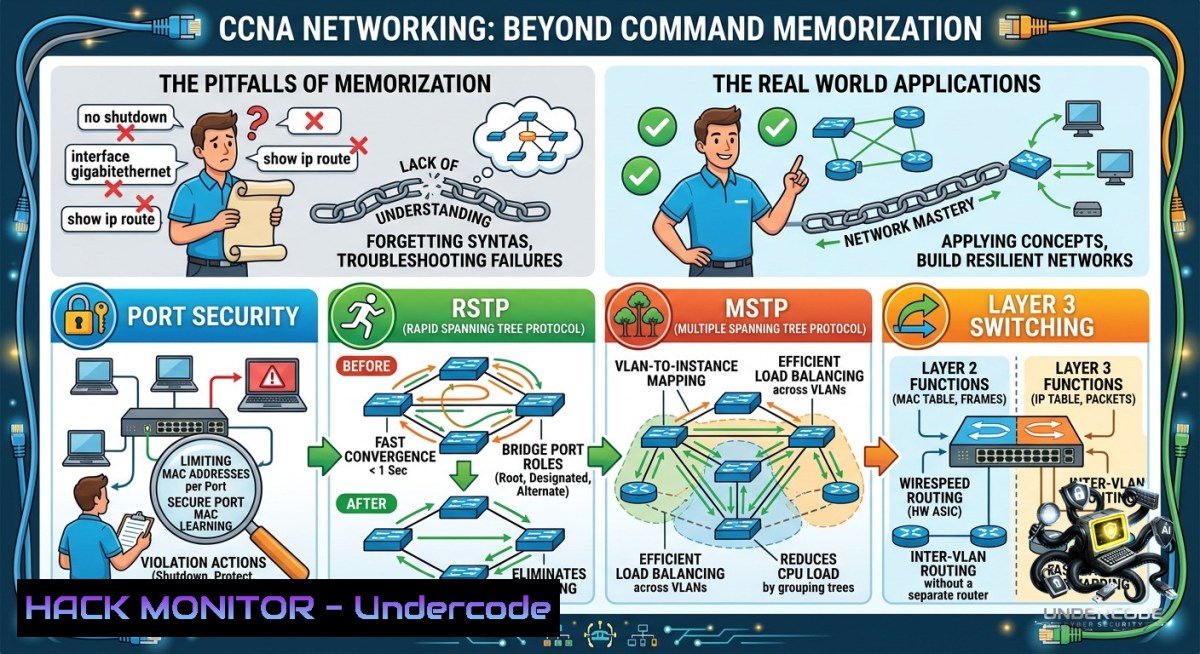
Most aspiring network engineers approach CCNA by cramming command syntax and hoping for the best. In reality, switching fundamentals, loop prevention, port-level access control, and multilayer switching form the bedrock of every enterprise network. This article strips away the memorization trap and delivers hands-on logic, configuration workflows, and troubleshooting commands for Port Security, Rapid Spanning Tree Protocol (RSTP), Multiple Spanning Tree Protocol (MSTP), and Layer 3 Switching—transforming certification theory into real-world network mastery.
Learning Objectives:
- Understand how switches build CAM tables and apply Port Security to block MAC flooding attacks.
- Configure RSTP and MSTP to eliminate Layer 2 loops while optimizing convergence and load balancing.
- Implement Layer 3 Switching using SVIs to replace legacy router-on-a-stick designs.
You Should Know:
- Port Security: Defeating MAC Flooding at the Edge
Port Security prevents an attacker from overwhelming a switch’s CAM table (a technique used to force the switch into hub‑like flooding mode). It limits the number of MAC addresses permitted on a port and defines violation actions. Below are the essential Cisco IOS commands to harden an access port.
Step‑by‑step guide to configure Port Security:
1. Enter interface configuration mode (e.g., FastEthernet 0/1):
Switch> enable
Switch configure terminal
Switch(config) interface fastEthernet 0/1
- Enable Port Security and set a maximum MAC count (default = 1):
Switch(config-if) switchport port-security
Switch(config-if) switchport port-security maximum 2
-
Define violation mode (protect – drops offending traffic without log; restrict – drops + increments counter; shutdown – err-disables port):
Switch(config-if) switchport port-security violation shutdown
-
Enable sticky MAC learning – dynamically learned MACs are added to running-config:
Switch(config-if) switchport port-security mac-address sticky
5. Verify configuration:
Switch show port-security interface fastEthernet 0/1
Switch show port-security address
Troubleshooting a shut down (err‑disabled) port:
Switch show interfaces fastEthernet 0/1 status  Verify err-disabled state
Switch show port-security interface fastEthernet 0/1  Check violation count
Switch(config-if) shutdown
Switch(config-if) no shutdown  Manual recovery
For automatic recovery: `errdisable recovery cause psecure-violation` in global config.
Linux command correlation – While not identical, network hardening on Linux includes `arp` filtering and `iptables` to limit MAC flooding:
 Limit ARP announcements (similar principle)
sudo iptables -A INPUT -m mac --mac-source 00:11:22:33:44:55 -j ACCEPT
2. RSTP (IEEE 802.1w): Sub‑Second Loop Prevention
RSTP improves upon legacy STP (802.1D) by introducing alternate and backup port roles and a handshake mechanism that dramatically reduces convergence from 50 seconds to under 6 seconds (often <1 sec). Understanding RSTP port states (Discarding, Learning, Forwarding) and roles (Root, Designated, Alternate, Backup) is critical.
Step‑by‑step guide to enable and verify RSTP:
- Set spanning-tree mode to rapid‑pvst (Cisco proprietary but industry standard):
Switch(config) spanning-tree mode rapid-pvst
-
Configure primary and secondary root bridges for VLAN 1:
Switch(config) spanning-tree vlan 1 root primary
Switch(config) spanning-tree vlan 1 root secondary
-
Tune RSTP timers (advanced – only when necessary):
Switch(config) spanning-tree vlan 1 hello-time 2
Switch(config) spanning-tree vlan 1 forward-time 15
Switch(config) spanning-tree vlan 1 max-age 20
4. Verify RSTP operation:
Switch show spanning-tree vlan 1
Switch show spanning-tree summary
Switch show spanning-tree interface fastEthernet 0/1 detail
Forcing edge port behavior (similar to PortFast for end devices):
Switch(config-if) spanning-tree portfast edge
This immediately transitions a port to forwarding, bypassing RSTP listening/learning – safe only for host ports.
Troubleshooting slow convergence – Check for inconsistent port roles:
Switch debug spanning-tree events
Switch show spanning-tree inconsistentports
- MSTP (IEEE 802.1s): VLAN Scaling Without CPU Meltdown
MSTP maps multiple VLANs into fewer spanning‑tree instances, reducing BPDU overhead and CPU load compared to per‑VLAN RSTP (PVST+). In large enterprise networks with hundreds of VLANs, MSTP enables efficient load balancing by allowing different instances to use different root bridges.
Step‑by‑step guide to configure MSTP:
1. Set spanning-tree mode to mst:
Switch(config) spanning-tree mode mst
- Enter MST configuration mode and define the region (all switches in the same region must have identical name, revision number, and VLAN‑to‑instance mapping):
Switch(config) spanning-tree mst configuration
Switch(config-mst) name REGION-1
Switch(config-mst) revision 1
Switch(config-mst) instance 1 vlan 10, 20, 30
Switch(config-mst) instance 2 vlan 40, 50, 60
3. Set root bridge priority per instance:
Switch(config) spanning-tree mst 1 root primary
Switch(config) spanning-tree mst 2 root secondary
4. Verify MSTP operation:
Switch show spanning-tree mst configuration
Switch show spanning-tree mst 1
Switch show spanning-tree mst detail
Practical use case: Instance 1 root = Switch A (for VLANs 10,20,30), Instance 2 root = Switch B (for VLANs 40,50,60). Traffic for different VLAN groups flows over different active links, achieving true load balancing.
4. Layer 3 Switching: SVIs That Kill Router‑on‑a‑Stick
A Layer 3 switch performs inter‑VLAN routing using Switched Virtual Interfaces (SVIs) – logical interfaces associated with a VLAN. Unlike router‑on‑a‑stick, which requires a trunk link and subinterfaces, SVIs deliver near wire‑speed routing and eliminate the single‑link bottleneck.
Step‑by‑step guide to configure inter‑VLAN routing with SVIs:
1. Enable IP routing (global configuration):
Switch(config) ip routing
2. Create VLANs and assign access ports:
Switch(config) vlan 10
Switch(config-vlan) name Sales
Switch(config) vlan 20
Switch(config-vlan) name Engineering

Switch(config) interface fastEthernet 0/1
Switch(config-if) switchport mode access
Switch(config-if) switchport access vlan 10
- Create SVI for each VLAN and assign IP addresses:
Switch(config) interface vlan 10
Switch(config-if) ip address 192.168.10.1 255.255.255.0
Switch(config-if) no shutdown</li>
</ol>

Switch(config) interface vlan 20
Switch(config-if) ip address 192.168.20.1 255.255.255.0
Switch(config-if) no shutdown
- Enable routing between VLANs (automatically enabled by
ip routing). For dynamic routing, add OSPF/EIGRP:Switch(config) router ospf 1 Switch(config-router) network 192.168.10.0 0.0.0.255 area 0 Switch(config-router) network 192.168.20.0 0.0.0.255 area 0
5. Verify routing:
Switch show ip route
Switch show ip interface brief | include Vlan
Switch ping 192.168.20.2 source vlan 10
Windows/Linux commands to test cross‑VLAN reachability after SVI configuration:
 Linux: set default gateway to SVI IP
ip route add default via 192.168.10.1
 Windows: verify route
route PRINT
ping 192.168.20.1
What Undercode Say:
- Key Takeaway 1: Certification cramming creates fragile engineers. The true value of CCNA is understanding why STP converges the way it does, how CAM aging impacts security, and when to choose MSTP over RSTP. Hands‑on labs with `show spanning-tree` and `debug` commands reveal more than any brain dump.
- Key Takeaway 2: Port Security is not a theoretical bullet point – it directly mitigates real MAC flooding tools like `macof` (part of dsniff suite). Combine sticky MAC with violation shutdown and SNMP traps to turn an attack into a forensic alert. Layer 3 switching with SVIs reduces latency by 40‑60% compared to router‑on‑a‑stick, a measurable difference in voice and video networks.
Analysis (approx. 10 lines): The original post correctly highlights that memorizing commands without architectural logic leads to brittle troubleshooting skills. In my experience, network failures often stem from misconfigured spanning-tree root bridges or forgotten port-security aging. RSTP’s alternate port is routinely misunderstood – it’s not a backup; it’s a pre‑computed loop‑free path that becomes active instantly if the root port fails. Similarly, MSTP region mismatches are the 1 cause of unexpected Layer 2 loops after merging acquired companies. Layer 3 switching has largely replaced traditional routers in campus cores, but many engineers still configure router‑on‑a‑stick for legacy reasons. The commands provided above (especially `spanning-tree mst configuration` and
ip routing) are the exact snippets used in Fortune 500 data centers. If you only take one thing from this article, remember: `show spanning-tree vlan 1` and `show port-security` should be your first reflexes during any network anomaly.Prediction:
- +1 RSTP and MSTP will remain relevant for at least another decade; even as SD‑Access and EVPN‑VXLAN gain traction, the underlying loop‑prevention logic directly descends from STP. Engineers who master RSTP today will adapt faster to controller‑based architectures.
- -1 Port Security alone is increasingly bypassed by attackers using VLAN hopping and double‑tagging. Within five years, 802.1X (NAC) will be mandatory for edge defense, making static port security a secondary control. The knowledge gap will leave unprepared CCNA holders vulnerable in audits.
- +1 Layer 3 switching is evolving into programmable ASICs with P4 language support. The SVI concept will morph into virtual routing and forwarding (VRF)‑aware logical interfaces, but the configuration pattern (
interface vlan X) will stay almost identical – a huge win for current learners. - -1 Automation tools like Ansible and Terraform now generate spanning-tree and port-security configs from templates. Relying solely on manual CLI will be a career bottleneck. Engineers must add `napalm` or `pyats` scripts to their toolkit to stay relevant.
▶️ Related Video (70% Match):
🎯Let’s Practice For Free:
🎓 Live Courses & Certifications:
Join Undercode Academy for Verified Certifications
🚀 Request a Custom Project:
Secure, high-velocity infrastructure and disruptive technological engineering. Contact our engineering team for high-tier development and proprietary systems:
[email protected]
💎 Smart Architecture | 🛡️ Secure by Design | ⭐ Trusted by ThousandsIT/Security Reporter URL:
Reported By: Iamtolgayildiz Ccna – Hackers Feeds
Extra Hub: Undercode MoN
Basic Verification: Pass ✅🔐JOIN OUR CYBER WORLD [ CVE News • HackMonitor • UndercodeNews ]
📢 Follow UndercodeTesting & Stay Tuned:
- Enable routing between VLANs (automatically enabled by


