Listen to this Post
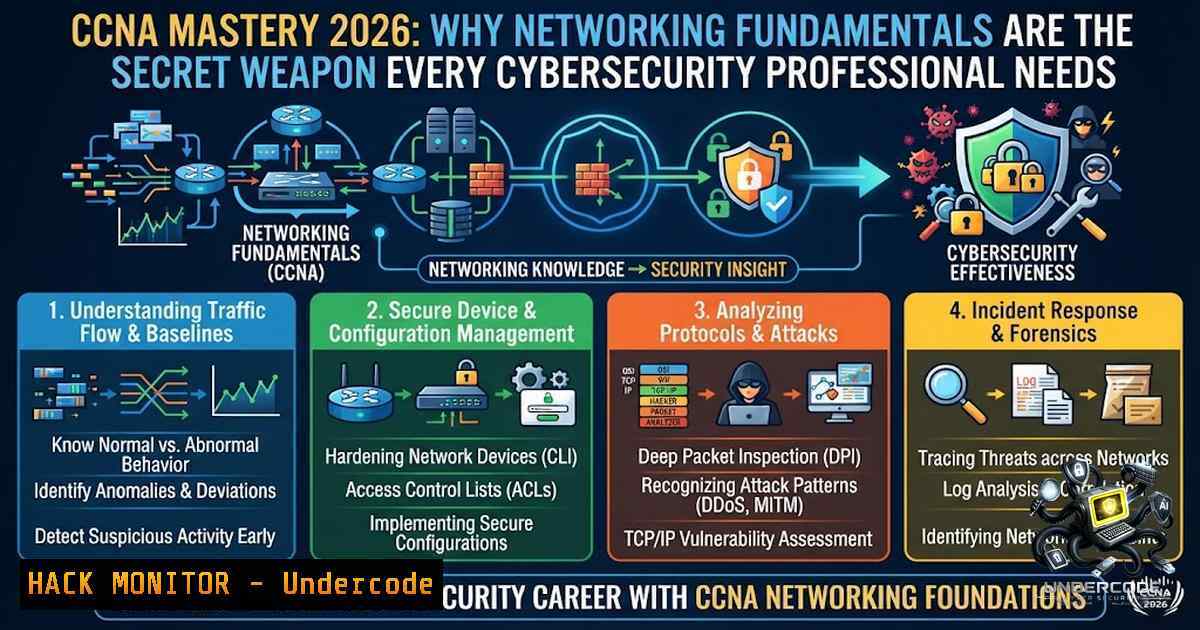
Introduction:
In an era where cloud computing, AI-driven operations, and zero-trust architectures dominate the cybersecurity conversation, one truth remains constant: strong networking fundamentals are the bedrock of every successful IT career. With over a decade of experience in enterprise networking and cybersecurity, industry professionals consistently emphasize that mastering concepts like subnetting, VLANs, routing, network security, and automation—the core pillars of the CCNA certification—transforms good engineers into exceptional ones. No matter how advanced the technology becomes, a solid foundation makes troubleshooting easier, solutions more effective, and career growth exponentially faster.
Learning Objectives:
- Master IPv4/IPv6 subnetting and the “magic number” method for rapid address calculation
- Configure and verify VLANs, trunking, and inter-VLAN routing on Cisco IOS
- Implement network security hardening across Linux and Windows environments
- Automate repetitive network tasks using Python, Netmiko, and RESTCONF APIs
- Develop systematic troubleshooting methodologies for real-world connectivity issues
You Should Know:
1. Subnetting Mastery: The Non-1egotiable Foundation
Subnetting is the single most critical skill any network engineer must possess. The CCNA 200-301 exam tests this relentlessly, and real-world troubleshooting demands it daily. The most efficient approach is the “magic number” method: subtract the subnet mask octet from 256 to find the block size.
Example: A /26 mask (255.255.255.192) gives a block size of 64. This means subnets increment by 64 in the fourth octet: 0, 64, 128, 192.
Linux Command to Verify Subnet Mask:
 Display IP configuration with subnet mask in dotted decimal
ifconfig

Display subnet mask in prefix notation (/26)
ip address show
The `ifconfig` command shows the subnet mask in dotted decimal format, while `ip address` displays it in slash/prefix notation.
Windows Command:
ipconfig
ipconfig /all  Displays detailed IP, subnet mask, gateway, DNS, MAC, and DHCP lease info
Step-by-Step Subnetting Practice:
1. Identify the network address and subnet mask.
- Calculate the block size:
256 - (value of the interesting octet in the mask). - List subnet ranges by incrementing the block size.
- Determine the network address, first usable host, last usable host, and broadcast address for each subnet.
2. VLAN Configuration and Verification
Virtual Local Area Networks (VLANs) allow segmentation at Layer 2, while subnets handle segmentation at Layer 3. Proper VLAN configuration is essential for network security and performance.
Cisco IOS Commands:
 View existing VLANs and port assignments
show vlan brief

Create a new VLAN
vlan 10
name Sales

Assign an interface to a VLAN
interface fastEthernet 0/1
switchport mode access
switchport access vlan 10

Configure a trunk port
interface gigabitEthernet 0/1
switchport mode trunk
switchport trunk allowed vlan 10,20,30
The `show vlan brief` command displays all VLANs on the switch and which ports belong to each VLAN.
Inter-VLAN Routing (Router-on-a-Stick):
interface gigabitEthernet 0/0.10
encapsulation dot1Q 10
ip address 192.168.10.1 255.255.255.0
This configures a subinterface on the router to handle routing between VLAN 10 and other VLANs.
Verification on Linux Hosts:
 Verify VLAN tagging is functioning
ip link show
 Check routing table
ip route show
- Network Security Hardening: Linux iptables and Windows Firewall
Security hardening is no longer optional—it’s mandatory. Whether you’re protecting on-premises infrastructure or cloud-based servers, understanding firewall configuration across platforms is critical.
Linux iptables:
 Block a specific IP address
sudo iptables -A INPUT -s 192.168.1.100 -j DROP

Allow SSH from a specific subnet
sudo iptables -A INPUT -p tcp --dport 22 -s 192.168.10.0/24 -j ACCEPT

Block all TCP ports 1-1024 (low ports often targeted by DNS attacks)
sudo iptables -A INPUT -p tcp --dport 1:1024 -j DROP

Save rules persistently
sudo iptables-save > /etc/iptables/rules.v4
Blocking low TCP ports (1-1024) enhances security by preventing common attack vectors.
Windows Firewall (PowerShell):
 Allow TCP port 15555 from a specific IP only
New-1etFirewallRule -DisplayName "Allow TCP:15555 from certain IP" -Direction Inbound -Protocol TCP -LocalPort 15555 -RemoteAddress 192.168.1.0/24 -Action Allow

Block all incoming traffic from an IP
New-1etFirewallRule -DisplayName "Block Malicious IP" -Direction Inbound -RemoteAddress 203.0.113.45 -Action Block

View all firewall rules
Get-1etFirewallRule | Where-Object {$_.Enabled -eq "True"}
These PowerShell commands provide granular control over Windows Firewall.
Cloud Server Hardening Strategy:
- Define what needs protection (web servers, databases, admin interfaces).
- Configure firewall rules in your cloud dashboard (AWS Security Groups, Azure NSGs).
- Implement host-based firewalls (iptables/UFW on Linux, Windows Firewall).
4. Routing Fundamentals: Static and Dynamic
Routing directs traffic between networks. CCNA covers both static routing and dynamic protocols like OSPF.
Static Route Configuration (Cisco IOS):
ip route 192.168.20.0 255.255.255.0 192.168.10.1
OSPF Configuration:
router ospf 1
network 192.168.10.0 0.0.0.255 area 0
network 192.168.20.0 0.0.0.255 area 0
Linux Routing Commands:
 View routing table
route -1
 or
ip route show

Add a static route
sudo ip route add 192.168.20.0/24 via 192.168.10.1

Delete a route
sudo ip route del 192.168.20.0/24
Windows Routing:
 View routing table
route print

Add a static route
route add 192.168.20.0 mask 255.255.255.0 192.168.10.1

Delete a route
route delete 192.168.20.0
Understanding how routing tables are built and interpreted is essential for troubleshooting connectivity issues.
5. Network Automation with Python
Modern networks demand speed, accuracy, and scalability. Automation reduces repetitive manual work through reusable scripts that configure devices, collect operational data, and validate network state.
Basic Netmiko Script (Python):
from netmiko import ConnectHandler

Define device connection parameters
device = {
'device_type': 'cisco_ios',
'ip': '192.168.1.1',
'username': 'admin',
'password': 'secret',
}

Establish connection and send command
connection = ConnectHandler(device)
output = connection.send_command('show ip interface brief')
print(output)
connection.disconnect()
Automation Project Ideas:
- Build a Python script to collect interface statistics from all switches
- Write a script to ping all devices in a subnet and output reachable hosts
- Use Ansible roles to deploy identical switch configurations across multiple devices
RESTCONF and YANG:
import requests

url = "https://192.168.1.1/restconf/data/Cisco-IOS-XE-1ative:native/interface/GigabitEthernet=1"
headers = {"Accept": "application/yang-data+json"}
response = requests.get(url, auth=('admin', 'secret'), verify=False)
print(response.json())
APIs, Python scripting, Ansible, and model-driven programmability with YANG and RESTCONF are now integral to the CCNA curriculum.
6. Systematic Troubleshooting Methodology
When a user cannot connect to the internet, follow this structured approach:
Step 1: Verify IP Configuration
- Windows: `ipconfig` or `ipconfig /all`
– Linux: `ifconfig` or `ip address show`
– macOS: `ifconfig` or `networksetup -getinfo`
Step 2: Test Local Connectivity
 Ping the default gateway
ping 192.168.1.1

Windows: continuous ping
ping 192.168.1.1 -t

Linux: ping with count
ping -c 4 192.168.1.1
Step 3: Trace the Route
- Windows: `tracert 8.8.8.8`
– Linux/macOS: `traceroute 8.8.8.8`
Step 4: Check ARP Table
 Windows and Linux
arp -a
Step 5: Verify DNS Resolution
 Windows
nslookup google.com

Linux
dig google.com
Step 6: Check Network Statistics
 Both Windows and Linux
netstat -s  Displays protocol statistics
This logical, step-by-step approach ensures efficient troubleshooting regardless of the underlying technology.
7. Client OS IP Parameter Configuration
Configuring IP settings correctly across different operating systems is a fundamental skill:
Linux:
 Set static IP (using nmcli)
nmcli con mod "eth0" ipv4.addresses 192.168.1.100/24
nmcli con mod "eth0" ipv4.gateway 192.168.1.1
nmcli con mod "eth0" ipv4.dns "8.8.8.8"
nmcli con mod "eth0" ipv4.method manual
nmcli con down eth0 && nmcli con up eth0
Windows (PowerShell):
 Set static IP
New-1etIPAddress -InterfaceAlias "Ethernet" -IPAddress 192.168.1.100 -PrefixLength 24 -DefaultGateway 192.168.1.1
Set-DnsClientServerAddress -InterfaceAlias "Ethernet" -ServerAddresses 8.8.8.8
macOS:
networksetup -setmanual "Wi-Fi" 192.168.1.100 255.255.255.0 192.168.1.1
networksetup -setdnsservers "Wi-Fi" 8.8.8.8
Understanding how to configure IP settings across Windows, macOS, and Linux is essential for any network professional.
What Undercode Say:
- Key Takeaway 1: Networking fundamentals are not optional—they are the prerequisite for every advanced IT discipline, including cloud engineering, DevOps, and cybersecurity. CCNA provides the foundational knowledge that makes learning specialized technologies exponentially easier.
-
Key Takeaway 2: Career growth accelerates with a solid foundation. Professionals who master subnetting, VLANs, routing, and security troubleshooting consistently outperform those who jump to advanced topics without grounding. The CCNA is a game-changer that opens doors to NOC engineer roles, cloud positions, and beyond.
Analysis: After 10+ years in networking and cybersecurity, the consensus among industry veterans is clear: technology evolves, but fundamentals endure. Whether you’re configuring a firewall, deploying a cloud infrastructure, or responding to a security incident, your ability to think in terms of IP addressing, routing decisions, and network segmentation determines your effectiveness. The CCNA isn’t just a certification—it’s a career investment that pays dividends throughout your professional journey. Professionals who skip fundamentals often find themselves hitting a ceiling, while those who master them continue to grow into senior roles, architecture positions, and specialized security careers.
Prediction:
- +1 The demand for professionals with strong networking fundamentals will continue to rise as organizations adopt hybrid cloud architectures, requiring engineers who understand both traditional networking and modern SDN/automation frameworks.
-
+1 AI-assisted network operations will augment—not replace—skilled engineers, making fundamental knowledge even more valuable for validating AI-generated configurations and troubleshooting complex issues.
-
-1 Engineers who neglect foundational networking skills risk being left behind as automation and AI tools become mainstream, unable to interpret outputs or verify correctness without deep understanding.
-
+1 The integration of network automation (Python, Ansible, RESTCONF) into the CCNA curriculum will create a new generation of engineers who are both network-savvy and code-literate, driving innovation in network operations.
-
+1 Cybersecurity roles will increasingly require networking expertise as zero-trust architectures and micro-segmentation become standard, making CCNA-level knowledge a prerequisite for security positions.
▶️ Related Video (80% Match):
https://www.youtube.com/watch?v=3_4cs5Gji54
🎯Let’s Practice For Free:
🎓 Live Courses & Certifications:
Join Undercode Academy for Verified Certifications
🚀 Request a Custom Project:
Secure, high-velocity infrastructure and disruptive technological engineering. Contact our engineering team for high-tier development and proprietary systems:
[email protected]
💎 Smart Architecture | 🛡️ Secure by Design | ⭐ Trusted by Thousands
IT/Security Reporter URL:
Reported By: Mohamed Abdelgadr – Hackers Feeds
Extra Hub: Undercode MoN
Basic Verification: Pass ✅


