Listen to this Post
Introduction
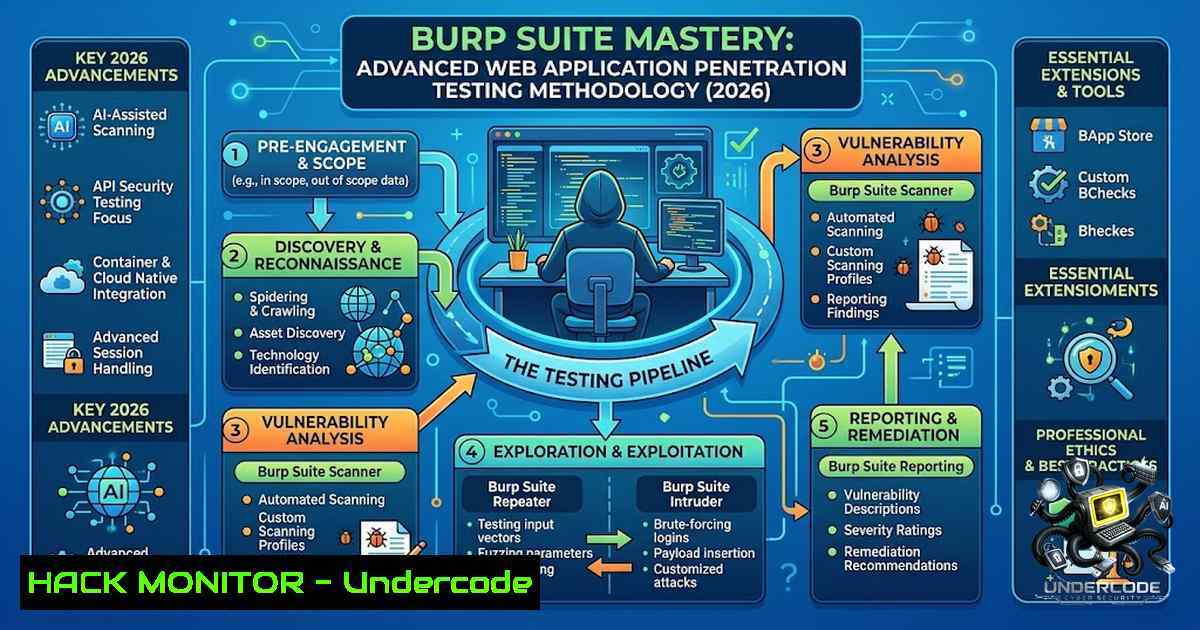
Web application security testing has evolved from a niche skill to an absolute necessity in today’s threat landscape, where attackers continuously probe for vulnerabilities like SQL Injection, Cross-Site Scripting (XSS), and Insecure Direct Object References (IDOR). Burp Suite stands as the industry-standard proxy-based testing platform that enables security professionals to intercept, inspect, and manipulate HTTP/HTTPS traffic between a browser and web applications, providing unparalleled visibility into application behavior and attack surfaces. This comprehensive guide walks through the essential tools, configurations, and methodologies that transform Burp Suite from a simple intercepting proxy into a complete web application security assessment arsenal.
Learning Objectives
- Master Burp Suite Proxy configuration to intercept, inspect, and modify HTTP/HTTPS traffic in real time across multiple browsers and devices
- Leverage Repeater and Intruder for manual vulnerability verification and automated attack customization
- Implement automated vulnerability scanning workflows to detect OWASP Top 10 flaws including SQLi, XSS, CSRF, and IDOR
- Configure session handling, API scanning, and extension-based workflows for enterprise-grade security testing
You Should Know
1. Installation and Initial Configuration
Burp Suite is available in two editions: Community (free) and Professional (paid). The Professional edition unlocks the full automated scanner, unlimited Intruder speed, and advanced features like Burp Collaborator and AI-powered issue exploration. Starting with Burp Suite 2026, PortSwigger introduced a combined installer for both editions, simplifying the setup process.
Step-by-Step Installation Guide:
Linux (Manual JAR Installation):
 Download the latest Burp Suite Professional JAR
wget -O burpsuite_pro_v2026.jar https://portswigger.net/burp/releases/download?product=pro&version=2026&type=Jar

Run with Java (JDK 21+ required)
java -jar -Xmx4g burpsuite_pro_v2026.jar
Windows (Installer):
1. Download the Windows installer (`burpsuite_pro_windows-x64_v2026.3.3.exe`) from PortSwigger
2. Run the installer and follow the wizard
3. For silent/unattended installation: `burpsuite_pro_windows-x64_v2026.3.3.exe -q`
Initial Activation (Professional Edition):
When launching Burp Suite Professional for the first time, you will be prompted to enter your license key, available from your PortSwigger account page. For manual activation (offline environments):
– Click “Manual activation” instead of “Next”
– Copy the URL and paste it into a browser on an internet-connected machine
– Copy the activation request, paste it into the activation page, and retrieve the response
– Paste the response back into the activation wizard to complete the process
Project Setup:
When asked to select a project file and configuration, click “Next” and then “Start Burp” to skip this for now. For temporary testing, select “Temporary Project” from the splash screen.
2. Proxy Configuration and Traffic Interception
The Proxy tool operates as a man-in-the-middle between the browser and the target web application, allowing you to intercept, inspect, and modify raw traffic passing in both directions.
Configuring Burp’s Built-in Browser (Recommended):
The simplest approach uses Burp’s preconfigured browser:
1. Go to Proxy > Intercept tab
2. Set the intercept toggle to Intercept on
- Click Open Browser — this launches a Chromium-based browser preconfigured to work with Burp out of the box
Configuring an External Browser (Firefox/Chrome):
- Set the browser’s proxy to 127.0.0.1:8080 (Burp’s default listener)
- For Firefox: Settings > Network Settings > Manual proxy configuration
- For Chrome: Use the FoxyProxy extension for easy toggling
- For Safari: Preferences > Advanced > Proxies > check Web Proxy (HTTP) and Secure Web Proxy (HTTPS), enter 127.0.0.1 and port 8080
Intercepting HTTPS Traffic:
Burp Suite acts as a Man-in-the-Middle (MITM) proxy, generating fake SSL certificates for each domain. To avoid certificate warnings:
1. In Burp, go to Proxy > Options > Import / Export CA Certificate
2. Export the certificate and import it into your browser’s trusted certificate store
3. For mobile devices (iOS/Android), configure the proxy settings and install the CA certificate following PortSwigger’s device-specific guides
Intercepting a Request:
- With intercept turned on, navigate to any website in the configured browser
- The request appears in the Proxy > Intercept tab, held before reaching the server
- Study the request, modify parameters if needed, then click Forward to send it
- Click Forward again for subsequent requests until the page loads
- Toggle intercept off to browse normally; all traffic is still recorded in Proxy > HTTP history
Viewing HTTP History:
The HTTP history tab shows all traffic that has passed through Burp Proxy, even when intercept was off. Click any entry to view raw requests and corresponding responses — essential for understanding application behavior and identifying potential attack vectors.
3. Repeater: Manual Request Manipulation
Repeater is a tool for manually manipulating and resending individual HTTP messages, analyzing the application’s responses to understand how different inputs affect behavior.
Step-by-Step Repeater Workflow:
- Send a request to Repeater: In Proxy > HTTP history (or any location showing HTTP requests), right-click the request and select Send to Repeater
-
Modify and resend: Go to the Repeater tab, modify any part of the request — parameters, headers, path, or body — and click Send
-
Analyze responses: Compare responses between modified requests to identify vulnerabilities like SQL injection, XSS, or command injection
Practical Example — Testing for OS Command Injection:
- In Proxy > HTTP history, right-click the request and select Send to Repeater
- Modify a parameter to inject a command, e.g., changing `filename=report.pdf` to `filename=report.pdf; whoami`
– Send the request and examine the response for command output
Advanced Repeater Techniques:
- Burp AI in Repeater (Professional): Run AI-powered tasks to automate follow-up testing on identified vulnerabilities
- HTTP/2 Support: Burp provides unrivaled support for HTTP/2-based testing, allowing you to work with HTTP/2 requests in ways no other tools can
- Insert Collaborator Payload: Right-click and select “Insert Collaborator payload” to test for out-of-band vulnerabilities like blind SSRF
4. Intruder: Automated Customized Attacks
Intruder is a powerful tool for carrying out automated customized attacks against web applications — highly configurable for tasks like fuzzing, brute-forcing, and enumeration.
Step-by-Step Intruder Configuration:
- Send to Intruder: Right-click any HTTP request and select Send to Intruder
2. Set payload positions (Positions tab):
- Highlight the value you want to fuzz (e.g., a user ID in the URL, a password field, or a parameter)
- Click Add to mark it as a payload position
3. Configure payloads (Payloads tab):
- Select a payload type: Numbers, Simple list, Runtime file, or Custom iterator
- For IDOR testing: Use Numbers with a range (e.g., 1-1000 in increments of 1)
- For brute-force: Load a wordlist (Simple list) with usernames or passwords
4. Select attack type:
- Sniper: Places each payload into each position in turn (single payload set)
- Battering ram: Places the same payload into all positions simultaneously
- Pitchfork: Uses multiple payload sets in parallel
- Cluster bomb: Tries all combinations of multiple payload sets
- Start the attack: Click Start Attack and analyze the results
Practical Example — IDOR Vulnerability Testing:
When testing for Insecure Direct Object References (where a user can access another user’s data by modifying an identifier):
– Intercept a request containing a user ID in the URL (e.g., /account?user=123)
– Send to Intruder and mark the `123` as a payload position
– Configure Numbers payload from 1-1000
– Start the attack and look for responses with different data or status codes indicating successful access to other users’ records
Intruder Limitations (Community Edition):
The Community Edition throttles Intruder speed, making brute-force attacks impractically slow; Professional edition provides full-speed Intruder that completes attacks in seconds.
5. Scanner: Automated Vulnerability Detection
Burp Scanner (Professional Edition) is an advanced web vulnerability scanner that automatically crawls content and audits for numerous types of vulnerabilities.
Scan Configuration Best Practices:
Preset Scan Configurations: Choose based on scan frequency and application type:
– Lightweight: Quick scans for frequent testing
– Fast: Balanced speed and coverage
– Balanced: Recommended for most applications
– Deep: Maximum coverage for comprehensive assessments
Application-Specific Configurations:
- Single-Page Applications (SPAs): Set Crawling > Crawl strategy to “Most complete” and enable “Application uses fragments for routing”
- Static Legacy Web Apps: Set Crawling > Crawl strategy to “Fastest” and enable GPU optimization
- API-Focused Scanning: Burp Scanner automatically detects endpoints, parameters, and authentication details in API definitions
Scope Configuration:
- Use Target > Scope to define which hosts and URLs to test
- In-scope URLs are scanned; out-of-scope URLs are excluded
- For complex scenarios, use regex patterns (Advanced mode)
- For large applications, divide scans into separate sites using in-scope/out-of-scope settings
Vulnerabilities Detected:
Burp Scanner identifies common security flaws including SQL injection, cross-site scripting (XSS), cross-site request forgery (CSRF), command injection, and more. The scanner supports both active scanning (injecting payloads) and passive scanning (analyzing traffic without modification).
AI-Powered Features (Professional):
The AI-powered “Explore Issue” feature automates follow-up testing on identified vulnerabilities, uncovering additional attack vectors and generating proof-of-concept exploits automatically.
6. API Security Testing
Modern applications increasingly rely on APIs, and Burp Suite provides comprehensive API testing capabilities.
API Scanning Workflow:
- Add API Definition: Burp Suite Professional allows uploading API definitions (OpenAPI/Swagger, GraphQL)
- Automatic Detection: Burp automatically detects endpoints, parameters, and authentication details
- Run API-Only Scan: Configure scan type specifically for API endpoints
GraphQL API Testing:
Burp Suite Professional supports GraphQL API testing, allowing you to identify vulnerabilities and generate comprehensive security reports.
Integration with CI/CD:
Burp Suite DAST integrates with Azure API Management and Apigee for automatic API discovery, enabling continuous security testing in development pipelines.
7. Extending Burp Suite with BApps
The BApp Store contains Burp extensions written by users to extend Burp’s capabilities.
Installing Extensions:
- Go to Extensions > BApp Store in Burp
- Select an extension from the list and click Install
3. The extension is automatically enabled
Notable Extensions:
- ReTrishul: Active detection of XSS, SQLi, and Server-Side Template Injection (SSTI)
- WAF Bypadd: Bypasses WAFs by padding HTTP requests with dummy data (many WAFs only analyze the first few kilobytes)
- Proxy Rotate: Routes each HTTP request through a random proxy for IP rotation, WAF evasion, and geo-targeted testing
- Session Switcher: Easily save and switch session cookies and headers for manual authorization testing
Creating Custom Extensions:
Burp extensions can be created in Java using the Montoya API, enabling complete customization of testing workflows.
8. Session Handling and Authentication
Maintaining authenticated sessions during automated testing is crucial for comprehensive coverage.
Session Handling Rules:
- Go to Settings > Sessions > Session handling rules
2. Click Add to create a new rule
- Configure the rule to determine whether a session is valid
- If invalid, run a macro to update session cookies and log back in
Macros for CSRF Token Management:
Macros automate complex testing workflows, manage session states, and handle dynamic tokens. This is essential for applications using CSRF tokens or multi-step authentication flows.
Authenticated Crawling:
To perform an authenticated crawl, authenticate with the application using Burp’s browser before crawling. If authentication is not required, log out before crawling.
What Undercode Say:
- Burp Suite is the gateway to web application security mastery — understanding its core tools (Proxy, Repeater, Intruder) transforms how you approach security testing, moving from passive observation to active vulnerability discovery.
-
Automation amplifies human expertise but never replaces it — while Burp Scanner and Intruder automate repetitive tasks, the most critical vulnerabilities are often found through manual investigation using Repeater and thoughtful payload customization.
The journey from SOC analyst to penetration tester is built on tools like Burp Suite that bridge the gap between theoretical knowledge and practical exploitation. What makes Burp Suite indispensable is not just its feature set but its workflow — the ability to seamlessly pass requests between tools, from interception to replay to automated attack to scanning. For aspiring security professionals, mastering Burp Suite means understanding not just how each tool works, but when to use each one. The Proxy gives you visibility, Repeater gives you control, Intruder gives you scale, and Scanner gives you efficiency. Together, they form a complete web application security testing ecosystem that, when combined with solid fundamentals in HTTP, web technologies, and the OWASP Top 10, enables you to identify and exploit vulnerabilities that would otherwise remain hidden.
Prediction:
- +1 Burp Suite’s integration of AI capabilities (Burp AI in Repeater, AI-powered Explore Issue) will accelerate vulnerability discovery by 40-60%, enabling junior testers to achieve senior-level detection rates within months rather than years.
-
+1 The shift toward API-first architectures will make Burp Suite’s API scanning capabilities (OpenAPI/GraphQL support, Azure/Apigee integrations) the primary use case, outpacing traditional web application testing by 2027.
-
-1 The increasing sophistication of WAFs and bot detection mechanisms will require continuous adaptation of Burp extensions (WAF Bypadd, Proxy Rotate) just to maintain current testing effectiveness, creating an ongoing arms race.
-
-1 Organizations relying solely on automated scanning without manual Repeater-based verification will face a 30-45% higher rate of false positives and missed business logic vulnerabilities, as scanners cannot adequately test complex authorization and workflow-based flaws.
-
+1 The Burp Suite ecosystem’s extensibility through the BApp Store will become the primary differentiator, with community-contributed extensions addressing niche testing scenarios faster than any single vendor could develop them internally.
▶️ Related Video (82% Match):
https://www.youtube.com/watch?v=7Fl7OoIzQYY
🎯Let’s Practice For Free:
🎓 Live Courses & Certifications:
Join Undercode Academy for Verified Certifications
🚀 Request a Custom Project:
Secure, high-velocity infrastructure and disruptive technological engineering. Contact our engineering team for high-tier development and proprietary systems:
[email protected]
💎 Smart Architecture | 🛡️ Secure by Design | ⭐ Trusted by Thousands
IT/Security Reporter URL:
Reported By: Chandrasekar Cybersecurity – Hackers Feeds
Extra Hub: Undercode MoN
Basic Verification: Pass ✅


