
Listen to this Post
Introduction
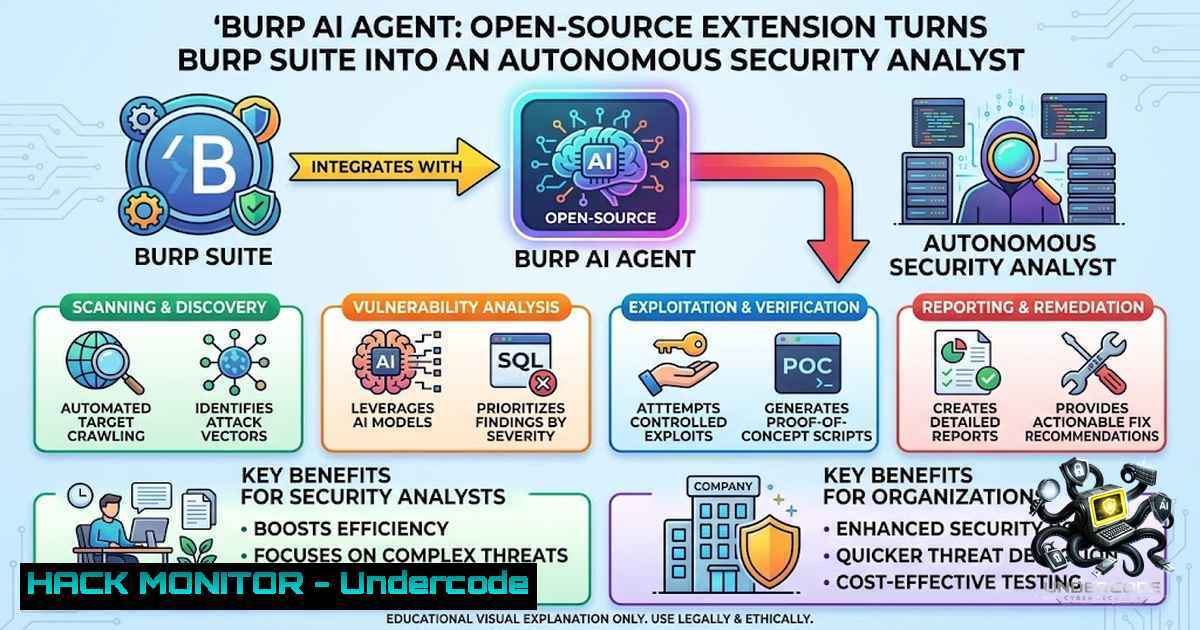
The cybersecurity industry is witnessing a paradigm shift where artificial intelligence is no longer a futuristic concept but a practical force multiplier for security professionals. Burp AI Agent—an open-source extension developed by security researcher six2dez—bridges the gap between traditional web application security testing and modern AI, transforming Burp Suite from a passive traffic interceptor into an active, reasoning security analyst. This extension doesn’t replace the researcher; it amplifies their capabilities by automating repetitive pattern recognition and freeing up cognitive bandwidth for creative exploitation.
Learning Objectives
- Understand the architecture and capabilities of Burp AI Agent, including its 11 AI backends and 53+ MCP tools
- Learn to install, configure, and deploy the extension across Burp Suite Community and Professional editions
- Master practical workflows for AI-assisted vulnerability discovery, including passive/active scanning and autonomous tool chaining
- Implement privacy controls and audit logging for compliance in sensitive enterprise environments
You Should Know
- Installation and Initial Setup: From Zero to AI-Powered Burp
Burp AI Agent (published as “Custom AI Agent” in the BApp Store to comply with PortSwigger’s naming requirements) supports both Burp Suite Community and Professional editions (2023.12+). The installation process is straightforward but offers multiple pathways depending on your preference for pre-built binaries versus source compilation.
Step-by-Step Installation Guide:
Option A: BApp Store Installation (Recommended)
1. Open Burp Suite (Community or Professional)
- Navigate to the Extensions tab and click on BApp Store
- Search for “Custom AI Agent” (the official BApp Store name)
- Click Install and confirm the AI feature permissions when prompted
- The extension will appear under Extensions > Installed
Option B: Manual JAR Installation
- Download the latest JAR from the GitHub Releases page
- In Burp Suite, go to Extensions > Installed > Add
3. Select Java as the extension type
4. Browse and select the downloaded `.jar` file
Option C: Build from Source (Java 21 required)
git clone https://github.com/six2dez/burp-ai-agent.git
cd burp-ai-agent
JAVA_HOME=/path/to/jdk-21 ./gradlew clean shadowJar
 Output: build/libs/Custom-AI-Agent-<version>.jar
Post-Installation Verification:
- A new AI Agent tab should appear in Burp’s main interface
- The extension auto-installs bundled agent profiles into `~/.burp-ai-agent/AGENTS/` on first run
- Additional custom profiles can be added by dropping `.md` files into this directory
Troubleshooting Tip: If the extension doesn’t appear, ensure you’re running Java 21 or later and that Burp Suite is updated to version 2023.12+.
2. Configuring AI Backends: Choosing Your Intelligence Engine
One of Burp AI Agent’s standout features is its support for 11 distinct AI backends spanning the entire privacy spectrum—from fully local execution to cloud-powered LLMs. This flexibility allows you to use local models for sensitive internal assessments and cloud power for public bug bounty targets without switching tools.
Backend Configuration Guide:
- Open the AI Agent tab in Burp Suite
- Navigate to Settings and select a backend from the dropdown
Local Backends (Air-Gapped / Privacy-First):
| Backend | Setup Instructions |
||-|
| Ollama | Install Ollama, run ollama serve, pull a model: `ollama pull llama3.1` |
| LM Studio | Install LM Studio, load a model, start the local server |
Cloud API Backends:
| Backend | Setup Instructions |
||-|
| NVIDIA NIM | Use default endpoint https://integrate.api.nvidia.com`, set NVIDIA API key, choose model like `moonshotai/kimi-k2.5` |https://api.perplexity.ai`, set `pplx-…` API key, choose
| Perplexity | Usesonar, sonar-pro, or `sonar-reasoning` |
| Generic OpenAI-compatible | Provide base URL and model for any OpenAI-compatible provider |
CLI-Based Cloud Backends:
- Gemini CLI: Install
gemini, run `gemini auth login`
– Claude CLI: Installclaude, set `ANTHROPIC_API_KEY` or run `claude login`
– Codex CLI, Copilot CLI, OpenCode CLI: Similar setup with respective authentication
Built-in Backend:
- Burp AI: Uses Burp Suite Pro’s built-in AI when available; requires the Use AI for extensions toggle enabled in Burp’s Extensions > Installed screen
Privacy Note: Only the Burp AI backend depends on Burp Pro’s Use AI for extensions toggle; every other backend runs independently and works on Burp Community too.
3. MCP Tools and Autonomous Agent Workflows
The Model Context Protocol (MCP) integration is where Burp AI Agent transcends being a simple extension and becomes a true autonomous security partner. The extension exposes 59 MCP tools (8 in the BApp Store build, 59 in the full GitHub release) covering Burp history, Repeater, Intruder, Scanner, Scope, Site Map, and Collaborator.
What This Enables:
- AI-Driven Burp Control: Claude Desktop or any MCP client can drive Burp autonomously
- Auto Tool Chaining: The AI autonomously chains up to 8 tool calls to complete complex tasks
- Burp Scan Skill: Use preferred AI coding assistants (Claude Code, Gemini CLI, Codex, etc.) as scanners via MCP
Practical MCP Workflow Example:
- Connect an MCP Client: Configure Claude Desktop or Cursor to connect to Burp’s MCP server
- Issue Natural Language Commands: “Analyze the current request for SQL injection vectors”
- Autonomous Execution: The AI agent fetches the request, runs analysis, and returns findings
- Iterative Testing: The AI can chain multiple tools—fetch history, send to Repeater, modify parameters, resend, analyze responses
Real-World Usage Pattern:
“Instead of running a chat next to your tooling, it extends Burp itself with AI-driven capabilities that work directly on live traffic and findings, helping reduce context switching during real security testing.”
MCP Server Configuration (Advanced):
- The embedded MCP server runs automatically when the extension loads
- External AI clients can connect to Burp’s MCP endpoint
- Full build (GitHub releases) registers all 59 tools; BApp Store build exposes the 8 extension-1ative AI tools
- Privacy Controls and Audit Logging for Enterprise Compliance
In enterprise security assessments, data privacy isn’t optional—it’s mandatory. Burp AI Agent implements a privacy-first design with configurable redaction modes and comprehensive audit logging.
Privacy Modes:
| Mode | Behavior |
||-|
| STRICT | Maximum redaction; all sensitive patterns stripped |
| BALANCED (Default) | Cookies, auth headers, inline Bearer/Basic/JWT tokens, and sensitive URL query parameters are stripped before data leaves Burp |
| OFF | No redaction (use only in isolated environments) |
How to Configure Privacy:
1. Open AI Agent tab > Settings
2. Locate the Privacy Mode dropdown
3. Select STRICT, BALANCED, or OFF
- A preview dialog shows the exact payload before any auto-captured context is sent
Audit Logging Features:
- JSONL-based logging with per-event SHA-256 payload hashes for compliance and reproducibility
- AI Request Logger: Real-time activity log with trace ID correlation, preset filters, rolling JSONL persistence, and full metadata for prompts, responses, MCP calls, retries, and scanner operations
- Every launch stamped with `promptSource` and `contextKind` for reproducibility
Compliance Use Case:
For penetration tests subject to regulatory oversight (PCI-DSS, HIPAA, GDPR), the audit trail provides verifiable evidence of what was tested, when, and with what AI assistance—without exposing sensitive client data.
5. AI Scanners: Passive and Active Vulnerability Discovery
Burp AI Agent includes passive and active scanners that analyze traffic automatically across 62 vulnerability classes, covering injection, authentication, cryptography, and more.
Passive Scanner:
- Runs as a Burp `PassiveScanCheck` (Burp Pro)
- Analyzes HTTP traffic in real-time without sending additional requests
- Ideal for initial reconnaissance and low-1oise testing
Active Scanner:
- Actively sends crafted requests to test for vulnerabilities
- Can be configured to use AI backends for intelligent payload generation
- Works alongside Burp’s native scanner for comprehensive coverage
Scanner Configuration:
- Navigate to AI Agent tab > Scanner Settings
2. Enable/disable passive and active scanning
3. Configure which vulnerability classes to include
4. Set scope restrictions to avoid out-of-scope testing
Integration with Burp Scanner:
- AI-generated findings can be imported as native Burp Scanner issues
- Explore Issue feature performs automated follow-up investigations on identified vulnerabilities
6. Custom Prompt Library and BountyPrompt Actions
The extension provides a Custom Prompt Library that allows you to save free-form prompts tagged per context (HTTP request or scanner issue), managed from Settings and surfaced in a right-click Custom prompts submenu.
How to Use Custom Prompts:
1. Create a
- Go to AI Agent tab > Prompt Library
- Click Add New Prompt
- Enter a name, description, and the prompt text
- Tag it for context (HTTP request or scanner issue)
2. Launch a
- Right-click on any HTTP request or scanner issue
- Navigate to Custom prompts submenu
- Select your saved prompt
- Or use Custom… to type ad-hoc ones
3. BountyPrompt Actions:
- Optional, tag-aware context menu actions loaded from JSON prompt files
- Pre-configured prompts for common bug bounty scenarios
Example Custom Prompt for IDOR Testing:
“Analyze this request for potential Insecure Direct Object References. Check all parameters containing user IDs, document IDs, or sequential numbers. Suggest parameter mutations to test for horizontal and vertical privilege escalation.”
7. Advanced Configuration and Performance Tuning
Agent Profiles:
- The extension auto-installs bundled profiles into `~/.burp-ai-agent/AGENTS/`
– Drop additional `.md` files in this directory to add custom profiles - Profiles define system prompts and behavior for different testing scenarios
Performance Considerations:
- Local Models: Ollama and LM Studio run on consumer hardware; ensure sufficient RAM (8GB+ recommended for 7B parameter models)
- Cloud APIs: Faster but require internet access and API credits
- MCP Tool Chaining: Auto tool chaining can perform up to 8 sequential tool calls; monitor for potential latency
Logging and Debugging:
- AI Request Logger provides real-time visibility into all operations
- JSONL logs stored with rolling persistence for debugging and compliance
- Trace ID correlation links related operations across the system
Burp Suite Compatibility:
- Supports both Community and Professional editions
- Requires Burp Suite 2023.12 or later
- Burp AI backend requires Professional edition with Use AI for extensions enabled
What Undercode Say:
- AI Augments, Doesn’t Replace: Burp AI Agent exemplifies the future of bug bounty hunting—researchers leveraging AI to find vulnerabilities faster, not AI replacing human creativity. The extension handles 80% of repetitive pattern matching, leaving 20% for high-value exploitation.
-
Privacy-First Architecture Matters: In an era of data breaches and regulatory scrutiny, the ability to run local models (Ollama, LM Studio) or use strict redaction modes makes this tool enterprise-ready. The SHA-256 hashed audit logs provide defensible evidence for compliance audits.
-
MCP Is the Game-Changer: The Model Context Protocol integration isn’t just a buzzword—it’s the “USB-C for AI agents” that enables seamless interoperability between Burp and any MCP-compliant AI client. This open standard approach prevents vendor lock-in and future-proofs the tool.
-
Community-Driven Innovation: Built by six2dez (creator of reconftw and gitleaks) and released under MIT license, Burp AI Agent represents the best of open-source security tooling—transparent, auditable, and continuously improved by the community.
-
Accessibility for All: Supporting both Community and Professional editions democratizes AI-powered security testing, making enterprise-grade capabilities available to students, independent researchers, and corporate teams alike.
Prediction:
-
+1 The integration of MCP into Burp Suite will accelerate the development of agentic security tools, creating an ecosystem where AI agents from different vendors can interoperate seamlessly, much like how USB-C standardized device connectivity.
-
+1 Local LLM capabilities (Ollama, LM Studio) will continue to mature, enabling fully air-gapped AI-powered security testing that satisfies the strictest data privacy requirements without sacrificing analytical power.
-
-1 As AI-powered extensions become more capable, the barrier to entry for bug bounty hunting may lower significantly, potentially saturating the market and reducing payout values for common vulnerability classes.
-
+1 The audit logging and privacy controls in Burp AI Agent set a precedent for responsible AI adoption in security, potentially influencing how other tools implement AI features with compliance in mind.
-
-1 Organizations may become overly reliant on AI-assisted scanning, leading to a false sense of security if human oversight is diminished. The extension is a tool, not a replacement for skilled manual testing.
-
+1 The open-source nature of Burp AI Agent under MIT license will likely spur further innovation, with forks and derivative tools addressing niche use cases across the AppSec landscape.
-
-1 API costs for cloud-based backends could become a barrier for independent researchers, though the availability of local models mitigates this concern.
-
+1 The trend toward AI-assisted security testing will drive demand for new skill sets—prompt engineering, MCP tool development, and AI workflow optimization—creating new career opportunities in cybersecurity.
▶️ Related Video (78% Match):
https://www.youtube.com/watch?v=-vJwPcM4gNw
🎯Let’s Practice For Free:
🎓 Live Courses & Certifications:
Join Undercode Academy for Verified Certifications
🚀 Request a Custom Project:
Secure, high-velocity infrastructure and disruptive technological engineering. Contact our engineering team for high-tier development and proprietary systems:
[email protected]
💎 Smart Architecture | 🛡️ Secure by Design | ⭐ Trusted by Thousands
IT/Security Reporter URL:
Reported By: Deepak Saini – Hackers Feeds
Extra Hub: Undercode MoN
Basic Verification: Pass ✅


