Listen to this Post
Introduction
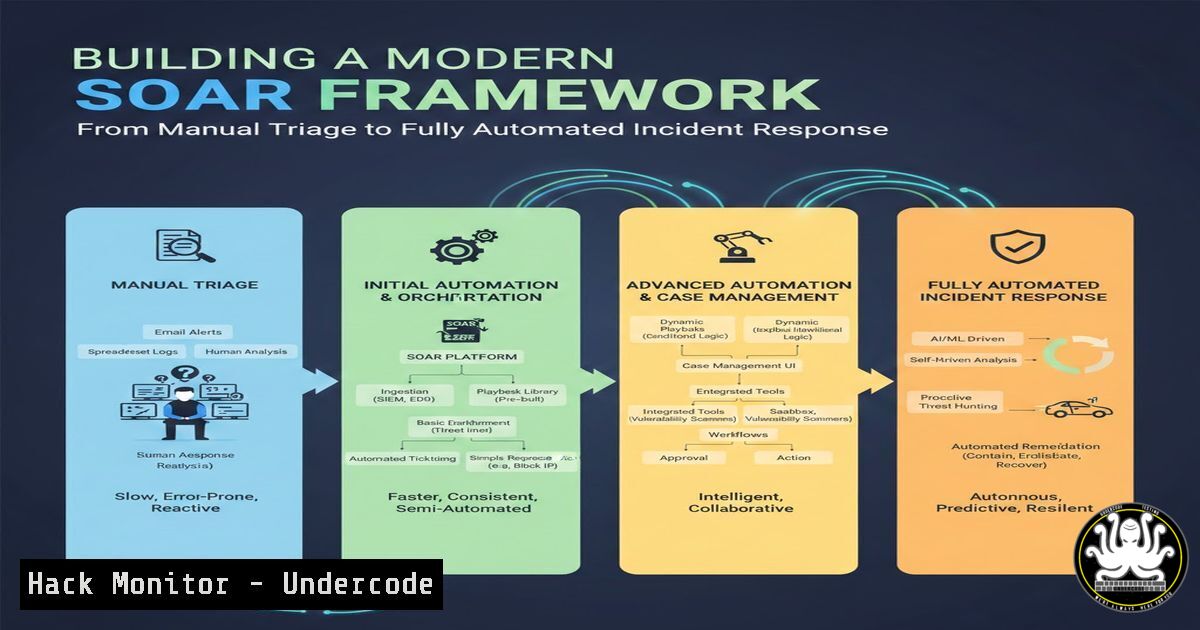
Security Orchestration, Automation, and Response (SOAR) represents the evolutionary leap in Security Operations Center (SOC) maturity, transforming chaotic alert floods into streamlined, machine-speed incident response workflows. By integrating disparate security tools—SIEM, EDR, firewalls, and threat intelligence platforms—SOAR platforms enable security teams to automate repetitive tasks, enforce consistent response procedures, and reclaim countless analyst hours previously lost to manual clipboard operations. Understanding SOAR architecture and implementation is no longer optional for organizations facing alert fatigue and persistent cyber threats.
Learning Objectives
- Understand the core components of SOAR architecture and how they integrate with existing security infrastructure
- Master the creation of automated playbooks for common incident types including phishing, IOC enrichment, and endpoint isolation
- Learn practical automation techniques using Python scripting, REST APIs, and native SOAR platform capabilities
- Implement critical safeguards to prevent automated responses from causing business disruption
- Design metrics frameworks to measure SOAR effectiveness through MTTR reduction and analyst productivity gains
You Should Know
1. SOAR Core Architecture and Tool Integration
Modern SOAR platforms function as the central nervous system of the SOC, orchestrating communication between previously siloed security tools. The orchestration layer maintains API connections to SIEM solutions like Splunk or QRadar, EDR platforms such as CrowdStrike or SentinelOne, firewall vendors including Palo Alto and Fortinet, and ticketing systems like Jira or ServiceNow.
Step-by-Step Integration Verification:
 Test SIEM API connectivity (Splunk example)
curl -k -u admin:password https://splunk-server:8089/services/auth/login -d "username=admin&password=password"

Verify EDR API endpoint accessibility
curl -X GET "https://api.crowdstrike.com/sensors/entities/queries" \
-H "Authorization: Bearer YOUR_TOKEN" \
-H "Content-Type: application/json"

Test firewall API for rule modification capabilities
curl -X POST "https://panorama.local/api/?type=op&cmd=<show><system><info></info></system></show>&key=YOUR_API_KEY"
The orchestration layer normalizes data formats between tools, enabling seamless data flow. When an alert triggers, the SOAR platform automatically queries threat intelligence feeds for IP reputation, pulls process telemetry from EDR, and checks user authentication logs from Active Directory—all without human intervention.
2. Building Automated Playbooks for Phishing Response
Phishing incidents consume disproportionate analyst time, but represent ideal candidates for automation. A well-designed phishing playbook can reduce investigation time from 20 minutes to under 60 seconds while maintaining accuracy.
Sample Python Automation Script for Phishing Triage:
import requests
import json
from datetime import datetime

def automate_phishing_response(email_data):
 Extract indicators
sender_ip = email_data['headers']['x-originating-ip']
attachment_hash = email_data['attachments'][bash]['hash']

Check IP reputation
abuseipdb_response = requests.get(
f"https://api.abuseipdb.com/api/v2/check?ipAddress={sender_ip}",
headers={"Key": "YOUR_API_KEY", "Accept": "application/json"}
)

Query VirusTotal for hash
vt_response = requests.get(
f"https://www.virustotal.com/api/v3/files/{attachment_hash}",
headers={"x-apikey": "YOUR_VT_API_KEY"}
)

Decision logic
if abuseipdb_response.json()['data']['abuseConfidenceScore'] > 50 or \
vt_response.json()['data']['attributes']['last_analysis_stats']['malicious'] > 5:
 Isolate endpoint
isolate_endpoint(email_data['recipient'])
 Block sender domain on email gateway
block_domain(email_data['from'].split('@')[bash])
 Create high-priority ticket
create_serviceNow_ticket("CRITICAL", "Phishing confirmed", email_data)
return "IOC confirmed - automated containment executed"
else:
return "Low confidence - escalate to analyst review"
Windows PowerShell Integration:
 Automated account lockout script for SOAR
$username = "suspicious_user"
$domainController = "DC01.domain.local"

Disable compromised account
Disable-ADAccount -Identity $username -Server $domainController

Reset password with random 20-character string
$newPassword = -join ((65..90) + (97..122) + (33..47) | Get-Random -Count 20 | % {[bash]$_})
Set-ADAccountPassword -Identity $username -NewPassword (ConvertTo-SecureString $newPassword -AsPlainText -Force)

Log action for audit
Add-Content -Path "C:\SOAR\Audit\account_actions.log" -Value "$(Get-Date): Account $username disabled due to suspicious activity"
3. IOC Enrichment and Threat Intelligence Automation
Effective SOAR implementations leverage multiple threat intelligence sources to enrich raw alerts, providing context that drives accurate decision-making. The enrichment process should be automated at alert ingestion.
Linux-Based Threat Intelligence Automation:
!/bin/bash
 IOC enrichment script for SOAR platform

ALERT_IP=$1
ALERT_HASH=$2

Check IP against AlienVault OTX
curl -s -H "X-OTX-API-KEY: YOUR_OTX_KEY" \
"https://otx.alienvault.com/api/v1/indicators/IPv4/${ALERT_IP}/general" | \
jq '.pulse_info.count'

Query MISP instance for hash matches
misp_response=$(curl -s -H "Authorization: YOUR_MISP_KEY" \
-H "Accept: application/json" \
-H "Content-Type: application/json" \
-X POST "https://misp.local/attributes/restSearch" \
-d "{\"value\": \"${ALERT_HASH}\", \"type\": \"sha256\"}")

Parse response for attribute count
echo $misp_response | jq '.response.Attribute | length'

Update SOAR context with findings
python3 update_soar_context.py --ip $ALERT_IP --hash $ALERT_HASH \
--otx_score $(cat otx_result.txt) \
--misp_hits $(echo $misp_response | jq '.response.Attribute | length')
4. Automated Endpoint Isolation and Containment
When indicators confirm malicious activity, rapid containment prevents lateral movement. SOAR platforms should execute isolation procedures across EDR solutions while preserving forensic data.
EDR Isolation Commands Across Platforms:
 CrowdStrike Falcon API isolation
curl -X POST "https://api.crowdstrike.com/devices/entities/devices-actions/v2" \
-H "Authorization: Bearer $TOKEN" \
-H "Content-Type: application/json" \
-d '{
"action_parameters": [{"name": "ids", "value": ["DEVICE_ID_HERE"]}],
"ids": ["DEVICE_ID_HERE"],
"action_name": "contain"
}'

Microsoft Defender for Endpoint isolation via PowerShell
$deviceId = "DEVICE_ID"
$accessToken = Get-MsalToken -ClientId "CLIENT_ID" -TenantId "TENANT_ID"
$headers = @{Authorization = "Bearer $($accessToken.AccessToken)"}
$body = @{ActionType = "Isolate"} | ConvertTo-Json
Invoke-RestMethod -Uri "https://api.security.microsoft.com/api/machines/$deviceId/isolate" \
-Method Post -Headers $headers -Body $body -ContentType "application/json"

SentinelOne isolation CLI
sentinelctl isolate --id DEVICE_ID --reason "SOAR automated response - confirmed malicious activity"
5. Firewall Rule Automation for Threat Blocking
SOAR platforms must dynamically update network defenses by pushing blocking rules to firewalls and web proxies when threats are confirmed at the network level.
Palo Alto Firewall Automation:
import xml.etree.ElementTree as ET
import requests

def block_malicious_ip(malicious_ip, api_key, firewall_ip):
 Construct XML API request for PAN-OS
xml_payload = f"""
<request>
<add>
<entry name="SOAR_Block_{malicious_ip.replace('.', '_')}">
<ip-netmask>{malicious_ip}</ip-netmask>
<description>Automated block by SOAR - {datetime.now()}</description>
</entry>
</add>
</request>
"""

response = requests.post(
f"https://{firewall_ip}/api/?type=config&action=set&xpath=" \
f"/config/devices/entry/vsys/entry/rulebase/security/rules&element={xml_payload}",
params={"key": api_key},
verify=False
)

if response.status_code == 200 and "<response status='success'>" in response.text:
 Commit changes
commit_response = requests.post(
f"https://{firewall_ip}/api/?type=commit&cmd=<commit></commit>",
params={"key": api_key},
verify=False
)
return "Firewall rule added and committed"
return "Firewall rule addition failed"
iptables Automation for Linux Environments:
!/bin/bash
 Dynamic iptables blocking via SOAR webhook

THREAT_IP=$(echo $1 | jq -r '.malicious_ip')
ACTION=$(echo $1 | jq -r '.action')

if [ "$ACTION" == "block" ]; then
 Add to iptables drop chain
iptables -A INPUT -s $THREAT_IP -j DROP
iptables -A FORWARD -s $THREAT_IP -j DROP

Persist across reboots
iptables-save > /etc/iptables/rules.v4

Log to SIEM
logger -p authpriv.info "SOAR automation: Blocked IP $THREAT_IP via iptables"

elif [ "$ACTION" == "unblock" ]; then
 Remove block after investigation
iptables -D INPUT -s $THREAT_IP -j DROP
iptables -D FORWARD -s $THREAT_IP -j DROP
iptables-save > /etc/iptables/rules.v4
fi
6. Creating Incident Tickets with Forensic Context
Automated ticket creation ensures investigations maintain proper documentation while providing analysts with enriched context for manual review when necessary.
ServiceNow API Integration:
import requests
import json

def create_incident_ticket(alert_data, enrichment_results):
 Prepare incident payload
incident = {
"short_description": f"SOAR Alert: {alert_data['alert_type']} - Automated investigation",
"description": f"""
Alert Details:
- Source IP: {alert_data['source_ip']}
- Destination IP: {alert_data['dest_ip']}
- User: {alert_data['user']}
- Device ID: {alert_data['device_id']}

Enrichment Results:
- IP Reputation Score: {enrichment_results['ip_score']}
- Threat Intelligence Hits: {enrichment_results['ti_hits']}
- Malware Family: {enrichment_results['malware_family']}

Automated Actions Taken:
- Account disabled: {enrichment_results['account_disabled']}
- Endpoint isolated: {enrichment_results['endpoint_isolated']}
- Firewall rules added: {enrichment_results['firewall_rules']}
""",
"urgency": 1,
"impact": 1,
"assignment_group": "SOC_L2",
"caller_id": "automation_soar"
}

Create ticket via ServiceNow REST API
response = requests.post(
"https://your-instance.service-now.com/api/now/table/incident",
auth=("username", "password"),
headers={"Accept": "application/json", "Content-Type": "application/json"},
data=json.dumps(incident)
)

return response.json()['result']['sys_id']
7. SOAR Performance Metrics and Safeguards
Automation without governance creates operational risk. Implement circuit breakers, approval workflows, and comprehensive logging to prevent unintended consequences.
Linux Monitoring Script for SOAR Actions:
!/bin/bash
 SOAR action monitor with automated rollback capabilities

LOG_FILE="/var/log/soar_actions.log"
ERROR_THRESHOLD=5
ERROR_COUNT=$(grep "ERROR" $LOG_FILE | wc -l)

if [ $ERROR_COUNT -gt $ERROR_THRESHOLD ]; then
 Disable automated actions
touch /tmp/SOAR_DISABLED

Send alert to SOC manager
mail -s "SOAR Automation Disabled - Error Threshold Exceeded" [email protected] <<< "SOAR has exceeded error threshold with $ERROR_COUNT errors. Manual intervention required."

Create high-priority ticket
python3 create_soar_incident.py "SOAR Health" "Automation paused due to error threshold"

echo "$(date): SOAR automation paused - $ERROR_COUNT errors detected" >> /var/log/soar_audit.log
fi

Monitor for excessive blocks (potential false positive cascade)
BLOCK_COUNT=$(grep "BLOCK_ACTION" $LOG_FILE | grep "$(date +%Y-%m-%d)" | wc -l)
if [ $BLOCK_COUNT -gt 50 ]; then
echo "$(date): WARNING - Unusual block volume detected: $BLOCK_COUNT actions today" >> /var/log/soar_audit.log

Trigger manual review requirement
touch /tmp/REQUIRE_REVIEW
fi
What Undercode Say
- Automation is an augmentation strategy, not a replacement: SOAR eliminates repetitive tasks but preserves human judgment for complex threat hunting and strategic analysis. The most effective SOCs use automation to handle 80% of alerts while empowering analysts to focus on sophisticated threats.
-
Playbook design determines success or failure: Poorly designed automation creates operational noise and false positives that erode trust in the system. Each playbook must include validation steps, exception handling, and clear escalation paths to maintain accuracy and prevent business disruption.
-
Integration depth matters more than platform features: The value of SOAR correlates directly with the breadth and quality of tool integrations. Organizations should prioritize platforms offering robust APIs and pre-built connectors for their existing security stack to accelerate time-to-value.
-
Metrics-driven optimization separates mature from immature implementations: Track mean time to respond (MTTR), automation rate, false positive reduction, and analyst time saved. These metrics justify continued investment and guide playbook refinement toward maximum operational efficiency.
-
Security controls must extend to the automation layer: SOAR platforms themselves become high-value targets requiring rigorous access controls, audit logging, and change management procedures. Compromised automation can disable defenses across the enterprise, making platform security paramount.
-
The human element remains critical for edge cases: While automation handles known patterns, novel attack techniques and business-specific scenarios require analyst interpretation. Maintain clear documentation of automated responses and regularly review edge cases to identify opportunities for playbook enhancement.
Prediction
Within 24 months, SOAR platforms will evolve from reactive automation tools to proactive defense orchestrators incorporating machine learning for predictive threat modeling. We anticipate widespread adoption of autonomous response capabilities where systems preemptively isolate suspicious endpoints based on behavioral anomalies before formal alerts trigger. This shift will reduce mean time to contain from hours to seconds, fundamentally altering the defender-adversary timeline. However, this acceleration will create new challenges in false positive management and require regulatory frameworks governing automated security actions to prevent cascading infrastructure failures from erroneous machine decisions.
▶️ Related Video (82% Match):
🎯Let’s Practice For Free:
IT/Security Reporter URL:
Reported By: Shaik Muzammil – Hackers Feeds
Extra Hub: Undercode MoN
Basic Verification: Pass ✅


