
Listen to this Post
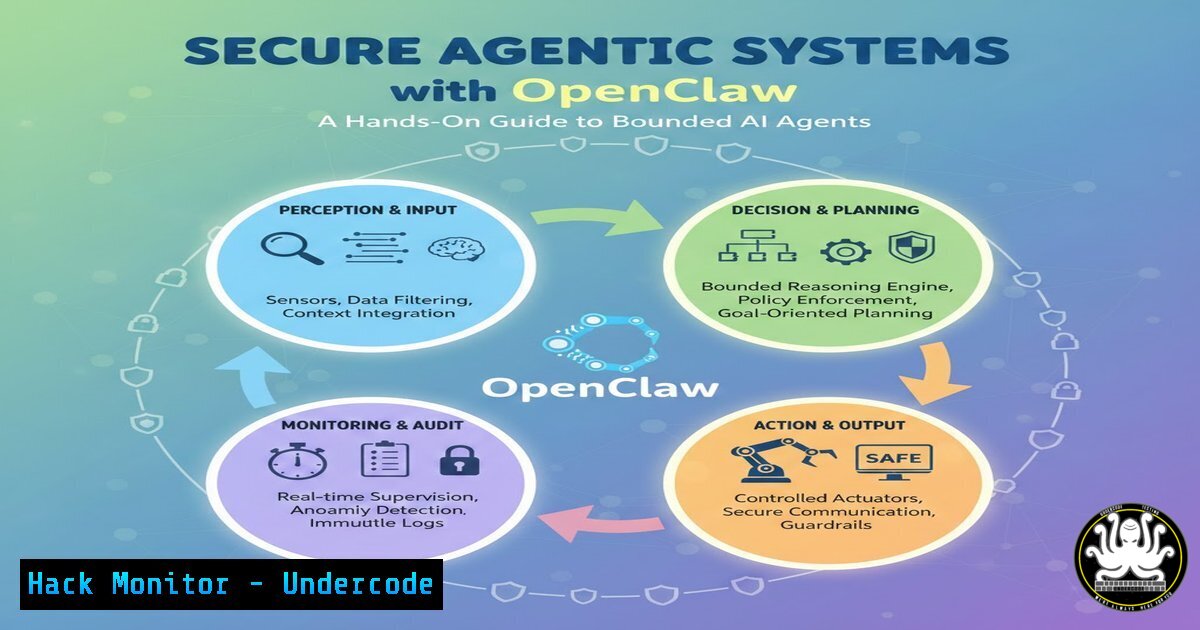
Introduction:
As artificial intelligence evolves from passive chatbots to active agents capable of executing tasks, a fundamental security paradigm shift is required. Treating an AI agent not as an extension of our user account but as a “bounded actor” with its own identity and limited privileges is crucial for mitigating the novel risks outlined in the OWASP GenAI Security Project Top 10. This article provides a practical guide to constructing such a securely isolated agent using OpenClaw, moving from theoretical concepts to real-world implementation with hardware separation, identity control, and strict authority scoping.
Learning Objectives:
- Implement hardware-level isolation for an AI agent to create a physical trust boundary.
- Configure an agent with a dedicated identity and scoped permissions separate from the user.
- Apply supply chain scrutiny and secure tooling configurations to mitigate agentic AI risks.
You Should Know:
1. Establishing Physical Isolation: The “Enclosure” Layer
This foundational step moves beyond virtual separation by housing the AI agent on its own dedicated hardware, such as a Mac Mini or any resource-sufficient machine. This creates a robust physical boundary, ensuring that even if the agent is compromised, the attacker’s access is limited to that isolated system, not your primary workstation or network.
Step‑by‑step guide explaining what this does and how to use it:
1. Provision Hardware: Obtain a separate machine (e.g., a Mac Mini, a Raspberry Pi, or a dedicated virtual machine with strong hypervisor isolation). Ensure it has no default network trust relationships with your primary devices.
2. Install OpenClaw: On the isolated machine, install the OpenClaw agent framework. Verify the checksum of the downloaded binaries to ensure integrity (supply chain scrutiny).
Linux Example:
wget https://example.com/openclaw-latest.tar.gz
sha256sum openclaw-latest.tar.gz  Compare with official hash
tar -xzvf openclaw-latest.tar.gz
cd openclaw && sudo ./install.sh
3. Configure Network Firewall: On the host machine, use a firewall to strictly limit the agent’s outbound connections to only essential services (e.g., specific APIs) and block all inbound connections.
Linux (using `ufw`):
sudo ufw default deny incoming
sudo ufw default allow outgoing
sudo ufw allow out on <interface> to <api-endpoint-ip> port 443 proto tcp
sudo ufw enable
Windows (using `netsh`):
netsh advfirewall firewall add rule name="Allow_Agent_API" dir=out remoteip=<API-IP> remoteport=443 protocol=tcp action=allow
netsh advfirewall set allprofiles firewallpolicy blockinbound,allowoutbound
2. Forging a Distinct Identity and Privilege Model
The agent must never operate under your user credentials. Create a dedicated, low-privilege service account specifically for the agent. This ensures its actions are logged against a non-human identity and limits the blast radius of a compromise.
Step‑by‑step guide explaining what this does and how to use it:
1. Create Service Account: On the isolated machine, create a new user with minimal permissions.
Linux:
sudo useradd -r -s /usr/sbin/nologin -m -d /opt/agent-home agent-service
2. Run Agent Under This Account: Configure the agent’s service or process to run as this user.
Systemd Service Example (`/etc/systemd/system/openclaw.service`):
[bash]
User=agent-service
Group=agent-service
ExecStart=/opt/openclaw/bin/agent
Restart=always
3. Scope Filesystem Access: Restrict the agent’s filesystem access to its own directories using permissions and `chroot` or containerization.
Linux (using `chroot` for a test run):
sudo chroot --userspec=agent-service:agent-service /opt/agent-home /bin/bash
 Inside the chroot, the agent sees only /opt/agent-home as its root.
3. Limiting Authority and Tooling: The “Doing” Phase
The most significant risk emerges when an agent moves from “chatting” to “doing.” Granting it access to tools (like web browsers, calendars, or APIs) must be done with explicit, narrow scope. Instead of giving it a general browser, provide a constrained API client.
Step‑by‑step guide explaining what this does and how to use it:
1. Replace Browser with API Client: If the agent needs to book a dinner, do not give it a headless browser. Instead, have it call a specific, secured API endpoint that you control.
Conceptual Agent Configuration (YAML):
tools:
- name: calendar_check
type: api
endpoint: https://your-api.gateway/calendar/availability
allowed_methods: [bash]
authentication: oauth2
scope: calendar:read:availability_only
- name: appointment_book
type: api
endpoint: https://your-api.gateway/calendar/appointments
allowed_methods: [bash]
authentication: oauth2
scope: calendar:write:restricted_to_user_preconfirmation
2. Validate and Sanitize All Actions: Every tool invocation from the agent should pass through a policy enforcement point that validates the intent and parameters against a predefined policy before execution. This is the “nervous system” layer that prevents privilege-intent mismatch.
- API Security and Cloud Hardening for Agent Interactions
Since the agent will likely interact with cloud services, those endpoints must be hardened. The agent’s identity should be used for authentication, and all requests must be subject to strict validation and rate limiting.
Step‑by‑step guide explaining what this does and how to use it:
1. Use API Keys with Minimal Permissions: Generate API keys for the agent-service account, scoped only to the exact resources it needs.
2. Implement Request Signing: Have the agent sign its API requests to prevent tampering and ensure authenticity.
Python Example using `requests` and HMAC:
import requests, hmac, hashlib
secret_key = b'super-secret-agent-key'
message = b'/api/calendar GET'
signature = hmac.new(secret_key, message, hashlib.sha256).hexdigest()
headers = {'X-Agent-Signature': signature, 'X-Agent-ID': 'agent-service'}
response = requests.get('https://your-api.gateway/calendar', headers=headers)
3. Cloud-side Rate Limiting and Monitoring: On the cloud provider (e.g., AWS, Azure), configure API Gateway to apply strict rate limits based on the `X-Agent-ID` header and log all requests for anomaly detection.
5. Supply Chain Scrutiny and Continuous Verification
Security doesn’t end at installation. Regularly verify the integrity of the agent’s software supply chain, including the OpenClaw framework, its dependencies, and any models it uses.
Step‑by‑step guide explaining what this does and how to use it:
1. Establish a Software Bill of Materials (SBOM): Generate and maintain an SBOM for your agentic system.
Using `syft` (Open Source):
syft openclaw:latest -o spdx-json > openclaw-sbom.spdx.json
2. Automate Vulnerability Scanning: Regularly scan the SBOM or the running system for known vulnerabilities (CVEs).
Using `grype`:
grype sbom:./openclaw-sbom.spdx.json
3. Monitor for Drift: Implement file integrity monitoring (FIM) on the agent’s binaries and configuration files to detect unauthorized changes.
Linux using `AIDE` (Advanced Intrusion Detection Environment):
sudo aideinit  Initialize database
sudo mv /var/lib/aide/aide.db.new.gz /var/lib/aide/aide.db.gz
sudo aide --check  Run periodically to check for changes
What Undercode Say:
- The “Bounded Actor” is a Foundational Security Principle: Treating an AI agent as a separate, lightly-trusted entity with its own identity and hardware boundary is not paranoia; it’s the digital equivalent of placing a new hire in a locked office with a specific badge and a company phone, rather than giving them the keys to the entire building. This “enclosure” contains the blast radius of any compromise.
- The Real Risk Emerges When Agents “Do”: The transition from passive language model to active tool-user introduces severe risks (privilege-intent mismatch, tool misuse). The solution isn’t to avoid giving agents tools, but to engineer the tools themselves as secure, scoped, and monitored APIs. Your agent shouldn’t “browse the web”; it should query a secured, summarized web access API. This field report moving from theory to practice perfectly illustrates that the “nervous system” of governance above the enclosure is where the next generation of security challenges and innovations will lie.
Prediction:
This hands-on experiment signals a clear trajectory: the future of enterprise AI security will be defined by “enclave computing” for agents. We will likely see the rapid emergence of standardized, secure “agent enclaves” from major cloud providers—pre-configured, isolated environments with built-in identity, policy, and supply chain management. Just as containers revolutionized app deployment, secure enclaves will standardize how we deploy, trust, and govern autonomous AI agents, making the bespoke hardware isolation seen here a template for mainstream, automated security practices.
▶️ Related Video (80% Match):
🎯Let’s Practice For Free:
IT/Security Reporter URL:
Reported By: Wilsonsd Last – Hackers Feeds
Extra Hub: Undercode MoN
Basic Verification: Pass ✅


