Listen to this Post
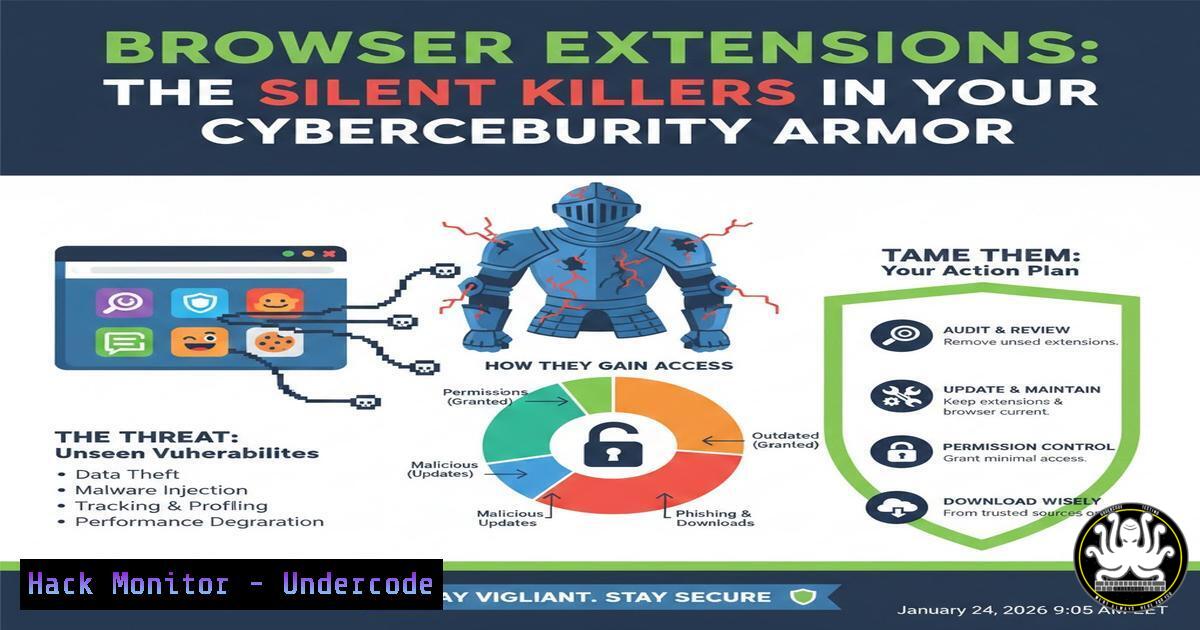
Introduction:
Browser extensions have evolved from productivity boosters to critical security vulnerabilities, operating outside traditional IT controls. With silent updates and pervasive permissions, they create a vast, unmonitored attack surface that adversaries are increasingly exploiting. This article unpacks why comprehensive inventory management is your first and most crucial line of defense against extension-borne threats.
Learning Objectives:
- Understand the inherent risks and governance challenges posed by unmanaged browser extensions in an enterprise environment.
- Learn practical, scriptable methods for inventorying and risk-assessing extensions across Windows, Linux, and macOS fleets.
- Implement technical controls and hardening strategies to mitigate extension-based threats and integrate visibility into security operations.
You Should Know:
- The Invisible Threat: Understanding Extension Sprawl and Shadow IT
The core issue, as emphasized by security firm MagicSword, is that browser extensions bypass standard software deployment and management workflows. They don’t appear in traditional application catalogs, can update capabilities overnight without notice, and are often installed by users without review. This leads to a dangerous sprawl of duplicate extensions, abandoned yet active tools, and high-permission “shadow IT” that would never pass a security audit. The first step to control is acknowledging the scale of the problem.
Step‑by‑step guide explaining what this does and how to use it:
Manual Baseline Audit: Begin by understanding what’s installed. On Google Chrome, navigate tochrome://extensions/. On Mozilla Firefox, go toabout:addons. Manually document each extension’s ID, name, version, permissions, and install source (Chrome Web Store, sideloaded, developer mode).
Analyze Findings: Catalog this data in a spreadsheet. Immediately look for red flags: extensions with permissions like<all_urls>,debugger, ortabs; extensions installed from outside official stores; and multiple extensions with similar functionality but different risk profiles. -
Technical Inventory: Command-Line and Scripting Approaches for Scalability
Manual audits don’t scale. To gain fleet-wide visibility, you must use command-line tools and scripts to programmatically extract extension data from browser profiles.
Step‑by‑step guide explaining what this does and how to use it:
On Windows (via PowerShell): This script queries the registry to list installed Chrome extensions for the current user.Extract Chrome Extension IDs from the Windows Registry $path = "HKCU:\Software\Google\Chrome\Extensions\" if (Test-Path $path) { $extensions = Get-ChildItem -Path $path foreach ($ext in $extensions) { $extId = $ext.PSChildName $version = Get-ItemProperty -Path "$($ext.PSPath)" -Name "version" -ErrorAction SilentlyContinue Write-Output "Extension ID: $extId, Version: $($version.version)" } }On Linux/macOS (via Bash): This command lists the directories of installed extensions in the Chrome user profile, which correspond to extension IDs.
List installed Chrome extension IDs from the default profile
ls -1 ~/.config/google-chrome/Default/Extensions/ 2>/dev/null
Next Step: For each Extension ID, you can examine its `manifest.json` file to extract critical details like permissions, name, and version.
3. Permission Auditing and Automated Risk Scoring
Knowing what’s installed is only half the battle. You must assess risk by analyzing the permissions granted to each extension, as they define its capability to access data, tabs, and websites.
Step‑by‑step guide explaining what this does and how to use it:
Python Script for Analysis: Create a script to parse `manifest.json` files and score risk based on permissions. Save the following as analyze_extensions.py.
import json, os, sys
from pathlib import Path

Define high-risk permissions
HIGH_RISK_PERMS = ["debugger", "webRequest", "webRequestBlocking", "<all_urls>", "tabs"]

def analyze_extension(ext_path):
manifest_path = ext_path / "manifest.json"
try:
with open(manifest_path, 'r') as f:
manifest = json.load(f)
except:
return None

name = manifest.get('name', 'N/A')
perms = manifest.get('permissions', []) + manifest.get('optional_permissions', [])
 Risk logic: count high-risk perms
risk_score = sum(1 for perm in perms if perm in HIGH_RISK_PERMS)
return {'name': name, 'permissions': perms, 'risk_score': risk_score}

if <strong>name</strong> == "<strong>main</strong>":
 Example path (Chrome Linux). Adapt for your OS and browser.
base_path = Path.home() / ".config/google-chrome/Default/Extensions/"
for ext_dir in base_path.iterdir():
if ext_dir.is_dir():
for version_dir in ext_dir.iterdir():
result = analyze_extension(version_dir)
if result:
print(f"Name: {result['name']}, Risk Score: {result['risk_score']}, Perms: {result['permissions']}")
Run the Script: Execute it with python3 analyze_extensions.py. Use the output to prioritize review of extensions with high `risk_score` values.
4. Enterprise Hardening: Enforcing Policies via Management APIs
For proactive control, use built-in browser management APIs to enforce policies across your organization, moving from visibility to enforcement.
Step‑by‑step guide explaining what this does and how to use it:
Chrome Enterprise Policy (Example): Deploy an extension allowlist (whitelist) and block all others. This is typically done via Group Policy (Windows) or configuration profiles (macOS/Linux).
Create a Policy File (for Linux/macOS): Save the following JSON to /etc/opt/chrome/policies/managed/extensions_policy.json.
{
"ExtensionSettings": {
"": {
"installation_mode": "blocked"
},
"ahfgeienlihckogmohjhadlkjgocpleb": { // Web Store example ID
"installation_mode": "allowed",
"update_url": "https://clients2.google.com/service/update2/crx"
}
}
}
What It Does: This configuration blocks the installation of all extensions ("") except for the one with the specified ID (e.g., a legitimate, reviewed tool). The `update_url` ensures it updates from the official store.
- Mitigation and Operational Integration: SIEM and Continuous Monitoring
Static inventory is insufficient. Extension states can change, so integrating this data into your Security Information and Event Management (SIEM) system is key for continuous monitoring and alerting.
Step‑by‑step guide explaining what this does and how to use it:
Create a Log Source: Automate the collection script from Section 2/3 to run periodically (e.g., via cron or Task Scheduler) and output structured logs (JSON format is ideal).
Forward to SIEM: Use your SIEM’s agent (e.g., Splunk Universal Forwarder, Elastic Agent) to ship these logs to a central index.
Build Alerts: Create alerts for high-risk events. Example Splunk SPL query to alert on a newly detected, high-risk extension:index=browser_extensions sourcetype=json:ext_inventory | stats earliest(_time) as first_seen by ext_id, ext_name, risk_score | where first_seen > relative_time(now(), "-1d@d") AND risk_score > 3
This Workflow ensures your security operations center (SOC) is notified when a new, potentially dangerous extension appears, enabling rapid investigation.
What Undercode Say:
- Key Takeaway 1: Visibility is foundational and non-negotiable. You cannot secure, govern, or mitigate threats from assets you cannot see. A programmatic, fleet-wide inventory is the absolute prerequisite for any browser extension security program.
- Key Takeaway 2: The risk is dynamic, not static. Extensions can change behavior through silent updates, and user installations can happen at any moment. Therefore, security must shift from periodic audits to continuous monitoring and automated policy enforcement integrated into the broader IT ecosystem.
Analysis: The post correctly identifies browser extensions as a critical blind spot, but the real challenge is operationalizing the response. Treating extensions like any other endpoint software—with inventory, risk assessment, and policy enforcement—is the necessary paradigm shift. The technical methods outlined, from PowerShell to Python to SIEM integration, provide a roadmap to transform this vague threat into a manageable control surface. Failure to do so leaves a gaping hole in perimeter and data-loss defenses, as a single malicious extension can bypass network security controls and access authenticated sessions.
Prediction:
The future of extension-based threats will see increased automation and sophistication. Adversaries will leverage AI to craft extensions that mimic legitimate behavior more closely or use AI-assisted social engineering to increase installation rates. Defensively, AI and machine learning will become integral to behavioral analysis of extensions, detecting anomalies in permission usage or network calls that static analysis misses. Extension security will converge with Zero Trust architectures, requiring continuous validation of extension integrity and user context before granting access to sensitive applications and data. Ultimately, browser vendors may enforce stricter API sandboxing and mandatory enterprise management hooks, making the technical controls discussed here not just best practice, but a baseline requirement.
▶️ Related Video (78% Match):
🎯Let’s Practice For Free:
IT/Security Reporter URL:
Reported By: Michaelahaag Browser – Hackers Feeds
Extra Hub: Undercode MoN
Basic Verification: Pass ✅


