Listen to this Post
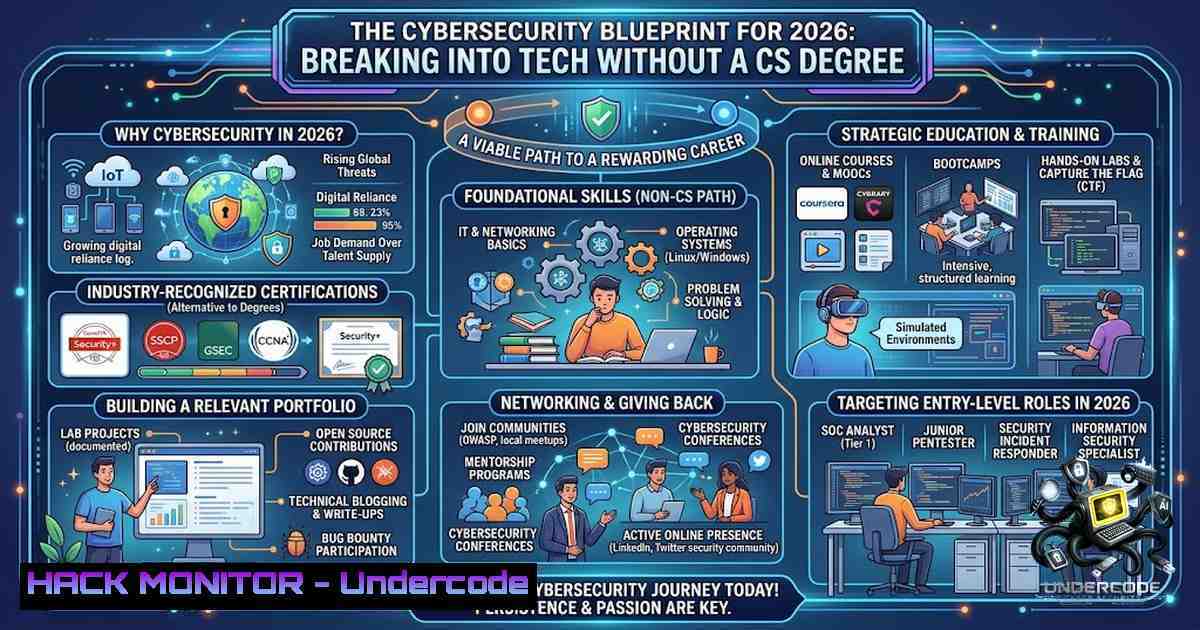
Introduction:
The modern tech landscape is shifting rapidly, with traditional four-year computer science degrees no longer serving as the sole gateway to lucrative and impactful careers. As organizations migrate to cloud infrastructures and face an ever-evolving threat landscape, the demand for practical, hands-on cybersecurity and IT skills has eclipsed theoretical academic knowledge. This article provides a comprehensive, blueprint-style guide for transitioning into tech, focusing on the specific technical skills, configurations, and command-line expertise required to defend modern enterprises.
Learning Objectives:
- Master foundational networking and operating system concepts, including IP subnetting and the OSI model.
- Execute practical Linux and Windows hardening commands to secure endpoints.
- Configure and deploy API security gateways and Web Application Firewalls (WAF).
- Perform vulnerability discovery and exploitation mitigation on internal networks.
- Implement cloud hardening techniques for AWS and Azure environments.
- Deconstructing the Tech Entry Barrier: Skills Over Degrees
The initial perception that a Computer Science degree is mandatory is a significant barrier. However, security operations centers (SOCs) and IT departments prioritize demonstrable skills over academic credentials. The core competencies required include an understanding of TCP/IP, DNS, HTTP/HTTPS protocols, and the ability to navigate both Linux and Windows environments efficiently.
To begin, one must master the command line. For Linux, proficiency in text processing and network inspection is crucial. Below are foundational commands used daily in threat hunting and system administration:
Linux Command Primer:
– `netstat -tulpn` : Used to display active listening ports and associated processes, essential for identifying unauthorized services.
– `ss -tulw` : A faster, modern replacement for netstat to view socket statistics.
– `grep -r “error” /var/log/` : Recursively searches log files for specific error patterns, vital for troubleshooting application and security logs.
– `journalctl -xe -p err` : Views systemd journal logs filtered to show only critical errors for rapid diagnosis.
Windows Command Primer (PowerShell):
– `Get-1etTCPConnection -State Listen` : Lists all listening TCP ports, akin to `netstat` in Linux.
– `Get-Process | Where-Object {$_.CPU -gt 10}` : Identifies processes consuming excessive CPU resources, often indicative of malware or misconfigurations.
– `Get-WinEvent -FilterHashTable @{LogName=’Security’; ID=4625}` : Queries security logs for failed login attempts (Event ID 4625), critical for brute-force detection.
- Building Your Home Lab: Infrastructure as a Practice Ground
A home lab is the most effective way to bridge the theoretical-to-practical gap. Utilizing virtualization technologies like VMware or Proxmox allows candidates to simulate enterprise environments. The key is to build a mini-1etwork comprising a firewall (e.g., pfSense), a vulnerable target machine (like Metasploitable), and a Kali Linux attack machine.
Step-by-step guide to establishing a secure lab:
- Isolation: Create a virtual network segment (NAT or Host-Only) in your hypervisor to prevent accidental exposure to your main network. This isolates your penetration testing activities.
- Firewall Configuration: Deploy pfSense and configure Network Address Translation (NAT) and firewall rules. Implement a strict “deny all” inbound policy, only allowing necessary ports for specific VMs.
- Vulnerable Targets: Deploy Metasploitable 2 or DVWA (Damn Vulnerable Web Application) on a Linux VM. This provides a safe environment to practice vulnerability scanning and exploitation.
- Hardening: Use the Linux command `ufw enable && ufw allow 22/tcp` to enable the Uncomplicated Firewall and only permit SSH access. For Windows, run `New-1etFirewallRule -DisplayName “BlockAll” -Direction Inbound -Action Block` to test network resilience.
- Monitoring: Set up ELK (Elasticsearch, Logstash, Kibana) or Splunk Free to aggregate logs from all VMs. Utilize the command `sudo filebeat setup` to configure log shipping, gaining insights into simulated attacks.
3. Vulnerability Exploitation and Mitigation (The Defender’s Perspective)
Understanding how to exploit vulnerabilities is paramount to defending against them. The EternalBlue vulnerability (MS17-010) serves as a classic example of how SMB protocol weaknesses can compromise entire networks. While exploiting is useful for proof-of-concept, the critical skill is mitigation.
Mitigation Step-by-Step:
- Discovery: Use Nmap to scan your lab:
nmap -p 445 --open 192.168.1.0/24. This scans the subnet for systems with port 445 open, indicating potential SMB exposure. - Assessment: Once identified, you can test using Metasploit (
use exploit/windows/smb/ms17_010_eternalblue). However, the lesson lies in the defensive response. - Mitigation (Windows): Disable SMBv1 via PowerShell:
Set-SmbServerConfiguration -EnableSMB1Protocol $false -Force. This removes the legacy protocol vulnerable to the exploit. - Mitigation (Network): Block port 445 at the firewall level. On Linux (iptables):
iptables -A INPUT -p tcp --dport 445 -j DROP. - Patching: Ensure Windows Update is configured to deploy critical security patches automatically. The command `wuauclt /detectnow /updatenow` forces an immediate check for updates.
4. Cloud Hardening: AWS and Azure Fundamentals
With the “shift-left” security paradigm, securing cloud infrastructure is non-1egotiable. Misconfigured S3 buckets or Azure Storage Accounts are the leading causes of data leaks.
Step-by-step guide to preventing cloud misconfigurations:
- Identity and Access Management (IAM): Implement the principle of least privilege. In AWS CLI, create a read-only user: `aws iam create-user –user-1ame ReadOnlyUser` and attach the policy
arn:aws:iam::aws:policy/ReadOnlyAccess. Avoid using root accounts. - Storage Security (AWS): Ensure S3 buckets are private. Command:
aws s3api put-bucket-acl --bucket your-bucket-1ame --acl private. Additionally, enable server-side encryption:aws s3api put-bucket-encryption --bucket your-bucket --server-side-encryption-configuration '{"Rules": [{"ApplyServerSideEncryptionByDefault": {"SSEAlgorithm": "AES256"}}]}'. - Azure Key Vault: For Azure, utilize Key Vault to store secrets. Command:
az keyvault create --1ame "MyKeyVault" --resource-group "MyResourceGroup" --location "EastUS". Ensure network ACLs are set to restrict access to specific IPs. - Network Security Groups (NSG): In Azure, restrict inbound RDP/SSH to specific IPs. PowerShell:
$nsg = Get-AzNetworkSecurityGroup -1ame "MyNSG"; Add-AzNetworkSecurityRuleConfig -1ame "AllowRDP" -1etworkSecurityGroup $nsg -Protocol Tcp -Direction Inbound -SourceAddressPrefix "YourIPAddress" -SourcePortRange '' -DestinationAddressPrefix '' -DestinationPortRange 3389 -Access Allow -Priority 100.
5. API Security: The New Frontline
As microservices proliferate, APIs have become the primary attack vector. Securing RESTful APIs requires strict validation and throttling.
Implementing an API Gateway with Rate Limiting (using NGINX as a reverse proxy):
1. Install NGINX: `sudo apt-get install nginx` (Linux).
2. Configuration: Edit `/etc/nginx/conf.d/rate-limit.conf`.
- Define Limit Zone: `limit_req_zone $binary_remote_addr zone=mylimit:10m rate=10r/s;` (This allows 10 requests per second per IP).
- Apply to Location: In the server block:
location /api/ { limit_req zone=mylimit; proxy_pass http://api_backend; }. - SSL/TLS Enforcement: Redirect HTTP to HTTPS. Add a server block: `listen 80; return 301 https://$server_name$request_uri;`.
6. Testing: Use `curl -I https://your-api.com` to verify the strict transport security headers are present.
6. Database Security and Hardening
Databases hold the crown jewels. Hardening MySQL/PostgreSQL is often overlooked in beginner training.
Step-by-step MySQL Hardening:
- Run Secure Installation:
sudo mysql_secure_installation. This script removes anonymous users, disallows root login remotely, and removes test databases. - Disable Local Infile: Prevent unauthorized file reads. Edit `/etc/mysql/mysql.conf.d/mysqld.cnf` and add:
local-infile=0. - Implement ACLs: Create users with specific host restrictions. SQL: `CREATE USER ‘app_user’@’192.168.1.%’ IDENTIFIED BY ‘StrongPassword’; GRANT SELECT, INSERT ON mydb. TO ‘app_user’@’192.168.1.%’;` This prevents the user from connecting from random IP addresses.
- Audit Logging: Enable general query logs for monitoring suspicious activities. Set `general_log = 1` and `log_output = TABLE` to store logs in the MySQL database for easy querying using
SELECT FROM mysql.general_log;.
What Undercode Say:
- Key Takeaway 1: The tech industry now heavily relies on demonstrable portfolio projects rather than degree certificates. A well-documented GitHub repository of CTF (Capture The Flag) solves and lab configurations speaks volumes.
- Key Takeaway 2: Understanding the “OSI Model” in depth, especially Layers 3 (Network) and 7 (Application), is critical for troubleshooting both networking issues and security policies like Web Application Firewalls.
- Key Takeaway 3: Automation is the future. Learning to script with Bash and Python is essential for writing custom exploitation scripts or automating security patches across thousands of endpoints.
Prediction:
- +1: The rise of AI-driven DevSecOps tools will lower the barrier to entry, allowing junior engineers to perform complex security scans without deep expertise, accelerating hiring cycles.
- +1: Bug bounty platforms will proliferate, offering accessible, monetized, and validated learning paths for self-taught individuals to gain real-world experience.
- -1: As entry-level cybersecurity becomes more accessible, the market will become saturated, driving down contract rates and requiring individuals to specialize in niche areas like cloud forensics or AI ethics.
- -1: Automation will inevitably replace repetitive SOC Analyst Level 1 tasks, forcing new entrants to focus heavily on advanced detection engineering and incident response strategy.
- +1: The demand for “Zero Trust” architects will outpace supply, creating high-paying roles for those who master identity management and micro-segmentation technologies early.
▶️ Related Video (84% Match):
🎯Let’s Practice For Free:
🎓 Live Courses & Certifications:
Join Undercode Academy for Verified Certifications
🚀 Request a Custom Project:
Secure, high-velocity infrastructure and disruptive technological engineering. Contact our engineering team for high-tier development and proprietary systems:
[email protected]
💎 Smart Architecture | 🛡️ Secure by Design | ⭐ Trusted by Thousands
IT/Security Reporter URL:
Reported By: Nicolas Dunlap – Hackers Feeds
Extra Hub: Undercode MoN
Basic Verification: Pass ✅


