Listen to this Post
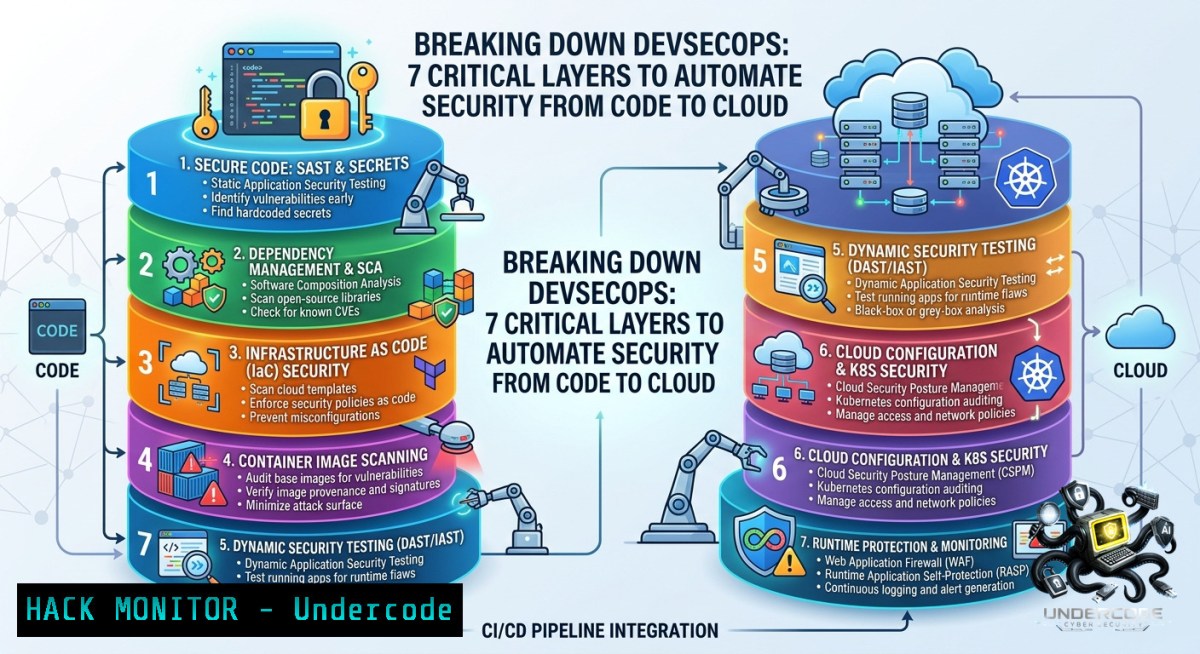
Introduction:
Modern software delivery moves at breakneck speed, but security teams often remain stuck in reactive “test-and-fix” cycles. DevSecOps shifts that paradigm by embedding security controls directly into every phase of the development lifecycle—from design to deployment. This article provides actionable blueprints for automating key management, CI/CD pipeline hardening, infrastructure-as-code (IaC) scanning, container vulnerability management, and continuous monitoring so you can detect risks earlier and fix vulnerabilities faster.
Learning Objectives:
- Implement automated secrets rotation and CI/CD security checks using native cloud tools and open-source utilities.
- Integrate SAST/DAST scanning and IaC configuration validation into your pipeline without slowing down developers.
- Harden container images and runtime environments while establishing continuous threat monitoring with real-time alerting.
You Should Know
- Automating Secrets Management & Key Rotation in CI/CD
Hard‑coded credentials are a leading cause of breaches. Modern DevSecOps demands dynamic secrets handling.
Step‑by‑step guide:
- Linux / macOS – Use `gpg` or `pass` for local testing, but integrate HashiCorp Vault or AWS Secrets Manager for production.
- Windows – Leverage `secrets` in Azure Key Vault via PowerShell.
- CI/CD integration – In GitHub Actions, use `aws-actions/configure-aws-credentials` then fetch secrets:
Linux example: retrieve secret from AWS Secrets Manager
aws secretsmanager get-secret-value --secret-id my-db-password --query SecretString --output text
- Rotate secrets automatically: schedule a pipeline that runs `aws secretsmanager rotate-secret` every 30 days.
- Pre‑commit hook – Block commits containing secrets:
.git/hooks/pre-commit
if git diff --cached | grep -E "(password|secret|token) = ['\"]"; then
echo "❌ Found hardcoded secret. Aborting commit."
exit 1
fi
2. Hardening CI/CD Pipelines with SAST/DAST Scans
Static (SAST) and dynamic (DAST) analysis catch vulnerabilities before they reach production.
Step‑by‑step guide:
- SAST with SonarQube (Linux/Docker):
docker run -d --1ame sonarqube -p 9000:9000 sonarqube:latest
Then run scanner in your project
sonar-scanner -Dsonar.projectKey=myapp -Dsonar.host.url=http://localhost:9000
- DAST with OWASP ZAP – Add a pipeline stage that spiders and attacks a staging URL:
Linux full scan
zap-full-scan.py -t https://staging.myapp.com -g gen.conf -r report.html
- Windows – Use PowerShell to invoke OWASP ZAP in headless mode:
.\zap.bat -cmd -quickurl https://staging.myapp.com -quickprogress
- Fail the build if any high‑severity issue is found (e.g.,
if grep "FAIL" report.html; then exit 1).
3. Infrastructure as Code (IaC) Security Scanning
Misconfigured cloud resources are a top attack vector. Scan Terraform, CloudFormation, or ARM templates early.
Step‑by‑step guide:
- Install checkov (Python‑based, cross‑platform):
pip install checkov
- Run against your Terraform directory:
checkov -d ./terraform --quiet --output cli
- For advanced policy‑as‑code, use tfsec:
tfsec ./terraform --config-file .tfsec/config.yml
- Integrate into CI – Example GitHub Actions step:
</li>
<li>name: Run tfsec
uses: aquasecurity/[email protected]
with:
sarif_file: tfsec.sarif
- Remediation example: If checkov flags an open S3 bucket, add `block_public_acls = true` and `ignore_public_acls = true` to your resource.
4. Container Security & Vulnerability Management
Containers can pack known vulnerabilities (CVEs) from base images. Scan every build.
Step‑by‑step guide:
- Trivy (fast, no database required):
Linux / macOS
trivy image myapp:latest --severity HIGH,CRITICAL --exit-code 1 --ignore-unfixed
- Windows (using Docker Desktop + WSL2): Same Trivy command works inside WSL.
- Scan in pipeline – Fail if critical CVEs found:
trivy image --format json --output trivy-report.json myapp:latest
if jq -e '.Results[].Vulnerabilities[] | select(.Severity=="CRITICAL")' trivy-report.json; then
echo "Critical CVEs detected. Aborting deployment."
exit 1
fi
- Base image hardening – Use distroless or Alpine, and regularly run `docker scan` or `docker scout` (Docker Scout CLI).
5. Continuous Monitoring & Runtime Threat Modeling
Shift‑left is not enough; runtime monitoring detects zero‑day exploits and misconfigurations in production.
Step‑by‑step guide:
- Falco (cloud‑native runtime security): Install on Kubernetes or Linux host:
Linux (Debian/Ubuntu)
curl -s https://falco.org/repo/falcosecurity-packages.asc | apt-key add -
echo "deb https://download.falco.org/packages/deb stable main" | tee /etc/apt/sources.list.d/falcosecurity.list
apt-get update && apt-get install -y falco
- Run Falco with default rules:
sudo falco -r /etc/falco/falco_rules.yaml
- Custom rule example – Detect `wget` or `curl` from a pod that shouldn’t reach the internet:
</li>
<li>rule: Unusual Outbound Network Activity
desc: Alert on any outbound connection from a sensitive pod
condition: outbound and container and not allowed_outbound_pods
output: Outbound connection from pod %container.name (cmd=%proc.cmdline)
priority: WARNING
- Integrate with SIEM or Slack via
falco-sidekick.
- Threat Modeling as Code with OWASP Threat Dragon
Move threat modeling out of whiteboards and into your CI/CD.
Step‑by‑step guide:
- Install OWASP Threat Dragon (Node.js):
npm install -g threat-dragon
- Create a threat model (
threatmodel.json) for each microservice. - Use a script to validate data flows against known attack patterns (e.g., STRIDE).
- Automated check – Commit the JSON to the repo and run a custom Python script that fails the build if a “tampering” threat is not mitigated:
import json
with open("threatmodel.json") as f:
tm = json.load(f)
unmitigated = [t for t in tm["threats"] if t["status"] == "Open" and t["severity"] == "High"]
if unmitigated:
print(f"❌ Found {len(unmitigated)} unmitigated high-severity threats.")
exit(1)
7. Automating Vulnerability Management with Dependency Scans
Open‑source libraries are the new perimeter. Use software composition analysis (SCA).
Step‑by‑step guide:
- OWASP Dependency‑Check (cross‑platform):
Linux / Windows (Java required)
dependency-check --scan ./src --format HTML --out ./reports
- npm audit for Node.js projects:
npm audit --audit-level=high --production
- GitHub Dependabot – Enable “Security updates” in repo settings → automatically create PRs for vulnerable dependencies.
- Trivy for filesystem – Scan your lock files:
trivy fs --scanners vuln --severity HIGH,CRITICAL .
What Undercode Say
Key Takeaway 1:
Automation is the only scalable way to enforce security in fast‑paced DevOps environments. Manual reviews miss misconfigurations and slow down teams.
Key Takeaway 2:
Security must be embedded as early as the first line of code (pre‑commit hooks, IaC scanning) but also verified at runtime (Falco, continuous monitoring).
Analysis (10 lines):
The post correctly highlights that DevSecOps is not a tool but a cultural and technical shift. Most organisations fail because they adopt point solutions (e.g., only a SAST scanner) without closing the loop between detection and remediation. The commands and integrations shown above address that gap: secrets rotation prevents credential leaks, CI/CD hardening stops vulnerable code from merging, and container scanning blocks vulnerable images from reaching production. Threat modeling as code brings security architecture into version control, making it auditable and repeatable. However, none of these steps work without executive buy‑in and developer training – security tools that are too noisy or too slow will be bypassed. The real win comes when developers can self‑serve secure defaults (e.g., pre‑configured CI templates with scanning baked in). Looking ahead, we will see tighter coupling between observability pipelines and runtime security, enabling autonomous rollbacks when anomalies are detected.
Expected Output
When you run the complete pipeline (SAST, secrets audit, IaC scan, container scan, and Falco monitoring), a successful build output looks like this:
[bash] SonarQube scan: 0 bugs, 0 vulnerabilities, 0 code smells.
[bash] checkov: 0 failed checks (PASSED).
[bash] Trivy: No CRITICAL or HIGH vulnerabilities.
[bash] Falco: No security events during smoke test.
[bash] All DevSecOps gates passed. Proceeding to deployment.
A failing scenario would halt the pipeline and produce:
[bash] Trivy found 2 CRITICAL CVEs in base image (CVE-2025-1234, CVE-2025-5678).
[bash] checkov found S3 bucket publicly writable (CKV_AWS_18).
[bash] Pipeline failed. See reports/security-failures.html
Prediction
- +1 DevSecOps automation will become a compliance requirement (e.g., PCI DSS v5.0, NIST SSDF) within 18 months, forcing even legacy enterprises to adopt code‑based security controls.
- +1 AI‑powered remediation bots will automatically suggest patches for IaC misconfigurations and dependency CVEs, cutting mean‑time‑to‑fix from days to minutes.
- -1 As pipelines become more complex, misconfigured “skip security” flags or overly permissive service accounts will create new supply‑chain attack vectors, with adversaries targeting CI/CD systems directly.
- -1 Small teams without dedicated security engineers may drown in false positives from too many tools unless they invest in unified orchestration platforms (e.g., DefectDojo, SecureBlue).
- +1 The convergence of runtime monitoring (Falco) and observability (OpenTelemetry) will enable real‑time threat detection with automatic rollback of compromised microservices, turning security into a reliability feature.
▶️ Related Video (82% Match):
🎯Let’s Practice For Free:
🎓 Live Courses & Certifications:
Join Undercode Academy for Verified Certifications
🚀 Request a Custom Project:
Secure, high-velocity infrastructure and disruptive technological engineering. Contact our engineering team for high-tier development and proprietary systems:
[email protected]
💎 Smart Architecture | 🛡️ Secure by Design | ⭐ Trusted by Thousands
IT/Security Reporter URL:
Reported By: Devsecops Cybersecurity – Hackers Feeds
Extra Hub: Undercode MoN
Basic Verification: Pass ✅


