Listen to this Post
Introduction:
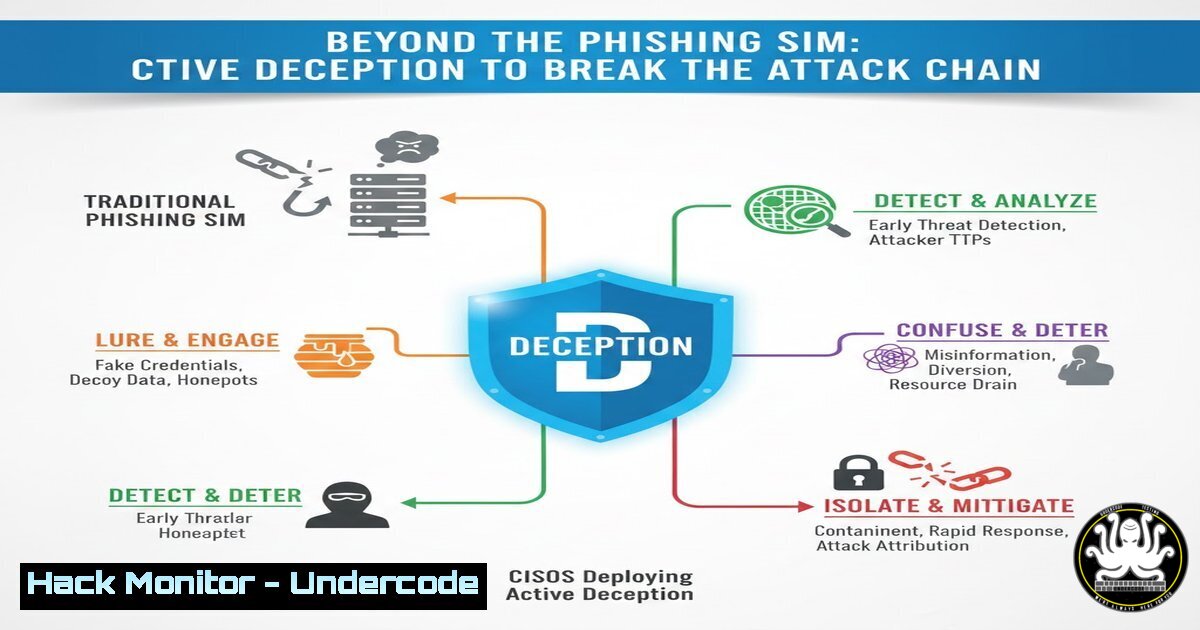
The traditional model of phishing defense—relying solely on employee awareness and predictable training simulations—is cracking under the weight of alert fatigue and sophisticated social engineering. Forward-thinking security leaders are now architecting defenses that assume breaches will occur, integrating deception technologies and automated counter-phishing to actively disrupt attackers and gather critical threat intelligence. This shift moves the battleground from the user’s inbox to a controlled environment where defenders hold the advantage.
Learning Objectives:
- Understand the limitations of conventional security awareness and phishing simulation programs.
- Learn how to design and deploy basic deception environments (honeypots) to detect lateral movement.
- Implement automated email analysis and containment scripts to counter phishing campaigns post-click.
- Integrate threat intelligence feeds and AI tools to evolve phishing simulations dynamically.
- Harden endpoint and cloud logging to improve post-incident forensic capabilities.
You Should Know:
1. The Architecture of a Simple Canary Honeypot
While awareness training aims to prevent the initial click, a deception strategy assumes a click will happen. A canary token or honeypot acts as a digital tripwire, alerting you when an attacker interacts with a decoy resource. This is crucial for detecting lateral movement after a potential compromise.
Step‑by‑step guide explaining what this does and how to use it.
Concept: Deploy a fake SMB share, database server, or web directory that appears legitimate but is isolated and monitored. Any interaction with it is malicious by definition.
Linux Example (Using Canarytokens):
- Generate a token: Visit `canarytokens.org` and select “Windows File Share.” You’ll receive a unique file (e.g.,
Finance_Q4_Confidential.docx). - Deploy the decoy: Place the file on a dedicated Linux server within your network.
scp Finance_Q4_Confidential.docx user@internal-server:/var/www/html/decoys/
- Monitor access: Use `inotifywait` to log any file access attempts.
sudo apt-get install inotify-tools
inotifywait -m -e access /var/www/html/decoys/ | while read path action file; do
echo "[$(date)] - Alert: $file was accessed! Possible breach." >> /var/log/canary.log
Integrate with SIEM or send alert via curl/webhook
done
Windows Example (Fake Share with Auditing):
1. Create a directory `C:\Deploy\Fake_Share`.
- Enable detailed auditing: Open `secpol.msc` > Local Policies > Audit Policy > Audit object access > Enable “Success” and “Failure”.
- Right-click the folder > Properties > Security > Advanced > Auditing > Add. Select “Everyone” and audit “All” activities.
- Any access will generate Event ID 4663, viewable in
Event Viewer. Forward these logs to your SIEM. -
Automating Phishing Email Analysis with Python and API Integrations
When a user reports a phishing email, speed is critical. An automated script can extract indicators of compromise (IOCs) and check them against threat feeds.
Step‑by‑step guide explaining what this does and how to use it.
Concept: A Python script that parses a forwarded email, extracts headers, URLs, and attachments, and queries them against VirusTotal or similar services.
Basic Script Outline:
import re, requests, json
from email.parser import BytesParser

Configuration
VT_API_KEY = 'your_virustotal_api_key'
VT_URL_SCAN = 'https://www.virustotal.com/api/v3/urls'

def analyze_email(raw_email):
 Parse email
msg = BytesParser().parsebytes(raw_email)
body = msg.get_body(preferencelist=('plain')).get_content()

Extract URLs
urls = re.findall(r'https?://(?:[-\w.]|(?:%[\da-fA-F]{2}))+', body)
suspicious_urls = []

for url in set(urls):  Deduplicate
headers = {'x-apikey': VT_API_KEY}
response = requests.post(VT_URL_SCAN, headers=headers, data={'url': url})
if response.status_code == 200:
result = response.json()
 Check if URL is malicious (simplified)
if result.get('data', {}).get('attributes', {}).get('last_analysis_stats', {}).get('malicious', 0) > 2:
suspicious_urls.append(url)
return suspicious_urls

Example usage with an email saved as a file
with open('reported_phish.eml', 'rb') as f:
malicious_links = analyze_email(f.read())
print(f"Malicious URLs found: {malicious_links}")
Action: Integrate this into a ticketing system (like Jira Service Desk) to auto-create incidents with enriched IOC data.
3. Hardening Cloud Logging for Phishing Campaign Forensics
If an attacker harvests credentials via a phishing page, you need detailed logs to trace their activity in your cloud environment (e.g., AWS, Azure).
Step‑by‑step guide explaining what this does and how to use it.
Concept: Enable and centralize all critical logs. An attacker’s first action post-compromise is often to disable logging.
AWS CLI Commands for Critical Logging:
- Enable CloudTrail in all regions and send to a secured, immutable S3 bucket.
aws cloudtrail create-trail --name Organization-Trail --s3-bucket-name my-secure-log-bucket --is-multi-region-trail --enable-log-file-validation
aws cloudtrail start-logging --name Organization-Trail
- Enable S3 Data Events for sensitive buckets to log object-level reads/writes.
aws cloudtrail put-event-selectors --trail-name Organization-Trail --event-selectors '[{ "ReadWriteType": "All", "IncludeManagementEvents": true, "DataResources": [{ "Type": "AWS::S3::Object", "Values": ["arn:aws:s3:::prod-bucket/"] }] }]' - Enable GuardDuty for intelligent threat detection based on these logs.
Response: Create an AWS Lambda function triggered by GuardDuty findings (e.g.,UnauthorizedAccess:EC2/SSHBruteForce) to automatically isolate a compromised instance by attaching a security group that blocks all egress traffic.
4. Implementing AI-Driven, Dynamic Phishing Simulations
Move beyond predictable quarterly simulations. Use AI to generate personalized, context-aware phishing tests that mimic modern tactics like conversational AI phishing (as mentioned in the post’s comment).
Step‑by‑step guide explaining what this does and how to use it.
Concept: Leverage tools like GoPhish or commercial platforms integrated with OpenAI’s API to create highly convincing, variable simulations.
Process:
- Segment your audience: Create groups (Finance, HR, Engineering) and tailor lures (fake invoices, resume alerts, package delivery).
- Use AI for content generation: Script to create unique email body text.
Example using curl with OpenAI (ensure API key is secured) curl https://api.openai.com/v1/chat/completions \ -H "Authorization: Bearer $OPENAI_API_KEY" \ -H "Content-Type: application/json" \ -d '{ "model": "gpt-4", "messages": [{"role": "user", "content": "Generate a convincing phishing email from a fake IT support team about a mandatory password reset due to a system upgrade. Use a urgent but professional tone."}] }' - Vary delivery times and techniques: Include QR codes, use conversational threads over time (via compromised colleague simulations), or even test vishing with AI-generated voice clones in controlled exercises.
-
Building a Counter-Phishing Webhook with Microsoft Graph API
For organizations using Microsoft 365, you can automate the response to reported phishing messages directly from the Outlook client.
Step‑by‑step guide explaining what this does and how to use it.
Concept: Use the “Report Phishing” add-in to trigger an automated workflow that quarantines the message, blocks the sender, and searches for other instances.
PowerShell Script Example (Requires `MgGraph` Module):
 Connect to Graph API with appropriate permissions (Mail.ReadWrite, Mail.Send)
Connect-MgGraph -Scopes "Mail.ReadWrite", "Mail.Send"

When a user reports a message, this function could be triggered via Power Automate
function Invoke-CounterPhishingAction {
param($messageId, $userId)

<ol>
<li>Move the reported message to a quarantine folder for analysis
Move-MgUserMessage -UserId $userId -MessageId $messageId -DestinationId "JunkEmail"</p></li>
<li><p>Get the sender and create a mail rule to block future emails
$msg = Get-MgUserMessage -UserId $userId -MessageId $messageId
$sender = $msg.Sender.EmailAddress.Address</p></li>
<li><p>Create a block rule in the user's mailbox (simplified example)
$params = @{
displayName = "Block Phish Sender $((Get-Date).ToString('yyyyMMdd'))"
sequence = 2
conditions = @{ senderContains = @($sender) }
actions = @{ moveToFolder = "JunkEmail" }
}
New-MgUserMailFolderMessageRule -UserId $userId -MailFolderId "Inbox" -BodyParameter $params</p></li>
</ol>

<p>Write-Host "Reported message quarantined and sender $sender blocked." -ForegroundColor Green
}
What Undercode Say:
- Awareness is a Control, Not a Silver Bullet. Treating training as a checkbox activity creates a false sense of security. Metrics like click-rates are vanity metrics if they don’t translate to reduced mean time to detect (MTTD) and respond (MTTR) to real incidents.
- Shift Left on Defense, Assume Compromise. The most effective modern strategy layers preventive awareness with assumed breach detective controls. Deception technology is a force multiplier that makes the attacker’s life harder and provides unparalleled signal clarity in a noisy environment.
The analysis from the original post and subsequent discussion highlights an industry pivot. CISOs are intellectually conceding that the human element will fail, not due to poor training, but due to the overwhelming volume and sophistication of attacks. The innovation is now focused on designing security architectures that are resilient to this reality. By deploying deception, automating response, and using AI to keep simulations relevant, defenders change the attacker’s economics, making campaigns more costly and less reliable for them.
Prediction:
Within the next 18-24 months, deception and automated counter-phishing will become standard modules in enterprise EDR/XDR platforms, moving from niche tools to mainstream controls. AI will be dual-use: attackers will leverage it for hyper-personalized campaigns, while defenders will use it to generate dynamic simulations, analyze phishing kit code, and auto-generate containment rules. The CISO’s role will evolve further from policy enforcer to a master of adversarial simulation and active defense orchestration, where understanding attacker TTPs and designing environments to foil them becomes a core competency. The fatigue associated with passive training will catalyze this more active, intelligence-driven defense model.
▶️ Related Video (78% Match):
🎯Let’s Practice For Free:
IT/Security Reporter URL:
Reported By: Fabriziodicarlo Phishing – Hackers Feeds
Extra Hub: Undercode MoN
Basic Verification: Pass ✅


