
Listen to this Post
Introduction:
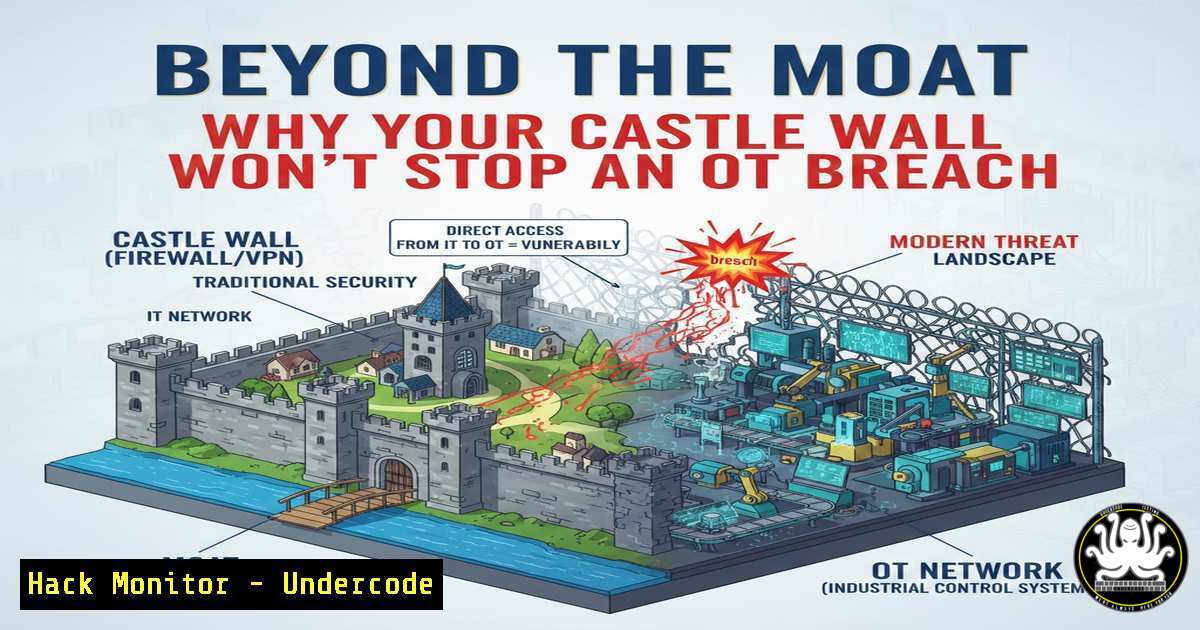
The medieval castle, with its imposing stone walls and guarded drawbridge, has long served as a flawed metaphor for Operational Technology (OT) security. While the traditional “castle-and-moat” model correctly emphasizes a strong perimeter, it fails to account for the sophisticated threats that now plague critical infrastructure. Modern OT environments, from power grids to water utilities, are discovering that a single, hardened firewall is as insufficient as a castle wall against an enemy already inside the courtyard. This article deconstructs the castle analogy, extracting lessons from historical fortifications and applying them to modern frameworks like IEC 62443 and NIS2 to build a truly defensible OT architecture.
Learning Objectives:
- Understand the limitations of perimeter-only security in OT environments and the need for defense-in-depth.
- Learn how to map medieval defense concepts (keep, moat, guards) to modern OT security controls (zones, conduits, OT-SOC).
- Identify practical hardening techniques for remote access and legacy system segmentation.
You Should Know:
- The Broken Moat: Why Logical Walls Are Not Enough
In medieval times, the moat and drawbridge were physical barriers. In IT, we replicate this with VLANs, firewalls, and ACLs—logical barriers. However, as Evan Lee pointed out in the discussion, these “walls” rely entirely on software behaving as expected. In a siege, you can see the enemy lowering the drawbridge. In a cyber-attack, the “guards” (the firewall rules and software) can be compromised without anyone noticing.
To audit your current logical segmentation, you can use network scanning tools to verify that only expected traffic traverses your “drawbridge.”
Linux Command (Reconnaissance – What an attacker sees):
 Scan for open ports on a critical OT controller (use with extreme caution in live environments)
nmap -sS -p 1-100 --open <OT_Device_IP>
Explanation: This stealth SYN scan checks which ports are open on a device. If you see unexpected ports like 3389 (RDP) or 445 (SMB) open on a PLC, your logical “drawbridge” is down.
Windows Command (Defender – Auditing your own walls):
 View current firewall rules on a Windows-based engineering workstation
Get-NetFirewallRule -Direction Inbound | Where-Object {$_.Enabled -eq 'True'} | Format-Table Name, Action
Explanation: This PowerShell command lists all active inbound firewall rules. It helps you audit what traffic is allowed into the workstation, identifying potential over-permissive rules that an attacker could use for lateral movement.
- The Compromised Guard: VPNs and Remote Access Risks
The post highlights that vulnerable VPN gateways are a primary attack vector. In the castle analogy, this is like bribing the guard to let in the enemy. Simply encrypting the traffic (transport) and checking an ID (authentication) is not enough. As Emilie Lerche Fenger noted, once through the VPN, lateral movement is often uncontrolled. The solution lies in “just-in-time” access and hardware-enforced isolation.
To analyze your VPN exposure, you can perform a basic configuration review and vulnerability scan.
OpenVPN Configuration Hardening (Linux Server):
 Edit your server.conf to enforce stronger security
sudo nano /etc/openvpn/server.conf

Add or ensure these lines are present
tls-version-min 1.2
auth SHA256
cipher AES-256-CBC
tls-cipher TLS-ECDHE-RSA-WITH-AES-256-GCM-SHA384
 Restrict client-to-client traffic (prevents lateral movement via VPN)
client-to-client
 Use a specific user/password auth script to integrate with 2FA
auth-user-pass-verify /etc/openvpn/scripts/verify_auth.sh via-file
Explanation: This hardens the VPN configuration by enforcing strong ciphers and, crucially, allows for `client-to-client` restrictions. However, even with this, you still need to control what the remote user can do once inside.
3. Raising the Drawbridge: Hardware-Enforced Isolation
The discussion introduced the concept of moving from logical segmentation to physical disconnection for legacy, unpatchable systems. This is akin to physically raising the drawbridge rather than just trusting the gatekeeper. In OT, this can be achieved through unidirectional gateways or data diodes.
While full hardware isolation is a physical purchase, you can simulate an “air gap” scenario using Linux firewall rules to enforce strict, state-less isolation for a specific test device.
Linux iptables (Simulating a Physical Disconnect for a Legacy System):
 Flush existing rules
sudo iptables -F

Set default policies to DROP (like raising the drawbridge)
sudo iptables -P INPUT DROP
sudo iptables -P FORWARD DROP
sudo iptables -P OUTPUT DROP

Allow only outbound NTP to a specific time server (if needed for logs)
sudo iptables -A OUTPUT -p udp --dport 123 -d <NTP_SERVER_IP> -j ACCEPT
sudo iptables -A INPUT -p udp --sport 123 -s <NTP_SERVER_IP> -j ACCEPT
Explanation: By setting the default policy to DROP for all chains, you create a software-enforced air gap. You then punch only specific, necessary holes. This is a strict version of “default deny” that can protect a legacy system from unauthorized lateral movement.
4. Just-in-Time Access: Engineering the Drawbridge
Mats Karlsson Landré and Evan Lee discussed “just-in-time reachability.” Instead of a permanently open gate (persistent VPN), the bridge only lowers when needed. This minimizes the attack surface. In modern infrastructure, this is implemented via Privileged Access Management (PAM) solutions that broker connections on-demand.
You can simulate a basic “just-in-time” SSH access using a combination of a firewall rule and a script.
Linux Firewall-cmd (Dynamic Access):
 Allow SSH access from a specific IP for 5 minutes (use with 'at' command)
 First, create a script (open_ssh.sh)
!/bin/bash
firewall-cmd --add-rich-rule='rule family="ipv4" source address="<REMOTE_ADMIN_IP>" port port="22" protocol="tcp" accept' --timeout=300

Then schedule it to run immediately when access is requested
chmod +x open_ssh.sh
./open_ssh.sh
Explanation: This script adds a temporary firewall rule that grants SSH access for 300 seconds and then automatically removes it. This reduces the window of opportunity for an attacker scanning for open ports.
- The Keep: Crown Jewel Analysis and Blast Radius
A castle’s inner keep was the last line of defense, containing the most valuable assets. This maps directly to “crown jewel analysis” in OT. You must identify your most critical process controllers and ensure they are in the most secure zone, with a limited “blast radius” should outer defenses fall.
Network traffic analysis can help identify these critical assets by mapping communication patterns.
Wireshark Filter (Identifying Critical Asset Communication):
 In a packet capture, filter traffic to/from a specific PLC to see all its connections
ip.addr == <PLC_IP> and tcp.port == 102
Explanation: This display filter shows all traffic to and from a Siemens PLC (using port 102 for S7 communication). Analyzing this helps you understand which HMIs or engineering workstations talk to it, defining its potential “blast radius” if compromised.
6. Forensics in the Ruins: NIS2 Compliance
The conversation highlighted that under NIS2, it’s not just about preventing problems, but understanding what happened. In a castle, this would be questioning guards and examining arrow slits. In OT, it means immutable logs and detailed session recording.
To prepare for NIS2 audit requirements, you must centralize and secure logs.
Windows Log Forwarding (Setting up a Central Collector):
 On a Windows Event Collector (WEC) server, create a subscription
wecutil qc
 Then create an XML subscription to collect security events from domain controllers or engineering workstations
Explanation: While complex to set up manually, Windows Event Forwarding allows you to create a central, secure repository of logs. This ensures that if an attacker compromises an engineering workstation, they cannot delete the logs because they are already forwarded to the collector, satisfying NIS2’s forensic requirements.
- Defending Against the “Burned” Guard: Mitigating Lateral Movement
Once an attacker is inside, they move laterally to find the “keep.” This is often done by dumping credentials from one machine and reusing them on another. The castle analogy teaches us that the guard shouldn’t have the key to the treasury.
Mitigating this in OT involves implementing Local Administrator Password Solution (LAPS) and restricting administrative tokens.
PowerShell (Checking for Local Admin Groups):
 Check who is in the local administrators group on a remote machine
$computer = "EngineeringWS01"
$group = <a href=""WinNT://$computer/Administrators,group"">ADSI</a>
$members = @($group.Invoke("Members"))
$members | ForEach-Object { $<em>.GetType().InvokeMember("Name", 'GetProperty', $null, $</em>, $null) }
Explanation: This script remotely enumerates members of the local Administrators group on a workstation. If the same domain admin account is a member of every workstation’s local admin group, a single compromised workstation grants the attacker the keys to the entire kingdom.
What Undercode Say:
- The “Hard Shell, Soft Center” is Dead: The castle analogy’s biggest lesson is that modern attackers will bypass the wall. Security must be baked into every layer, from the physical process to the network segment. A breach of the outer wall should not mean the loss of the keep.
- Connectivity is a Privilege, Not a Right: The conversation on just-in-time access for vendors and the concept of hardware-enforced isolation for legacy systems points to a future where persistent connectivity is the exception. For critical infrastructure, designing for temporary, controlled connections will significantly reduce the attack surface, especially for the unpatchable legacy systems that will remain in service for decades.
Prediction:
The future of OT security will see a fundamental shift from software-defined segmentation to hardware-enforced physical controls at critical Purdue Model levels. As NIS2 and similar regulations mature, organizations will abandon the “permanent VPN” model for a “zero-trust physical access” model. We will see the rise of hardware data diodes and mechanical disconnect switches becoming standard architectural components, not just emergency fail-safes, effectively turning our modern digital castles into islands that can only be reached by a bridge we choose to lower, on our own schedule.
▶️ Related Video (84% Match):
🎯Let’s Practice For Free:
IT/Security Reporter URL:
Reported By: Karlssonmats Otsecurity – Hackers Feeds
Extra Hub: Undercode MoN
Basic Verification: Pass ✅


