Listen to this Post
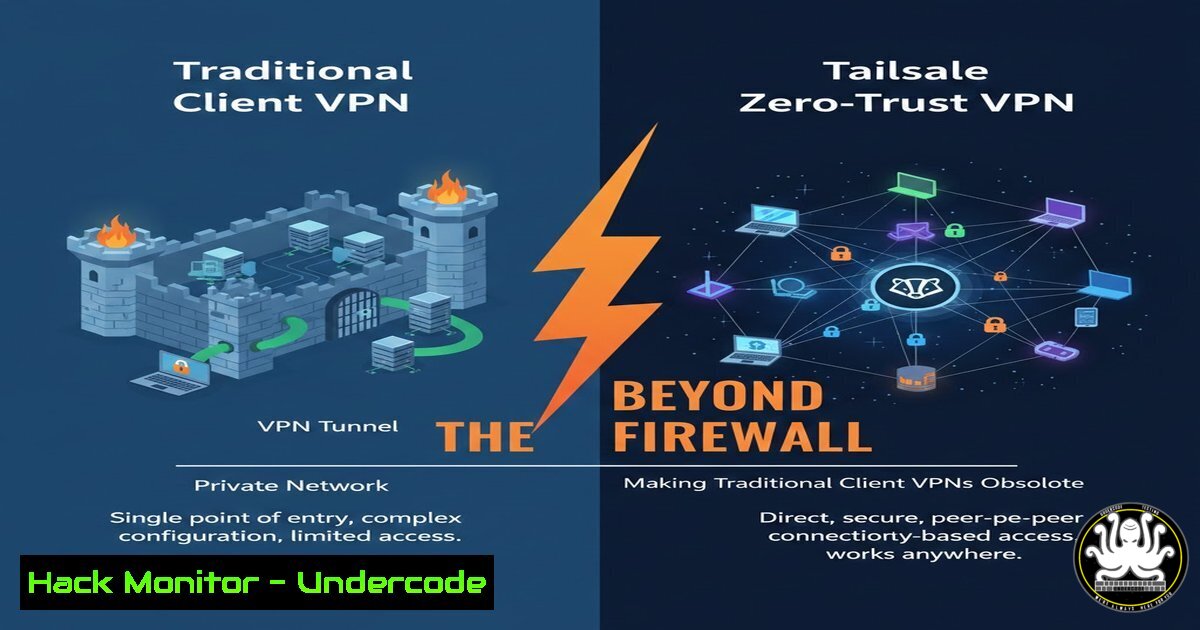
Introduction:
The perimeter-based security model, reliant on traditional firewall VPN clients like GlobalProtect, FortiClient, and AnyConnect, is being challenged by a more intrinsic, identity-centric approach. Tailscale implements a zero-trust network model built on the WireGuard protocol, where access is never implicitly trusted and is governed by granular, user/device-specific policies. This shift moves security away from bulky firewall configuration sprawl and towards seamless, cryptographically secure connections defined by precise Access Control Lists (ACLs).
Learning Objectives:
- Understand the fundamental difference between traditional firewall VPNs and a zero-trust model like Tailscale.
- Learn how to implement and manage Tailscale’s key security features: Access Control Lists and Subnet Routers.
- Gain practical knowledge for deploying Tailscale on Linux and Windows, and explore a leading open-source alternative.
You Should Know:
- The Core Principle: Identity as the New Perimeter
The post highlights the move from network-level trust to device/user-level trust. Traditional VPNs often grant a user full access to a subnet once connected, creating a wide attack surface for lateral movement. Tailscale, using WireGuard, authenticates each device via a central authority (like your SSO) and encrypts all traffic end-to-end. Access is then finely controlled by ACLs, not just network topology.
Step-by-step guide explaining what this does and how to use it:
This is a philosophical and architectural shift. Instead of configuring rules on a firewall for IP ranges, you define policies in a single place that state which users or which devices can talk to which other devices on which ports.
1. Concept: Every device gets a Tailscale IP (100.x.y.z). Traffic between these IPs is encrypted via WireGuard.
2. Control Plane: You manage devices and ACLs through the Tailscale admin console (or a self-hosted coordination server).
3. Data Plane: Peer-to-peer WireGuard connections are established directly between devices, maximizing performance and security. If a direct path is blocked, Tailscale can relay traffic through its secure DERP (Detoured Encrypted Routing Protocol) servers.
- Crafting Granular Security with Access Control Lists (ACLs)
The power of Tailscale lies in its ACLs. They are JSON-based rules that define precisely what is allowed, moving far beyond the “all-or-nothing” access of traditional VPNs.
Step-by-step guide explaining what this does and how to use it:
1. Navigate to the ACL Editor: In your Tailscale admin console, go to the ‘Access Controls’ tab.
2. Understand the Syntax: ACLs consist of “accept” rules specifying source, destination, and protocol/port.
3. Define User & Group Tags: First, define auto-groups or static groups. For example, tag developers with tag:developers.
4. Write a Restrictive Rule: The following ACL allows `tag:developers` to only access a specific web server on ports 80 and 443, and nothing else.
// Example tailscale ACL policy (ACL.json)
{
"acls": [
// Allow developers to access the production web server on HTTP/S
{
"action": "accept",
"src": ["tag:developers"],
"dst": ["tag:prod-webserver:80,443"],
},
// Deny all other traffic by default (Tailscale's implicit default)
],
"tagOwners": {
"tag:prod-webserver": ["group:[email protected]"],
"tag:developers": ["group:[email protected]"],
}
}
5. Apply & Test: Save the ACL. The changes propagate to user devices within minutes. Test access by trying to ping or connect to an unauthorized resource.
3. Installation and Basic Node Configuration
Deploying Tailscale is notably simpler than configuring traditional VPN clients and firewalls in tandem.
Step-by-step guide explaining what this does and how to use it:
– On Linux (Ubuntu/Debian Example):
1. Add the Tailscale repository and install:
curl -fsSL https://tailscale.com/install.sh | sh
2. Start Tailscale and authenticate:
sudo tailscale up
This will provide a URL to log in with your identity provider (Google, GitHub, Okta, etc.).
3. Verify your connection and IP:
tailscale status
tailscale ip
- On Windows:
- Download the installer from tailscale.com/download.
2. Run the installer and follow the prompts.
- The Tailscale GUI will open; click “Log in” and authenticate via your browser.
- Your machine is now part of your zero-trust tailnet.
-
Exposing Legacy Subnets with the Subnet Router Feature
Not all resources can run the Tailscale client (e.g., network printers, legacy servers). The subnet router feature allows a Tailscale node to advertise routes to traditional subnets.
Step-by-step guide explaining what this does and how to use it:
1. Designate a Subnet Router: Choose a Linux server (on-prem or in the cloud) that has Tailscale installed and network access to the legacy subnet (e.g., 192.168.1.0/24).
2. Enable as Subnet Router: Run the `tailscale up` command with the `–advertise-routes` flag.
sudo tailscale up --advertise-routes=192.168.1.0/24
3. Approve the Route: In the Tailscale admin console, find the device, click the “…” menu, and “Edit route settings.” Enable the advertised subnet.
4. Client Access: Other Tailscale nodes can now access the `192.168.1.0/24` subnet. You must pair this with ACLs to control which users/devices can use this route.
5. Securing SSH with Tailscale SSH
Tailscale can manage SSH access, removing the need to manage SSH keys or expose SSH ports to the internet.
Step-by-step guide explaining what this does and how to use it:
1. Enable Tailscale SSH: In the admin console, go to Settings > SSH. Enable the feature.
2. Configure ACLs for SSH: Update your ACLs to specify who can SSH into which machines.
{
"action": "accept",
"src": ["tag:sysadmins"],
"dst": ["tag:servers:22"],
"proto": "tcp"
}
3. Connect: From any device in your tailnet, simply SSH to the Tailscale hostname or IP of the target machine. Tailscale handles authentication and encryption seamlessly.
ssh [email protected]
6. Exploring Open-Source Alternatives: Netbird
As noted in the post comment, Netbird is a compelling open-source alternative, offering a similar zero-trust, WireGuard-based mesh network.
Step-by-step guide explaining what this does and how to use it:
1. Self-Host the Management Dashboard: Netbird’s control plane can be self-hosted. Their documentation provides Docker/Kubernetes setups.
2. Install Clients: Similar to Tailscale, clients are available for all major OSs.
 Linux example using install script
curl -fsSL https://pkgs.netbird.io/install.sh | sh
sudo netbird up
3. Key Difference: Netbird provides more control over the infrastructure (you host it) and may be preferable for organizations with strict data sovereignty requirements, while Tailscale offers a managed service for simplicity.
What Undercode Say:
- Key Takeaway 1: The primary security advancement is the inversion of the trust model. Access is defined by identity-based ACLs applied at the individual connection level, drastically reducing the lateral movement potential that plagues traditional VPNs. This is a more enforceable application of the principle of least privilege.
- Key Takeaway 2: Operational simplicity is achieved without sacrificing security. The complexity is centralized in policy definition (ACLs), not distributed across countless firewall rules and client configurations. The use of WireGuard provides modern, auditable cryptography by default.
The analysis underscores a paradigm shift. Tailscale and similar tools aren’t just “another VPN”; they are a re-imagination of remote access that aligns with modern cloud-native and work-from-anywhere realities. They mitigate risks like credential phishing (by requiring device authentication and user SSO) and internal network reconnaissance by making invisible any resource a user is not explicitly authorized to see. The reduced “configuration sprawl” directly translates to a smaller attack surface and fewer human configuration errors.
Prediction:
Within 3-5 years, the traditional firewall-client VPN will be considered legacy for most green-field and cloud-forward enterprises, reserved for specific high-throughput site-to-site links or extreme legacy application support. Zero-trust access solutions like Tailscale will become the default for remote employee and contractor access. We will see deeper integration with CI/CD pipelines (for ephemeral access), IoT device management, and a convergence with Secure Service Edge (SSE) and SASE frameworks, where network access is just one component of a continuous security posture assessment for every connection attempt.
▶️ Related Video (82% Match):
🎯Let’s Practice For Free:
IT/Security Reporter URL:
Reported By: Charlescrampton The – Hackers Feeds
Extra Hub: Undercode MoN
Basic Verification: Pass ✅


