Listen to this Post
Introduction:
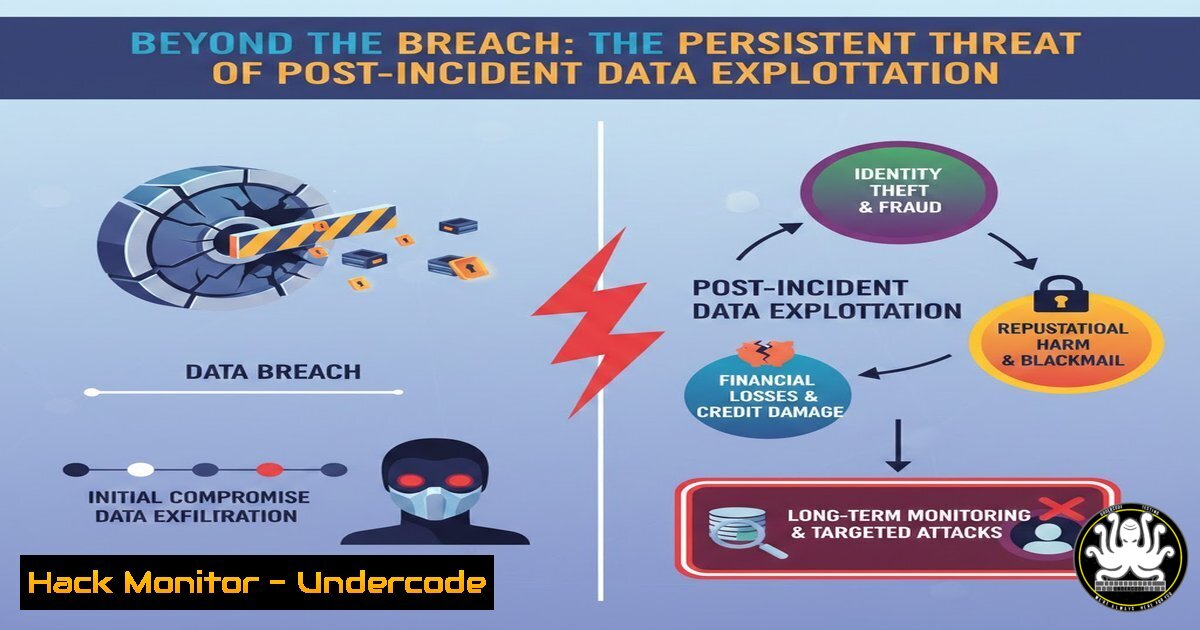
The recent cyberattack on Senegal’s Directorate of Public Accounts (DAF) serves as a stark reminder that a data breach is not a single event, but the beginning of a prolonged risk lifecycle. While the initial intrusion grabs headlines, the real danger lies in the days, months, and even years that follow, as stolen data is systematically weaponized for fraud, identity theft, and targeted social engineering. Understanding the post-incident threat landscape is crucial for both individuals and organizations to mitigate the cascading effects of a leak.
Learning Objectives:
- Understand the lifecycle of stolen data and the phases of post-breach exploitation.
- Learn to implement personal and organizational security controls to mitigate post-breach risks.
- Develop the ability to identify and defend against advanced social engineering tactics that leverage leaked information.
You Should Know:
- The Anatomy of a Data Breach: From Exfiltration to Exploitation
The initial breach at the DAF likely involved the exfiltration of structured and unstructured data. Attackers don’t just steal a single file; they steal databases, emails, and documents. This raw data is then parsed and categorized. For a security professional, understanding this process is the first step in building a defense.
What this does and how to use it:
To simulate an attacker’s post-exploitation data enumeration on a compromised Linux system (for educational purposes in a lab), you might use commands to locate and list files containing sensitive information:
 Find files containing common data patterns in the current directory (e.g., after a breach)
grep -r -i "carte nationale d'identité" /path/to/exfiltrated/data/
grep -r -E "[0-9]{3}-[0-9]{2}-[0-9]{4}" /path/to/exfiltrated/data/  Find SSN-like patterns

List files by size to find potential database dumps
ls -laS /path/to/exfiltrated/data/ | head -20

Use 'file' command to identify unknown data types
file /path/to/exfiltrated/data/ | grep -i "sql|csv|json"
On a Windows system, a similar enumeration would use PowerShell:
 Search for files with specific extensions
Get-ChildItem -Path C:\exfiltrated_data\ -Recurse -Include .sql, .csv, .xlsx, .pdf

Search for text within files (slow, use on small datasets)
Select-String -Path C:\exfiltrated_data\ -Pattern "passport" -List
These commands illustrate the initial triage an attacker performs to find high-value data like identity documents (CNI), financial records, or credentials, which are then prepared for sale or direct use.
2. Digital Hygiene: Immediate Steps for Individuals Post-Breach
When an institution like the DAF is compromised, citizens whose data was stored there become primary targets. The post correctly highlights the surge in phishing and vishing attempts. Your first line of defense is immediate and proactive digital hygiene.
Step‑by‑step guide:
- Credential Rotation: Immediately change passwords for all critical accounts (email, banking, government portals). Do not use the password from the compromised service elsewhere.
- Enable 2FA/MFA Everywhere: Prioritize accounts that offer Two-Factor Authentication (2FA). Use an authenticator app (like Google Authenticator or Aegis) over SMS-based 2FA, as SIM swapping is a common post-breach tactic.
- Financial Monitoring: Log into your banking apps and set up transaction alerts for any amount. Review statements weekly for unauthorized micro-transactions, which are often a precursor to larger fraud.
- Check for Leaked Credentials: Use services like `Have I Been Pwned` to see if your email or phone number appears in new breach dumps. You can check programmatically using
curl:Check if an account has been pwned (requires API key for full access, basic check without) curl -s "https://haveibeenpwned.com/api/v3/breachedaccount/[email protected]"
3. Fortifying Against Phishing 2.0
Post-breach phishing is no longer generic. It is “spear phishing” or “whaling,” where attackers use your actual data (e.g., your tax ID, address, or a recent transaction) to craft highly convincing emails or SMS messages. The goal is often to steal OTP codes or install malware.
Step‑by‑step guide:
- Inspect Email Headers: When you receive a suspicious “official” email, analyze its headers. In Gmail, click the three dots next to Reply > “Show original”. Look for
Received-SPF,DKIM, and `DMARC` results. They should all sayPASS.Example of what to look for in headers Authentication-Results: mx.google.com; spf=pass (google.com: domain of [email protected] designates 209.85.220.41 as permitted sender) dmarc=pass (p=REJECT sp=REJECT dis=NONE)
- Verify via a Secondary Channel: If you receive a call from “your bank” asking for an OTP, hang up and call the official number on the back of your card.
- Check for Typosquatting: Attackers register domains like `gouv-senegal.com` or
daf-securisation.com. Use tools like `nslookup` or `whois` to verify domain legitimacy:Check the IP address of a suspicious link nslookup suspicious-portal-login.com Get domain registration details whois gouv-senegal.com | grep -E "Registrar|Creation Date"
4. Device Hardening: Preventing Secondary Infections
The post-breach phase often involves attempts to install malware on victims’ devices to gain persistent access. This can be through malicious email attachments or fake software updates advertised on fraudulent sites.
Step‑by‑step guide:
- Windows Defender (Windows): Ensure real-time protection is enabled. Run a custom scan with the latest definitions.
Start a full system scan with Windows Defender from PowerShell (Admin)
Start-MpScan -ScanType FullScan
- Linux Hardening: Ensure your firewall is active to prevent reverse shells.
Check UFW (Uncomplicated Firewall) status
sudo ufw status verbose

If inactive, enable it and deny all incoming by default
sudo ufw default deny incoming
sudo ufw default allow outgoing
sudo ufw enable
- Browser Isolation: Use browser extensions that disable scripts by default (like uBlock Origin or NoScript) on untrusted websites. Clear cookies and cache regularly, especially after visiting a site from a suspicious link.
For advanced users, edit about:config in Firefox to enforce stricter security
network.cookie.lifetimePolicy = 2 (cookies expire at end of session)
privacy.firstparty.isolate = true
- Cloud and Account Hardening: Securing the Identity Perimeter
Attackers use leaked credentials for “credential stuffing”—trying the same username/password pairs on hundreds of popular services (Amazon, Netflix, LinkedIn). If you reused your password, your account is at risk.
Step‑by‑step guide:
- Audit Connected Apps: Review which third-party applications have access to your Google, Microsoft, or social media accounts. Revoke access for any you don’t recognize or no longer use.
- Set Up Account Alerts: Most major cloud providers (Google, Microsoft) allow you to set up alerts for new device logins or changes to security settings. Enable these immediately.
- Use a Password Manager: The only way to maintain unique, complex passwords for every site is with a password manager (e.g., Bitwarden, KeepassXC). This prevents a breach at one service from compromising others.
Example of generating a strong password using the command line
openssl rand -base64 16
Output: a9H7kL+zpQ2wR3tY (Use this as a password)
What Undercode Say:
- Data is a Permanent Liability: The Senegal DAF breach is not a singular event; it’s a release of persistent digital assets that will be traded and weaponized for years. The “cleanup” never ends.
- Vigilance is the Only Antidote: While technical controls like MFA and firewalls are essential, the human element—skepticism, verification, and calm under pressure—remains the most critical defense against the sophisticated social engineering that follows a major leak.
The post-breach reality is a game of asymmetric warfare. The attacker only needs one successful deception among millions of leaked identities, while the individual must be perfect every time. The focus must shift from purely preventing the breach to assuming it has happened and building a resilient, vigilant society capable of withstanding the long-tail consequences. Institutional responsibility includes not just securing data, but also funding public awareness campaigns to equip citizens with the tools and mindset to protect themselves in the aftermath.
Prediction:
We will see a significant rise in “hybrid” attacks in the coming months, where leaked government data from incidents like the DAF breach is combined with AI-generated deepfake audio and video to bypass even advanced authentication methods. This will force a rapid migration towards hardware-based security keys (FIDO2) and decentralized identity solutions that give individuals direct control over their personal information, making large, centralized databases less attractive targets.
▶️ Related Video (88% Match):
🎯Let’s Practice For Free:
IT/Security Reporter URL:
Reported By: Ndeye Adama – Hackers Feeds
Extra Hub: Undercode MoN
Basic Verification: Pass ✅


