
Listen to this Post
Introduction:
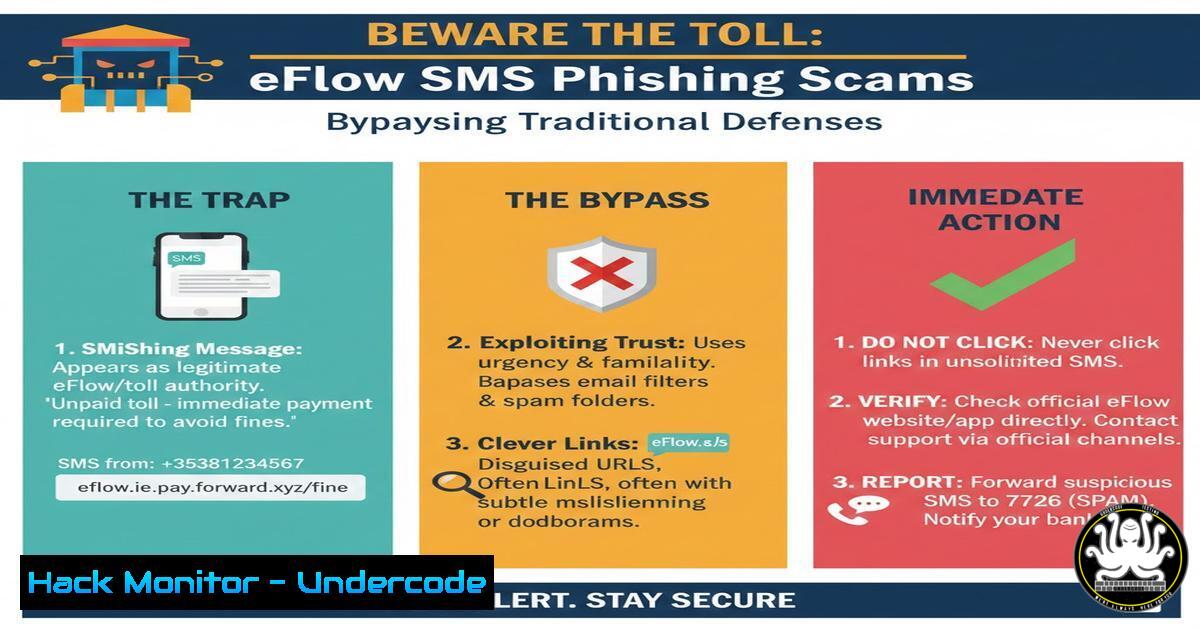
A new wave of sophisticated SMS phishing (smishing) campaigns is exploiting trusted Irish brands like eFlow, the national motorway toll service. Cybercriminals are adapting to enhanced sender ID controls by using unverified mobile numbers, leveraging social engineering, and distributing malicious links directly to personal devices. This attack vector bypasses corporate email filters entirely, targeting individuals where they are most vulnerable and posing a significant risk to both personal and organizational security.
Learning Objectives:
- Understand the mechanics of modern smishing attacks and how they evade traditional sender verification.
- Learn to technically analyze suspicious SMS messages and the embedded links safely.
- Implement proactive technical and policy-based defenses for individuals and enterprises.
You Should Know:
1. The Anatomy of an eFlow Smishing Attack
The scam described is a classic smishing operation with a modern twist. Attackers, aware that Irish regulators have tightened controls on alphanumeric sender IDs (like “eFlow”), have pivoted to using standard mobile numbers. This bypasses platform-level checks for brand impersonation via SMS. The message creates urgency—often a fake unpaid toll with a late fee—and includes a link. The link, often a shortened URL or a domain with a slight typo (e.g., `eflow-payment[.]ie` instead of eflow.ie), is the payload delivery mechanism.
Step-by-step guide to analyzing a suspicious link (SAFELY):
1. DO NOT CLICK. Use passive analysis tools.
- URL Expansion: If it’s a shortened URL (bit.ly, tinyurl), use a non-interactive expander. In a Linux terminal, you can use `curl` with the `-I` (head) flag to see the destination without fetching the full body:
curl -I -L --max-redirs 5 "https://bit.ly/suspicious-link"
The `-L` follows redirects, and `–max-redirs` limits them. Look for the final `Location:` header.
- Domain Reputation Check: Use command-line tools like `whois` or online APIs (from a sandbox) to check the domain’s age and registration details. A very new domain is a major red flag.
whois suspicious-domain.ie
- VirusTotal API: For automated analysis, you can submit a URL hash to VirusTotal’s API using
curl:curl --request GET --url 'https://www.virustotal.com/api/v3/urls/{url_id}' --header 'x-apikey: YOUR_API_KEY'(Replace `{url_id}` with the base64 encoded URL and `YOUR_API_KEY` with a valid VT API key).
-
Simulating and Understanding SMS Spoofing (The Sender Vulnerability)
The post asks if verification ensures the sending number is valid. The answer is often no for basic SMS (SMPP protocol). While telecoms are implementing STIR/SHAKEN protocols to combat caller ID spoofing, smishing via textual SMS from a spoofed number remains technically simple for attackers using cheap online SMS gateways or compromised modems with GSM hats.
Step-by-step guide on conceptual setup (For Educational Purposes Only):
1. Attacker Tooling: Attackers use software like GNOKII, Gammu, or cloud-based SMS APIs paired with SIM bank hardware or virtual numbers.
2. Spoofing: By manipulating the `SOURCE_ADDR` field in the SMPP submission packet, an attacker can set any number as the apparent sender. Carrier-level filtering is the primary, but inconsistent, defense.
3. Defensive Insight: As an admin, you cannot block this at the network level for personal phones. Defense shifts to endpoint education and technical analysis of the message content (the link), not the sender.
3. Defensive Hardening: Endpoint and DNS Protection
Since the attack culminates in a link click, hardening the endpoint’s last line of defense is critical.
Step-by-step guide for Windows and Linux hardening:
- Browser Isolation: Use enterprise-grade browsers configured to open all unknown links in a disposable container or sandbox (e.g., using Windows Defender Application Guard integration).
- Hosts File Blocking (Linux/Windows): For confirmed malicious domains, block them at the host level. On Linux/Windows, edit the `hosts` file (
C:\Windows\System32\drivers\etc\hostsor/etc/hosts):127.0.0.1 eflow-payment.fake.ie 127.0.0.1 malicious-domain.com
- DNS Filtering: Configure your router or endpoint to use a secure DNS resolver that blocks phishing sites (e.g., Cisco Umbrella, Cloudflare 1.1.1.3, or Quad9 at
9.9.9.9). On a Linux endpoint, change DNS in/etc/resolv.conf:nameserver 9.9.9.9
-
Organizational Policy: Mobile Device Management (MDM) and Awareness
For businesses, an employee receiving this scam on a personal device used for work (BYOD) is a major threat vector.
Step-by-step guide for IT Admins:
- Enforce MDM Policies: Require all BYOD devices accessing corporate data to be enrolled in an MDM solution (e.g., Microsoft Intune, VMware Workspace ONE).
- Configure Threat Prevention: Within the MDM, push policies that force all web traffic through a corporate Secure Web Gateway (SWG) or enforce the use of a protected browser when accessing work accounts.
-
Simulated Phishing Campaigns: Regularly run simulated smishing campaigns. Tools like KnowBe4 or GoPhish allow you to send simulated phishing SMS (with clear watermarks) to train users to report, not click.
-
Incident Response: What to Do After a Click
If a user clicks the link, a rapid response is needed.
Step-by-step incident response checklist:
- Immediate Isolation: If on a corporate device, immediately disconnect it from all networks (Wi-Fi and cellular).
- Credential Rotation: Assume any credentials entered are compromised. Force an immediate global password reset for the user’s accounts, prioritizing email, VPN, and SSO.
- Forensic Triage: On the device, capture volatile data. On Windows, use built-in tools from an IR USB drive:
Capture network connections
netstat -ano > C:\evidence\netstat.txt
Capture running processes
tasklist /v > C:\evidence\tasklist.txt
- Full Image & Analysis: Take a forensic disk image and scan for persistence mechanisms (scheduled tasks, startup folders, registry `Run` keys).
What Undercode Say:
- The Perimeter is Now the Pocket: The most significant modern attacks bypass the corporate firewall entirely, landing directly on mobile devices. Security awareness and policy must extend unequivocally to the SMS inbox.
- Verification is a Weak Link: The assumption that a sender ID or number is verified is dangerously flawed. The primary trust signal must shift from the sender to the content and context, with a default stance of zero trust for any message containing a link or demand for action.
This eFlow scam is not an isolated incident but a template. The convergence of unverified SMS channels, sophisticated social engineering, and cloud-based attack infrastructure creates a potent, scalable threat. Organizations that fail to adapt their security training, endpoint policies, and incident response plans to include the mobile smishing vector are effectively leaving their digital back door wide open.
Prediction:
We will see a rapid evolution of these smishing campaigns leveraging AI-generated voice and video (deepfakes) in follow-up calls to victims who engage, creating multi-vector “confirmation” scams. Furthermore, as QR code usage grows, we predict a surge in “quishing” (phishing via QR codes) sent via SMS, completely obscuring the malicious URL from both the user and text-based security scanners. Defense will require AI-powered on-device analysis of message intent and universal adoption of advanced application sandboxing on mobile operating systems.
▶️ Related Video (72% Match):
🎯Let’s Practice For Free:
IT/Security Reporter URL:
Reported By: Claudesaulnier Eflow – Hackers Feeds
Extra Hub: Undercode MoN
Basic Verification: Pass ✅


