
Listen to this Post
Introduction:
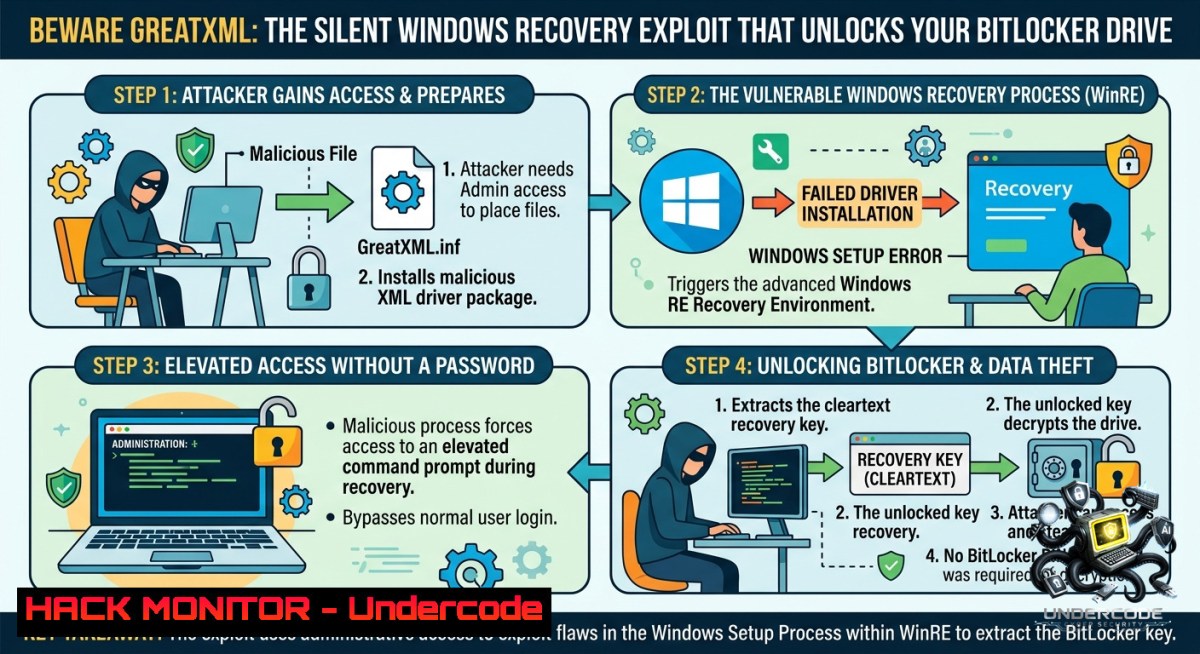
BitLocker is designed to protect your data from prying eyes, but a newly surfaced zero-day exploit, dubbed GreatXML, manipulates the Windows Recovery Environment (WinRE) to completely bypass the encryption without any password or recovery key. This vulnerability weaponizes an unexpected element—Microsoft Defender’s Offline Scan feature—and serves as a stark reminder that physical access to a device can undermine even the strongest software-based defenses.
Learning Objectives:
- Understand the technical mechanics behind the GreatXML vulnerability (CVE-2026-50507) and why it affects BitLocker on certain Windows systems.
- Learn to identify the prerequisites for this attack, including the role of the WinRE partition and the `unattend.xml` configuration file.
- Acquire actionable mitigation strategies and discover verification commands to assess if a system has previously run an offline scan.
You Should Know:
- Anatomy of the GreatXML Exploit: How BitLocker Is Bypassed
The GreatXML exploit, discovered by researcher Chaotic Eclipse (also known as Nightmare Eclipse), is not a flaw in the cryptography itself but an attack on the operating system’s boot and recovery logic. The core target is a specific state that the Windows Recovery Environment (WinRE) enters after Microsoft Defender has performed an offline scan. The researcher noted that if an offline scan was ever run on a machine, “there is no need to login, the machine is automatically vulnerable”. The attack leverages two XML files placed on the unencrypted recovery partition: `unattend.xml` and Recovery/WindowsRE/ReAgent.xml. After rebooting into WinRE (by holding Shift while clicking Restart), the system processes these malicious files, which leads to a command shell spawning with unrestricted SYSTEM-level privileges to the BitLocker-encrypted volume.
Step‑by‑step breakdown of the attack flow:
- Step 1: The attacker gains physical access to the target machine.
- Step 2: The attacker copies two malicious files (
unattend.xmland aRecovery/WindowsRE/ReAgent.xml) to the root of the recovery partition. This is often possible because the WinRE partition is not encrypted by BitLocker. - Step 3: The attacker reboots the system into the Windows Recovery Environment (WinRE) by holding the Shift key while clicking the Restart option in the power menu.
- Step 4: Upon booting into WinRE, the system processes the planted configuration files. This triggers a command prompt or shell with unrestricted SYSTEM permissions, granting full access to the BitLocker-protected drive.
2. Technical Deep Dive: The XML Configuration Abuse
The exploit exploits how WinRE reads configuration files during its operation, specifically abusing the interaction between WinRE and Windows answer file (unattend.xml) processing. The attack leverages artifacts left behind by Microsoft Defender’s Offline Scan tool, which is why systems that have never run a Defender Offline scan might be less vulnerable. Microsoft has officially tracked this security feature bypass as CVE-2026-50507. The researcher emphasizes that the exploit was an “accidental discovery” and took about four hours to find.
Verification and diagnostic commands:
To determine if your system has ever run an offline scan (which is a prerequisite for the easiest exploitation path), an administrator can use PowerShell to query the Windows event logs:
Get-WinEvent -LogName "Microsoft-Windows-Windows Defender/Operational" | Where-Object { $<em>.Id -eq 1001 -or $</em>.Id -eq 1007 }
Alternatively, you can check for the presence of specific scan-related registry keys:
Get-ItemProperty -Path "HKLM:\SOFTWARE\Microsoft\Windows Defender\Scan" | Select-Object LastOfflineScanStartTime
How to use these commands:
Run PowerShell as an administrator. The first command filters for Event IDs 1001 and 1007, which can indicate the start or completion of a scan. The second attempts to read the recorded timestamp of the last offline scan from the registry. If either returns no data, an offline scan may not have occurred.
3. Windows and Linux Hardening Strategies
Given the nature of this physical access attack, defense-in-depth is paramount. For Windows systems:
– Enable and enforce pre-boot authentication: Configure BitLocker to require a PIN or a startup key in addition to the TPM. This adds a layer of security that must be satisfied even before the OS bootloader runs.
– Physically secure the recovery partition: Use Group Policy to configure the WinRE partition to be as locked down as possible. While it cannot be fully encrypted in all configurations, limiting write access to it is a crucial step.
– Monitor the WinRE partition: Implement file integrity monitoring (FIM) for critical directories like `\Recovery\WindowsRE\` and for any `unattend.xml` files on the system. This can help detect the planting of malicious files.
For IT administrators managing Linux systems (to draw parallels or for cross-platform awareness), the concept of a recovery environment bypass exists as well. Commands to monitor for changes in the `/boot` partition or to check for unusual initrd modifications can be part of a routine audit:
sudo find /boot -1ame ".xml" -ls
sudo ausearch -f /boot -i
4. Mitigation Blueprint and Verification Checklist
Organizations should act immediately to assess and mitigate their risk posture against this bypass. The following checklist provides actionable steps for security teams:
– Verify if a patch or advisory exists: Check the Microsoft Security Response Center (MSRC) for updates regarding CVE-2026-50507.
– Inventory physical security controls: Ensure that endpoints, especially those in sensitive roles, have robust physical security to prevent unauthorized access.
– Review BitLocker group policies: Enforce the “Configure TPM platform validation profile” and require a PIN or startup key. This makes the attack much harder to execute.
Extended hardening guide for Windows endpoints:
- Disable Windows Recovery Environment (if not required): In high-security environments, consider using the `reagentc /disable` command in an elevated command prompt to disable WinRE. This removes the attack vector entirely but may impact recovery capabilities.
- Deploy Microsoft Defender for Endpoint: Use Advanced Hunting to query for suspicious file creations on the recovery partition. A sample query could look for any new `.xml` files written to
\\?\GLOBALROOT\device\harddisk\partition\Recovery\.
5. Ongoing Controversy and Exploit Reliability
The GreatXML disclosure has been met with skepticism from other security researchers. Will Dormann, an experienced vulnerability analyst, was unable to replicate the exploit on three different Windows 11 versions, stating that the steps are “flawed”. The primary contention is that triggering the prerequisite offline scan requires administrative credentials and an interactive login, at which point the attacker could simply disable BitLocker through legitimate means. Despite this, the researcher has already uploaded code to GitHub and other platforms, ensuring the exploit code is publicly available. This incident underscores a broader challenge in the vulnerability disclosure ecosystem: the line between a true zero-day and a practical attack path can often be blurred.
What Undercode Say:
- This GreatXML vulnerability is a game-changer in the sense that it highlights how security features can become new attack surfaces through unintended interactions.
- The controversy over exploit reliability shows that the security community is moving faster than ever, but also that disclosure without coordination can lead to panic without a clear, workable solution.
Prediction:
- -1 Expect a surge in physical security policy updates across enterprises, as IT departments realize that full-disk encryption is just one piece of a much larger puzzle.
- -1 Microsoft will likely expedite a patch for CVE-2026-50507, but until then, admins will be forced to impose stricter boot-time authentication, which could increase helpdesk calls.
- +1 On the positive side, this incident will accelerate the adoption of advanced endpoint detection and response (EDR) tools that monitor low-level boot processes.
▶️ Related Video (84% Match):
🎯Let’s Practice For Free:
🎓 Live Courses & Certifications:
Join Undercode Academy for Verified Certifications
🚀 Request a Custom Project:
Secure, high-velocity infrastructure and disruptive technological engineering. Contact our engineering team for high-tier development and proprietary systems:
[email protected]
💎 Smart Architecture | 🛡️ Secure by Design | ⭐ Trusted by Thousands
IT/Security Reporter URL:
Reported By: Mohit Hackernews – Hackers Feeds
Extra Hub: Undercode MoN
Basic Verification: Pass ✅


