Listen to this Post
Introduction
The AI community’s obsession with GPU clusters and cloud infrastructure has created a dangerous blind spot—most organizations can’t afford or don’t need massive compute resources for everyday AI operations. When Tunde Oyedeji spent 13 hours testing five open-source LLMs on a CPU-only Intel Xeon E-2224 server, the goal wasn’t academic curiosity; it was survival for edge deployments where GPUs are luxury items. The results reveal that storage architecture, not processing power, may be the true bottleneck preventing widespread local AI adoption.
Learning Objectives
- Understand the performance characteristics of small open-source LLMs in CPU-only environments
- Identify storage bottlenecks that severely impact AI model loading and inference
- Learn how to benchmark AI models using Ollama with proper tool-call validation
- Implement storage optimizations for AI model deployment on limited hardware
- Evaluate model suitability for agent-based applications based on reasoning and tool-call accuracy
You Should Know
1. The Real-World LLM Benchmarking Methodology
Most AI benchmarks are conducted in pristine cloud environments with dedicated GPU resources—they tell you nothing about what happens when you’re running models on the hardware you actually own. Tunde’s methodology addressed this gap by testing five models on an Intel Xeon E-2224 server with no GPU acceleration, measuring three critical dimensions: generation speed (warm tokens/second across three runs), tool-call validity (whether the model produces a correct OpenAI-format tool_calls array), and reasoning quality (specifically, the bat-and-ball Cognitive Reflection Test that trips up most small models).
The bat-and-ball test is a classic cognitive reflection problem: “A bat and ball cost $1.10 in total. The bat costs $1.00 more than the ball. How much does the ball cost?” The intuitive answer ($0.10) is wrong—the correct answer is $0.05. Small models frequently fail this because they lack the necessary reasoning depth, making them unsuitable for agent-based workflows.
Here’s how to set up your own benchmark:
 Install Ollama on Linux (Ubuntu/Debian)
curl -fsSL https://ollama.ai/install.sh | sh

Pull the models for testing
ollama pull gemma3:1b
ollama pull llama3.2:3b
ollama pull qwen2.5:3b
ollama pull qwen3:14b

Create a benchmark script
cat > benchmark.sh << 'EOF'
!/bin/bash
MODELS=("gemma3:1b" "llama3.2:3b" "qwen2.5:3b" "qwen3:14b")
for model in "${MODELS[@]}"; do
echo "=== Testing $model ==="
 Warm-up run
echo "Test prompt" | ollama run $model > /dev/null
 Measure token generation speed over 3 runs
for run in {1..3}; do
time ollama run $model "Write a 50-word summary of AI security"
done
done
EOF
chmod +x benchmark.sh
Windows alternative using PowerShell:
 Install Ollama for Windows
 Download from https://ollama.ai/download/windows

Create benchmark script
$models = @("gemma3:1b", "llama3.2:3b", "qwen2.5:3b")
foreach ($model in $models) {
Write-Host "Testing $model" -ForegroundColor Green
 Measure speed
Measure-Command { ollama run $model "Explain zero-trust architecture" }
}
2. The Qwen2.5:3B Victory—Why It Matters
The results were stark: Gemma3:1b achieved 25 tok/s but failed tool-call validation entirely. Llama3.2:3b managed 9 tok/s with valid tool calls but timed out on the reasoning test. Qwen2.5:3b delivered 10 tok/s with both valid tool calls AND correct reasoning—making it the only 3B model capable of true agent functionality on CPU-only hardware. The Qwen3:14b model couldn’t even load consistently, highlighting the practical limits of parameter scaling on modest hardware.
The “tool_calls” array is critical for agent systems because it determines whether the model can interact with external APIs, execute code, and perform actions beyond text generation. Invalid tool calls break agent loops, rendering the model useless for automation despite otherwise competent language capabilities.
Testing tool-call validity:
 Python script to validate OpenAI-format tool calls
import json
import subprocess

def test_tool_call(model_name, prompt):
result = subprocess.run(
["ollama", "run", model_name, prompt],
capture_output=True,
text=True
)
try:
 Look for tool_calls in response
if "tool_calls" in result.stdout:
data = json.loads(result.stdout)
if "tool_calls" in data and isinstance(data["tool_calls"], list):
return True
except:
pass
return False

Test Qwen2.5:3b
print("Testing Qwen2.5:3b tool calls...")
result = test_tool_call("qwen2.5:3b", '{"function": "get_weather", "parameters": {"city": "London"}}')
print(f"Tool call valid: {result}")
3. The Storage Revelation: USB 2.0 vs LVM
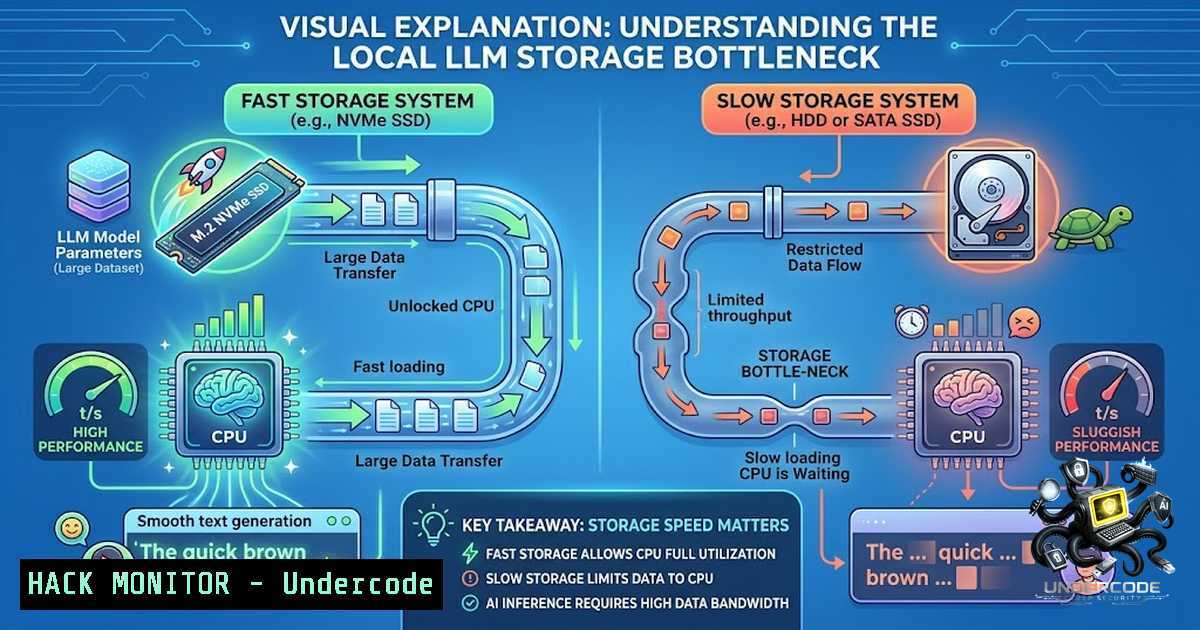
The most significant finding wasn’t about models at all—it was about storage. Initial cold load times exceeded 5 minutes due to a USB 2.0 connection combined with a FUSE filesystem. When Tunde migrated to local LVM (Logical Volume Manager), cold load times dropped by approximately 50x. This means the storage subsystem was the primary bottleneck, not CPU performance.
This finding is crucial for organizations planning edge deployments or on-premises AI infrastructure. Many IT administrators assume CPU is the limiting factor for AI workloads, but model files can be 5-10GB or larger—loading these into memory requires substantial I/O throughput. USB 2.0 maxes at 480 Mbps (~60 MB/s) theoretical, while modern NVMe drives deliver 3,000-7,000 MB/s.
Optimizing storage for AI model deployment:
 Check current storage performance on Linux
sudo hdparm -Tt /dev/sda

For USB devices, check connection speed
lsusb -t

Create LVM volume for model storage
sudo pvcreate /dev/nvme0n1
sudo vgcreate ai_vg /dev/nvme0n1
sudo lvcreate -L 100G -1 models ai_vg
sudo mkfs.ext4 /dev/ai_vg/models

Mount with optimal settings
sudo mount -o noatime,nodiratime /dev/ai_vg/models /opt/ollama/models

Set Ollama to use this path
export OLLAMA_MODELS=/opt/ollama/models

Verify IO performance
fio --randrepeat=1 --ioengine=libaio --direct=1 --gtod_reduce=1 --1ame=test --bs=4k --iodepth=64 --size=4G --readwrite=randrw --rwmixread=75
Windows storage optimization:
 Check drive performance
wmic diskdrive get name,model,interfaceType

For SSD optimization
 Enable write caching
Set-ItemProperty -Path "HKLM:\SYSTEM\CurrentControlSet\Control\Session Manager\Memory Management" -1ame "ClearPageFileAtShutdown" -Value 0

Use dedicated partition for AI models
 Format with 64K cluster size for large model files
format D: /FS:NTFS /A:64K /Q
4. Implementing the Benchmark Harness
Tunde’s benchmark harness included three test components that can be replicated for any organization evaluating local AI capabilities. The harness measures practical performance under realistic conditions rather than synthetic benchmarks.
Complete benchmark harness implementation:
 ai_benchmark.py - Full benchmark harness
import time
import json
import subprocess
import statistics
from typing import Dict, List, Tuple

class AIBenchmark:
def <strong>init</strong>(self, model_names: List[bash]):
self.models = model_names
self.results = {}

def measure_throughput(self, model: str, prompt: str, runs: int = 3) -> Dict:
"""Measure tokens/second over multiple runs"""
speeds = []
for run in range(runs):
start = time.time()
result = subprocess.run(
["ollama", "run", model, prompt],
capture_output=True,
text=True
)
elapsed = time.time() - start
 Approximate token count (4 chars per token average)
tokens = len(result.stdout) / 4
speeds.append(tokens / elapsed)
return {
"mean": statistics.mean(speeds),
"stdev": statistics.stdev(speeds),
"runs": speeds
}

def test_tool_call(self, model: str) -> bool:
"""Verify OpenAI-format tool_calls generation"""
test_prompt = """Generate a tool call for getting weather in London.
Output must be valid JSON with 'tool_calls' array."""
result = subprocess.run(
["ollama", "run", model, test_prompt],
capture_output=True,
text=True
)
try:
 Look for tool_calls in response
if "tool_calls" in result.stdout:
 Simple validation
import re
match = re.search(r'{."tool_calls".}', result.stdout)
if match:
data = json.loads(match.group())
return isinstance(data.get("tool_calls"), list)
except:
pass
return False

def test_reasoning(self, model: str) -> Tuple[bool, str]:
"""Test bat-and-ball cognitive reflection"""
prompt = """A bat and ball cost $1.10 in total.
The bat costs $1.00 more than the ball.
How much does the ball cost? Answer only the number."""
result = subprocess.run(
["ollama", "run", model, prompt],
capture_output=True,
text=True
)
 Look for 0.05 or 5 cents
if "0.05" in result.stdout or ".05" in result.stdout or "5 cents" in result.stdout:
return True, "CORRECT"
elif "TIMEOUT" in result.stdout or len(result.stdout) < 5:
return False, "TIMEOUT"
else:
return False, f"FAILED - Answer: {result.stdout.strip()}"

def run_full_benchmark(self):
"""Execute complete benchmark suite"""
for model in self.models:
print(f"\n=== Benchmarking {model} ===")
speed = self.measure_throughput(model, "Write a 50-word summary of AI security")
tool = self.test_tool_call(model)
reasoning, reason_text = self.test_reasoning(model)

self.results[bash] = {
"speed": speed,
"tool_calls": tool,
"reasoning": reason_text
}
print(f"Speed: {speed['mean']:.2f} tok/s")
print(f"Tool Calls: {'✅' if tool else '❌'}")
print(f"Reasoning: {reason_text}")

return self.results

Usage
if <strong>name</strong> == "<strong>main</strong>":
benchmark = AIBenchmark([
"gemma3:1b",
"llama3.2:3b",
"qwen2.5:3b"
])
results = benchmark.run_full_benchmark()
print("\n=== Summary ===")
print(json.dumps(results, indent=2))
5. Security Implications of Local AI Deployment
Running AI models locally introduces unique security considerations that cloud-based deployments abstract away. Model files are effectively executable binaries—they contain weights and configurations that could be poisoned, tampered with, or exfiltrated. Organizations must implement security controls for both the models themselves and the inference environment.
Security hardening for AI model storage:
 Verify model file integrity
sha256sum /opt/ollama/models/ > model_hashes.txt

Restrict access to model files
sudo chown -R ollama:ollama /opt/ollama/models
sudo chmod -R 750 /opt/ollama/models

Configure AppArmor for Ollama
sudo apt-get install apparmor-profiles
sudo aa-enforce /etc/apparmor.d/usr.bin.ollama

Implement read-only mount for production models
sudo mount -o remount,ro /opt/ollama/models
Windows security measures:
 Set NTFS permissions
icacls C:\OllamaModels /grant "ollama:(OI)(CI)F" /t

Enable Windows Defender folder protection
Add-MpPreference -ControlledFolderAccessProtectedFolders "C:\OllamaModels"

Verify file integrity
Get-FileHash C:\OllamaModels\ | Export-Csv -Path model_hashes.csv
6. Resource Constraints and Model Selection Strategy
The practical takeaway is that for CPU-only deployments, model size matters more than parameter count. Qwen2.5:3B at 3B parameters outperformed larger models because it could actually run effectively within the memory and I/O constraints of the test hardware. Organizations should adopt a “smallest viable model” strategy, testing for specific task capabilities rather than assuming larger models are better.
Model selection decision tree:
 Script to test models and recommend based on hardware
!/bin/bash

Detect system specs
RAM_GB=$(free -g | awk '/^Mem:/{print $2}')
CPU_CORES=$(nproc)
STORAGE_TYPE=$(lsblk -o NAME,ROTA | grep -E "^(nvme|sd)" | head -1 | awk '{print $2}')

echo "System Detection:"
echo "RAM: ${RAM_GB}GB"
echo "CPU Cores: $CPU_CORES"
echo "Storage Type: $([ $STORAGE_TYPE -eq 0 ] && echo 'SSD' || echo 'HDD')"

Recommendation logic
if [ $RAM_GB -lt 8 ]; then
echo "RECOMMENDED: gemma3:1b (lightweight, good for basic tasks)"
elif [ $RAM_GB -lt 16 ]; then
echo "RECOMMENDED: qwen2.5:3b (best agent capability on limited hardware)"
elif [ $RAM_GB -lt 32 ]; then
echo "RECOMMENDED: qwen2.5:3b or llama3.2:3b"
else
echo "RECOMMENDED: Consider larger models with GPU acceleration"
fi
What Undercode Say
- Storage architecture is the hidden bottleneck in AI deployments—NVMe over USB 2.0 or FUSE filesystems can increase load times by 50x
- The Qwen2.5:3B model at 10 tok/s with 3B parameters outperforms larger models for agent functionality on CPU-only hardware
- Most “AI readiness” assessments ignore storage I/O, creating unrealistic expectations about deployment viability
- The bat-and-ball test is a valid quick check for reasoning capability—small models often fail, making them unsuitable for production agents
- Edge deployments should implement LVM or similar storage optimization before investing in model testing
- The benchmark harness methodology is portable and can be adapted for any model evaluation scenario
- Security controls for model files are non-1egotiable in production environments
This analysis reveals that organizations can successfully deploy local AI on modest hardware, but must prioritize storage infrastructure and benchmark practical capabilities rather than relying on cloud-based performance metrics.
Prediction
+1 Enterprise adoption of local AI will accelerate as storage optimization techniques become standard practice, eliminating the perceived need for expensive GPU hardware
+1 The Qwen2.5:3B model will become the reference standard for edge AI deployments, creating a new market for optimized 3B-parameter models
+N Organizations that fail to audit their storage infrastructure will waste significant resources on AI experiments that fail deployment
-P New security vulnerabilities will emerge as model files become high-value targets for exfiltration and poisoning attacks
+1 The benchmark-first, hardware-second approach will become the industry standard for AI evaluation
+1 Edge computing providers will integrate storage optimization into their default deployments, reducing friction for AI workloads
+N The gap between academic benchmarks and real-world performance will widen as researchers continue using GPU-optimized testing environments
▶️ Related Video (82% Match):
🎯Let’s Practice For Free:
🎓 Live Courses & Certifications:
Join Undercode Academy for Verified Certifications
🚀 Request a Custom Project:
Secure, high-velocity infrastructure and disruptive technological engineering. Contact our engineering team for high-tier development and proprietary systems:
[email protected]
💎 Smart Architecture | 🛡️ Secure by Design | ⭐ Trusted by Thousands
IT/Security Reporter URL:
Reported By: Tunde Oyedeji – Hackers Feeds
Extra Hub: Undercode MoN
Basic Verification: Pass ✅


