Listen to this Post
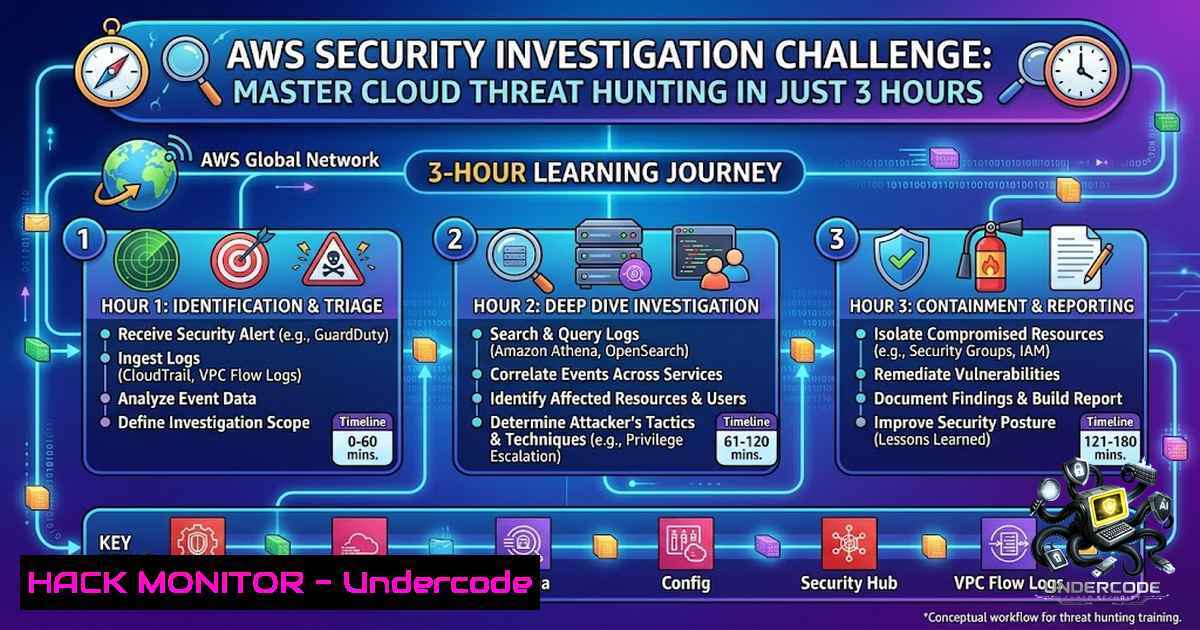
Introduction:
As organizations accelerate their cloud migration, AWS environments have become prime targets for sophisticated threat actors. The complexity of IAM permissions, sprawling CloudTrail logs, and the sheer scale of cloud infrastructure create significant visibility gaps that security teams must bridge. The upcoming AWS Security Investigation Challenge by HAXCAMP offers a practical, hands-on opportunity to develop real-world incident response skills using Splunk as the primary investigation platform—no setup required, just a browser and a willingness to think like an attacker.
Learning Objectives:
- Master Splunk-based AWS log analysis to detect and investigate security incidents across CloudTrail, S3 access logs, and VPC Flow Logs
- Conduct comprehensive IAM permission analysis to identify privilege escalation paths, misconfigurations, and excessive permissions
- Apply threat detection and incident response methodologies to real-world AWS security scenarios, from initial compromise to remediation
1. Setting Up Your AWS Security Investigation Lab
Before diving into threat hunting, you need a controlled environment to practice. The HAXCAMP platform provides a pre-configured Splunk lab, but for those building their own, here’s a step-by-step setup guide using Docker and Terraform.
Prerequisites:
- Docker Desktop running on your machine
- Python 3.10+ installed
- An AWS sandbox account (non-production)
- Basic Linux command-line knowledge
Step-by-Step Setup:
 Step 1: Start Splunk locally using Docker
cd /path/to/your/lab
docker compose up -d

Access Splunk at https://localhost:8000
 Default credentials: admin / ChangeMe123!
Step 2: Create Splunk indexes for AWS log sources — indexes organize your data for efficient searching:
 Via Splunk UI: Settings > Indexes > New Index
 Create three indexes:
 - aws_cloudtrail (for API activity logs)
 - aws_s3_access (for S3 bucket access logs)
 - aws_vpc_flow (for VPC network traffic logs)
Step 3: Install the Splunk Add-on for AWS to ingest CloudTrail logs via S3 + SQS. This add-on parses raw JSON events and provides structured field extraction for efficient querying.
Windows Alternative: For Windows environments, use Git Bash (included with Git for Windows) to run the bash scripts, and ensure Docker Desktop is running with WSL2 backend enabled.
2. AWS CloudTrail Investigation Fundamentals
CloudTrail logs serve as digital breadcrumbs, capturing every API call made in your AWS environment. Understanding how to query these logs in Splunk is the foundation of any cloud investigation.
Key CloudTrail Fields to Know:
| Field | Description |
|-|-|
| `eventName` | The API action performed (e.g., PutBucketAcl, CreateUser) |
| `userIdentity.userName` | The IAM user or role that made the request |
| `sourceIPAddress` | The originating IP address |
| `eventTime` | Timestamp of the request (UTC) |
| `requestParameters` | Parameters sent with the request |
| `errorCode` | Present only if the request failed |
Essential Splunk Queries for CloudTrail Investigation:
 Query 1: Identify all IAM users interacting with AWS services
index=aws_cloudtrail sourcetype=aws:cloudtrail
| stats count by userIdentity.userName

Query 2: Find all PutBucketAcl events (S3 permission changes)
index=aws_cloudtrail sourcetype=aws:cloudtrail eventName=PutBucketAcl
| stats count by userIdentity.userName, eventName
| sort - count

Query 3: Investigate a specific event by eventID
index=aws_cloudtrail sourcetype=aws:cloudtrail eventID=<EVENT_ID>
| table requestParameters.bucketName, userIdentity.userName, eventTime, sourceIPAddress
Real-World Scenario: In a typical investigation, a SOC analyst might discover that an S3 bucket was made publicly accessible via a `PutBucketAcl` event. The query above would reveal which IAM user performed the action, when it happened, and from which IP address—critical evidence for determining whether the change was malicious or accidental.
3. IAM Permission Analysis & Privilege Escalation Detection
IAM misconfigurations are among the most common attack vectors in AWS. Attackers often exploit overly permissive policies or escalate privileges by modifying existing policies.
AWS CLI Commands for IAM Auditing:
 List all IAM users in the account
aws iam list-users

List policies attached to a specific user
aws iam list-attached-user-policies --user-1ame <USERNAME>

Get detailed policy document
aws iam get-policy --policy-arn <POLICY_ARN>
aws iam get-policy-version --policy-arn <POLICY_ARN> --version-id <VERSION_ID>

Identify unused policies (not attached to any principal)
aws iam list-policies --only-attached false --scope Local
Detecting Privilege Escalation in Splunk:
 Detect creation of new IAM policy versions that allow all resources
index=aws_cloudtrail sourcetype=aws:cloudtrail eventName=CreatePolicyVersion
| search requestParameters.policyDocument=""Resource":""
| stats count by userIdentity.userName, eventTime, requestParameters.policyArn

Detect SetDefaultPolicyVersion events (changing active policy version)
index=aws_cloudtrail sourcetype=aws:cloudtrail eventName=SetDefaultPolicyVersion
| table userIdentity.userName, requestParameters.policyArn, requestParameters.versionId, eventTime
This detection is critical because attackers may create a new policy version that grants broader permissions and then set it as the default, effectively escalating their privileges.
Access Analyzer for Continuous Monitoring:
AWS IAM Access Analyzer helps validate policies for syntax errors and compliance with best practices. Use it to generate fine-grained policies based on actual access activity:
 Validate a policy document
aws accessanalyzer validate-policy --policy-document file://policy.json

Generate a policy based on CloudTrail activity
aws accessanalyzer generate-policy --principal-arn <ARN> --resource-arn <RESOURCE_ARN>
4. Threat Detection: Identifying Suspicious Activity
Effective threat detection requires a combination of known patterns and anomaly detection. Splunk Enterprise Security provides pre-built detections for common AWS threats.
Detecting Console Logins Without MFA:
Single-factor authentication is a significant security risk. The following detection identifies successful console logins where MFA was not used:
index=aws_cloudtrail eventName=ConsoleLogin errorCode=success
"additionalEventData.MFAUsed"=No
| rename user_name as user
| stats count min(_time) as firstTime max(_time) as lastTime
BY signature dest user user_agent src vendor_account vendor_region vendor_product
| `security_content_ctime(firstTime)`
| `security_content_ctime(lastTime)`
Detecting Anomalous GetObject Activity (Data Exfiltration):
Attackers exfiltrating data from S3 buckets will generate unusual patterns of `GetObject` API calls:
index=aws_cloudtrail eventName=GetObject
| timechart count by userIdentity.userName span=10m
| anomalydetection
Detecting Previously Unseen Instance Types:
Attackers creating EC2 instances with unusual instance types (e.g., GPU instances for cryptomining) can be detected using:
| tstats count FROM datamodel=Change WHERE nodename=Change.All_Changes
BY _time, All_Changes.user, All_Changes.src, All_Changes.object, All_Changes.action
| search All_Changes.object=EC2 All_Changes.action=create
| `detect_never_seen(All_Changes.object)`
AWS CLI Commands for Threat Hunting:
 Check for publicly accessible S3 buckets
aws s3api get-bucket-acl --bucket <BUCKET_NAME>

List all security group rules (check for 0.0.0.0/0)
aws ec2 describe-security-groups --query 'SecurityGroups[].IpPermissions[]'

Check GuardDuty findings
aws guardduty list-findings --detector-id <DETECTOR_ID>
5. Incident Response: Containment & Remediation
When a threat is confirmed, swift containment is essential. AWS provides several native services for automated incident response.
Isolating Compromised EC2 Instances:
 Apply a restrictive security group to isolate the instance
aws ec2 modify-instance-attribute --instance-id <INSTANCE_ID> --groups <ISOLATION_SG_ID>

Or terminate the instance if confirmed malicious
aws ec2 terminate-instances --instance-ids <INSTANCE_ID>
Revoking Compromised IAM Credentials:
 Deactivate access keys for a compromised user
aws iam update-access-key --access-key-id <KEY_ID> --status Inactive --user-1ame <USERNAME>

Or delete the key entirely
aws iam delete-access-key --access-key-id <KEY_ID> --user-1ame <USERNAME>
Automated Response with GuardDuty & Lambda:
GuardDuty findings can trigger Lambda functions for automated remediation. For example, when GuardDuty detects a malicious file in S3, a Lambda function can delete the file using SSM to execute shell commands.
Splunk Queries for Incident Documentation:
 Build a timeline of all activity related to a specific IAM user
index=aws_cloudtrail userIdentity.userName=<COMPROMISED_USER>
| sort eventTime
| table eventTime, eventName, sourceIPAddress, requestParameters, errorCode

Identify all resources accessed by the compromised user
index=aws_cloudtrail userIdentity.userName=<COMPROMISED_USER>
| stats values(eventSource) as services_accessed, count by userIdentity.userName
6. Cloud Hardening Best Practices
Prevention is always better than detection. Implement these hardening measures to reduce your attack surface:
IAM Hardening:
- Enforce MFA for all users (ConsoleLogin with MFA required)
- Implement least-privilege access—grant only the permissions required for each task
- Regularly audit and remove unused IAM users and policies
- Use IAM roles instead of long-lived access keys for EC2 instances
Monitoring & Logging:
- Enable CloudTrail in all regions with log file validation enabled
- Stream CloudTrail logs to Splunk via S3 + SQS for real-time analysis
- Enable VPC Flow Logs to monitor network traffic patterns
- Configure GuardDuty for continuous threat detection
Network Security:
- Restrict security group rules to specific IP ranges (avoid 0.0.0.0/0)
- Implement AWS WAF for web application protection
- Use VPC endpoints to keep traffic within the AWS network
Windows-Specific Hardening (for hybrid environments):
 Enable advanced audit logging on Windows instances
auditpol /set /subcategory:"Logon" /success:enable /failure:enable
auditpol /set /subcategory:"Account Management" /success:enable /failure:enable

Configure Windows Event Forwarding to Splunk
wevtutil set-log "Microsoft-Windows-Sysmon/Operational" /enabled:true /retention:false /maxsize:1073741824
What Undercode Say:
- Key Takeaway 1: The most dangerous AWS security incidents often begin with a simple misconfiguration—an overly permissive S3 bucket, a missing MFA requirement, or an IAM policy that grants “Action”: “” on “Resource”: “”. The HAXCAMP challenge mirrors this reality, teaching participants to spot these seemingly minor issues before attackers exploit them.
-
Key Takeaway 2: Splunk’s query language (SPL) is the investigator’s superpower. The ability to correlate CloudTrail events, S3 access logs, and VPC Flow Logs in a single search transforms scattered log entries into a coherent attack narrative. Mastering queries like `stats count by userIdentity.userName` and `timechart count span=10m` is non-1egotiable for any cloud security professional.
Analysis: The challenge’s emphasis on IAM and permission analysis is particularly timely. With AWS adding hundreds of new services and features annually, the complexity of IAM policies grows exponentially. Attackers are increasingly targeting identity-based attacks—privilege escalation, credential theft, and persistent backdoor creation. The hands-on nature of this challenge, combined with the Splunk lab environment, provides exactly the kind of practical experience that traditional certification courses often lack. The 3-hour format forces participants to think under pressure, simulating the urgency of a real incident. The completion certificate, while symbolic, adds a layer of accountability that motivates thorough engagement.
Prediction:
- +1 Hands-on cybersecurity challenges like this AWS Security Investigation Challenge will become the de facto standard for security training by 2027, surpassing traditional certification exams that focus on memorization rather than practical application.
-
+1 The integration of Splunk with AWS CloudTrail will evolve toward real-time AI-assisted investigation, where machine learning models surface anomalous events before analysts even begin their queries, reducing mean time to detection (MTTD) by 60-70%.
-
-1 As more organizations adopt AWS, the shortage of skilled cloud security investigators will worsen, creating a talent gap that threat actors will eagerly exploit. Challenges like this are critical for closing that gap, but they must scale to reach thousands of practitioners annually.
-
+1 The rise of automated incident response—where GuardDuty findings trigger Lambda functions for immediate containment—will shift the SOC analyst’s role from reactive firefighting to proactive threat hunting and playbook development, a trend this challenge directly supports.
-
-1 Organizations that fail to implement continuous AWS security monitoring with tools like Splunk and GuardDuty will face increasing regulatory scrutiny and breach-related costs, as cloud-1ative attacks become more sophisticated and frequent.
Join the Challenge: The AWS Security Investigation Challenge takes place on 27th June 2026 from 02:00 PM – 05:00 PM UTC. No setup required—just your browser. Register at: https://lnkd.in/d3cGsK3A. Visit www.haxcamp.com for 100+ Blue Team labs and hands-on learning.
▶️ Related Video (84% Match):
🎯Let’s Practice For Free:
🎓 Live Courses & Certifications:
Join Undercode Academy for Verified Certifications
🚀 Request a Custom Project:
Secure, high-velocity infrastructure and disruptive technological engineering. Contact our engineering team for high-tier development and proprietary systems:
[email protected]
💎 Smart Architecture | 🛡️ Secure by Design | ⭐ Trusted by Thousands
IT/Security Reporter URL:
Reported By: %F0%9D%9F%AD %F0%9D%97%97%F0%9D%97%94%F0%9D%97%AC – Hackers Feeds
Extra Hub: Undercode MoN
Basic Verification: Pass ✅


